


Karete ea MOKHOA OA HO SEBELISA RASPBERRY Pi
TATAISO EA MOSEBETSI 4.1
SequentMicrosystems.com
TLHALOSO KAKARETSO

Moloko oa bobeli oa Karete ea Boiketsetso ea Moaho o tlisa sethaleng sa Raspberry Pi lintho tsohle tse kenang le liphetho tse hlokahalang bakeng sa Building Automation Systems. E tsitsitse ho isa maemong a 8, karete e sebetsa le mefuta eohle ea Raspberry Pi, ho tloha ho Zero ho isa ho 4.
Lithapa tse peli tsa Raspberry Pi's GPIO li sebelisetsoa puisano ea I2C. Pini e 'ngoe e abetsoe motho ea sebetsanang le tšitiso, e siea lithakhisa tse 23 tsa GPIO li fumaneha bakeng sa mosebelisi.
Lisebelisoa tse robeli tsa bokahohleng, tse ka khethoang ka bonngoe, li u lumella ho bala matshwao a 0-10V, ho bala ho koaloa ha mabitso, kapa ho lekanya mocheso o sebelisa 1K kapa 10K thermistors. Lintlha tse 'nè tsa 0-10V tse ka khonehang li ka laola li-dimmers tse khanyang kapa lisebelisoa tse ling tsa indasteri. Liphetho tse 'ne tsa 24VAC tsa triac li ka laola li-relay tsa AC kapa lisebelisoa tsa ho futhumatsa le ho futhumatsa. Lipontšo tsa LED li bonts'a boemo ba liphetho tsohle. Tumello ea boema-kepe ea RS485/MODBUS e batla e atolosoa ho se nang moeli. Qetellong, boema-kepe bo bocha ba 1-WIRE bo ka sebelisoa ho bala mocheso ho tsoa ho sensor ea DS18B20.
Li-diode tsa TVS linthong tsohle tse kenang li sireletsa karete bakeng sa ESD ea kantle. Fuse e ka setang botjha e e sireletsang ho marikgwe a makgutshwane a iketsahalletseng. Mohloli o le mong oa 24V AC kapa oa DC o ka fana ka 5V/3A bakeng sa Raspberry Pi.
LIKAROLOANA
- Lits'ebetso tse robeli tsa jumper tsa bokahohleng, tsa analog/digital
- 0-10V Lintho tse kenang kapa
- Ikopanye le Lits'oants'o tsa Libali tsa ho Koala kapa
- 1K/10K Likenyo tsa Sensora ea Mocheso
- Liphetho tse 'nè tsa 0-10V
- Liphetho tse 'ne tsa TRIAC tse nang le bakhanni ba 1A/48VAC
- Four General Purpose LED's
- RS485/MODBUS boema-kepe
- Oache ea nako ea 'nete e nang le bekapo ea betri
- Konopo ea ho tobetsa ka holim'a board
- Khokahano ea 1-WIRE
- Tšireletso ea TVS linthong tsohle tse kenang
- Seboholi sa Hardware se ka har'a board
- 24VAC / DC phepelo ea motlakase
Lintho tsohle tse kenang le tse hlahisoang li sebelisa lihokelo tse plugable tse lumellang ho fihlella ha lithapo ha likarete tse ngata li pakiloeng. Ho ka beoa likarete tse ka bang robeli tsa Moaho oa Moaho ka holim'a Raspberry Pi e le 'ngoe. Likarete li arolelana bese ea serial ea I2C e sebelisa lithapo tse peli feela tsa Raspberry Pi's GPIO ho tsamaisa likarete tsohle tse robeli.
Li-LED tse 'ne tse akaretsang li ka amahanngoa le li-analog kapa mekhoa e meng e laoloang.
Konopo e ka har'a board e ka hlophisoa ho fokotsa lintho tse kenang, ho fetisa sephetho kapa ho koala Raspberry Pi.
KE ENG KA KITENG YA HAO
- Ho aha Karete ea Boiketsetso bakeng sa Raspberry Pi

- Ho kenya lisebelisoa
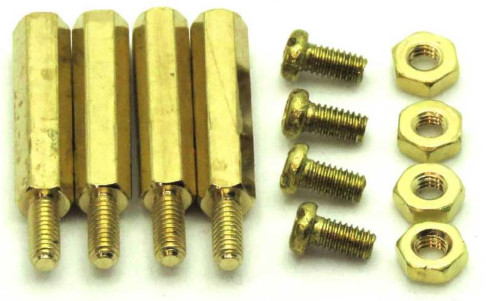 a. Li-standoffs tse 'ne tsa M2.5x18mm tsa koporo ea banna le basali
b. Li-screws tse 'nè tsa koporo tsa M2.5x5mm
c. Linate tse 'ne tsa M2.5 tsa koporo - Li-jumper tse peli.
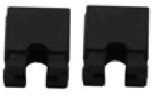 Ha u hloke li-jumpers ha u sebelisa Karete e le 'ngoe feela ea Building Automation. Sheba karolo ea STACK LEVEL JUMPERS haeba u rera ho sebelisa likarete tse ngata.
 - Lihokelo tsohle tse hlokehang tsa ho nyalana ha basali.

POTLAKO MOTSAMAI
- Hokela karete ea hau ea Automation ea Moaho holim'a Raspberry Pi ea hau 'me u matlafatse sistimi.
- Numella puisano ea I2C ho Raspberry Pi u sebelisa raspi-config.
- Kenya software ho tsoa ho github.com:
a. ~$ git clone https://github.com/SequentMicrosystems/megabas-rpi.git
b. ~$ cd /home/pi/megabas-rpi
c. ~/megabas-rpi$ sudo etsa install - ~/megabas-rpi$ megabas
Lenaneo le tla arabela ka lethathamo la litaelo tse fumanehang.
LEBOTO LEBOTO

Li-LED tse 'ne tsa Morero o Akaretsang li ka laoloa ho software. Li-LED li ka kenngoa ts'ebetsong ho bonts'a boemo ba ho kenya letsoho, tlhahiso kapa ts'ebetso ea kantle.
LITSAMAI SEBAKA
Maemo a mararo a ka ho le letšehali a sehokelo J3 a sebelisoa ho khetha boemo ba karete:
MOEKETSI KHETHANG MAHALA
Lisebelisoa tse robeli tsa bokahohle li ka khethoa ka bonngoe ho bala li-thermistor tsa 0-10V, 1K kapa 10K kapa li-counter closure / liketsahalo tsa liketsahalo. Maqhubu a phahameng a li-counter tsa liketsahalo ke 100 Hz.

RS-485/MODBUS PUISANO
Karete ea Automation Card e na le transceiver e tloaelehileng ea RS485 e ka fihlellehang ka processor ea lehae le ke Raspberry Pi. Tlhophiso e lakatsehang e behiloe ho tloha ho li-jumper tse tharo tsa bypass ho sehokelo sa tlhophiso J3.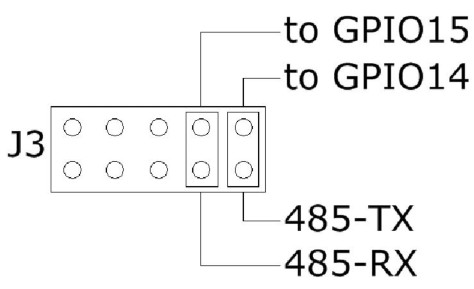
Haeba li-jumpers li kentsoe, Raspberry Pi e ka buisana le sesebelisoa leha e le sefe se nang le sebopeho sa RS485. Tokisong ena, Karete ea Boiketsetso ea Kaho ke borokho bo sa sebetseng bo sebelisang feela maemo a hardware a hlokoang ke protocol ea RS485. Ho sebelisa tlhophiso ena, o hloka ho bolella processor ea lehae hore e lokolle taolo ea bese ea RS485:
~$ megabas [0] wcfgmb 0 0 0 0
Haeba li-jumpers li tlosoa, karete e sebetsa e le lekhoba la MODBUS mme e sebelisa protocol ea MODBUS RTU. Mong'a ofe kapa ofe oa MODBUS a ka fihlella lintho tsohle tse kentsoeng kareteng, 'me a beha liphetho tsohle a sebelisa litaelo tse tloaelehileng tsa MODBUS. Lethathamo le qaqileng la litaelo tse kentsoeng le ka fumanoa ho GitHub:
https://github.com/SequentMicrosystems/megabas-rpi/blob/master/Modbus.md
Litlhophisong tsena ka bobeli processor ea lehae e hloka ho hlophisoa ho lokolla (li-jumpers li kentsoe) kapa ho laola (li-jumpers li tlositsoe) matšoao a RS485. Sheba mohala oa taelo inthaneteng thuso bakeng sa lintlha tse ling.
RASPBERRY PI SEHLOHO

LITLHAKISO MATLA
Karete ea Boiketsetso ea Kaho e hloka phepelo ea motlakase e laoloang kantle ho 24VDC/AC. Matla a fanoa ka boto ka sehokelo se inehetseng se hukung e kaholimo ho le letona (sheba BOARD LAYOUT). Liboto li amohela mohloli oa matla oa DC kapa oa AC. Haeba ho sebelisoa mohloli oa motlakase oa DC, polarity ha e bohlokoa. Molaoli oa lehae oa 5V o fana ka matla a 3A ho Raspberry Pi, 'me molaoli oa 3.3V o matlafatsa lipotoloho tsa dijithale. Li-converter tse ikhethileng tsa DC-DC li sebelisoa ho matlafatsa li-relay.
RE KHOTHATSA HO SEBELISA FEELA 24VDC/AC POWER SUPPLY
HO MATLAFATSA RASPBERRY PI KARETE
Haeba likarete tse ngata tsa Moaho oa Moaho li pakiloe holim'a tse ling, re khothaletsa ho sebelisa motlakase o le mong oa 24VDC/AC ho matlafatsa likarete tsohle. Mosebelisi o tlameha ho arola thapo ebe o tsamaisa lithapo ho karete ka 'ngoe.
TIRISO EA MATLA:
• 50 mA @ +24V
LIEKETSENG PAKA
Karete ea Boiketsetso ea Kaho e na le lisebelisoa tse robeli tsa bokahohleng tse ka khethoang ho lekanya mats'oao a 010V, 1K kapa 10K thermistors kapa li-counter closure / liketsahalo tsa ho fihla ho 100Hz.

TLHOKOMELISO EA HO TLOA KETSAHALO 
TLHOKOMELISO EA MEEA EA MOCHECHE KA 1K THERMISTORS 
TLHOKOMELISO EA MEEA EA MOCHECHE KA 10K THERMISTORS 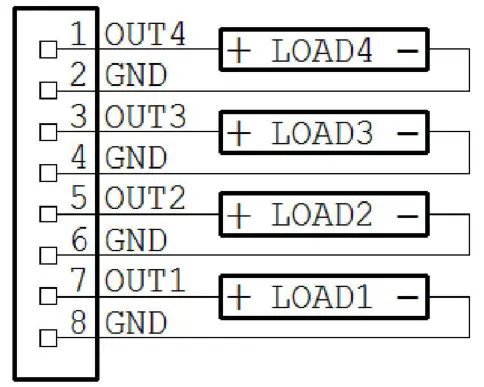
0-10V TLHOKOMELO EA LITŠOANTŠISO. MOKHOA OA BOHLOKOA = 10mA 
LITŠOANTŠISO NTJA
Karete ea Boiketsetso ea Kaho e na le sebali sa lisebelisoa tse hahelletsoeng kahare se tla netefatsa hore projeke ea hau ea bohlokoahali e tla tsoelapele ho sebetsa leha software ea Raspberry Pi e ka emisa. Ka mor'a hore motlakase o phahamise, seboholi sea koalloa, 'me se sebetsa ka mor'a hore se fumane reset ea pele.
Nako ea ho qetela ke metsotsoana e 120. Ha e se e kentsoe tšebetsong, haeba e sa fumane reset ho tsoa ho Raspberry Pi nakong ea metsotso e 2, seboholi se fokotsa matla ebe se se khutlisetsa kamora metsotsoana e 10.
Raspberry Pi e hloka ho fana ka taelo ea reset boema-kepeng ba I2C pele sebali sa nako se shebileng se felloa ke nako.
Nako ea nako ka mor'a hore motlakase o phahamisoe le nako e sebetsang ea nako e ka behoa ho tloha molaong oa taelo. Palo ea li-reset e bolokoa ka flash 'me e ka fihlelleha kapa ea hlakoloa moleng oa taelo. Litaelo tsohle tsa balebeli li hlalosoa ke ts'ebetso ea thuso ea inthaneteng.
LITLHAHISO TSA ANALOGE/ LITHO TSE KHOLO
Lintho tsohle tse kenyang analoge le liphetho li lekantsoe fekthering, empa litaelo tsa firmware li lumella mosebelisi ho lekanya boto hape, kapa ho e lekanya ka nepo e nepahetseng. Lintho tsohle tse kenang le tse hlahisoang li lekantsoe ka lintlha tse peli; khetha lintlha tse peli haufi le ho khoneha lipheletsong tse peli tsa sekala. Ho lekanya lintho tse kentsoeng, mosebelisi o tlameha ho fana ka matšoao a analog. (Example: ho lekanya lisebelisoa tsa 0-10V, mosebelisi o tlameha ho fana ka matla a feto-fetohang a 10V). Ho lekanya liphetho, mosebelisi o tlameha ho fana ka taelo ea ho beha sephetho ho boleng bo lakatsehang, a lekanye sephetho le ho fana ka taelo ea ho lekanya ho boloka boleng.
Litekanyetso li bolokoa ka flash 'me curve ea ho kenya e nkoa e le mola. Haeba phoso e etsoa nakong ea ho lekanya ka ho thaepa taelo e fosahetseng, taelo ea RESET e ka sebelisoa ho tsosolosa liteishene tsohle tsa sehlopha se tsamaisanang le litekanyetso tsa fektheri. Ka mor'a hore RESET calibration e ka qala hape.
Boto e ka lekanyetsoa ntle le mohloli oa matšoao a analog, ka ho lekanya pele liphetho ebe o tsamaisa liphetho tse lekantsoeng ho ea ho tse tsamaellanang. Litaelo tse latelang lia fumaneha bakeng sa ho lekanya:
| LEBAKA 0-10V MENYETSO: | megabas cuin |
| TLHOKOMELA BOSHA TSA MENYETSO EA 0-10V: | megabas rcuin |
| LEBAKA TSE TSENYA 10K: | megabas cresin |
| TLHOKOMELA TSONA TSE 10K: | megabas rcresin |
| LEBAKA TSE TSOANG 0-10V: | megabas qoela |
| LEBENKELE LE BOLEMO LE LEBELENG KA FLASH: | megabas alta_comnda |
| TLHOKOMELA BOSHA TSA TLHOKOMELO TSA 0-10V: | megabas rcuout/ |
LITŠOANTŠISO LITŠOANTŠISO
FUSE E RESETTABLE KA LEBONG: 1A
0-10V MENYETSO:
| • Maximum Input Voltage: | 12V |
| • Tšitiso ea ho Kena: | 20KΩ |
| • Qeto: | 12 likotoana |
| • Sampsekhahla: | tbd |
TS'ELISO TS'OLETSO
- Nako e phahameng ea ho bala: 100 Hz
0-10V TSOANG:
- Moroalo o fokolang: 1KΩ
- Qeto: 13 BITS
TRIAC OUTPUTS:
- Boholo ba Sephetho sa Hona Joale: 1A
- Palo e kahodimodimo di neng di kwalwa Voltage: 120v
TS'OANELO HO FETA LEKELETSO
Lisebelisoa tsa analoge li sebetsoa ho sebelisoa li-converter tsa 12 bit A/D ka hare ho processor ea board. Maikutlo ke sampe etelletse pele ho 675 Hz.
Liphetho tsa analog li entsoe ka PWM ho sebelisoa li-timers tse 16. Boleng ba PWM bo tloha ho 0 ho isa ho 4,800.
Lintho tsohle tse kenang le tse hlahisoang li lekantsoe ka nako ea teko qetellong 'me boleng bo bolokoa ka flash.
Ka mor'a ho lekanya, re ile ra lekola moeli ka tekanyo e felletseng mme ra fumana liphetho tse latelang:
| Channel | Phoso e kholo | % |
| 0-10V IN | 15μV | 0.15% |
| 0-10V TSOA | 10μV | 0.10% |
LIEKETSENG MOCHA

LIEKETSENG SOFUPE
- Etsa hore Raspberry Pi ea hau e itokisetse le OS ea morao-rao.
- Numella puisano ea I2C: ~$ sudo raspi-config
1. Fetola Password ea Mosebelisi Fetola password bakeng sa mosebelisi ea kamehla 2. Likhetho tsa marang-rang Lokisa litlhophiso tsa marang-rang 3. Likhetho tsa Boot Lokisa likhetho bakeng sa ho qala 4. Libaka tsa Likhetho Beakanya litlhophiso tsa puo le libaka hore li tsamaisane.. 5. Likhetho tsa ho Kopana Lokisa likhokahano ho li-peripheral 6. Overclock Lokisa overclocking bakeng sa Pi ea hau 7. Dikgetho tse tsoetseng pele Lokisa litlhophiso tse tsoetseng pele 8. Nchafatso Ntlafatsa sesebelisoa sena ho mofuta oa morao-rao 9. Mabapi le raspi-config Lintlha mabapi le tlhophiso ena P1 Khamera Numella / Tlosa khokahano ho Khamera ea Raspberry Pi P2 SSH Nolofatsa / Tlosa phihlello ea mohala oa taelo o hole ho Pi ea hau P3 VNC Numella / Thibela phihlello e hole ea graphical ho Pi ea hau u sebelisa… P4 SPI Sebetsa/Thibela ho kenya mojule oa kernel oa SPI P5 I2C Sebetsa/Thibela ho ikatisa ha mojule oa I2C kernel P6 Seriale Numella/Thibela melaetsa ea khetla le kernel ho koung ea serial P7 1-Tsela Numella/Thibela segokanyimmediamentsi sa mohala o le mong P8 GPIO e hole Numella / Thibela phihlello e hole ho liphini tsa GPIO - Kenya software ea megabas ho tsoa ho github.com: ~$ git clone https://github.com/SequentMicrosystems/megabas-rpi.git
- ~$ cd /home/pi/megabas-rpi
- ~/megaioind-rpi$ sudo etsa kenya
- ~/megaioind-rpi$ megabas
Lenaneo le tla arabela ka lethathamo la litaelo tse fumanehang.
Tlanya "megabas -h" bakeng sa thuso ea inthanete.
Kamora ho kenya software, o ka e ntlafatsa ho ea mofuta oa morao-rao ka litaelo:
~$ cd /home/pi/megabas-rpi
~/megabas-rpi$ git pull
~/megabas-rpi$ sudo etsa install
Litokomane / Lisebelisoa
 |
Karete ea Boiketsetso ea Pi Hut bakeng sa Raspberry Pi [pdf] Bukana ea Mosebelisi Karete ea Boiketsetso ea Raspberry Pi, Karete ea Boiketsetso ea Kaho, Karete ea Boiketsetso bakeng sa Raspberry Pi, Moaho oa Raspberry Pi Automation Card |


