


BrainChild QS0MCT1A MCT Multi Loop Controller
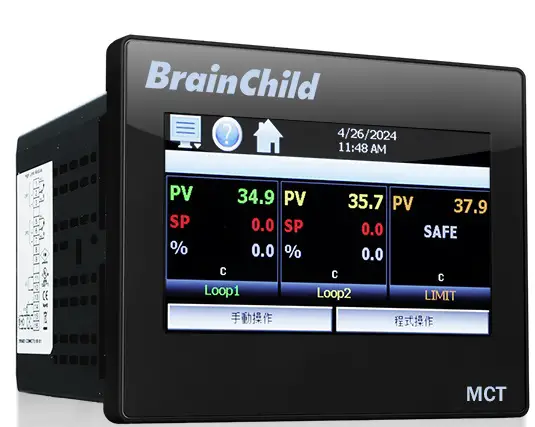
Litlhaloso
- Mohlala: MCT Ver: QS0MCT1A
- Mofuta: 1/4 DIN Multi-Loop Controller
- Sehokelo: Touch Screen
Litaelo tsa Tšebeliso ea Sehlahisoa
Kenya Mekhoa ea Taolo ea Ts'ebetso / Moeli
- Khetha slot bakeng sa module ebe o tlosa sekoaelo se se nang letho.
- Seta sesebelisoa sa DIP mojuleng bakeng sa mofuta o hlokahalang oa ho kenya.
- Kenya module ka har'a slot 'me u e boloke sebakeng seo u sebelisa li-screw tsa ho boloka.
Ho kenya le ho Homa
- Seha sebaka se lekaneng sa ho bula phanele ebe u kenya molaoli oa MCT ka sekoahelo se ka pele.
- Kenya li-brackets tse kobehileng ka har'a li-notch ho MCT ebe u tiisa li-screw ka ho lekana ho li tiisa hore li be teng.
Lihokelo le Wiring
- Hokela lithapo tsa ho kenya/output ho li-module tse kentsoeng tsa PCM/HLM ho latela litšoantšo tsa khokahano tse fanoeng.
- Hokela MCT ho netweke kapa khomphutha ka segokanyimmediamentsi sa seriale sa puisano (ho ikhethela).
Lokisa MCT bakeng sa Tšebeliso
Fetoha pakeng tsa Mekhoa ea Ts'ebetso/Tlhahiso ha ho hlokahala ho theha le ho lokisa MCT bakeng sa tšebeliso.
MCT - 1/4 DIN Multi-Loop Controller A 1/4 DIN ea li-loop tse ngata tse sebetsang joaloka smartphone kapa tablet eo u e ratang.
Ho bonolo ho sebelisa Touch Screen Interface
- Latela mehato ea tataiso ena e potlakileng ea ho qala ho theha le ho qala ho sebelisa molaoli oa hau oa MCT.

Hardware e khothalelitsoeng
ToolsHardware Recommended Tools
- Lisebelisoa

- PCM (mojule oa taolo ea ts'ebetso)
- Tlhokomeliso: ho hlokahala bonyane 1

- HLM (mojule oa moeli o phahameng)
- Tlhokomeliso: boikhethelo

Sesebedisoa
- Bracket e bolokang bakeng sa ho kenya

Lisebelisoa
- Phillips screwdriver e nyane

- Sekoti se senyenyane sa flathead

- Mohala oa mohala le terata (boholo ba 14awg)
Ho kenya
Kenya Mekhoa ea Taolo ea Ts'ebetso / Limit
- A. Khetha slot bakeng sa module.
- B. Lokolla likurufu; tlosa sekoaelo se se nang letho

- C. Seta sesebelisoa sa DIP mojuleng bakeng sa mofuta o hlokahalang oa ho kenya.
- HLM 0-1V le 0-5V/1-5V mefuta ea ho kenya ke taelo e khethehileng. Li-HLM tse otarang ka mofuta ofe kapa ofe oa ho kenya li ke ke tsa hlophisoa kapa tsa hlophisoa bakeng sa mofuta ofe kapa ofe o mong.

- D. Kenya mojule ka har'a slot ha u ntse u shebile li- card le module e sireletsehileng e le teng u sebelisa li-screws tse tsoang sekoahelong sa slot.

Tlhophiso le Tlhokomelo
- A. Khaola boholo bo loketseng ho bula ka phanele.

- B. Kenya selaoli sa MCT ka ho seha phanele e ka pele.

- C. Kenya li-brackets tse kobehileng (C) ka har'a li-notch ka holimo, tlase le mahlakoreng a MCT(B) 'me u tiise li-screw ka ho lekana ho tiisa hore MCT e be teng.

Lihokelo le Wiring
- A. Hokela matla ka li-conductors tsa koporo tse 14 tsa AWG tse lekantsoeng bakeng sa 'm'e o monyenyane oa 90°C. Ho etsa khokahanyo, hlobola ¼” ea insuela pheletsong ea terata, fetola screw screw counter-clocking ho fihlela lekhalo le bulehile, kenya terata ho kena kaofela, 'me u fetole screw ho fihlela e tiea (tekanyo e phahameng ea torque 0.51 NXNUMX = XNUMX).

- B. Wiring ea taolo ea ho kenya / e tsoa: Hokela mohala oa ho kenya / o tsoang ho li-module tse kentsoeng tsa PCM/HLM. Setšoantšo sa khokahano ea PCM se fanoe ka lehlakoreng le letšehali la MCT. Setšoantšo sa khokahano ea HLM se fanoe ka lehlakoreng le letona la MCT.

- C. Mahokelo a puisano: Hokela MCT ho netweke le kapa PC ka segokanyimmediamentsi sa seriale sa puisano (boikhethelo).

Hlokomela:
- Vol e phahamengtagli-unit tsa e (90 ho isa ho 250 VAC) li na le sehokelo sa matla sa lamunu. Phallo e tlasetagli-unit tsa e (11 ho isa ho 26 VAC / DC) li na le sehokelo sa motlakase o motala.
Hlokomela:
- Khokahano ea puisano ha e hlokehe ho theha kapa ho sebelisa MCT ea hau.
Hlokomela:
- Li-connectors tse ka tlosoang li etsa hore ho be bonolo ho kenya mohala. Tlosa sehokelo, hokela lithapo tsa hau ebe u li hokela hape.

Hlokomela:
- Kamora ts'ebeliso ea matla, haeba MCT e sa tle nakong ea metsotsoana e 2, tlosa matla. Sheba lithapo ho netefatsa likhokahano tse nepahetseng 'me u leke ho matlafatsa hape. Fuse ea ka hare e tla thibela tšenyo ea over-voltage maemo; leha ho le joalo, ha e ea tiisetsoa.
Lokisa MCT bakeng sa Tšebeliso
4-1 Fetoha lipakeng tsa Ts'ebetso / Mekhoa ea Tlhophiso
- Mokhoa oa tlhophiso o tšehetsa sebopeho sa Senyesemane feela
- Mokhoa oa ho sebetsa o tšehetsa lipuo tse ngata. Ho fetola puo, eya ho Mokgwa wa Tlhophiso > Setting ya Offline.
Ho tima ho rekota data
- Sebelisa matla a mantlha ho MCT 'me u lumelle yuniti ho qala (Setšoantšo sa A).
- Tobetsa
 letshwao la menu ebe o kgetha Data > Data (Setshwantsho a/b). Tima lebone le letala hukung e kaholimo ho le letona. Tobetsa leqephe la lapeng
  letšoao la lapeng leo u lokelang ho tsoa ho lona (Setšoantšo sa b).
Ho kenya litlhophiso tsa Offline:
- Tobetsa aekhone ea menu ho fihlella ebe o khetha Sesebediswa > Di-setting (Setshwantsho c).

Ho fetola sebopeho sa puo:
- Ha u le offline, tobetsa hape Menu ebe u khetha Seta > Puo (Setšoantšo e). Khetha puo eo u e batlang ho ON. Tlanya (Setšoantšo f). Tlanya ka potlako.
- Tobetsa letšoao la menu > Sistimi ea ho tsoela pele ho seta ntle le inthanete (Setšoantšo sa G) kapa
- tobetsa ea aekhone ea lapeng ho tsoa tšebetsong Lehae. (Setšoantšo A).

Lokisa liparamente tsa molaoli:
Ho lokisa yuniti ka letsoho:
- Ha u le offline, tobetsa letšoao la menu ebe u khetha 'Tsoa' ho menu ea 'System' (Setšoantšo sa G). *Menu> Sistimi> Tsoa
- Ho tsoa skrineng sa Ts'ebetso, tobetsa khetho ea bobeli 'Tsoa ho sesebelisoa.
(ho qala mokhoa oa tlhophiso)' ho tlohela nako ea ho sebetsa (Setšoantšo sa H). Tlanya hang-hang ho tsoa hore u qalelle hape ts'ebetsong ea Configurator.(Setšoantšo sa B)
- Qala ka ho tobetsa aekhone ea menyu ebe u khetha "Control Setup" ho tsoa ho "Setup" menu. Beha mofuta oa taolo ho latela li-PCM/ HLM tse kentsoeng (Setšoantšo sa I) * Mokhoa oa tlhophiso o tšehetsa sebopeho sa Senyesemane feela.
- Hang ha mofuta oa taolo o se o hlophisitsoe, ea ho Loop Configuration ka ho e khetha ho tsoa ho menu ea 'Setup' (Setšoantšo sa J/ K). * Menu > Seta > Loop Configuration

- Lokisetsa loop ka ho khetha litlhophiso tse fapaneng ho theha lethathamo le ho kenya litekanyetso tse hlokahalang (Setšoantšo sa L).

- Tsoela pele ts'ebetso bakeng sa loops tse ling le moeli (haeba e kentsoe). (Setšoantšo M)
- Iketsetse sebopeho ka ho tlosa likarolo tse sa hlokahaleng ka ho khetha 'Mesebetsi' ho tsoa ho "Startup" le ho bulela kapa ho tima likhetho tse hlokahalang. (Setšoantšo sa N) *Menu > Ho qala > Mesebetsi

- Ha litlhophiso tsohle li se li phethiloe, khetha 'Tloha' ho tsoa ho '.File'menu. (Setšoantšo sa O). Hang ha fensetere ea Configurator e koetsoe, matla a potoloho ho MCT ho phethela ts'ebetso ea tlhophiso. (Setšoantšo P)

Iketsetse litlhophiso ka ho kenya files
Ho kenya tlhophiso e teng file:
Latela mehato ea 1-2. Matla a ho potoloha ho MCT ho ea ho mokhoa oa ts'ebetso. (P)
- Tobetsa letšoao la menu ebe u khetha Data > Data (Setšoantšo Q). Tima lebone le letala hukung e kaholimo ho le letona. Tobetsa Lehae ho tsoa. (Setšoantšo sa R)
- Tobetsa aekhone ea menyu ebe u khetha Sesebelisoa> Litlhophiso (Setšoantšo sa S). Tobetsa letšoao la menu hape ebe u khetha Offline > Offline (Setšoantšo sa T). Tlanya .

- Ha u le offline, tobetsa letšoao la menu > Sistimi > Tlhophiso (U).
- Ho kenya tlhophiso ho tsoa ho memory stick ya USB, kenya pele sesebediswa sa memori sa USB se nang le tokiso eo o e batlang file ho kena koung ea USB ea MCT. (Setšoantšo V)

- Tobetsa 'Load Configuration' file konopo, bula seo u se batlang file 'me u lumelle hore tlhophiso ea cthe e laole (Setšoantšo sa V/ W).
- Ha thomello e phethiloe, matla a potoloho ho MCT ho phethela tšebetso ea tlhophiso. (Setšoantšo sa X)

| File | |
| 1 Etsoa | 3 Loop Aterese Tšebeliso |
| 2 About | 4 Bohlale IO Comms Utility |
| Tlhophiso | |
| 1 Taolo Tlhophiso | |
| Lialamo tse Bonolo, Lintlha tsa Monitor, Lipalo/Logic, Outputs Off Phosong ea Kenyeletso | |
| 2. Loop Tlhophiso | |
| 2.1 TagLebitso | 2.21 Sephetho 4 Mosebetsi |
| 2.2 Mofuta oa ho Kena | 2.22 Sephetho 4 Ho hloleha Phetisetso |
| 2.3 Diyuniti tsa ho kenya | 2.23 Output 4 Litekanyetso tse tlase / tse phahameng tsa moeli |
| 2.4 Ntlha ea Decimal | 2.24 Output 4 Retransmit Low / High Scale |
| 2.5 Kenya Sekala se Tlase/se Phahameng | 2.25 Alamo (1-3) Mosebetsi |
| 2.6 Sefe ea ho Kena | 2.26 Alamo (1-3) Mokhoa |
| 2.7 Mosebetsi oa Kenyelletso ea Ketsahalo | 2.27 Alamo (1-3) Pontšo |
| 2.8 Ketsahalo ea Alamo Molaetsa/Tlhaloso | 2.28 Alamo (1-3) Setpoint |
| 2.9 Boemo ba Moeli o Tlase / o Phahameng | 2.29 Alarm (1-3) Hysteresis |
| 2.10 Sephetho 1 Mosebetsi | 2.30 Alamo (1-3) Ho lieha |
| 2.11 Sephetho 1 Ho hloleha Phetisetso | 2.31 Setpoint ho Qala ea Automatic Program |
| 2.12 Output 1 ON-OFF Control Hysteresis | 2.32 Setpoint Qetellong ea Automatic Program |
| 2.13 Output 1 Cycle Time | 2.33 Ho Fana ka Matla a Tsoelehileng |
| 2.14 Output 1 Litekanyetso tse tlase / tse phahameng tsa moeli | 2.34 Mokgwa wa Puisano |
| 2.15 Sephetho 2 Mosebetsi | 2.35 Loop Mode |
| 2.16 Sephetho 2 Ho hloleha Phetisetso | 2.36 Ramp Ts'ebetso ea Rate |
| 2.17 Output 2 Cycle Time | 2.37 Ramp Sekhahla ka tlase ho tlase / holimo moeling |
| 2.18 Output 2 Litekanyetso tse tlase / tse phahameng tsa moeli | 2.38 Ramp Lekanya Moeli o Tlase / o Holimo |
| 2.19 Sephetho 3 Mosebetsi | 2.39 Setpoint 2 Format |
| 2.20 Sephetho 3 Ho hloleha Phetisetso | 2.40 Ntlha ea 2 |
| 3. Moeli oa Tlhophiso | |
| 3.1 TagLebitso | 3.12 Sephetho 2 Mosebetsi |
| 3.2 Mofuta oa ho Kena | 3.13 Mosebetsi oa Alamo |
| 3.3 Diyuniti tsa ho kenya | Mokhoa oa Alamo oa 3.14 |
| 3.4 Ntlha ea Decimal | 3.15 Alarm Pontšo |
| 3.5 Kenyeletso e tlase/ Boemo bo phahameng | 3.16 Alarm Setpoint |
| 3.6 Sefe ea ho Kena | 3.17 Alarm Hysteresis |
| 3.7 Sephetho 1 Mosebetsi | 3.18 Alamo Ho Se fetisetsoe |
| 3.8 Sephetho sa 1 Hysteresis | 3.19 Mosebetsi oa Kenyelletso ea Ketsahalo |
| 3.9 Moedi o ka Tlase/ o Hodimo wa Sebaka se Phahameng | 3.20 Sebopeho sa Pontšo |
| 3.10 Moedi o ka Tlase/ o Hodimo wa Sebaka se Tlase | 3.21 Mokhoa oa ho qala bocha |
| 3.11 Boemo ba Moedi o Phahameng/ o Tlase | |
| 4 Lekola Tlhophiso | |
| 4.1 Taglebitso | 4.4 Ntlha ea Decimal |
| 4.2 Mofuta oa ho Kena | 4.5 Kenya Sekala se Tlase/se Phahameng |
| 4.3 Diyuniti tsa ho kenya | |
| 5 Bonolo Alamo Tlhophiso | |
| Mohloli oa alamo, mofuta oa alamo, Thibela, Khutsa, Imeile, Ringback, Alarm Setpoint, Hysteresis, Delay | |
| 6 Tlhophiso ea Lipalo/Mahlale | |
| 6.1 Ho Kena Palong ea Math/Logic | 6.2 Math/Logic Equation Examples |
| Dikgetho | |
| 1 Cascade Taolo | |
| E holofalitsoe, Ts'ebetso, Phapang, Karolelano | |
| 2 Katoloso IO | |
| 2.1 Kenyelletso (8-23) Mosebetsi | 2.3 Kenya Sekala se Tlase/se Phahameng |
| 2.2 Kenyeletso (8-23) Alamo Molaetsa/Tlhaloso | |
| 3 Nako ea Ketsahalo | |
| Khetho ea nako ea ketsahalo, Mokhoa oa ho felloa ke matla, Alamo ha e felile, Imeile / SMS ha e Phetha | |
| E qalang | |
| 1 Mesebetsi | 2 Ho qala View |
| Tagmabitso | |
| 1 Alamo Lebitso | 3 Tloaelo Lebitso\ Aterese |
| Ketsahalo ea 2 Mabitso | |
lintlha tse ling
ikopanye le thuso ea Tšehetso ea Tech:
- service@brainchild.com.tw
- 886-2-2786-1299
- http://www.brainchildtw.com
LBH
- P: Na ke hloka khokahano ea puisano ho sebelisa MCT?
- A: Che, khokahano ea puisano ha e hlokehe ho theha kapa ho sebelisa MCT ea hau.
- P: Ke lokela ho etsa eng haeba MCT e sa sebetse?
- K: Haeba MCT e sa tle nakong ea metsotsoana e 2 ka mor'a ho sebelisa matla, tlosa matla, hlahloba lithapo bakeng sa likhokahano tse nepahetseng, 'me u leke ho kenya motlakase hape. Fuse e ka hare e tla thibela tšenyo bakeng sa overvolvetage maemo.
Litokomane / Lisebelisoa
 |
BrainChild QS0MCT1A MCT Multi Loop Controller [pdf] Bukana ea Mosebelisi QS0MCT1A MCT Multi Loop Controller, QS0MCT1A, MCT Multi Loop Controller, Multi Loop Controller, Loop Controller |


