Selelekela
This manual provides comprehensive instructions for the assembly, operation, and maintenance of your Perlegear Dual Monitor Stand with Integrated Power Strip, model PGTVS41B. This freestanding monitor stand is designed to support two monitors, enhancing your workspace ergonomics and organization. Please read this manual thoroughly before installation and use to ensure proper setup and safe operation.
Boitsebiso ba Tšireletseho
- Netefatsa hore likarolo tsohle li teng ebile ha lia senyeha pele li kopanngoa. U se ke ua sebelisa haeba likarolo life kapa life li le sieo kapa li na le phoso.
- Verify that your monitors' weight and VESA patterns are within the specified limits (up to 22 lbs per arm, VESA 75x75mm or 100x100mm).
- O se ke wa tiisa dikurufu haholo nakong ya kopano ho thibela tshenyo ya dikarolo.
- Boloka bana le liphoofolo tse ruuoang lapeng hole nakong ea kopano. Likarolo tse nyane li ka baka kotsi ea ho khangoa.
- Beha setopo sebakeng se tsitsitseng, se lekaneng ho thibela ho phunyeletsa.
- Do not exceed the electrical ratings of the integrated power strip.
Litaba tsa Sephutheloana
Ka kopo netefatsa hore likarolo tse latelang li kenyelelitsoe ka har'a sephutheloana sa hau:
- Motheo oa Khalase
- Main Support Pole with Integrated Power Strip
- Dual Monitor Arms
- VESA Plates (x2)
- Hardware Kit (screws, washers, spacers, Allen wrenches)
- Power Cable (6.5ft)
- Likhechana tsa Tsamaiso ea Cable
Litaelo tsa ho seta
Follow these steps to assemble your Perlegear Dual Monitor Stand:
- Step 1: Assemble the Base and Pole
Attach the main support pole to the glass base using the provided screws and Allen wrench. Ensure it is securely fastened and stable.

Image: Fully assembled Perlegear Dual Monitor Stand, showing the main pole, monitor arms, and glass base.
- Step 2: Attach Monitor Arms
Slide the dual monitor arms onto the main support pole. Adjust their height to your preference and secure them with the locking mechanism.
- Mohato oa 3: Hokela Lipoleiti tsa VESA ho Bahlahlobisisi
Carefully attach the VESA plates to the back of your monitors using the appropriate screws, washers, and spacers from the hardware kit. Ensure the VESA pattern (75x75mm or 100x100mm) matches your monitor.

Image: Diagram illustrating VESA compatibility (75x75mm, 100x100mm) and supported monitor sizes (13-32 inches) and weight (22 lbs per arm).
- Step 4: Mount Monitors
With assistance if needed, carefully slide the monitors (with attached VESA plates) onto the monitor arms. Ensure they click into place securely.
- Step 5: Connect Power Strip
Plug the provided 6.5ft power cable into the integrated power strip on the main pole, then connect it to a wall outlet. The power strip includes 1 USB-A port (5V/2.1A), 1 USB-C port (5V/2.1A), and 3 AC outlets (120V/12A).
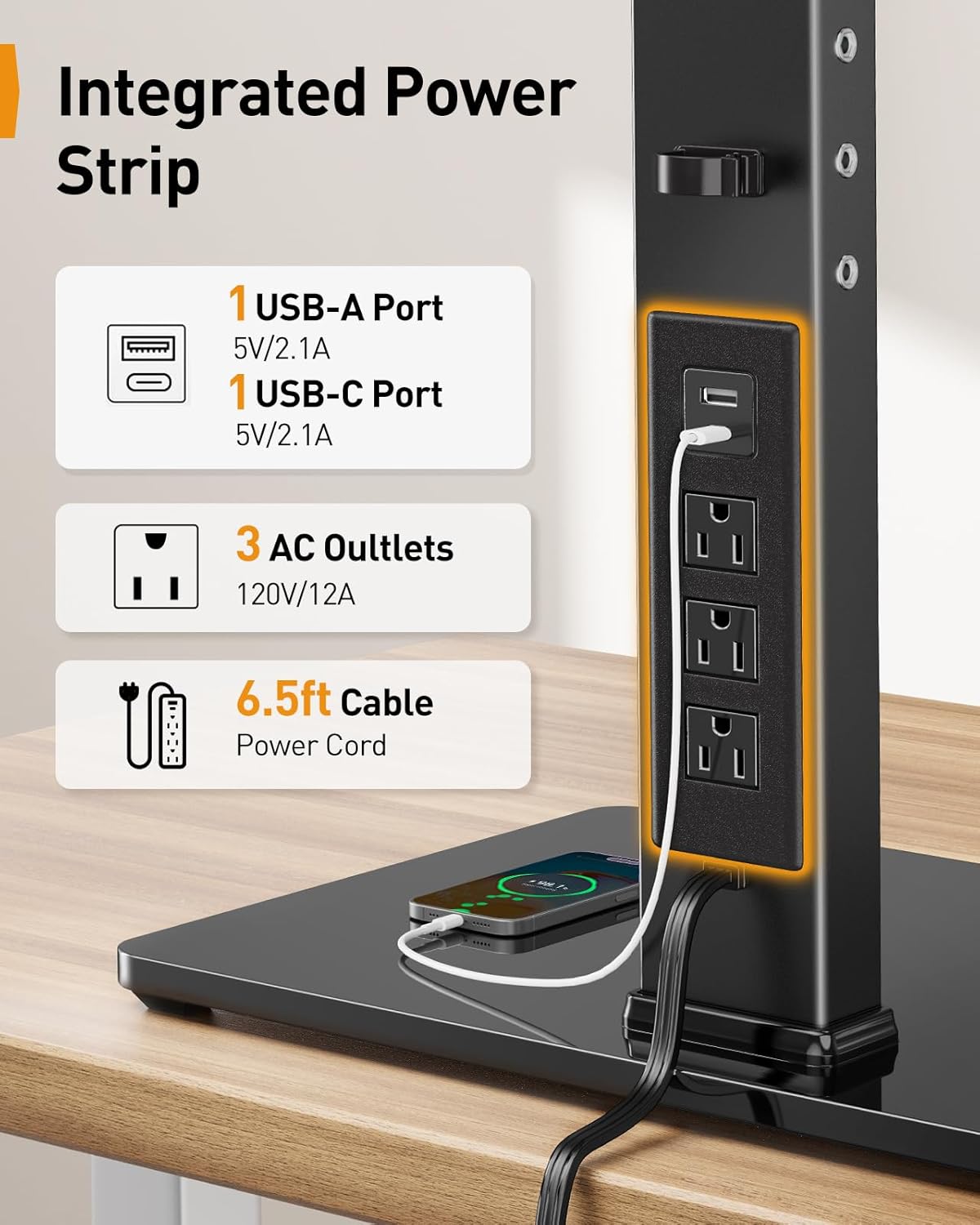
Setšoantšo: Haufi view of the integrated power strip, detailing the USB-A, USB-C, and three AC outlets, along with the 6.5ft power cable.
- Mohato oa 6: Tsamaiso ea Cable
Route monitor cables and power cords through the integrated cable management clips on the pole and arms to maintain a tidy workspace.

Setšoantšo: Example of a streamlined workspace utilizing the monitor stand's cable management features, showing monitors, keyboard, and other peripherals.
Litaelo tsa Ts'ebetso
The Perlegear Dual Monitor Stand offers various adjustments for optimal viewmatšeliso.
- Phetoho ea Bophahamo: The monitor stand has four height settings, allowing you to adjust the screen height from 10.79 inches to 14.92 inches. This helps achieve an ergonomic viewho fokotsa khatello ea molala le mahlo.
- Phetoho ea Tilt: Each monitor can be tilted ±45° to reduce glare and find your preferred viewing angle.
- Phetoho ea Swivel: Monitors can swivel ±90° horizontally, allowing for easy screen sharing or multi-user setups.
- Phetoho ea ho potoloha: Rotate your monitors 360° to switch between landscape and portrait orientation effortlessly.
- Flexible Arm Positioning: The monitor arms feature multiple joints that allow for flexible positioning, including ±105° articulation at the main arm joints and ±90° swivel at the monitor attachment point.
- Using the Power Strip: Plug your devices into the USB-A, USB-C, or AC outlets on the integrated power strip for convenient desktop power access.
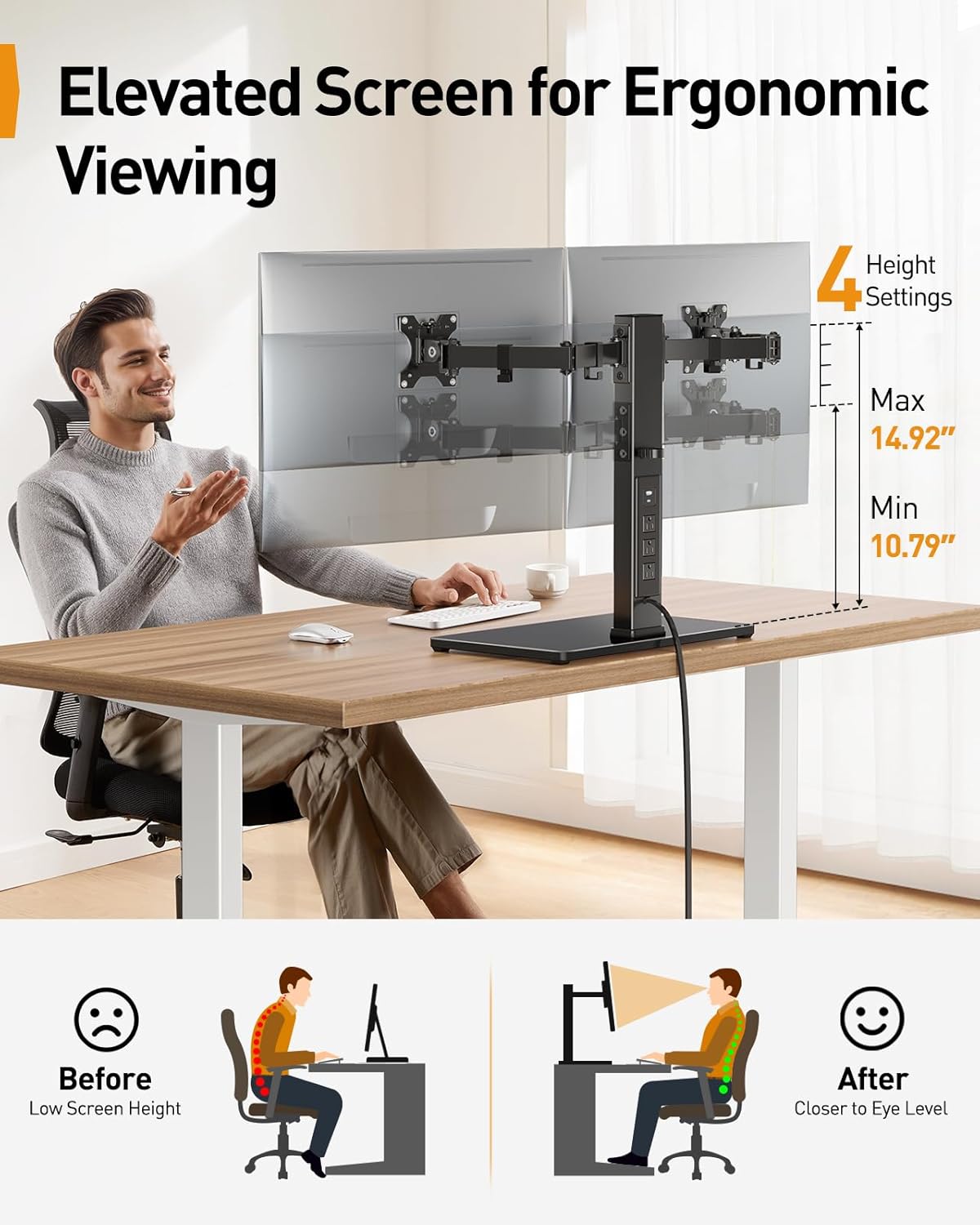
Image: Illustration demonstrating the ergonomic benefits of adjustable screen height, showing a user with correct posture and the stand's height range (10.79" to 14.92").

Image: Diagrams illustrating the ±45° tilt, ±90° swivel, and 360° rotation capabilities of the monitor mounts.

Setšoantšo: Ka holimo view demonstrating the flexible articulation of the monitor arms, showing ±105° movement at various joints and ±90° swivel for screen positioning.
Tlhokomelo
To ensure the longevity and proper function of your monitor stand:
- Ho hloekisa: Wipe the stand and base with a soft, dry cloth. For stubborn marks, a slightly damp Lesela le ka sebelisoa, ebe ho latela ho omisa. Qoba lihlatsoi tse khorofo kapa li-solvent.
- Litlhahlobo tsa nako le nako: Hlahloba dikurufu le dikgokelo nako le nako ho netefatsa hore di dula di tiile ebile di tiile. Di tiise hape haeba ho hlokahala.
- Tsamaiso ea Cable: Ensure cables are not pinched or excessively strained. Adjust cable routing as needed.
Ho batle phoso
If you encounter issues with your monitor stand, refer to the following common solutions:
- Stand is wobbly: Ensure the base is on a flat, stable surface. Check all assembly screws, especially those connecting the pole to the base and the arms to the pole, are securely tightened.
- Monitors are not level: Adjust the tilt and height of individual monitor arms to align them. Ensure VESA plates are securely attached to monitors.
- Power strip not working: Verify the main power cable is securely plugged into both the stand and a functional wall outlet. Check if the wall outlet is receiving power. Ensure devices are properly plugged into the power strip.
- Difficulty adjusting monitor position: Loosen the adjustment screws slightly, make the adjustment, then retighten to secure the position. Do not force adjustments.
Litlhaloso
| Mohlala | PGTVS41B |
| Monitor Ts'ebetsong | 13" - 32" Flat or Curved Screens |
| Boima ba Boima | Ho fihlela ho 22 lbs (10 kg) ka letsoho |
| VESA Patterns | 75x75mm, 100x100mm |
| Bophahamo ba Phetoho Range | 10.79" - 14.92" (27.4 cm - 37.9 cm) |
| Angle e sekame | ±45° |
| Swivel Angle | ±90° |
| Ho potoloha | 360° |
| Integrated Power Strip | 1x USB-A (5V/2.1A), 1x USB-C (5V/2.1A), 3x AC Outlets (120V/12A) |
| Bolelele ba Cable ea Matla | 6.5 ft (limithara tse 2) |
| Lintho tse bonahalang | Carbon Steel, Tempered Glass |
| Mmala | Ntsho |
Warranty le Tšehetso
Perlegear products are designed for durability and performance. For warranty information or technical support, please refer to the contact details provided with your purchase or visit the official Perlegear website. Our customer service team is available to assist you with any questions or concerns regarding your product.


