1. Selelekela
The AOCHUAN Smart M3 is a versatile 3-in-1 device combining a selfie stick, desktop stand, and floor tripod, featuring advanced AI face tracking and remote control capabilities. Designed for content creators and everyday users, it offers hands-free video recording and photography without the need for a dedicated application. This manual provides comprehensive instructions for setting up, operating, and maintaining your Smart M3 tripod.
2. Boitsebiso ba Tšireletseho
- Se ke oa beha sesebelisoa mochesong o feteletseng kapa khanya ea letsatsi ka nako e telele.
- Beha sesebelisoa hole le metsi le maro a mang.
- Qoba ho liha kapa ho beha sesebelisoa tlas'a tšusumetso e matla.
- Se ke oa leka ho qhaqholla kapa ho lokisa sesebelisoa ka bouena. Ikopanye le tšehetso ea bareki bakeng sa thuso.
- Ensure your smartphone is securely mounted in the holder before use.
3. Likahare tsa Sephutheloana
Netefatsa hore lintho tsohle li kenyelelitsoe ka har'a sephutheloana sa hau:
- Smart M3 AI Face Tracking Tripod
- Taolo ea Remote (x1)
- USB-C Charging Cable (x1)
- Product Manual (x1)

4. Sehlahisoa Overview
The AOCHUAN Smart M3 features an integrated design with several key components:
- Sets'oants'o sa Mohala: Securely holds smartphones from 1.8 to 3.8 inches in width.
- AI Tracking Camera: Located on the main unit, it detects and follows faces.
- Konopo ea Matla: For turning the device on/off.
- Boema-kepe ba ho tjhaja USB-C: Bakeng sa ho tjhaja betri e kahare.
- Remote Control Slot: Stores the detachable Bluetooth remote.
- Extendable Pole: Made from aluminum alloy, extends up to 57 inches.
- Maoto a Tripod: Four-legged design with anti-slip rubber pads for enhanced stability.


5. Seta
5.1 Ho manolla Tripod
- Gently pull the bottom of the device to extend the tripod legs. Ensure they are fully spread for maximum stability.
- Extend the telescopic pole to your desired height. The pole can reach up to 57 inches.
5.2 Ho hokela Smartphone ea hau
- Open the phone holder by pulling the top clip upwards.
- Carefully place your smartphone into the holder, ensuring it is centered and securely gripped. The holder accommodates devices from 1.8 to 3.8 inches wide.
5.3 Ho Matlafatsa
Press and hold the power button on the main unit until the indicator light illuminates.
5.4 Taolo ea Remote
The remote control uses Bluetooth. To pair, ensure the remote is charged and the tripod is powered on. Activate Bluetooth on your smartphone and select the Smart M3 remote from the list of available devices. The remote is typically pre-paired or automatically connects upon activation.
6. Litaelo tsa Ts'ebetso
6.1 Ho Latela Sefahleho sa AI
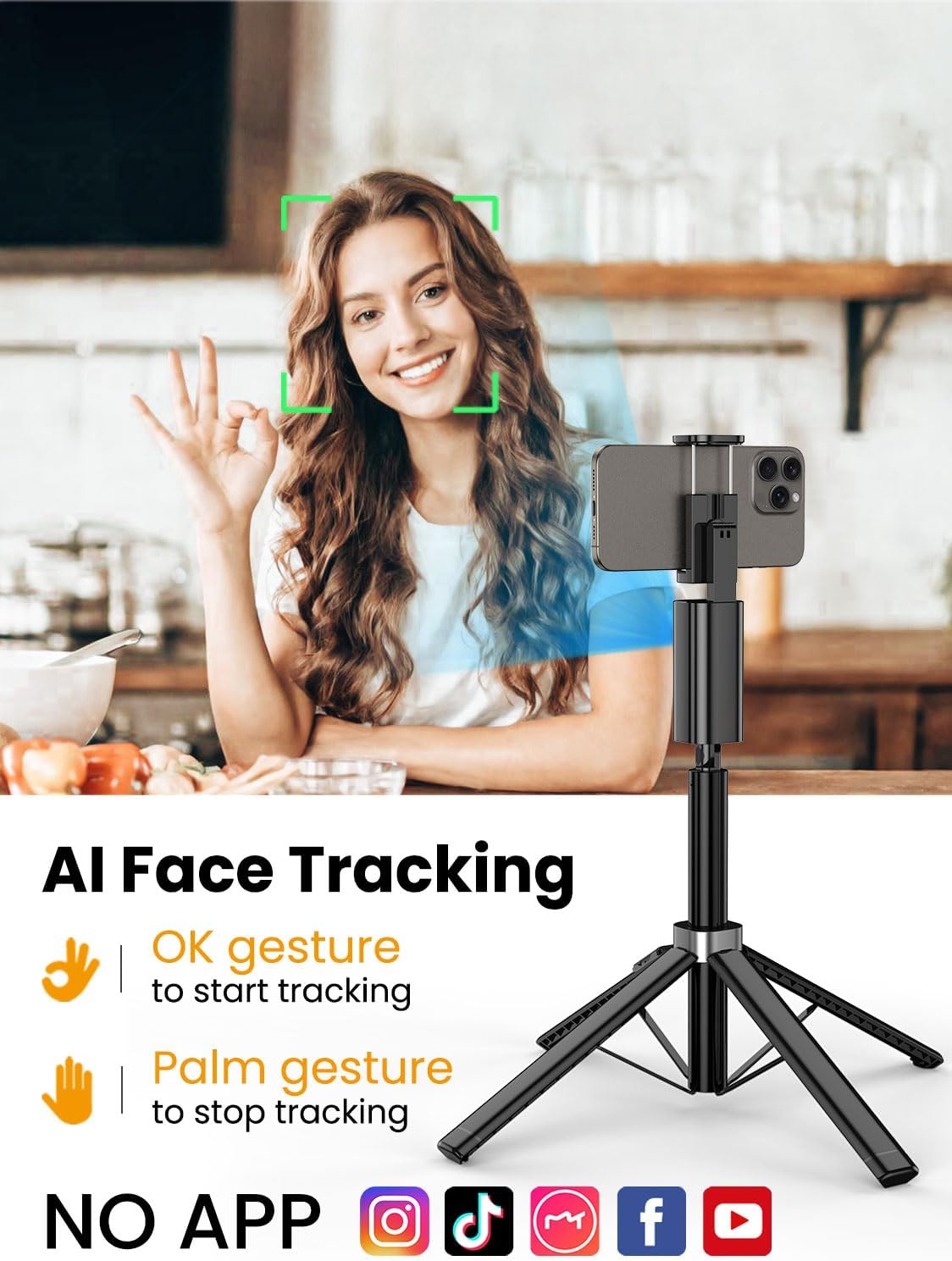
The Smart M3 features an integrated AI tracking camera that does not require an app. It automatically detects and follows faces.
- To Start Tracking: Make an "OK" gesture with your hand towards the AI tracking camera. The device will begin to rotate and follow your face.
- To Stop Tracking: Show your open palm to the AI tracking camera. The device will pause tracking.

6.2 Mosebetsi oa Taolo ea Remoutu
The detachable remote control allows you to operate your smartphone's camera from a distance of up to 10 meters (32 feet). Use it to trigger photos or start/stop video recording, ideal for group shots or solo content creation.

6.3 Extendable Pole
The built-in aluminum alloy extension pole can be adjusted to a maximum height of 57 inches, providing flexibility for various shooting scenarios and wider fields of view.

6.4 Multi-Angle Shooting
The Smart M3 offers extensive adjustability for capturing unique perspectives:
- 360° Hlooho e Potolohang: Allows for panoramic shots and seamless tracking.
- 270° Phetoho ea Tilt: Adjust the vertical angle of your smartphone.
- 360° Balanced Handle: Provides additional rotational flexibility.

6.5 Mekhoa ea ho Sebelisa
The Smart M3 can be used in three primary modes:
- Sebaka sa Desktop: Compact mode for stable placement on flat surfaces.
- Extended Selfie Mode: Use the extended pole for wider selfie shots.
- Floor Tripod Mode: Fully extend the pole and legs for stable, elevated recording.

7. Tlhokomelo
- Hloekisa sesebelisoa ka lesela le bonolo, le omeletseng. Se ke oa sebelisa li-abrasive cleaners kapa solvents.
- Store the tripod in a cool, dry place when not in use.
- Ensure the remote control is securely stored in its slot to prevent loss.
8. Ho rarolla mathata
- Sesebelisoa ha se sebetse: Ensure the device is fully charged using the provided USB-C cable.
- AI Face Tracking not working: Check for sufficient lighting. Ensure your face is clearly visible to the AI tracking camera. Avoid rapid movements that might cause the tracker to lose focus.
- Remote Control not connecting: Verify that the remote's battery is functional and that Bluetooth is enabled on your smartphone. Re-pair the remote if necessary.
- Ho se tsitse ha tripd: Ensure the four legs are fully extended and placed on a flat, stable surface. Avoid using in strong winds.
9. Litlhaloso
| Sebopeho | Tlhaloso |
|---|---|
| Litekanyo tsa Sehlahisoa | 1.77 x 1.57 x 57 lisenthimithara |
| Boima ba Ntho | 1.08 pounds (0.49 lik'hilograma) |
| Libetri | 1 Betri ea Lithium Ion e hlokahalang (e kenyelelitsoe) |
| Moetsi | AOCHUAN |
| Brand | AOCHUAN |
| Mmala | Ntsho |
| Lisebelisoa tse lumellanang | Smartphone |
| Lintho tse bonahalang | Aluminium |
| Maximum Height | 57 lisenthimithara |
| Mofuta oa Hlooho ea Tripod | Lihlooho Tsa Pan |
| Palo ea Likarolo tsa Maoto | 4 |
| Boholo bo Menoeng | 12.41 inch |
10. Tiisetso le Tšehetso
For warranty information and customer support, please refer to the contact details provided on the product packaging or visit the official AOCHUAN websebaka. Boloka rasiti ea hau ea theko bakeng sa likopo tsa tiisetso.


