Selelekela
The HMD Pulse Pro is an advanced unlocked smartphone designed for global use, featuring a powerful 50 MP dual rear camera and an equally impressive 50 MP front camera. It runs on Android 14, offers extended battery life, and boasts a repair-at-home design for user convenience. This manual provides essential information for setting up, operating, maintaining, and troubleshooting your device.
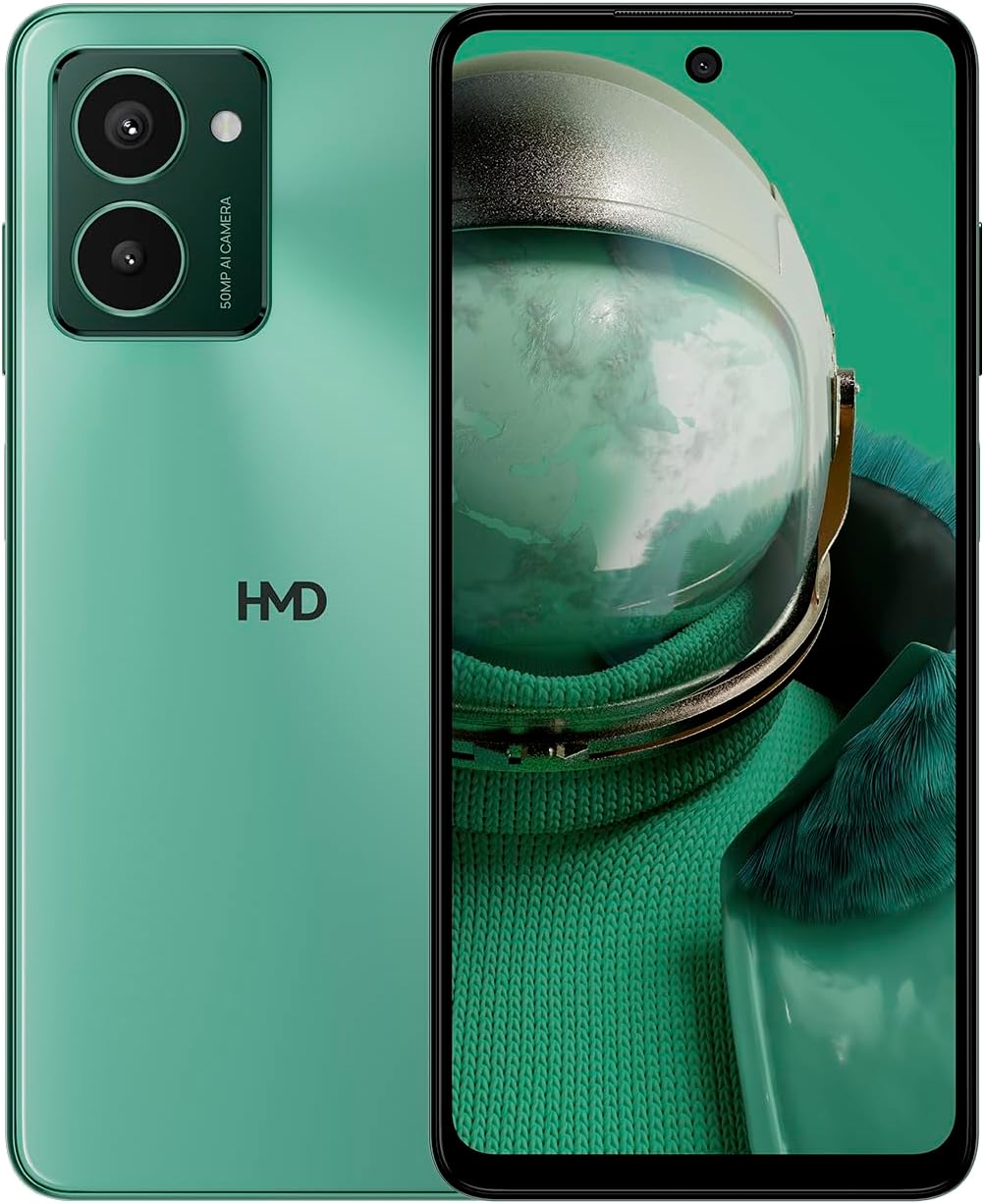
The HMD Pulse Pro smartphone in Glacier Green, showcasing its sleek design and dual camera system on the rear, alongside its vibrant display.
Likarolo tsa Bohlokoa:
- Striking design with refined lines and a cutting-edge aesthetic.
- Equipped with 50 MP rear and 50 MP front cameras for balanced and high-quality photography.
- Innovative selfie gesture function for easier and more dynamic self-portraits.
- Extended battery life providing up to 59 hours of usage on a single charge.
- International version, unlocked for compatibility with various carriers worldwide.
Se ka Lebokoseng
Upon unboxing your HMD Pulse Pro, please ensure all the following items are present:
- HMD Pulse Pro Smartphone
- Cable ea USB
- Sesebelisoa sa Ejector sa SIM Tray
- Quick Start Guide (may be separate or integrated)
Tlhophiso
1. Ho tjhaja ha Pele
Before first use, it is recommended to fully charge your HMD Pulse Pro. Connect the provided USB cable to the phone's charging port and the other end to a compatible USB power adapter (not always included) or a computer USB port. The device supports fast charging.
2. Ho kenya Dikarete tsa SIM le Karete ya MicroSD
The HMD Pulse Pro supports dual SIM cards and expandable memory via a microSD card.
- Fumana tray ea SIM ka lehlakoreng la fono ea hau.
- Kenya sesebelisoa sa ejector sa terei ea SIM ka lesobeng le lenyenyane le haufi le terei 'me u sutumelle butle ho fihlela terei e hlaha.
- Beha likarete tsa hau tsa Nano-SIM ka har'a likheo tse khethiloeng. Netefatsa hore likhokahano tsa khauta li shebile tlase.
- If using a microSD card for additional storage, place it into its dedicated slot on the tray.
- Ka hloko sutumelletsa terei fonong ho fihlela e tobetsa sebakeng.
3. Ho Matlafatsa le Tlhophiso ea Pele
Press and hold the Power button until the HMD logo appears. Follow the on-screen instructions to complete the initial setup, including language selection, Wi-Fi connection, Google account setup, and security settings.
Litaelo tsa Ts'ebetso
Navigation ea Motheo
- Skrine se thetsoang: Navigate by tapping, swiping, pinching, and spreading on the 6.65-inch display.
- Konopo ea Matla: Tobetsa ho tsosa/robala skrineng. Tobetsa o hatelle ho tima kapa ho qala bocha.
- Likonopo tsa Bolumo: Adjust media volume, call volume, and notification volume.
Tšebeliso ea khamera
The HMD Pulse Pro features a 50 MP dual rear camera and a 50 MP front camera, enhanced with AI capabilities.

A user demonstrating the innovative selfie gesture feature of the HMD Pulse Pro, allowing for hands-free photo capture.

E haufi-ufi view of the HMD Pulse Pro's 50 MP front-facing camera, highlighting its AI-powered capabilities for enhanced selfies.
- Launching Camera: Tap the Camera app icon or use a quick gesture (if enabled in settings).
- Ho nka linepe: Tap the shutter button. Use pinch-to-zoom for optical or digital zoom.
- Selfie Gestures: Utilize pre-defined hand gestures to trigger the front camera shutter without touching the screen. Refer to the in-app camera settings for available gestures.
- Mekhoa: Switch between various modes like Portrait, Night, Panorama, and Video.
Taolo ea Battery
The HMD Pulse Pro is equipped with a 5000 mAh battery, offering up to 59 hours of usage.

Two HMD Pulse Pro smartphones standing upright, with text emphasizing the impressive battery life of up to 59 hours.
- Ho tjhaja: Use the provided USB cable. A full charge takes approximately 2.5 hours.
- Seboloka Betri: Enable Battery Saver mode in Settings > Battery to extend usage time.
- Optimizing Usage: Reduce screen brightness, disable unused connectivity (Bluetooth, Wi-Fi, GPS), and close background apps to conserve battery.
Tlhokomelo
Ho Hloekisa Sesebelisoa sa Hau
To keep your HMD Pulse Pro in optimal condition:
- Sebelisa lesela le bonolo, le se nang lint ho hlakola skrine le 'mele.
- Qoba ho sebelisa lik'hemik'hale tse bohale, li-abrasive cleaners, kapa li-sprays tsa aerosol.
- The device is water resistant; however, avoid submerging it in water.
Lisebelisoa tsa Software
Kamehla hlahloba le ho kenya lintlafatso tsa software ho netefatsa hore sesebelisoa sa hau se na le likarolo tsa morao-rao, li-patches tsa ts'ireletso, le ntlafatso ea ts'ebetso. Eya ho Litlhophiso > Sistimi > Ntlafatso ea sistimi.
Tsamaiso ea polokelo
With 256 GB of internal storage, you have ampsebaka. Leha ho le jwalo, laola sebaka sa hao kamehla files and apps to maintain performance. You can also expand storage using a microSD card.
Ho batle phoso
This section addresses common issues you might encounter with your HMD Pulse Pro.
| Bothata | Tharollo e ka khonehang |
|---|---|
| Sesebelisoa se ke ke sa bulela | Ensure the battery is charged. Connect to a charger for at least 30 minutes. Try holding the Power button for 10-15 seconds. |
| Lisebelisoa lia senyeha kapa lia hoama | Clear the app's cache (Settings > Apps > [App Name] > Storage > Clear cache). Restart the phone. Update the app or the phone's software. |
| Bophelo bo fokolang ba betri | Check background app usage (Settings > Battery). Reduce screen brightness. Disable unused connectivity features (Wi-Fi, Bluetooth, GPS, NFC). Enable Battery Saver mode. |
| Ha e khone ho hokela ho Wi-Fi/Bluetooth | Toggle Wi-Fi/Bluetooth off and on. Restart your phone and the router/device. Forget the network/device and reconnect. |
| SIM card ha e fumanehe | Ensure the SIM card is correctly inserted in the tray. Restart the phone. Check with your carrier for network issues. |
Hlahisa Fektheri bocha
Haeba mathata a sa feleng a hlaha, ho ka hlokahala hore ho setefatswe botjha fekthering. Tlhokomeliso: Sena se tla hlakola data eohle fonong ea hau. Boloka lintlha tsa bohlokoa pele u tsoela pele.
- Eya ho Litlhophiso> Sistimi> Seta likhetho bocha.
- Khetha "Hlakola data eohle (ho seta fektheri)".
- Netefatsa qeto ea hau 'me u kenye PIN/paterone/phasewete ea hau haeba u khothalletsoa.
- Fono e tla qala hape mme e qale tshebetso ya ho seta botjha.
Litlhaloso
Detailed technical specifications for the HMD Pulse Pro smartphone:

The HMD Pulse Pro highlighting its stylish and cutting-edge design, dual SIM support, and 6.56" HD+ HID display with a 90Hz refresh rate. Note: While the image mentions 8GB/128GB, this specific model features 8GB RAM and 256GB internal storage.
| Sebopeho | Lintlha |
|---|---|
| Lebitso la Mohlala | Pulse Pro (TA-1606) |
| Mokhoa oa tšebetso | Android 14 |
| Boholo ba Pontšo | 6.65 lisenthimithara |
| Qeto | 720 x 1612 |
| Refresh Rate | 90 Hz |
| Memori ea RAM | 8 GB |
| Bokhoni ba polokelo | 256 GB (E ka atolosoa) |
| Khamera e ka morao | 50 MP Dual Camera |
| Khamera e ka pele | 50 MP |
| Bokhoni ba Battery | 5000 mAh |
| Nako ea ho tjhaja | Hoo e ka bang. Lihora tse 2.5 |
| CPU lebelo | 1.6 GHz |
| Khokahano | Bluetooth, Wi-Fi, USB, NFC |
| Likarolo Tse Khethehileng | Fast Charging Support, Dual SIM, Expandable Memory, Built-In GPS, Water Resistant |
| Litekanyo | 6.43 x 2.95 x 0.34 lisenthimithara |
| Boima ba Ntho | 0.249 ounces (7.06 Grams) |
| Jack Audio | 3.5 limilimithara |
| Mmala | Glacier Green |
Warranty le Tšehetso
Tiisetso ea Moetsi
Your HMD Pulse Pro smartphone is covered by a manufacturer's warranty against defects in materials and workmanship. The specific terms and duration of the warranty may vary by region. Please refer to the warranty card included with your product or visit the official HMD websaete bakeng sa tlhaiso-leseling e felletseng ea waranti.
Tšehetso ea Bareki
For technical assistance, troubleshooting beyond this manual, or warranty claims, please contact HMD customer support. You can typically find contact information (phone numbers, email, support portals) on the official HMD websaete kapa ka karolo ea tšehetso ea litlhophiso tsa sesebelisoa sa hau.
Lisebelisoa tsa Marang-rang: For the latest FAQs, software downloads, and support articles, visit the official HMD support page. (Specific URL not provided in input, so a generic statement is used).


