Selelekela
Thank you for choosing the Ourlife Mini Drone. This drone is equipped with dual 4K cameras, offering high-quality photo and video capture, and can be controlled via a smartphone app for real-time viewing. Designed for ease of use, it features one-button takeoff/landing, altitude hold, headless mode, and gesture control, making it suitable for beginners and enthusiasts alike. Its compact, foldable design ensures portability for all your adventures. Please read this manual carefully before operation to ensure safe and optimal performance.
Litaelo tsa Tšireletseho
Always prioritize safety when operating your drone. Failure to follow these guidelines may result in injury, damage to property, or legal issues.
- Bala Bukana: Fully understand all instructions and warnings before first flight.
- Open Space: Always fly in open, unobstructed areas, away from people, animals, buildings, and power lines. Avoid flying in strong winds.
- Tsela ea Pono: Maintain visual line of sight with the drone at all times.
- Tšireletseho ea Battery: Use only original batteries and charging cables. Do not overcharge or short-circuit batteries. Discontinue use if batteries are damaged or swollen.
- Polokeho ea Propeller: Keep fingers, hair, and loose clothing away from rotating propellers. Always turn off the drone before handling propellers.
- Thibelo ea lilemo: Sehlahisoa sena se khothaletsoa basebelisi ba lilemo tse 14 ho ea holimo.
- Tumellano ea Molao: Be aware of and comply with local laws and regulations regarding drone operation.
Litaba tsa Sephutheloana
Netefatsa hore lintho tsohle li teng ka har'a sephutheloana sa hau:

Image: Contents of the Ourlife Mini Drone package, showing the drone, remote control, two rechargeable batteries, a screwdriver, four protective frames, four main propellers, a USB charging cable, and an instruction manual.
- Ourlife Mini Drone x 1
- Taolo ea remoutu x 1
- Rechargeable Drone Battery x 2
- Screwdriver x 1
- Protective Frame x 4
- Main Propeller x 4 (spare)
- Cable ea ho tjhaja USB x 1
- Buka ea litaelo x 1
Note: The remote control requires 3 AAA batteries, which are not included.
Sehlahisoa se Felletseview
Familiarize yourself with the drone and remote control components.

Image: The Ourlife Mini Drone in its unfolded state, alongside its remote control, two drone batteries, and the drone in its folded, compact form.
Likarolo tsa Drone
- Matsoho a Menwang: Bakeng sa polokelo e kopaneng le ho nkeha habonolo.
- Bahlahisi: Four main propellers for flight.
- Lik'hamera tse peli: Front 4K camera (120° adjustable) and bottom optical flow lens for stable flight and diverse shooting angles.
- Kamore ea Battery: Located at the rear of the drone.
- Mabone a LED: Indicate drone status and orientation.

Setšoantšo: Haufi view ea Ourlife Mini Drone's dual camera system, highlighting the adjustable front camera and the lower lens for stable flight. The front camera can be adjusted by 120 degrees.
Remote Control Layout
- Left Joystick: E laola bophahamo (hodimo/tlase) le ho potoloha (ka letsohong le letshehadi/le letona).
- Joystick e nepahetseng: E laola motsamao wa ho ya pele/morao le ho ya ka letsohong le letshehadi/le letona.
- One-Key Takeoff/Landing Button: E qala ho theoha kapa ho theoha ka ho iketsa.
- Konopo ea Boemo ba Hlooho: Activates/deactivates headless mode.
- Konopo ea Switch Speed: Toggles between different flight speeds (low, medium, high).
- 360° Flip Button: Executes a 360-degree flip.
- Sets'oants'o sa Mohala: For mounting your smartphone to view FPV feed.
Tlhophiso
1. Ho tjhaja Battery ea Drone
- Hokela thapo ea ho tjhaja ya USB ho betri ya drone.
- Plug the USB end into a 5V/1A USB adapter (not included) or a computer USB port.
- The indicator light on the cable will show charging status. It will turn off or change color when fully charged.
2. Installing Drone Battery
- Etsa bonnete ba hore drone e tima.
- Insert the charged battery into the battery compartment at the rear of the drone until it clicks into place.
3. Ho kenya Libetri tsa Remote Control
- Bula karolo ea betri ka morao ho remote control.
- Kenya libeteri tse 3 tsa AAA (tse sa kenyelletsoeng) ho latela matšoao a polarity.
- Koala sekoaelo sa karolo ea betri ka mokhoa o sireletsehileng.
4. Attaching Propeller Guards
- Carefully attach the four protective frames to each motor arm of the drone.
- Ensure they are securely fastened to prevent detachment during flight.
5. App Installation (KY UFO)
- Scan the QR code provided in the manual or search for "KY UFO" in your smartphone's app store (App Store for iOS, Google Play for Android).
- Khoasolla le ho kenya sesebelisoa.
- Turn on the drone, then go to your phone's Wi-Fi settings and connect to the drone's Wi-Fi network (usually named "KY-UFO-XXXXXX").
- Open the KY UFO app to access the real-time FPV feed and advanced controls.
Litaelo tsa Ts'ebetso
1. Pairing the Drone and Remote Control
- Beha drone sepakapakeng se bataletse.
- Turn on the drone's power switch. The drone's indicator lights will flash.
- Bulela remote.
- Push the left joystick all the way up, then pull it all the way down. The drone's lights will stop flashing and remain solid, indicating successful pairing.
2. Litaolo tsa Motheo tsa Sefofane
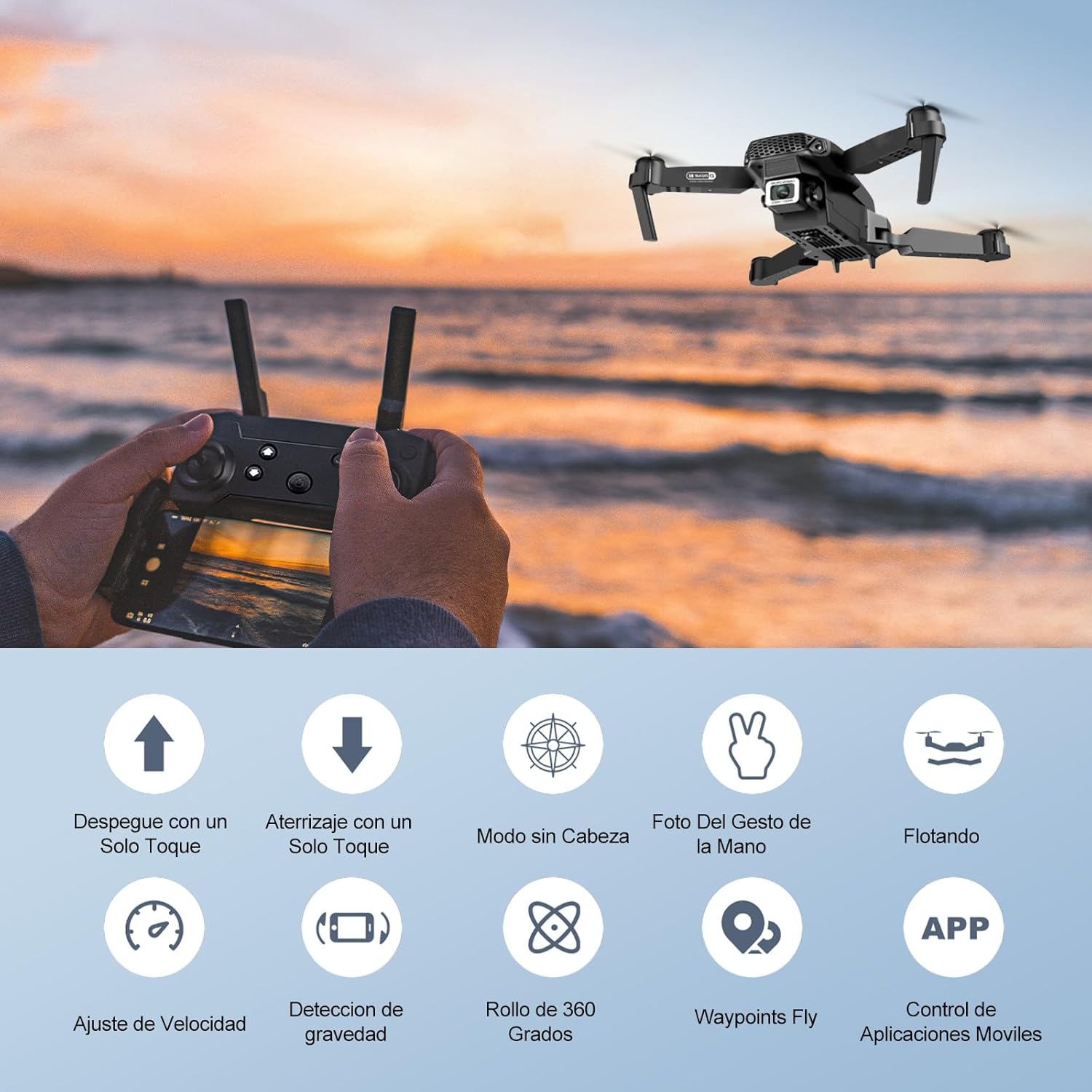
Image: Icons representing various flight features: One-touch takeoff, One-touch landing, Headless Mode, Hand Gesture Photo, Floating (Altitude Hold), Speed Adjustment, Gravity Detection, 360 Degree Roll, Waypoints Fly, and APP Control.
- One-Key Takeoff: Tobetsa ea Ho Tloha ha Senotlolo se le 'ngoe / Ho Lula button. The drone will automatically ascend and hover at a certain altitude.
- Ho Lula ka Ntlha e 'Ngoe: Tobetsa ea Ho Tloha ha Senotlolo se le 'ngoe / Ho Lula button again. The drone will automatically descend and land.
- Altitude Hold: The drone maintains its current altitude automatically, allowing for stable hovering.
- Left Joystick (Throttle/Yaw):
- Push up/down: Increase/decrease altitude.
- Push left/right: Rotate drone left/right.
- Right Joystick (Forward/Backward/Sideways):
- Push up/down: Fly forward/backward.
- Push left/right: Fly left/right (strafe).

Image: The Ourlife Mini Drone taking off or landing with a single button press, illustrating the ease of use for beginners.
3. Likarolo tse Tsoetseng Pele tsa Sefofane
- Mokhoa o se nang Hlooho: Tobetsa ea Mokhoa o se nang Hlooho button. In this mode, the drone's orientation is relative to the pilot, regardless of the drone's actual front. This simplifies control, especially for beginners.
- 360° Fetola: Fly the drone to a height of at least 2 meters. Press the Flip ea 360 ° button, then push the right joystick in any direction to perform a flip in that direction.
- Gesture Control (Photos/Videos): With the KY UFO app open, make specific hand gestures in front of the drone's camera to trigger photo or video recording.
- "V" Gesture: Triggers photo capture.
- Boitšisinyo ba Palm: Triggers video recording.
- Waypoint Flight: In the KY UFO app, draw a desired flight path on your smartphone screen. The drone will automatically follow this path.
- Phetoho ea Potlako: Tobetsa ea Speed Switch button to cycle through low, medium, and high-speed modes. Adjust according to your skill level and environmental conditions.
- FPV Real-Time Transmission: Connect your smartphone to the drone's Wi-Fi. Open the KY UFO app to view live video feed from the drone's camera on your phone screen.
- Gravity Induction: In the KY UFO app, activate gravity induction mode. You can then control the drone's movement by tilting your smartphone.

Image: The Ourlife Mini Drone performing a 360-degree flip in the air and demonstrating the Waypoints Fly feature, where the drone follows a pre-drawn path.

Image: Demonstrates 1080P FPV Real-Time Transmission, showing a live view from the drone. Also illustrates gesture control for taking photos (V-sign) and recording videos (palm gesture), and the 120-degree adjustable camera angle.
Tlhokomelo
- Ho hloekisa: Use a soft, dry cloth to clean the drone and remote control. Do not use harsh chemicals or solvents.
- Phetoho ea Propeller: If propellers are damaged, replace them with spare ones provided. Ensure correct propeller (A or B) is installed on the corresponding motor.
- Tlhokomelo ea Betri: Store batteries in a cool, dry place. Do not store fully charged or completely depleted batteries for extended periods. Charge them to about 50% for long-term storage.
- Polokelo: When not in use, store the drone and its accessories in a safe, dry place, away from direct sunlight and extreme temperatures.
Ho batle phoso
| Bothata | Lebaka le ka khonehang | Tharollo |
|---|---|---|
| Drone ha e arabele ho remote. | Not paired; low battery (drone/remote); interference. | Re-pair drone and remote. Charge batteries. Move to an area with less interference. |
| Drone e hoholeha nakong ea sefofane. | E sa lekanngoe; sebaka se sa lekaneng ha se tloha; moea. | Calibrate the gyroscope (refer to app instructions). Take off from a flat surface. Avoid flying in windy conditions. |
| Camera feed is not showing in app. | Not connected to drone Wi-Fi; app issue. | Ensure phone is connected to the drone's Wi-Fi network. Restart the app and drone. |
| Nako e khutšoane ea sefofane. | Betri ha e so tjhaje ka botlalo; betri ya kgale. | Ensure battery is fully charged before flight. Consider replacing old batteries. |
| Drone crashes easily. | Lack of experience; strong wind; damaged propellers. | Practice in open areas. Avoid strong winds. Replace damaged propellers. |
Litlhaloso

Image: Diagram showing the dimensions of the Ourlife Mini Drone (unfolded and folded) and its remote control in inches.
| Sebopeho | Lintlha |
|---|---|
| Brand | Ourlife |
| Nomoro ea Mohlala | AF-E88-BK |
| Boima ba Sehlahisoa | 430 g (hoo e ka bang 0.95 lbs) |
| Litekanyo tsa Sehlahisoa (Ho Atolositsoe) | 28 x 22 x 5 cm (hoo e ka bang 11 x 8.7 x 2 inch) |
| Litekanyo tsa Sehlahisoa (tse Menahaneng) | 12.5 x 8.1 x 5.3 cm (hoo e ka bang 4.9 x 3.2 x 2.1 inch) |
| Mofuta oa Leshala | Lithium Ion (2 e kenyelelitsoe) |
| Qeto ea ho nka video | 4K (Dual Cameras) |
| Theknoloji ea Khokahano | WiFi |
| Mokhoa oa ho Laola | Remote Control, Smartphone App |
| Mmala | Ntsho |
Warranty le Tšehetso
Ourlife provides post-sale warranty support for this product. If you encounter any issues with the drone, remote control, or the KY UFO application during flight or operation, please do not hesitate to contact the seller directly for assistance.
For optimal performance and to minimize potential issues, it is recommended to conduct initial flight tests in an open space, especially when using the propeller protectors. Please note that wind interference may occur when operating outdoors.


