1. Selelekela
Welcome to the WONNIE DC105P Digital Camera user manual. This guide provides essential information for setting up, operating, and maintaining your new camera. Designed for ease of use, this camera captures vivid 56MP photos and Full HD 1080P videos, making it perfect for young photographers to explore their creativity.
2. Boitsebiso ba Tšireletseho
- Se ke oa pepesetsa khamera metsing kapa mochesong o feteletseng.
- Boloka khamera hole le matla a makenete.
- Use only the specified batteries and charging cable.
- Qoba ho lahla khamera kapa ho e kenya kotsing e matla.
- Hloekisa lense ka lesela le bonolo, le omeletseng.
3. Se ka Lebokoseng
Upon unboxing your WONNIE DC105P Digital Camera, please ensure all the following items are present:
- WONNIE DC105P Digital Camera
- Karete ea TF ea 32GB
- Libetri tse ka tjhajwang hape (x2)
- Mofuta oa C-C oa USB
- Lanyard
- Mokotla oa polokelo
- Buka ea Mosebelisi (tokomane ena)
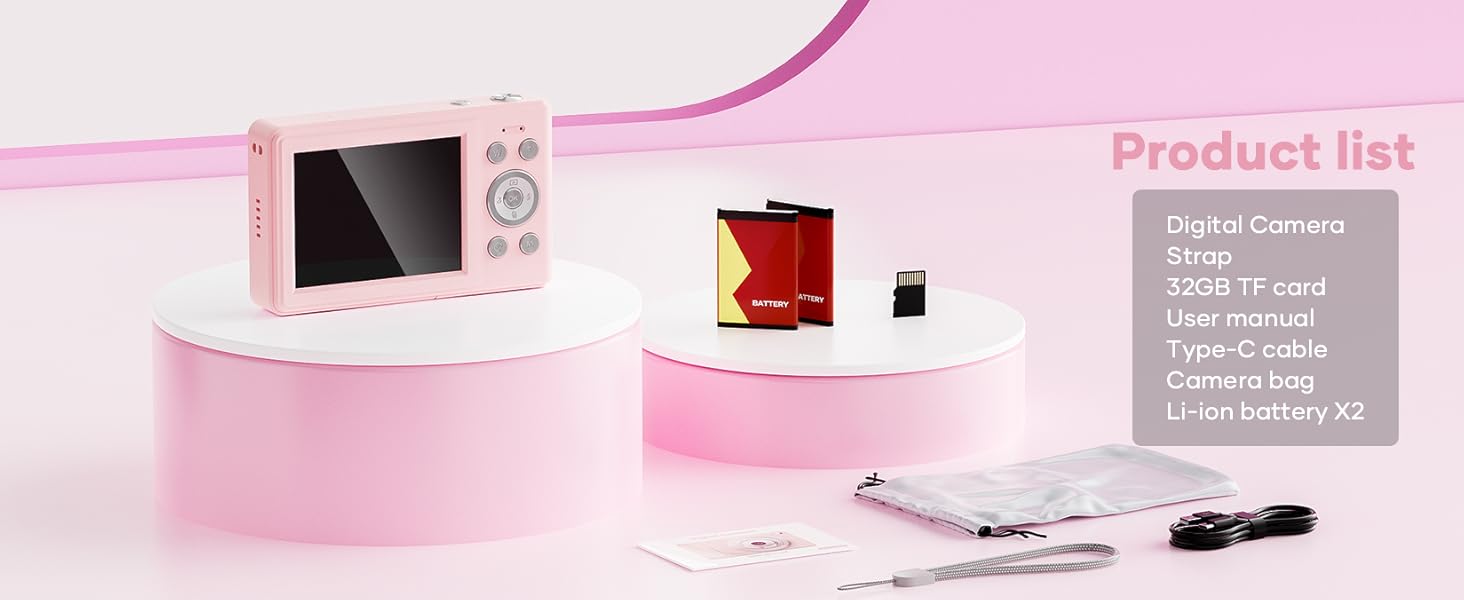
This image displays the WONNIE DC105P Digital Camera alongside its accessories: two rechargeable batteries, a 32GB TF card, a Type-C USB cable, a lanyard, and a soft storage bag, all neatly arranged.
4. Sehlahisoa Overview
Itloaetse likarolo le litsamaiso tsa khamera.
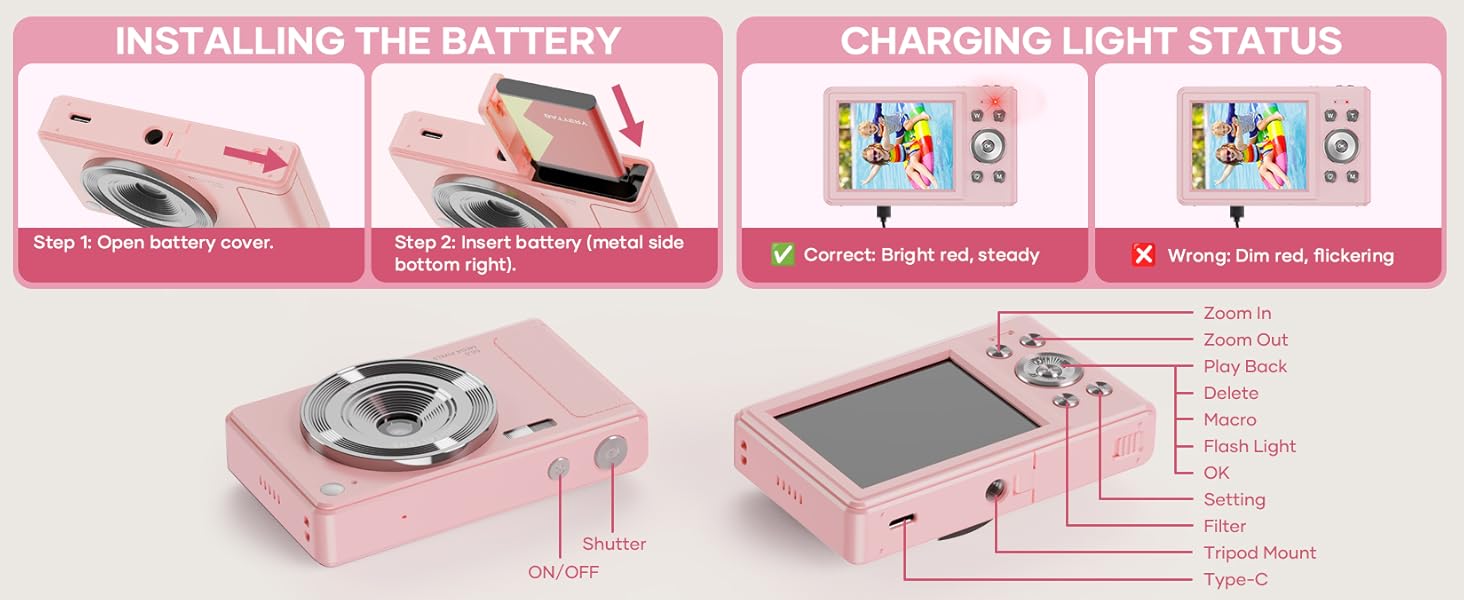
This diagram highlights the various buttons and ports on the WONNIE DC105P Digital Camera, including the power button, shutter button, zoom controls, playback button, menu button, OK button, flash light, tripod mount, and Type-C port.
Likarolo tsa Bohlokoa:
- Lense: E nka litšoantšo le livideo.
- Flash: E fana ka khanya maemong a khanya e tlase.
- Konopo ea Shutter: Press to take a photo or start/stop video recording.
- Konopo ea Matla: E bulela kapa e tima khamera.
- LCD skrine: Lipontšo lia phela view, menus, and playback.
- Likonopo tsa ho Tsamaea (Holimo/Tlase/Ka ho le Letshehadi/Ka ho le Letona/Ho Lokile): Used for menu navigation and selecting options.
- Zoom Buttons (W/T): Adjusts digital zoom.
- Konopo ea ho Bapala: Enters playback mode to view captured media.
- Konopo ea Menu: E kena ho li-setting tsa khamera.
- Mofuta oa C Port: Bakeng sa ho tjhaja le ho fetisa data.
- Thaba ea Tripod: For attaching the camera to a tripod.
5. Seta
5.1 Ho kenya Betri
- Bula sekoahelo sa karolo ea betri se lehlakoreng la khamera.
- Insert the rechargeable battery with the metal contacts facing down and to the right, ensuring it clicks into place.
- Koala sekoaelo sa karolo ea betri ka mokhoa o sireletsehileng.
This image illustrates the two steps for battery installation: first, opening the battery cover, and second, inserting the battery with the metal side facing down and to the right.
5.2 Ho kenya karete ea SD
The camera supports a 32GB TF (Micro SD) card. Insert the TF card into the designated slot in the battery compartment until it clicks.
5.3 Ho tjhaja Betri
- Connect the camera to a power source using the provided Type-C USB cable.
- The charging indicator light will show the charging status. A bright red, steady light indicates correct charging. A dim, flickering light indicates an issue.
This image displays the camera's charging light status: a bright red, steady light for correct charging, and a dim, flickering light indicating an incorrect status.
5.4 Ho hokela Lerala
Thread the lanyard through the designated loop on the camera body to prevent accidental drops.
6. Ho sebetsa Khamera
6.1 Ho Bulela/Ho tima
Press and hold the Power button (labeled ON/OFF) on the top of the camera to turn it on or off.
6.2 Ho nka linepe
In photo mode, frame your shot using the LCD screen and press the Shutter button to capture an image. The camera features 56MP resolution for clear photos.

This image shows a child holding the pink WONNIE DC105P Digital Camera, with the screen displaying a photo of children. Other children are in the foreground, emphasizing the camera's ease of use for capturing vibrant 56MP photos and smooth FHD 1080P videos.
Special Photo Features:
- 16x Zoom ea Dijithale: Use the 'W' and 'T' buttons to zoom in or out.
- 20 Fun Filters: Apply various creative filters to your photos via the menu.
- Nako ea ho iketsetsa nako: Set a delay (2s, 5s, 10s) before taking a photo, ideal for group shots.
- Continuous Shooting (Burst Mode): Capture a rapid sequence of 3 photos.
- Anti-Shake: Digital image stabilization helps reduce blur from camera movement.
- Tlatsa Leseli: Activate the built-in fill light for brighter photos in dim environments. (Note: Fill light won't activate in macro mode or when battery is too low.)
- Smile Recognition: Automatically captures a photo when a smile is detected.
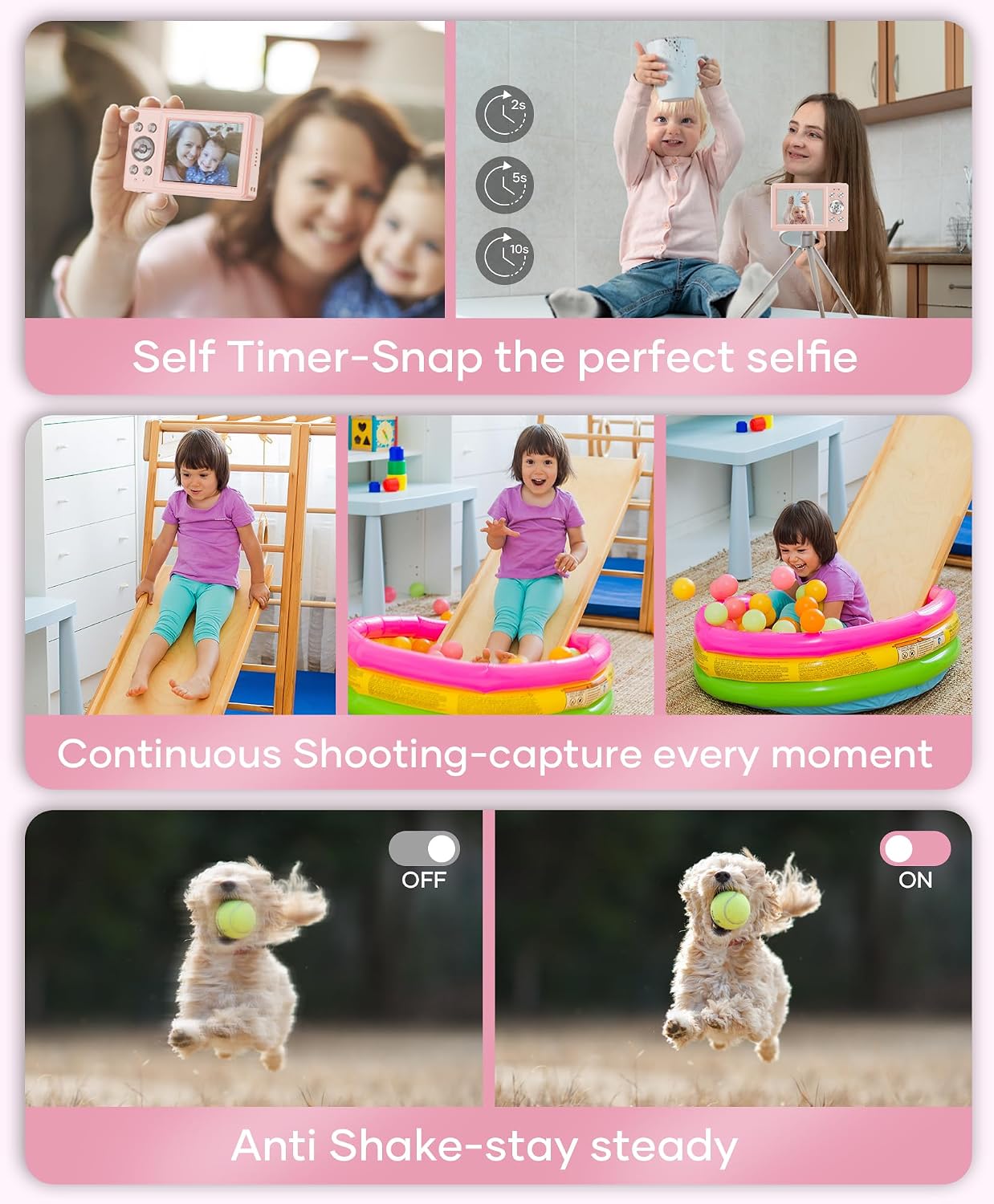
This image showcases three key features: Self Timer for perfect selfies, Continuous Shooting to capture every moment, and Anti Shake for steady shots.

This image illustrates the camera's 16x digital zoom capability with examples at 4x, 8x, and 16x, alongside a selection of 20 fun filters like Normal, Cold Filter, Warm Filter, and more, for endless creativity.
6.3 Ho rekota livideo
Switch to video mode (usually indicated by a camcorder icon in the menu) and press the Shutter button to start recording. Press again to stop. Videos are recorded in FHD 1080P with a built-in microphone.
6.4 Playback/Viewho Media
Press the Playback button to enter playback mode. Use the navigation buttons to scroll through your photos and videos. Press the OK button to play videos.
6.5 Ho fetisa Files
You have several options to transfer your media:
- USB to PC: Connect the camera to your computer using the Type-C cable. The camera will appear as a removable disk.
- OTG to Phone: Use a compatible OTG cable adapter (sold separately) to connect the camera to your smartphone (e.g., iPhone 15, Samsung).
- 'Mali oa karete: Remove the TF card and insert it into a card reader to transfer files to a computer or phone.

This image illustrates three convenient ways to view and transfer media: directly connecting the camera via USB to a PC, using an OTG adapter to connect to a smartphone, or using a card reader with a smartphone.
6.6 Webcam tshebetso
Connect the camera to a computer via the Type-C USB cable. Select 'Webcam' mode on the camera (if prompted) to use it for video calls or live streaming.

This image demonstrates the WONNIE DC105P Digital Camera's capability to function as a webcam, showing it mounted on a laptop for a video call and for live streaming.
7. Pontšo ea Video
Video ena e fana ka kakaretso ea kakaretsoview of the WONNIE Digital Camera, highlighting its features and suitability for kids and teens.
This video offers an introduction to the digital camera, demonstrating its basic functions and design.
8. Tlhokomelo
- Ho hloekisa: Use a soft, lint-free cloth to clean the camera body and screen. For the lens, use a specialized lens cleaning cloth and solution.
- Polokelo: Store the camera in its provided storage bag in a cool, dry place away from direct sunlight and humidity. Remove the battery if the camera will not be used for an extended period.
- Tlhokomelo ea Betri: Fully charge batteries before first use. Avoid completely draining the battery frequently to prolong its lifespan.
9. Ho rarolla mathata
| Bothata | Tharollo e ka khonehang |
|---|---|
| Khamera ha e sebetse. | Netefatsa hore betri e kentswe ka nepo mme e tjhajilwe ka botlalo. |
| Cannot take photos/record videos. | Check if the SD card is inserted correctly and has sufficient free space. Ensure the battery is not critically low. |
| Litšoantšo li lerootho. | Ensure the lens is clean. Use the anti-shake feature. Hold the camera steady while shooting. |
| Ha e khone ho fetisa files to computer/phone. | Verify the USB cable connection. Ensure the camera is in the correct mode for data transfer (if prompted). Try a different USB port or cable. For phones, ensure OTG compatibility and adapter. |
| Charging indicator is flickering. | Refer to Figure 5.2 for correct charging status. Re-insert the cable or try a different power source. |
10. Litlhaloso
| Sebopeho | Lintlha |
|---|---|
| Qeto ea Sensor ea Foto | 56 MP |
| Qeto ea Video | 1080p FHD |
| Optical Zoom | 16x Digital Zoom |
| Boholo ba skrine | 2.8 lisenthimithara tsa LCD |
| Ho tsitsisa setšoantšo | Dijithale |
| Mecha ea litaba ea polokelo | 32GB TF Card (included), Max 32GB supported |
| Khokahano | OTG, USB Type-C |
| Likarolo Tse Khethehileng | Nako Stamp, Anti-shake, Time-lapse, Continuous Shoot, Face Detection, Self-timer, Webcam, Filter Effect, Fill light, Selfie mirror, Auto Shut-off, Built-in Microphone |
| Boima ba Ntho | 0.22 lik'hilograma (hoo e ka bang 0.48 lbs) |
| Litekanyo | Approx. 3.8 x 0.78 x 2.4 inches (based on image) |
| Mofuta oa Leshala | Lithium Ion (1000mAh, 3.8V) |
11. Tiisetso le Tšehetso
Your WONNIE DC105P Digital Camera comes with a Waranti ea lilemo tse 1. We are committed to providing excellent customer service and offer a hassle-free replacement policy. For any inquiries, missing accessories, or support needs, please contact our customer service team. We aim to respond within 24 hours.
For further assistance, please visit the official WONNIE Store on Amazon: WONNIE Store


