Selelekela
The Arylic A30+ is a versatile WiFi and Bluetooth 5.0 sound power amplifier designed to transform your existing audio systems into a high-fidelity wireless streaming network. It enables multiroom audio control, allowing you to stream different tracks or synchronize sound across multiple units within the same network. With support for various lossless audio formats and multiple music services, the A30+ provides a comprehensive solution for modern home audio.
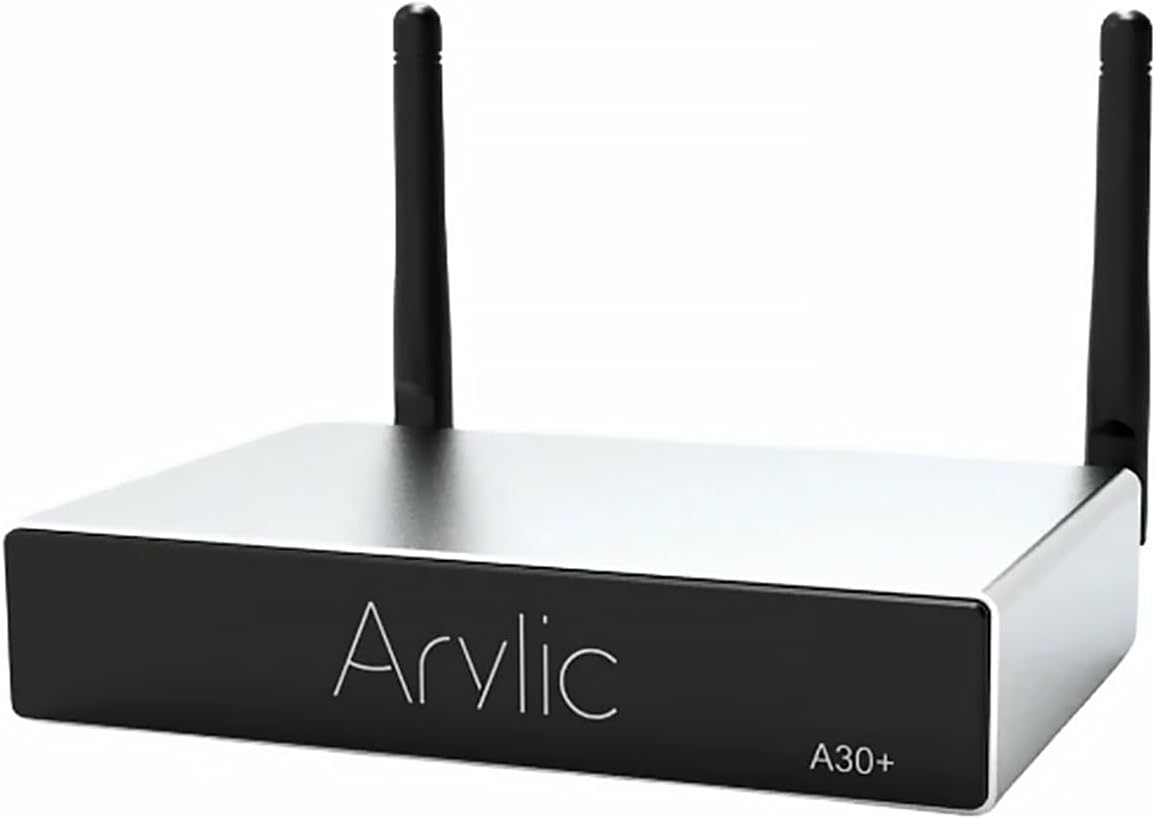
Setšoantšo: Pele view of the Arylic A30+ Wireless Audio Amplifier. The device is a compact, rectangular unit with a silver top and black front panel, featuring the 'Arylic' logo and 'A30+' model designation. Two black antennas are visible on the rear.
Se ka Lebokoseng
Ka kopo, sheba litaba tsa sephutheloana ho netefatsa hore lintho tsohle li teng:
- Arylic A30+ Main Unit
- Remote Control
- Adapter ea Matla (DC 18V/4A)
- Mohala oa Matla
- Cable ea RCA
- Speaker Connector (Phoenix connector)
- Screwdriver (for speaker connector)
- Wi-Fi Antennas (2 units)
- Bukana ea mosebelisi (tokomane ena)

Image: All components included in the Arylic A30+ package laid out. These include the amplifier unit, remote control, power adapter, power cord, RCA cable, speaker connector, screwdriver, two antennas, and a printed user manual.
Sehlahisoa se Felletseview
Phanele e ka pele

Image: Diagram of the Arylic A30+ front panel, highlighting input indicators and the IR sensor. Indicators for WiFi, Bluetooth, Line In, USB, and USB DAC are shown, along with the IR sensor for remote control.
- Lipontšo tsa ho Kena: LEDs indicating the currently active input source (WiFi, Bluetooth, Line In, USB, USB DAC).
- Sensor ea IR: E amohela matšoao ho taolo e hole.
Panele e ka morao

Image: Diagram of the Arylic A30+ rear panel, detailing all ports and connections. Labels include WiFi Antenna, Power/Reset Button, RJ45 LAN Port, USB, Micro USB, AUX IN, Speaker Out (L-, L+, R-, R+), DC Input (12V-18V), and Bluetooth Antenna. A separate inset shows the dimensions of the DC input jack (2.1mm inner, 5.5mm outer).
- WiFi Antenna Connector: For connecting the Wi-Fi antenna.
- Power/Reset Button: Press to power on/off, long press to reset.
- Kou ea LAN ea RJ45: Bakeng sa khokahanyo ea marang-rang ea marang-rang.
- Boema-kepe ba USB: Bakeng sa ho hokahanya lisebelisoa tsa polokelo ea USB.
- Port ea Micro USB: For connecting to a computer as a USB DAC.
- TLHOKOMELISO IN: 3.5mm stereo input for external audio sources.
- Sebui se tsoa: Phoenix connector for connecting passive speakers (L-, L+, R-, R+).
- Kenyeletso ea DC (12V-18V): Power input jack.
- Sehokelo sa Antena ea Bluetooth: For connecting the Bluetooth antenna.
Tlhophiso
1. Likamano tsa 'mele
- Kopanya li-Antenna: Screw the provided Wi-Fi and Bluetooth antennas onto their respective connectors on the rear panel.
- Kopanya Libui: Use the provided speaker connector (Phoenix connector) to connect your passive speakers. Ensure correct polarity (L+, L-, R+, R-). Use a small screwdriver to secure the speaker wires.
- Kopanya Matla: Plug the power adapter into the DC Input port on the rear panel, then connect the power cord to an electrical outlet.
- Optional: Wired Network: For a stable network connection, connect an Ethernet cable from your router to the RJ45 LAN port.
- Optional: AUX Input: Connect external audio devices (e.g., CD player, TV) to the AUX IN port using a 3.5mm audio cable.
- Optional: USB Storage: Kenya USB Flash drive e nang le molumo files ho koung ea USB.

Image: An Arylic A30+ amplifier connected to a pair of bookshelf speakers and a laptop. The image demonstrates a typical setup for audio playback, showing the amplifier's rear connections to speakers and a source device.
2. Ho seta Marang-rang (Wi-Fi)
- Matlafatsa: Press the Power/Reset button on the rear panel to turn on the A30+.
- Khoasolla App: Download the "4STREAM" app from the Apple App Store (for iOS) or Google Play Store (for Android).
- Connect to Device Wi-Fi: On your smartphone or tablet, go to Wi-Fi settings and connect to the network named "SoundSystem_XXXX" (XXXX will be a unique identifier for your device).
- Open 4STREAM App: Launch the 4STREAM app. It will guide you through connecting the A30+ to your home Wi-Fi network. Select your home Wi-Fi network and enter the password.
- Device Renaming: Once connected, you can rename your device within the app for easier identification (e.g., "Living Room Amplifier").
Note: If you are using a wired Ethernet connection, the device should automatically connect to your network and appear in the 4STREAM app.
Litaelo tsa Ts'ebetso
1. Basic Audio Playback
- Via 4STREAM App:
- Open the 4STREAM app and select your Arylic A30+ device.
- Choose a music source from the app (e.g., online music services, local music, USB, AUX).
- Select your desired audio and begin playback.
- Papali ea Bluetooth:
- Ensure the A30+ is powered on and the Bluetooth indicator is active (or switch to Bluetooth input via app/remote).
- On your mobile device, enable Bluetooth and search for "Arylic A30+".
- Pair with the device. Once connected, you can stream audio from your device.
- Kenyo ea AUX:
- Connect an audio source to the AUX IN port.
- Switch the A30+ input to AUX using the 4STREAM app or remote control.
- Papali ea USB:
- Kenya USB flash drive e nang le molumo files ho koung ea USB.
- Select USB as the input source in the 4STREAM app.
2. Multiroom Control
The Arylic A30+ supports multiroom audio, allowing you to group multiple Arylic devices on the same network.
- Group Devices: In the 4STREAM app, drag and drop devices to create groups. Audio played on the master device will synchronize across all grouped devices.
- Independent Playback: Each device can also play different audio independently.

Image: Screenshot of the 4STREAM mobile application interface demonstrating multiroom audio control. The screen shows a "Device List" with different rooms (Living Room, Kitchen, Bedroom, Bathroom) and controls for volume and playback, illustrating the ability to manage multiple Arylic devices simultaneously.
3. Music Sources & Protocols
The A30+ supports a wide range of music sources and streaming protocols:
- Online Music Services: Spotify, TuneIn, iHeartRadio, Himalaya, QQ Music, TIDAL, Napster, Qobuz, QQFM, and more.
- Protocol: AirPlay1, Qplay, DLNA, UPnP.
- Local Sources: Music stored on your phone/tablet, USB flash drives, NAS (Network Attached Storage), and Line Input (AUX).
Note: Due to recent iOS updates, direct streaming of online content from Apple Music is not supported; only music stored on your phone can be played via AirPlay.
4. App & Web Taolo
- 4STREAM App: Provides comprehensive control over your audio experience, including:
- Selecting music sources
- Controlling playback (play/pause, skip)
- Ho fetola molumo
- Setting EQ (Equalizer)
- Managing multi-room or standalone playback
- Ho beha lialamo
- Configuring Wi-Fi settings
- E nchafatsa firmware
- Web Taolo ea Sebatli: You can also control the device by entering its IP address into a web browser on any device connected to the same network. This provides an alternative interface for managing settings and playback.
5. Remote Control
The included remote control provides convenient access to basic functions:
- Motlakase/O tima
- Phahamiso ea Phahamiso / Tlase
- Bapala/Emisa
- E Latelang/E Fetileng
- Input Source Selection (OPT IN, BT, WiFi, AUX IN)
- EQ Presets (BASS+, TREBLE+, FLAT)
- Number buttons (for specific functions or presets, refer to app for configuration)
Tlhokomelo
- Ho hloekisa: Sebelisa lesela le bonolo, le omeletseng ho hloekisa bokantle ba amplifier. Do not use liquid cleaners or aerosols.
- Moea oa moea: Netefatsa hore amplifier has adequate ventilation. Do not block any ventilation openings.
- Sebaka: Beha sebaka amplifier on a stable, flat surface away from direct sunlight, heat sources, and moisture.
- Lisebelisoa tsa Firmware: Regularly check for and install firmware updates via the 4STREAM app to ensure optimal performance and access to new features.
Ho batle phoso
| Bothata | Seo e ka bang Sesosa / Tharollo |
|---|---|
| Ha ho Matla |
|
| Ha ho Modumo |
|
| Ha e khone ho hokela ho Wi-Fi |
|
| Bluetooth Disconnects Frequently |
|
| App ha e lemohe sesebelisoa |
|
Litlhaloso
| Nomoro ea Mohlala | Arylic A30+ |
| Litekanyo tsa Sehlahisoa | 4.57 x 2.52 x 0.87 lisenthimithara (11.6 x 6.4 x 2.2 cm) |
| Boima ba Ntho | 7.1 ounces (201 dikgerama) |
| Khokahano | Wi-Fi, Bluetooth 5.0, Ethernet (RJ45), USB, AUX In |
| Phatlalatso ea Audio | Speaker Out (30W x 2) |
| Liforomo tsa Audio tse tšehelitsoeng | MP3, APE, FLAC, WAV (Lossless and High-Resolution) |
| Kenyeletso ya Matla | DC 12V-18V |
| Moetsi | HonkweDirect |
Warranty le Tšehetso
For detailed warranty information and technical support, please refer to the official Arylic website or contact the manufacturer, HonkweDirect, directly. Warranty terms and conditions may vary by region and retailer.
Ho kgothaletswa ho ngolisa sehlahisoa sa hau ho moetsi websaete, haeba ho hlokahala, ho fumana lintlafatso le litsebiso tsa tšehetso.


