1. Sehlahisoa Overview
The Baseus Bowie E18 True Wireless Earphones offer a high-quality audio experience with a comfortable, ergonomic design. This section provides a visual guide to the components of your new earphones.
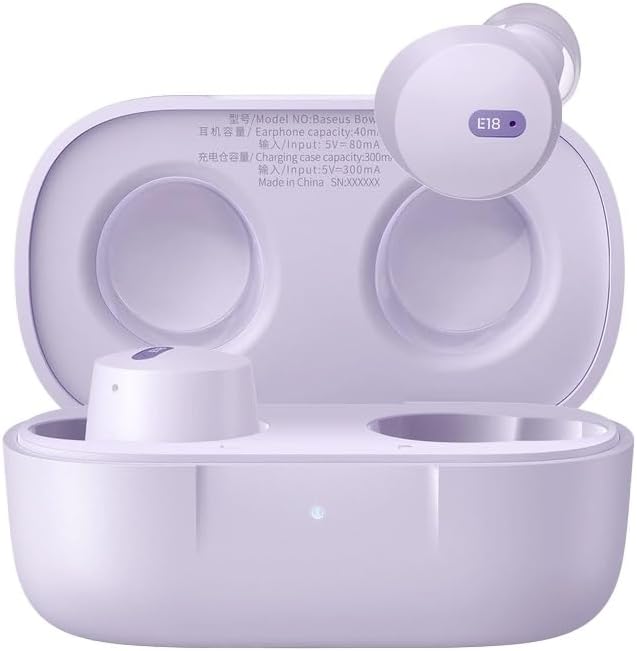
Image 1.1: Baseus Bowie E18 Earphones in their open charging case, showcasing the earbuds and charging contacts.
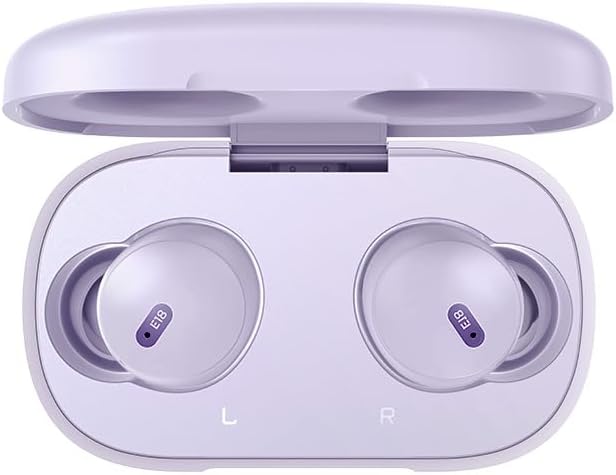
Setšoantšo sa 1.2: Ho ea holimo view of the Baseus Bowie E18 Earphones nestled in their charging case, showing the 'E18' model indicator on each earbud.
2. Seta le Tšebeliso ea Pele
2.1 Ho tjhaja Li-Earphone le Case
Pele o sebelisoa ka lekhetlo la pele, tjhaja li-earphone le mokotla oa ho tjhaja ka botlalo.
- Connect the charging case to a power source using a compatible USB-C cable.
- Leseli la pontšo holim'a mokotla le tla bontša boemo ba ho tjhaja.
- Kenya li-earbud ka har'a lebokose la ho tjhaja. Li tla qala ho tjhaja ka bohona.

Setšoantšo sa 2.1: Ka morao view of the Baseus Bowie E18 charging case, highlighting the USB-C charging port.
2.2 Ho hokahanya ha Bluetooth
Ho hokela li-earphone tsa hau sesebelisoa:
- Netefatsa hore li-earphone li tjhajiloe 'me li behiloe ka mokotlaneng oa ho tjhaja.
- Open the charging case lid. The earphones will enter pairing mode automatically.
- Sesebedisweng sa hao (smartphone, tablet, jj), kenya tshebetsong Bluetooth.
- Batla available devices and select "Baseus Bowie E18" from the list.
- Once connected, the earphones are ready for use.

Image 2.2: Visual representation of Bluetooth 5.3 technology, emphasizing stable connection and efficient power usage.
2.3 Ho Roala Li-Earphone
For optimal sound quality and comfort, ensure a proper fit:
- Kenya tsebe e 'ngoe le e 'ngoe ea tsebe ka har'a kanale ea hau ea tsebe.
- Adjust the earbud until it feels secure and comfortable.

Image 2.3: An earbud being worn, demonstrating the intended fit for the Baseus Bowie E18.
3. Litaelo tsa Ts'ebetso
3.1 Taolo ea ho ama
The Baseus Bowie E18 earphones feature intuitive touch controls for various functions:
- Bapala/Emisa Mmino: Tobetsa hang feela ho li-earbud.
- Pina e Latelang: Tobetsa habeli tsebeng e ka ho le letona.
- Pina e fetileng: Tlanya habeli tsebeng e ka letsohong le letšehali.
- Araba/Khaola mohala: Tobetsa ha 'ngoe ho li-earbud life kapa life nakong ea mohala o kenang.
- Hana Mohala: Tobetsa 'me u tšoare li-earbud metsotsoana e 2 nakong ea mohala o kenang.
- Sebelisa Mothusi oa Lentsoe: Tlanya gararo ho e 'ngoe ea li-earbud.
3.2 Ho Bulela/Ho tima
- Matlafatsa: Bula sekoahelo sa khetla ea ho tjhaja, kapa u ntše li-earbud ka har'a khetla. Li tla buleha ka bohona.
- Tlosa motlakase: Beha li-earbuds ka har'a mokotla oa ho tjhaja 'me u koale sekoahelo. Ba tla tima ka bohona.
4. Tlhokomelo le Tlhokomelo
Tlhokomelo e nepahetseng e netefatsa nako e telele le ts'ebetso ea li-earphone tsa hau.
- Ho hloekisa: Sebelisa lesela le bonolo, le omeletseng, le se nang lint ho hloekisa li-earbud le mokotla oa ho tjhaja. U se ke ua sebelisa lik'hemik'hale tse thata kapa lisebelisoa tse senyang.
- Polokelo: Ha e sa sebelisoe, boloka li-earphone ka mokotlaneng oa tsona oa ho tjhaja ho li sireletsa lerōleng le tšenyo.
- Tlhokomelo ea Betri: Avoid fully discharging the battery frequently. Charge the earphones regularly, even if not used for extended periods, to maintain battery health.
- Mathata a Metsi: The Baseus Bowie E18 earphones are IPX4 water resistant, meaning they are protected against splashing water from any direction. They are not designed for submersion in water or use during swimming. Avoid exposure to heavy rain or extreme moisture.

Image 4.1: Visual representation of IPX4 water resistance, indicating protection against splashes.
5. Ho rarolla mathata
If you encounter issues with your Baseus Bowie E18 earphones, try the following solutions:
- Li-earphone ha li kopane:
- Netefatsa hore li-earbud ka bobeli li tjhajiloe.
- Koala Bluetooth sesebedisweng sa hao ebe o se bulela hape.
- Delete "Baseus Bowie E18" from your device's Bluetooth list and attempt to re-pair.
- Beha li-earbud ka har'a khetla, koala sekoahelo, ema metsotsoana e 10, ebe u li bula ho kena hape mokhoeng oa ho li kopanya.
- Ha ho molumo o tsoang ho e 'ngoe ea li-earbud:
- Netefatsa hore li-earbud ka bobeli li tjhajiloe.
- Try placing both earbuds back in the case, closing the lid, and then taking them out again.
- Perform a factory reset (refer to manufacturer's website for specific instructions if not detailed here).
- Mathata a ho lefisa:
- Sheba thapo e tjhajang le adaptara bakeng sa tshenyeho.
- Netefatsa hore likhokahano tsa ho tjhaja tse li-earbud le tse ka hare ho khetla li hloekile ebile ha li na lithōle.
- Try a different charging cable and power source.
- Earbuds falling out:
- Ensure you are using the correct size ear tips for a secure fit.
- Adjust the angle of the earbuds in your ear.
6. Litlhaloso
Detailed technical specifications for the Baseus Bowie E18 True Wireless Earphones:
| Sebopeho | Tlhaloso |
|---|---|
| Lebitso la Mohlala | Bowie E18 |
| Nomoro ea Mohlala | A00023800537-Z1 |
| Bluetooth Version | 5.0 |
| Bluetooth Range | Ho fihlela ho 10 Meters |
| Bokgoni ba Battery ba Earbud | Approximately 50mAh (Each Earbud) |
| Bokhoni ba Battery ea ho tjhaja | Hoo e ka bang 500mAh |
| Nako ea ho Bapala 'Mino | Up to 5 Hours (Single Charge) / Up to 30 Hours (With Charging Case) |
| Nako ea ho Bua | Up to 5 Hours (Single Charge) / Up to 30 Hours (With Charging Case) |
| Nako ea ho tjhaja | Hoo e ka bang lihora tse 1.5 |
| Boima ba 'mele | Approximately 50g (Including Charging Case) |
| Yuniti ea Bakhanni | 10 limilimithara |
| Karabelo ea Khafetsa | 20Hz-20kHz |
| Tšitiso | 32 ohm |
| Kutloelo-bohloko | 120.5dB |
| Ho hanyetsa Metsi | IPX4 |
| Sebopeho sa Battery Cell | Lithium Ion |

Image 6.1: Illustration emphasizing the extended listening time provided by the Baseus Bowie E18 earphones with their charging case.
7. Tiisetso le Tšehetso
7.1 Tiisetso ea Moetsi
The Baseus Bowie E18 True Wireless Earphones come with a Tiisetso ea Selemo e 1 ea Moetsi from the date of purchase. This warranty covers manufacturing defects and ensures the product meets its specified performance standards under normal use. Please retain your proof of purchase for warranty claims.
For specific terms and conditions of the warranty, please refer to the official Baseus websebaka kapa ikopanye le litšebeletso tsa bareki.
7.2 Tšehetso ea Bareki
If you require further assistance, have questions not covered in this manual, or need to make a warranty claim, please contact Baseus customer support through their official websebaka kapa morekisi moo o rekileng sehlahiswa.


