1. Selelekela
This manual provides essential information for the safe and efficient operation of your DOUGH Spectrum One 27-Inch Gaming Monitor. Please read this manual thoroughly before using the product and retain it for future reference.
2. Boitsebiso ba Tšireletseho
- Netefatsa hore sekirini se behiloe holim'a sebaka se tsitsitseng, se bataletseng ho thibela ho oa ka phoso.
- U se ke ua pepesetsa mochine pula, mongobo, kapa mocheso o feteletseng.
- Sebelisa feela adaptara ea motlakase e fanoeng le sebali.
- Qoba ho thiba masoba a moea ho thibela mocheso o feteletseng.
- U se ke ua leka ho sebeletsa mochine ka bouena. Fetisetsa litšebeletso tsohle ho basebetsi ba tšoanelehang.
- Disconnect the power cable from the outlet during lightning storms or when unused for long periods.
3. Likahare tsa Sephutheloana
Netefatsa hore likarolo tsohle li teng ka har'a sephutheloana sa hau:
- DOUGH Spectrum One 27-Inch Gaming Monitor
- Adapter ea Matla le Cable
- Cable ea DisplayPort
- Cable ea USB-C
- Tataiso ea ho Qala ka Potlako (ha e kenyelelitsoe bukeng ena)

Setšoantšo sa 3.1: Pele view of the DOUGH Spectrum One monitor.
4. Seta
4.1 Tlhophiso ea 'Mele
The DOUGH Spectrum One monitor can be used with its optional stand (if purchased) or a VESA-compatible mount (100x100mm). This manual focuses on the monitor unit itself.
- Ho phutha: Tlosa sekirini le lisebelisoa tsohle ka hloko ho tsoa sephuthelong.
- Sebaka: Position the monitor on a stable, flat surface. Ensure adequate space for ventilation around the monitor.
- Ho hokela likhoele:
- Connect the power cable to the monitor and then to a power outlet.
- Connect your computer or gaming console to the monitor using either an HDMI 2.1 cable, DisplayPort 1.4 cable, or USB-C cable.
- For USB hub functionality, connect a USB-B to USB-A cable from your computer to the monitor's upstream USB-B port.
- For USB-C docking, connect a compatible laptop to the monitor's USB-C port. This single connection can provide video, data, and up to 100W of power delivery.
- Optional: Connect headphones to the 3.5mm audio jack.

Setšoantšo sa 4.1: Ka morao view of the monitor showing available ports including HDMI 2.1, DisplayPort 1.4, USB Type-C (100W), USB Type-B, USB Type-A, and 3.5mm AUX.
4.2 Matla a Pele a Buletsoe
- Netefatsa hore dithapo tsohle tse hlokahalang di hokahantswe ka mokhoa o sireletsehileng.
- Tobetsa konopo ea ho tima motlakase holim'a sekirini. Leseli la sesupo sa motlakase le tla bonesa.
- If no image appears, ensure your input source (computer/console) is powered on and correctly configured to output to the monitor.
5. Litaelo tsa Ts'ebetso
5.1 Pontšo ea skrineng (OSD) Navigation
The monitor features an On-Screen Display (OSD) menu for adjusting various settings. Use the physical buttons or joystick (if present) on the monitor to navigate the OSD. Typically, a central button or joystick allows for menu access and selection, while directional movements adjust values or navigate options.
Litlhophiso tsa litšoantšo
The DOUGH Spectrum One monitor offers advanced picture settings for optimal visual experience:
- Qeto: Supports 4K UHD (3840 x 2160 pixels).
- Sekhahla sa ho Nchafatsa: Up to 144Hz for smooth motion.
- Nepahalo ea Mmala: Factory calibrated for Delta E 0.6 average accuracy, covering 98% DCI-P3 and 100% sRGB color gamuts.
- HDR: HDR10 support with a 10 million:1 dynamic contrast ratio for enhanced highlights and deep shadows.
- Khanya: 450 nits (sustained), 750 nits (peak).

Setšoantšo sa 5.1: Ho fetaview of the monitor's core display technologies and features.
5.3 Likarolo tsa Papali
The monitor includes several features designed to enhance your gaming experience:
- Theknoloji ea Adaptive Sync: Supports AMD FreeSync Premium Pro, NVIDIA G-Sync, and VESA Adaptive-Sync compatibility to reduce screen tearing and stuttering by synchronizing the monitor's refresh rate with the graphics card's frame rate.
- Pixel-Perfect Upscaling: Uses integer-ratio pixel duplication for low-resolution input signals, preserving the look of pixel art and keeping retro games crisp.
- Crosshair Overlay: An on-screen crosshair can be enabled to assist aim in games.
- Frame Rate Counter: Displays the current frame rate on screen to monitor system performance.
- Blur Busters Presets: Pre-tuned settings for optimal motion clarity.

Image 5.2: The monitor displaying a high-performance gaming scene.
5.4 Khokahano
Mohlokomeli o fana ka dikgetho tse fapaneng tsa kgokelo:
- HDMI 2.1 (x2): For high-bandwidth connections to compatible devices, supporting 4K 144Hz.
- DisplayPort 1.4 (x1): Another high-bandwidth option for video input.
- USB-C 3.2 Gen 2 (x1): Supports video, data transfer (up to 10 Gb/s), and up to 100W power delivery over a single cable for compatible laptops.
- USB-A (x2 side-facing, x1 rear): Bakeng sa ho hokahanya lisebelisoa tsa peripheral.
- 3.5mm Audio Jack: Bakeng sa ho hokahanya li-headphones kapa libui tsa kantle.
- Arola mokhoa oa skrine: The display can show video from two separate sources simultaneously.
6. Tlhokomelo
6.1 Ho hloekisa skrine
To clean the monitor screen:
- Tima sehlahlo 'me u ntše thapo ea motlakase.
- Hlakola skrine ka bonolo ka lesela le bonolo le se nang letlapa.
- Bakeng sa matšoao a manganga, ha bobebe dampen the cloth with water or a screen-cleaning solution specifically designed for monitors. Do not spray liquid directly onto the screen.
- Qoba ho sebelisa lihlatso tse khorofo, tse nang le joala, kapa tse thehiloeng ho ammonia, kaha tsena li ka senya bokaholimo ba skrine.
6.2 Ho Hloekisa Casing
Hlakola sehlahlo casing ka lesela le bonolo, le omileng. Haeba ho hlokahala, sebelisa d hanyaneamp lesela. U se ke ua sebelisa lik'hemik'hale tse bohale.
7. Ho rarolla mathata
This section addresses common issues you might encounter with your DOUGH Spectrum One monitor.
| Bothata | Seo e ka bang Sesosa / Tharollo |
|---|---|
| Ha ho setšoantšo skrineng / Matla a LED a timme | Ensure the power cable is securely connected to both the monitor and the power outlet. Check if the power outlet is functional. Press the monitor's power button. |
| Ha ho setšoantšo / "No Signal" molaetsa | Verify the video cable (HDMI, DisplayPort, USB-C) is securely connected to both the monitor and your computer/console. Ensure the correct input source is selected in the monitor's OSD. Check if the computer/console is powered on and outputting video. |
| Monitor takes long to wake from sleep / Occasional black screen when changing resolution | This can sometimes be resolved by updating the monitor's firmware. Firmware updates typically require a Windows machine. Refer to the manufacturer's support website for instructions and the latest firmware. |
| Pontšo e fokolang | Adjust brightness and contrast settings in the OSD menu. Ensure HDR settings are correctly configured for your content and operating system. |
| Ho taboha kapa ho hoeleketsa skrineng | Ensure Adaptive Sync (FreeSync Premium Pro, G-Sync compatible) is enabled on both the monitor and your graphics card settings. Verify your graphics drivers are up to date. |
| Power supply not compatible with region | Ensure you have received the correct power supply for your region. Contact customer support if the provided power supply is incorrect. |
8. Litlhaloso
| Sebopeho | Tlhaloso |
|---|---|
| Nomoro ea Mohlala | ES07D03 |
| Boholo ba skrine | 27 lisenthimithara |
| Mofuta oa Panel | IPS |
| Qeto | Lipiksele tse 3840 x 2160 (4K UHD) |
| Refresh Rate | 144Hz |
| Nako ea Karabelo | 1ms |
| Aspect ratio | 16:9 |
| Khanya ea setšoantšo | 450 nits (sustained), 750 Nits (Peak) Candela |
| Tšehetso ea HDR | HDR10 |
| Colour Gamut | 98% DCI-P3, 100% sRGB |
| Adaptive Sync | AMD FreeSync Premium Pro, NVIDIA G-Sync Compatible, VESA Adaptive-Sync |
| Khokahano | 2x HDMI 2.1, 1x DisplayPort 1.4, 1x USB-C 3.2 Gen 2 (100W PD), 1x USB-B, 2x USB-A (side), 1x USB-A (rear), 1x 3.5mm Audio Jack |
| Litekanyo tsa Sehlahisoa | 6 x 27.5 x 17.5 lisenthimithara |
| Boima ba Ntho | 17.76 liponto |
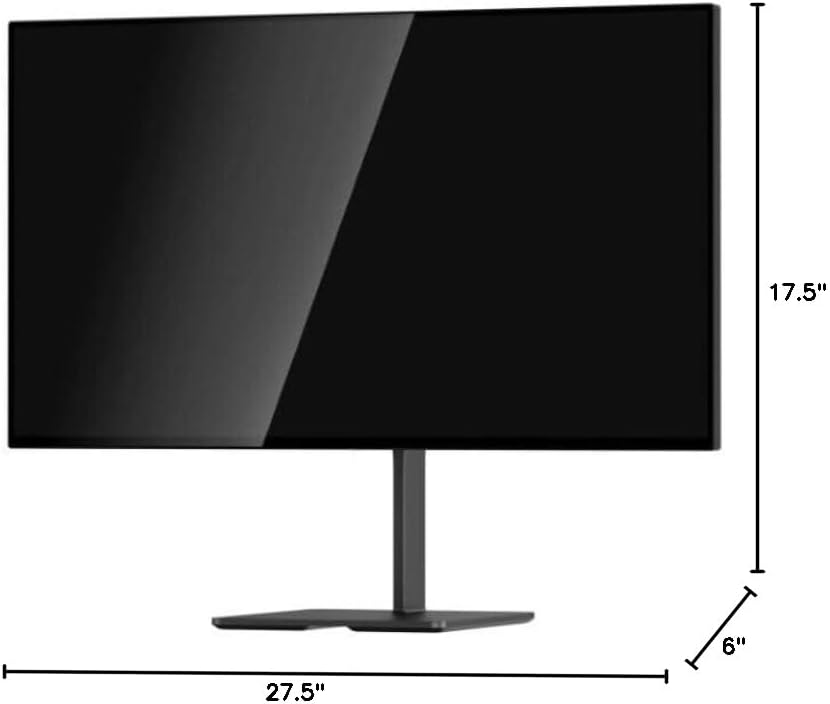
Image 8.1: Monitor dimensions.
9. Tiisetso le Tšehetso
For warranty information and technical support, please refer to the official DOUGH websaete kapa ikopanye le litšebeletso tsa bareki ka kotloloho. Boloka rasiti ea hau ea theko e le bopaki ba hore u rekile.
9.1 Coating Comparison
The DOUGH Spectrum One monitor is available in different screen finishes, including Matte, Glossy, and Gorilla Glass. Each finish offers distinct visual characteristics regarding reflections and clarity.
Video 9.1: This video demonstrates the visual differences between Matte, Glossy, and Gorilla Glass screen coatings on the Spectrum One monitor, particularly how they handle reflections from a light source.

Image 9.1: Visual comparison of Matte, Glossy, and Gorilla Glass screen coatings, illustrating how reflections appear on each surface.