1. Selelekela
Thank you for choosing the Defender Enjoy S200 Portable Bluetooth Speaker. This manual provides essential information for setting up, operating, and maintaining your speaker to ensure optimal performance and longevity. Please read this manual thoroughly before use.
The Defender Enjoy S200 is a versatile portable speaker featuring Bluetooth 5.3 connectivity, True Wireless Stereo (TWS) pairing, an integrated FM radio, and MP3 playback capabilities via USB flash drive or microSD card. It also includes an LED light and supports hands-free calling. Designed for portability, it offers up to 9 hours of playback on a single charge and convenient USB Type-C charging.
2. Sehlahisoa Overview
2.1 Likarolo tsa Bohlokoa
- Bluetooth 5.3: For stable and efficient wireless audio streaming.
- 'Nete Wireless Stereo (TWS): Connect two Enjoy S200 speakers for a stereo sound experience.
- Mekhoa e Mengata ea ho Bapala: Bluetooth, FM Radio, USB Flash Drive, MicroSD Card (up to 32GB).
- Leseli la LED le Kopantsoeng: Provides visual ambiance.
- Ho Letsa Ntle le Matsoho: Microphone e hahelletsoeng mohala oa mohala.
- Bophelo bo Bolelele ba Battery: Up to 9 hours of continuous music playback.
- Ho tjhaja USB Type-C: Modern and convenient charging port.
- Moralo o nkehang habonolo: Compact and lightweight with a carrying strap.
2.2 Likahare tsa Sephutheloana
- Defender Enjoy S200 Portable Bluetooth Speaker
- Mofuta oa C-tjhaja Cable
- Tataiso ea ho Qala ka Potlako
- Leqhoele la ho Jara

Image: The Defender Enjoy S200 Portable Bluetooth Speaker, showcasing its compact design and front grille with an illuminated LED ring.

Image: An infographic highlighting key features such as multi-colored LED lighting, True Wireless Stereo (TWS) pairing, Bluetooth 5.3, MP3 player, FM receiver, and hands-free calling.
3. Seta
3.1 Ho lefisa Sebui
- Locate the Type-C charging port on the back of the speaker.
- Connect the provided Type-C charging cable to the speaker and the other end to a USB power adapter (not included) or a computer's USB port.
- The LED indicator will show charging status. A full charge typically takes approximately 3-4 hours.
- Hakolla thapo ha e se e tjhaetsoe ka botlalo.
3.2 Ho Matlafatsa/Ho tima
- To power on, slide the ON/OFF switch located on the back of the speaker to the 'ON' position.
- Ho tima, thellisa switch ea ON/OFF boemong ba 'OFF'.
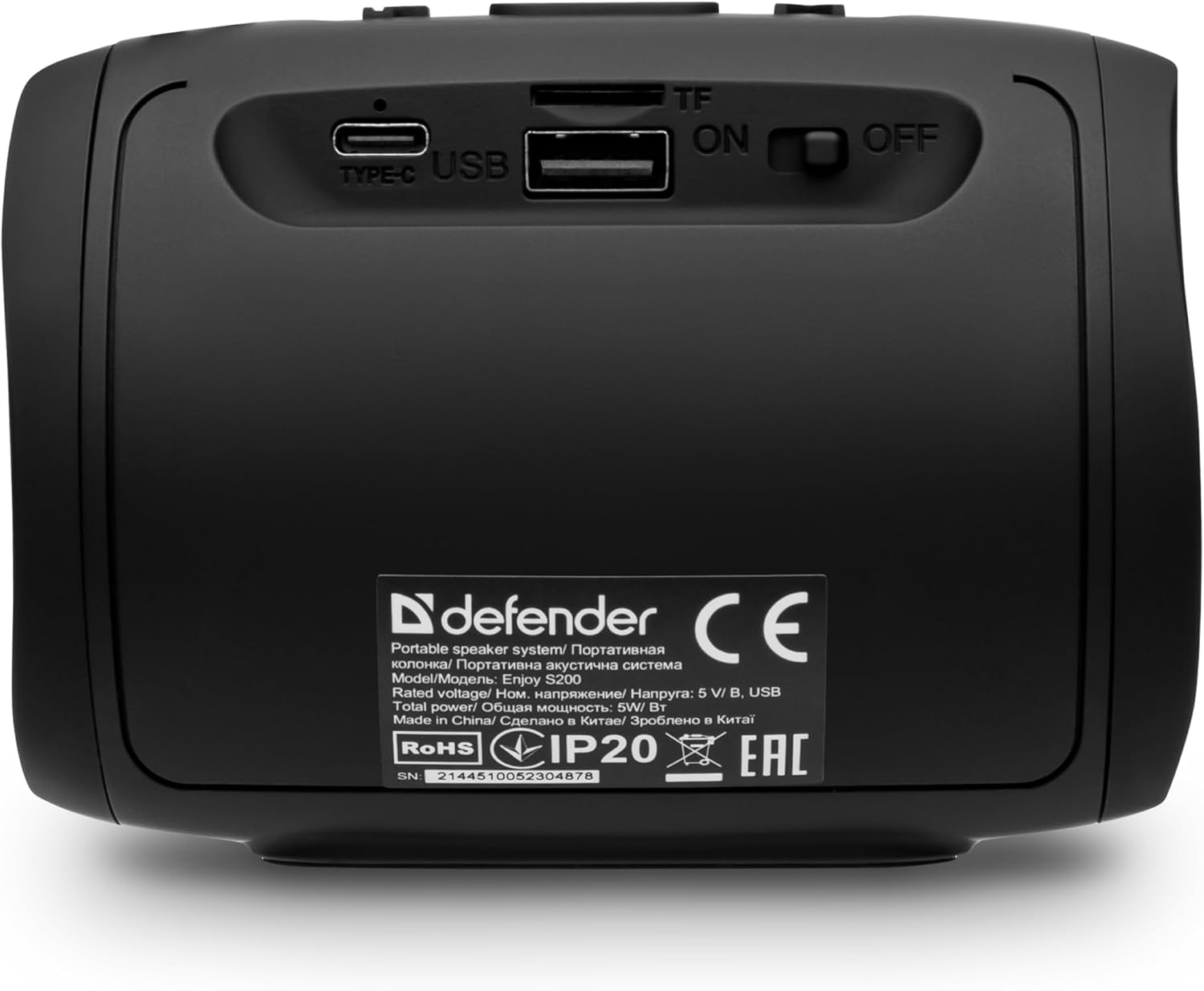
Setšoantšo: Ka morao view of the Defender Enjoy S200 speaker, showing the Type-C charging port, USB port, TF (microSD) card slot, and the ON/OFF power switch.
3.3 Ho hokahanya ha Bluetooth
- Netefatsa hore sebui se butswe mme se maemong a ho kopanya a Bluetooth (e bontshwang ke LED e benyang).
- Sesebedisweng sa hao (smartphone, tablet, jj.), bulela Bluetooth mme o batle disebediswa tse teng.
- Select "Defender Enjoy S200" from the list of devices.
- Once paired, the speaker will emit a confirmation sound, and the LED will stop flashing.
3.4 Tšebeliso ea 'Nete ea Wireless Stereo (TWS).
To pair two Defender Enjoy S200 speakers for stereo sound:
- Netefatsa hore libui ka bobeli li buletsoe 'me ha li hoketsoe sesebelisoa sefe kapa sefe sa Bluetooth.
- On one speaker (this will be the primary speaker), press and hold the TWS button (often indicated by a double-arrow icon) until you hear a pairing tone.
- The two speakers will automatically search and connect to each other. A confirmation tone will sound once connected.
- Jwale, hokela sesebediswa sa hao ho sebui sa mantlha ka Bluetooth jwalo ka ha ho hlalositswe karolong ya 3.3. Modumo o tla bapala ka stereo ka dibui ka bobedi.

Image: A visual representation of two Defender Enjoy S200 speakers pairing wirelessly to create a True Wireless Stereo system, alongside icons for Bluetooth 5.3, MP3 player, FM receiver, and hands-free calling.
4. Litaelo tsa Ts'ebetso
4.1 Button Functions (Refer to top panel controls)
- Konopo ea Matla: Long press to power on/off. Short press to play/pause in music mode, or answer/end calls.
- Phahamiso ea Phahamiso (+): Short press to increase volume. Long press for next track/station.
- Phatlalatso ea Phatlalatso (-): Short press to decrease volume. Long press for previous track/station.
- Konopo ea Mokhoa (M): Short press to switch between Bluetooth, FM Radio, USB, and MicroSD modes.
- Button ea Leseli la LED: Short press to cycle through LED light modes or turn off the LED.
4.2 Papali ea Bluetooth
After successful Bluetooth pairing (Section 3.3), open your music application on your device and begin playback. Use the speaker's volume buttons or your device's volume controls to adjust the audio level.
4.3 Mokhoa oa seea-le-moea oa FM
- Press the 'M' (Mode) button until you hear the FM radio prompt.
- Long press the Play/Pause button to automatically scan and save available FM stations.
- Use the Volume Up (+) and Volume Down (-) buttons (long press) to navigate between saved stations.
4.4 USB/MicroSD Playback
- Insert a USB flash drive or a microSD card (up to 32GB) containing MP3 audio files into the respective port on the back of the speaker.
- Press the 'M' (Mode) button until the speaker automatically switches to USB or MicroSD mode and begins playback.
- Use the speaker's control buttons for play/pause, next track, and previous track.
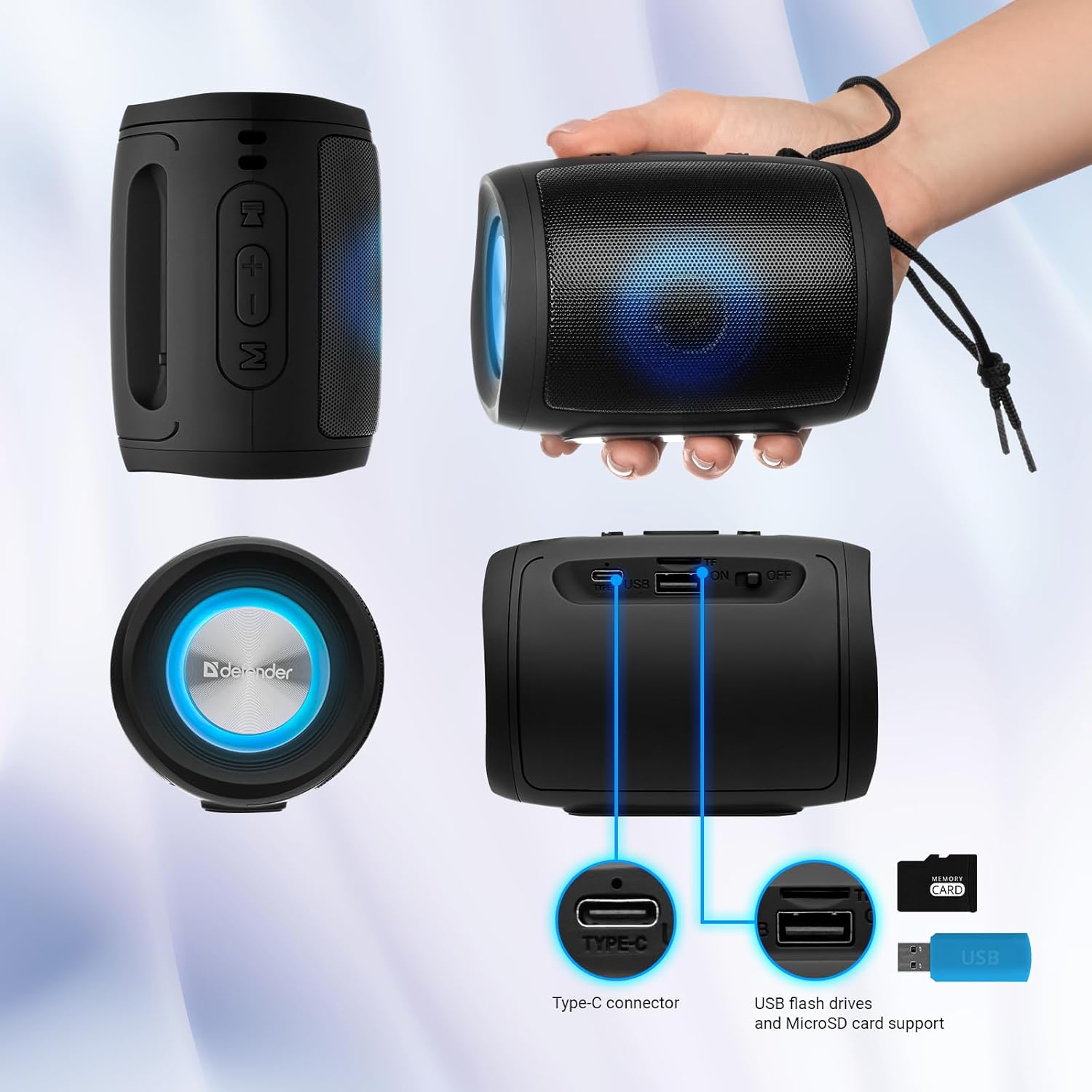
Image: A detailed diagram illustrating the Type-C connector, USB flash drive port, and MicroSD card slot on the Defender Enjoy S200 speaker.
4.5 Ho Letsa Matsoho
When connected to your smartphone via Bluetooth, the speaker's built-in microphone allows for hands-free calls.
- Araba Mohala: Tobetsa nakoana konopo ea Play/Emisa.
- Qetella Mohala: Tobetsa nakoana konopo ea Play/Emisa.
- Hana Mohala: Tobetsa nako e telele konopo ea Play/Emisa.
5. Tlhokomelo
- Ho hloekisa: Sebelisa lesela le bonolo, le omileng ho hlwekisa bokaholimo ba sebui. U se ke ua sebelisa lihlatsoi tse khorofo kapa li-solvent.
- Polokelo: Beha sebui sebakeng se pholileng, se omileng hole le khanya ea letsatsi le mocheso o feteletseng.
- Mathata a Metsi: The speaker has an IP20 rating, meaning it is protected against solid objects larger than 12.5mm but has no protection against water. Avoid exposure to rain, splashes, or immersion in water.
- Tlhokomelo ea Betri: Ho lelefatsa bophelo ba betri, tjhaja sebui ka botlalo pele o se sebedisa la pele mme o se tjhaje bonyane hang dikgweding tse tharo haeba se sa sebediswe kamehla.
6. Ho rarolla mathata
- Ha ho Matla: Ensure the speaker is charged. Connect the Type-C cable and allow it to charge for a few minutes before attempting to power on again.
- Ha ho Molumo: Check the volume levels on both the speaker and your connected device. Ensure the speaker is in the correct mode (Bluetooth, FM, USB, MicroSD).
- Mathata a ho Kopanya Bluetooth: Ensure the speaker is in pairing mode. Turn off Bluetooth on your device and turn it back on. Try unpairing and re-pairing the speaker. Move closer to the speaker to ensure you are within the 10-meter range.
- FM Radio Reception Poor: Ensure you are in an area with good signal. The charging cable can sometimes act as an antenna; try connecting it for improved reception.
- USB/MicroSD Not Playing: Netefatsa molumo files are in a compatible format (e.g., MP3). Check that the USB drive or microSD card is inserted correctly and is not corrupted.
7. Litlhaloso
| Lebitso la Mohlala | Natefeloa ke S200 |
| Ntho Nomoro ea Mohlala | 65200 |
| Brand | Mosireletsi |
| Theknoloji ea Khokahano | Bluetooth 5.3, USB |
| Theknoloji ea puisano e se nang mohala | Bluetooth, Radio Frequency |
| Mofuta oa Sebui | Multimedia |
| Boholo ba Sebui | 2 lisenthimithara |
| Sehlahisoa sa Matla | 5 Watts |
| Mokhoa oa Phatlalatso ea Audio | Setereo |
| Mohloli oa Matla | E Matlafatsoa ke Battery (1 Lithium-ion battery e kenyelelitsoe) |
| Likarolo Tse Khethehileng | Integrated Microphone, USB Port, Portable Bluetooth, LED Light, FM Radio, MicroSD Card Support, TWS |
| Litekanyo tsa Sehlahisoa (L x W x H) | 8 x 11 x 8 cm, |
| Boima ba 'mele | 330 dikgerama |
| Boholo Range | 10 metres |
| Boemo ba IP | IP20 |
8. Tiisetso le Tšehetso
8.1 Boitsebiso ba Tiisetso
Lintlha tse khethehileng tsa tiisetso hangata li fanoa hammoho le litokomane tsa theko ea hau kapa ho ofisiri ea moetsi website. Please refer to these resources for information regarding warranty coverage and duration.
8.2 Tšehetso ea Bareki
For technical assistance, troubleshooting beyond this manual, or inquiries about your Defender Enjoy S200 speaker, please contact Defender Global customer support. Contact information can usually be found on the product packaging, the manufacturer's websaete, kapa rasiti ea hau ea theko.


