Boitsebiso ba Bohlokoa ba Tšireletseho
Read all instructions before operating the TV. Keep this manual for future reference. Follow all warnings and instructions marked on the product.
- Se ke oa thibela menyetla ea moea o kenang.
- Se ke oa kenya haufi le mehloli ea mocheso.
- Sireletsa thapo ea motlakase hore e se ke ea tsamauoa kapa e penngoa.
- Sebelisa feela liphutheloana/lisebelisoa tse boletsoeng ke moetsi.
- Tlosa plug nakong ea lifefo tsa lehalima kapa ha e sa sebelisoe nako e telele.
- Fetisetsa lits'ebeletso tsohle ho basebetsi ba tšoanelehang.
Sehlahisoa se Felletseview
The THOMSON 24HA2S13C is a 24-inch HD Smart Android TV designed for versatile use, including camping with its 12V power supply. It features Google Assistant, Wi-Fi, Bluetooth, Dolby Digital audio, and a triple-tuner for various signal reception.

Setšoantšo: Pele view of the THOMSON 24HA2S13C 24-inch Smart Android TV, showing the screen displaying streaming service logos and a family enjoying the TV in a camping setting.
Litaba tsa Sephutheloana
Netefatsa hore lintho tsohle li kenyelelitsoe ka har'a sephutheloana:
- THOMSON 24HA2S13C Smart Android TV
- Remote Control
- Power Adapter (12V compatible)
- Liteishene tsa TV (2)
- Lisebelisoa tsa TV Stands
- Bukana ea mosebelisi (tokomane ena)
- Tataiso ea ho Qala ka Potlako
Tlhophiso
1. Ho hokela li-TV Stand
- Ka hloko beha sefahleho sa TV fatše sebakeng se bonolo, se bataletseng ho thibela tšenyo ea skrine.
- Align the TV stands with the mounting holes on the bottom of the TV.
- Tiisa litulo tsa ho ema u sebelisa likurufu tse fanoeng. Netefatsa hore li tiisitsoe ka thata.

Image: The THOMSON 24HA2S13C TV showing two possible stand positions for different furniture widths. The image highlights the flexibility in stand placement.
2. Matla a Ho kopanya
Connect the 12V power adapter to the TV's power input and then to a suitable power source. For camping or mobile use, connect to a 12V DC power outlet.

Image: The THOMSON 24HA2S13C TV mounted in a caravan, with a 12V power adapter shown, illustrating its suitability for mobile use.
3. Ho hokahanya lisebelisoa tsa ka ntle
TV e fana ka likou tse fapaneng bakeng sa ho hokahanya lisebelisoa tsa kantle:
- HDMI: For high-definition audio and video devices (e.g., game consoles, Blu-ray players).
- USB: Bakeng sa ho hokela lisebelisoa tsa polokelo ea USB ho bapala media.
- LAN: Bakeng sa khokahanyo ea marang-rang ea wired.
- Antenna/Sathelaete: Bakeng sa ho amohela matshwao a kgaso.
- AV IN: Bakeng sa lisebelisoa tsa khale tsa analoge.
- Audio Out (Optical): Bakeng sa ho hokela litsamaisong tsa molumo tsa kantle.
- CI+: Bakeng sa li-module tsa ho kena ka maemo.

Setšoantšo: Ka morao view of the THOMSON 24HA2S13C TV, detailing the various input and output ports available for connectivity.
Ho tsamaisa TV
1. Wizate ea ho Seta ea Pele
Ha TV e qala ho e bulela, e tla o tataisa tshebetsong ya pele ya ho seta. Sena se kenyeletsa:
- Khetho ea puo.
- Khokahano ea marang-rang (Wi-Fi kapa Ethernet).
- Google account sign-in (optional, but recommended for full Smart TV features).
- Channel scanning (for DVB-T2/C/S2).
2. Mesebetsi ea Remote Control
The included remote control provides access to all TV functions. It features backlit buttons for use in low light and a dedicated "Favorite" button for quick access to your preferred app.

Image: The remote control for the THOMSON 24HA2S13C TV, highlighting its ergonomic design, backlit buttons, and voice control capabilities.
3. Smart TV Features (Android TV)
This TV runs on Android TV, providing access to a wide range of applications and services:
- Litšebeletso tsa ho phallela: Access Netflix, Prime Video, YouTube, Disney+, and more.
- Mothusi oa Google: Use voice commands to search for content, control playback, and get information. Activate by pressing the Google Assistant button on the remote.
- Chromecast e hahelletsoeng ka hare: Cast content from compatible smartphones, tablets, or computers directly to your TV.
- Google Play Store: Download additional apps and games.

Image: The THOMSON 24HA2S13C TV screen showing the Android TV home interface with popular streaming applications and content recommendations.
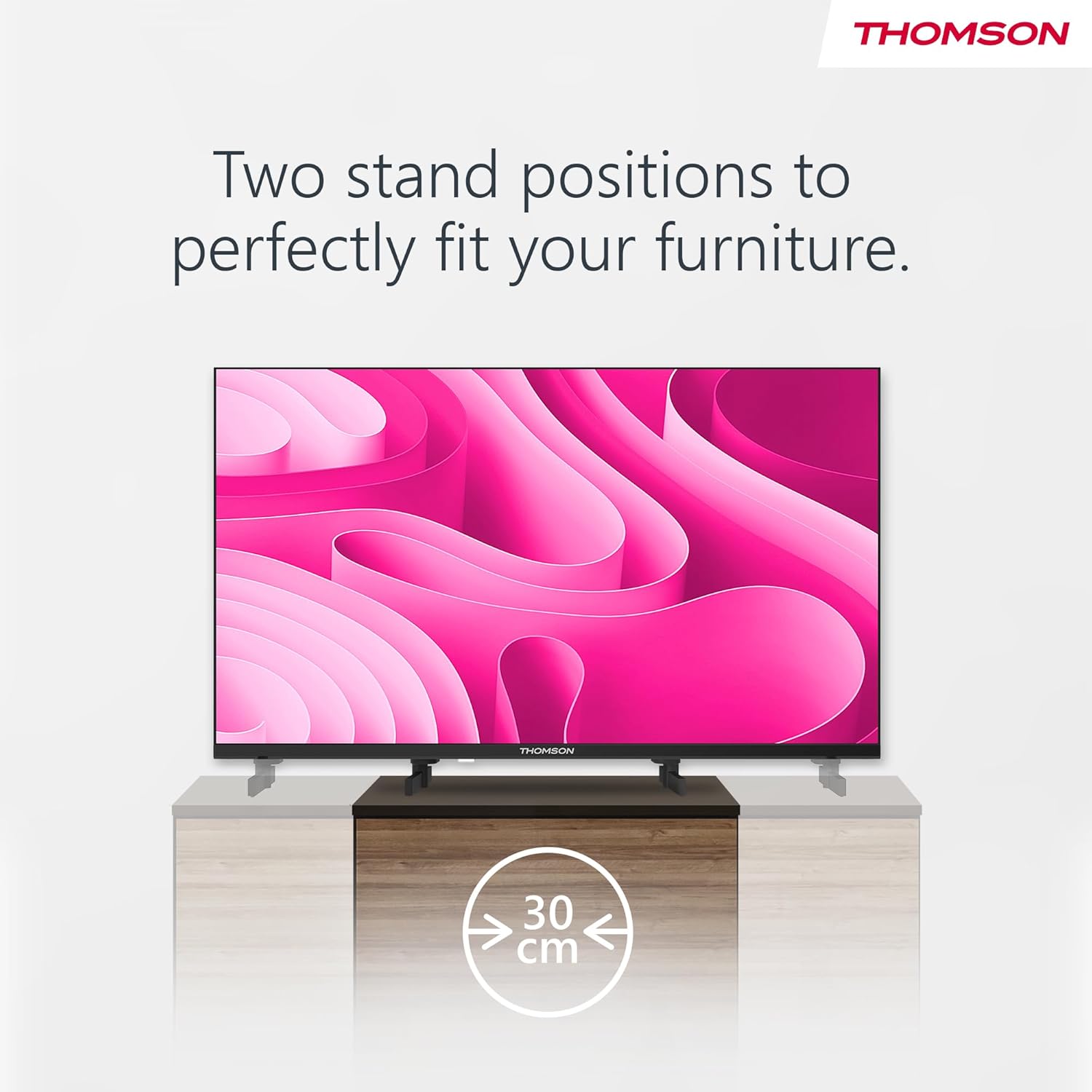
Image: A person using the voice control feature of the THOMSON TV remote, demonstrating interaction with Google Assistant.
Tlhokomelo
Ho hloekisa TV
- Kamehla u tlose TV pele u hloekisa.
- Use a soft, dry cloth to wipe the screen and cabinet. Do not use liquid cleaners or aerosol sprays.
- Bakeng sa matšoao a manganga, ha bobebe dampen a microfiber cloth with water and gently wipe. Avoid excessive moisture.
Lisebelisoa tsa Software
The TV may receive software updates to improve performance and add new features. Ensure your TV is connected to the internet to receive these updates. You can usually check for updates in the TV's settings menu.
Ho batle phoso
| Bothata | Lebaka le ka khonehang | Tharollo |
|---|---|---|
| Ha ho matla | Mohala oa motlakase ha o kopane; motlakase o sa sebetseng. | Hlahloba khokahano ea thapo ea motlakase. Leka sehokelo sa motlakase ka sesebelisoa se seng. |
| Ha ho setšoantšo, empa molumo o teng | Mohloli o fosahetseng oa ho kenya o khethiloe; bothata ba lebone la morao. | Press the "Input" button on the remote to select the correct source. Contact support if issue persists. |
| Ha ho na molumo, empa setšoantšo se teng | Volume too low or muted; audio cables loose. | Increase volume. Check mute status. Ensure audio cables are securely connected. |
| Remote control ha e sebetse | Batteries depleted; obstruction between remote and TV. | Replace batteries. Remove any obstructions. Ensure remote is pointed at the TV's IR sensor. |
| Ha e khone ho hokela ho Wi-Fi | Phasewete e fosahetseng; mathata a router; TV e hole haholo le router. | Verify Wi-Fi password. Restart router. Move TV closer to router or use a wired connection. |
Litlhaloso
| Sebopeho | Lintlha |
|---|---|
| Brand | Thomson |
| Mohlala | 24HA2S13C |
| Boholo ba skrine | 24 Inche (60cm) |
| Bontša Theknoloji | LED |
| Qeto | 1366 x 768 (HD) |
| Mokhoa oa tšebetso | Android TV |
| Likarolo Tse Khethehileng | Google Assistant, Chromecast Built-in, 12V Power Supply, Dolby Audio, Triple Tuner (DVB-T2/C/S2) |
| Khokahano | Wi-Fi, Bluetooth, HDMI (x3), USB (x2), LAN, Optical Audio Out, AV In, CI+ |
| Moqtage | 12 Volts (DC) |
| Litekanyo tsa Lihlahisoa (W x D x H) | 53.5 x 15.1 x 35.3 cm (ka setulo) |
| Boima ba 'mele | 3.5 lik'hilograma |
For detailed energy efficiency information, please refer to the EU EPREL database: https://eprel.ec.europa.eu/qr/1456673

Image: The EU Energy Label for the THOMSON 24HA2S13C TV, showing an energy efficiency rating of E and power consumption of 18 kWh/1000h.
Warranty le Tšehetso
This Thomson TV comes with a 3-year guarantee. For technical support, warranty claims, or service inquiries, please contact your local Thomson service provider or refer to the manufacturer's websebaka.
Manufacturer: STREAMVIEW GMBH
Websebaka: www.streamview.com
Lengolo-tsoibila: contact@streamview.com
Video ea Sehlahisoa sa Molao
Shebella video ena bakeng sa ho e shebellaview of the Thomson 24-inch Easy TV.
Video: Ka bokhutšoanyaneview of the Thomson 24-inch Easy TV, showcasing its design and features. This video is provided by the vendor Streamview GmbH.


