1. Selelekela
This manual provides detailed instructions for the setup, operation, and maintenance of your Creative Sound Blaster Katana SE Multi-Channel Gaming Soundbar. Designed for an immersive audio experience, this soundbar features 180W peak power, a bi-amplified 4-driver design, Super X-Fi technology, and customizable RGB lighting. Please read this manual thoroughly before using your device to ensure optimal performance and safety.

Figure 1: Creative Sound Blaster Katana SE Gaming Soundbar
2. Boitsebiso ba Bohlokoa ba Tšireletseho
- Bala litaelo tsena.
- Boloka litaelo tsena.
- Mamela litemoso tsohle.
- Latela litaelo tsohle.
- Se ke oa sebelisa sesebelisoa sena haufi le metsi.
- Hloekisa feela ka lesela le omeletseng.
- Se ke oa thibela menyetla efe kapa efe ea moea. Kenya ho latela litaelo tsa moetsi.
- Se ke oa kenya haufi le mehloli efe kapa efe ea mocheso joalo ka li-radiator, lirejista tsa mocheso, litofo, kapa lisebelisoa tse ling (ho kenyeletsoa amplifiers) tse hlahisang mocheso.
- Sireletsa thapo ea motlakase hore e se ke ea tsamauoa kapa e penngoa, haholo-holo ha li-plug, litšepe tse bonolo, le moo li tsoang teng.
- Sebelisa feela liphutheloana/lisebelisoa tse boletsoeng ke moetsi.
- Tlosa sesebelisoa sena nakong ea sefefo sa lehalima kapa ha se sa sebelisoe ka nako e telele.
3. Likahare tsa Sephutheloana
Netefatsa hore lintho tsohle li teng ka har'a sephutheloana sa hau:
- Creative Sound Blaster Katana SE Soundbar
- Subwoofer (wired)
- Remote Control
- Adapter ea Matla
- Cable ea USB-C
- Cable ea Optical
4. Sehlahisoa Overview
The Sound Blaster Katana SE is an all-in-one soundbar designed for powerful and immersive audio. It features a sleek design with integrated controls and a front-facing display.
4.1. Soundbar Components
- Litaolo tsa Phanele tse ka Holimo: Power, Volume Up/Down, Source, Mode, SXFI.
- Pontšo e ka Pele: Shows current source (USB, AUX, OPTICAL, BT, TV), volume level, and selected sound mode.
- Front Headphone Jack: For connecting headphones directly.
- Microphone e hahelletsoeng ka hare: Bakeng sa puisano ea lentsoe.
- RGB Lighting Strip: Customizable lighting effects located at the bottom of the soundbar.
- Bakhanni: Bi-amplified 4-driver design for clear and precise audio.

Setšoantšo sa 2: Pele view of the Sound Blaster Katana SE with RGB lighting
4.2. Ka morao Panel Connections
The rear panel provides various ports for connecting to your devices:
- HDMI Out (ARC): For connecting to a TV with Audio Return Channel support.
- SXFI Out: Dedicated port for Super X-Fi enabled headphones.
- USB Audio In: For digital audio connection to PC/Mac.
- Aux In: 3.5mm analog audio input.
- Optical In: Kenyelletso ea audio ea digital ea optical.
- Sub Out: For connecting the wired subwoofer.
- Kenyeletso ea Matla: Bakeng sa adaptara ea matla.

Figure 3: Rear panel with HDMI ARC, SXFI Out, USB Audio In, Aux In, Optical In, Sub Out, and Power Input.
4.3. Subwoofer
The included wired subwoofer enhances bass response for a more dynamic audio experience.

Setšoantšo sa 4: Ka hare view showing the soundbar's bi-amplified drivers and the subwoofer's design.
5. Seta
Follow these steps to set up your Sound Blaster Katana SE:
- Sebaka: Place the soundbar on a stable surface below your TV or monitor. Position the subwoofer on the floor near the soundbar for optimal bass.
- Kopanya Subwoofer: Connect the wired subwoofer cable to the 'Sub Out' port on the soundbar's rear panel.
- Kopanya Matla: Connect the power adapter to the soundbar's power input and then plug it into a wall outlet.
- Hokela Mohloli oa Mantsoe: Choose your preferred audio connection method (HDMI ARC, Optical, USB, Aux, or Bluetooth) and connect the appropriate cable.
Video 1: Official product video demonstrating the Sound Blaster Katana SE's features and connectivity options.
6. Dikgetho tsa kgokelo
The Sound Blaster Katana SE offers a wide range of connectivity to suit various devices:
- HDMI Out (ARC): Connect to your TV's HDMI ARC port for high-quality audio and control.
- USB Audio In: Ideal for connecting to PCs, Macs, or gaming consoles that support USB audio.
- Aux In: Use a 3.5mm audio cable to connect to devices with an analog audio output.
- Optical In: For digital audio connection from TVs, game consoles, or other media players.
- Bluetooth 5.0: Pair wirelessly with your mobile devices, tablets, or computers for convenient audio streaming.
- SXFI Out: Connect Super X-Fi certified headphones for a personalized holographic audio experience.

Figure 5: Soundbar showcasing versatile connectivity with gaming consoles and mobile devices.
7. Litaelo tsa Ts'ebetso
7.1. Matla On/O tima
Press the Power button on the soundbar's top panel or the remote control to turn the device on or off.
7.2. Taolo ea Molumo
Use the Volume Up (+) and Volume Down (-) buttons on the soundbar or remote to adjust the audio level. The current volume will be displayed on the front panel.
7.3. Khetho ea Mohloli
Press the 'Source' button on the soundbar or remote to cycle through available input sources (HDMI ARC, USB, Aux, Optical, Bluetooth).
7.4. Mekhoa ea molumo
The soundbar features optimized sound modes for different content types. Press the 'Mode' button on the soundbar or remote to switch between:
- Mmino: E ntlafalitsoe bakeng sa ho bapala 'mino.
- Lifilimi: Optimized for cinematic audio.
- Papali: Tailored for immersive gaming soundscapes.
- Effects Off: Neutral audio profile.
7.5. Ho Sebelisa Remote Control
The included remote control provides full functionality for the soundbar, including power, volume, source, mode, SXFI, RGB lighting, and custom buttons.
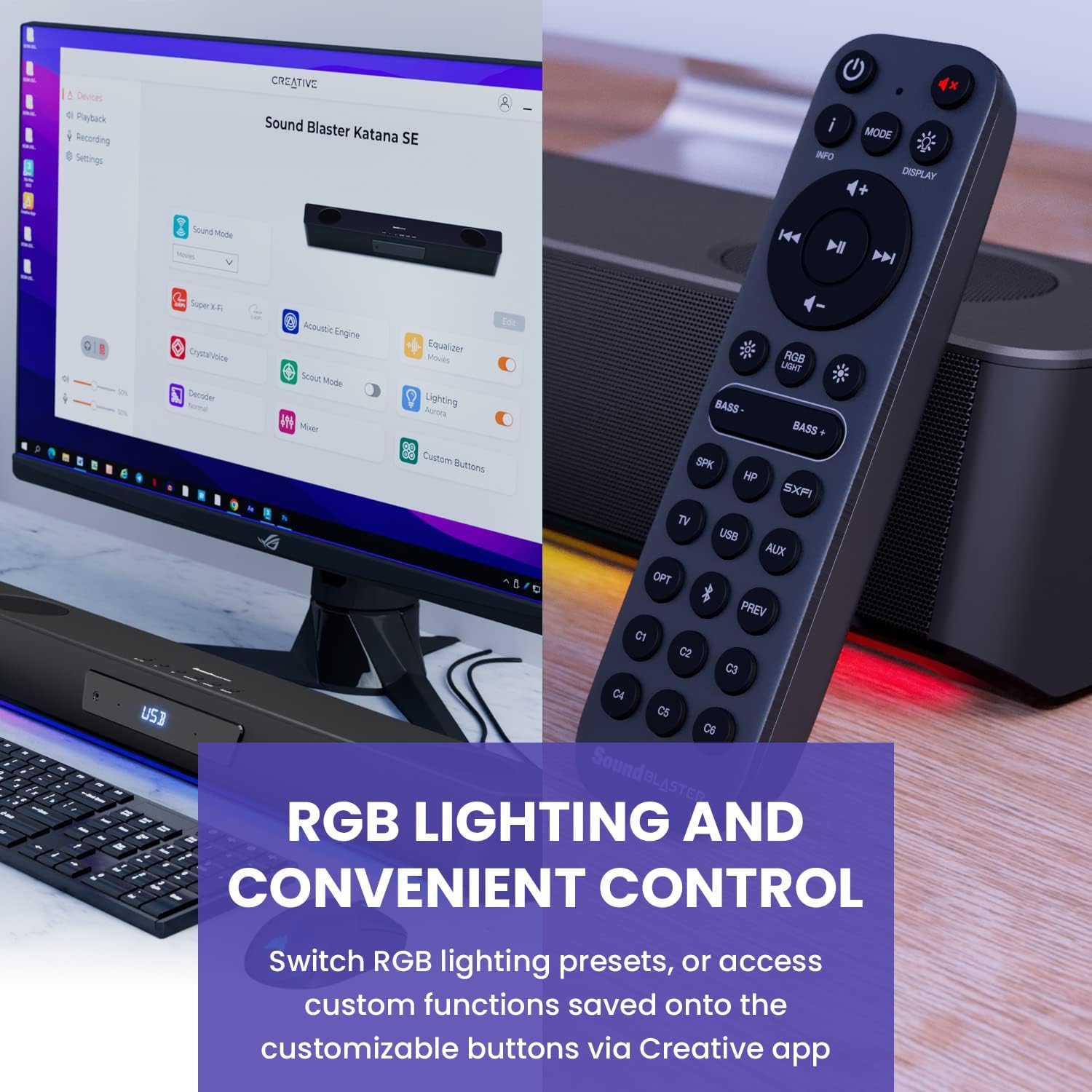
Figure 6: Remote control for the Sound Blaster Katana SE.
7.6. Creative App Customization
For advanced customization, download the Creative app on your PC or Mac. The app allows you to:
- Tune Audio Performance: Adjust EQ settings and activate Sound Blaster processing technologies.
- Iketsetse RGB Lighting: Select from various RGB presets or create your own custom lighting effects.
- Map Custom Functions: Assign specific commands to the six customizable buttons on the remote control.

Figure 7: Creative app interface showing sound mode, Super X-Fi, Acoustic Engine, Equalizer, CrystalVoice, Scout Mode, Lighting, Decoder, Mixer, and Custom Buttons.
8. Super X-Fi Technology
Super X-Fi technology personalizes your headphone audio experience for optimized and realistic listening. It recreates the soundstage of a multi-speaker system in your headphones.
- SXFI Battle Mode: Fumana advan ea tlholisanotage in FPS games by accurately pinpointing enemy locations through enhanced audio cues.

Figure 8: Super X-Fi and SXFI Battle Mode for enhanced gaming audio.
9. Microphone e hahiloeng kahare
The Sound Blaster Katana SE includes a built-in beamforming microphone, allowing you to participate in calls or in-game voice chat directly through the soundbar.
10. Mabone a RGB
The integrated RGB lighting strip can be customized to match your setup or mood. Use the remote control to cycle through presets or the Creative app for advanced color and effect adjustments.
11. Tlhokomelo
To ensure the longevity and performance of your Sound Blaster Katana SE:
- Boloka sesebelisoa se hloekile ka ho se hlakola ka lesela le bonolo, le omeletseng.
- Avoid using liquid cleaners or aerosols.
- Netefatsa hore menyetla ea moea ha e sitisoe.
- Se ke oa beha sesebelisoa mochesong o feteletseng kapa mongobo.
12. Ho rarolla mathata
If you encounter issues with your soundbar, refer to the following common solutions:
- Ha ho Molumo: Check all cable connections (power, audio source, subwoofer). Ensure the correct input source is selected on the soundbar. Verify the volume is not muted or too low.
- Molumo o sothehileng: Try reducing the volume. Check audio cable integrity. Ensure the audio source is providing a clean signal.
- Mathata a Khokahano ea Bluetooth: Ensure the soundbar is in Bluetooth pairing mode. Delete the soundbar from your device's Bluetooth list and re-pair. Move closer to the soundbar to reduce interference.
- Remote Control ha e sebetse: Check battery levels and replace if necessary. Ensure there are no obstructions between the remote and the soundbar.
- Mabone a RGB ha a sebetse: Check settings in the Creative app. Ensure RGB lighting is enabled via the remote or app.
13. Litlhaloso
| Sebopeho | Tlhaloso |
|---|---|
| Lebitso la Mohlala | 51MF8415AA000 27585486 |
| Mofuta oa Sebui | Soundbar |
| Mofuta oa ho Beha | Thaba ea Letlapa |
| Tšobotsi e Khethehileng | Bass Boost, Built In Microphone, Radio, Stereo Pairing, USB Port |
| Recommended Uses For Product | For Gaming Consoles, For Computers |
| Lisebelisoa tse lumellanang | Desktop, Laptop, MP3 Player, Projector, Smartphone, Letlapa, Thelevishene |
| Palo ea likarolo | 1.0 Palo |
| Potoloho ea Mohala oa Molumo o Potileng | 5.1 |
| Mmala | 180W Peak Power with Bluetooth 5.0 |
| Kenyellelitsoe Likaroloana | Hole |
| Litekanyo tsa Sehlahisoa | 25.6"D x 4.3"W x 3.1"H |
| Boima ba Ntho | 5.9 Liponto |
| Ha e na Metsi | LESHANO |
| Mofuta oa Warranty | Moedi |
| Palo ea Lintho | 1 |
| Mokhoa oa ho Laola | Hole |
| Theknoloji ea puisano e se nang mohala | bluetooth |
| Boholo ba Sebui | 1 lisenthimithara |
| Mohloli oa Matla | Motlakase oa Corded |
| Tweeter Diameter | 1 lisenthimithara |
| Boemo ba ho hanyetsa Metsi | Ha e Mamelle Metsi |
| Mofuta oa Sephutheloana sa Bareki | FFP |
| Mofuta oa Mokhanni oa Audio | Mokhanni ea Matla |
| Theknoloji ea khokahanyo ea Subwoofer | Wireless |
| Palo ea Maemo a Matla | 1 |
| Tšebeliso e khethehileng Bakeng sa Sehlahisoa | Gaming Consoles, Computers |
| UPC | 054651195639 |
| Moetsi | Pōpo Labs |
| Sebopeho | prism e khutlonnetsepa |
| Boima ba Ntho | 5.9 liponto |
| ASIN | B0C5DFMB93 |
| Nomoro ea mohlala oa ntho | MF8415 |
| Letsatsi le Fumanang Pele | La 16 Motšeanong 2023 |
| Brand | Moqapi |
| Sebui se Phahameng sa Matla a Phahamisang | 100 Watts |
| Karabelo ea Khafetsa | 20000 Hz |
| Theknoloji ea Khokahano | bluetooth |
| Mokhoa oa Phatlalatso ea Audio | Ho potoloha, Stereo |
14. Tiisetso le Tšehetso
Your Creative Sound Blaster Katana SE comes with a Limited Warranty. For detailed warranty information, product registration, technical support, and customer service, please visit the official Creative webkapa sheba karete ea tiisetso e kenyellelitsoeng sephutheloana sa hau.


