1. Selelekela
This manual provides detailed instructions for the safe and effective use of your AMIRO 9-inch Lighted Makeup Mirror, Model AML009. Please read this manual thoroughly before operating the device and retain it for future reference.

Figure 1: AMIRO 9-inch Lighted Makeup Mirror (Model AML009) and packaging.
2. Boitsebiso ba Bohlokoa ba Tšireletseho
Ka kopo ela hloko mehato e latelang ea tšireletso ho thibela kotsi kapa tšenyo ea sehlahisoa:
- Tšoara seipone ka hloko ho qoba ho senya.
- Be cautious of sharp edges if the mirror glass is broken.
- Ensure proper placement on a stable, flat surface to prevent tipping.
- Do not use the mirror while sleeping or in a location where it could fall and cause injury.
- Boloka moo bana ba ka fihlang teng.
- Do not expose the mirror to excessive moisture or immerse it in water.
- Sebelisa feela thapo e fanoeng ea USB-C ho tjhaja.
3. Likahare tsa Sephutheloana
Netefatsa hore lintho tsohle li teng ka har'a sephutheloana:
- AMIRO 9-inch Lighted Makeup Mirror (Model AML009)
- 10X Magnifying Mirror (detachable)
- Cable ea ho tjhaja ea USB-C
- Bukana ea Mosebelisi
4. Likarolo tsa lihlahisoa
The AMIRO 9-inch Lighted Makeup Mirror offers advanced features for an enhanced grooming experience:
- Seipone sa HD sa 9-inch: Provides a clear, wide view for makeup application.
- Seipone se holisang sa 10X: A small, detachable mirror for detailed tasks like eyebrow tweezing or contact lens application.
- Leseli la LED le Kopantsoeng: Premium bright LEDs provide natural and soft illumination without glare.
- Mefuta e 3 ea Mabone a Mebala: Switch between warm, natural, and cold white light to simulate various environments.
- Maemo a 6 a Khanya: Adjust light intensity from 0% to 100% for optimal visibility.
- Smart Touch Controls: Intuitive touch buttons for power, color mode, and brightness adjustments.
- Smart Sensor (Induction Mode): Automatically turns the light on when human movement is detected within 30cm and off when no movement is detected for 50cm outside the mirror surface for 10 seconds.
- Mosebetsi oa memori: The mirror remembers your last used brightness and color settings.
- E kachacha hape 'me ha e na Cordless: Equipped with a built-in 2200 mAh lithium battery, offering 3-5 hours of continuous use on a full charge.
- Ho tjhaja USB-C: Convenient charging via USB-C cable from various power sources.
- 50° Potoloho ea Mahala: Allows adjustment of the mirror angle for optimal viewng.
- Motheo o tsitsitseng: Features soft, non-slip rubber for secure tabletop placement.

Setšoantšo sa 2: Ho fetaview of AMIRO Lighted Makeup Mirror features.
5. Seta
5.1 Tefiso ea Pele
Before first use, fully charge the mirror. Connect the provided USB-C cable to the charging port located at the back of the mirror's base and plug the other end into a USB power source (e.g., wall adapter, power bank, computer).
- The indicator light will blink green during charging.
- Lebone la sesupo le tla fetoha botala bo tiileng ha le tjhajitsoe ka botlalo.

Figure 3: USB-C Charging Port and Indicator Light.
5.2 Attaching the 10X Magnifying Mirror
The 10X magnifying mirror attaches magnetically to the main mirror surface. Simply place it onto the desired area of the main mirror. Ensure it is securely attached before use.
5.3 Ho bea
Place the mirror on a flat, stable surface. The non-slip rubber base provides stability. Avoid placing it near edges where it could fall.

Figure 4: Stable silicone base.
6. Litaelo tsa Ts'ebetso
The mirror features intuitive touch controls located on the front of the mirror's base.

Figure 5: Smart Touch Controls.
6.1 Power On/Off and Color Mode Selection
- Tlosa/Tima: Short press the center touch button (power icon) to turn the light on or off.
- Change Color Modes: While the light is on, short press the center touch button to cycle through the three color modes: Warm Light, Natural Light, and Cold White Light.

Figure 6: 3 Color Temperature and 6 Brightness Levels.
6.2 Ho Fetola Khanya
- Eketsa Khanya: Long press the right touch button (+ icon).
- Fokotsa Khanya: Long press the left touch button (- icon).
- The brightness can be adjusted from 0% to 100%.
6.3 Smart Sensor (Induction Mode)
The mirror can automatically turn on or off based on human presence.
- To activate Induction Mode: Long press the center touch button until the indicator light turns blue. The light will turn on when you are within 30cm of the mirror surface.
- To deactivate Induction Mode (Constant On Mode): Long press the center touch button until the indicator light turns red. The light will remain on until manually turned off.
- When in Induction Mode, the light will automatically turn off approximately 10 seconds after you move 50cm away from the mirror surface.
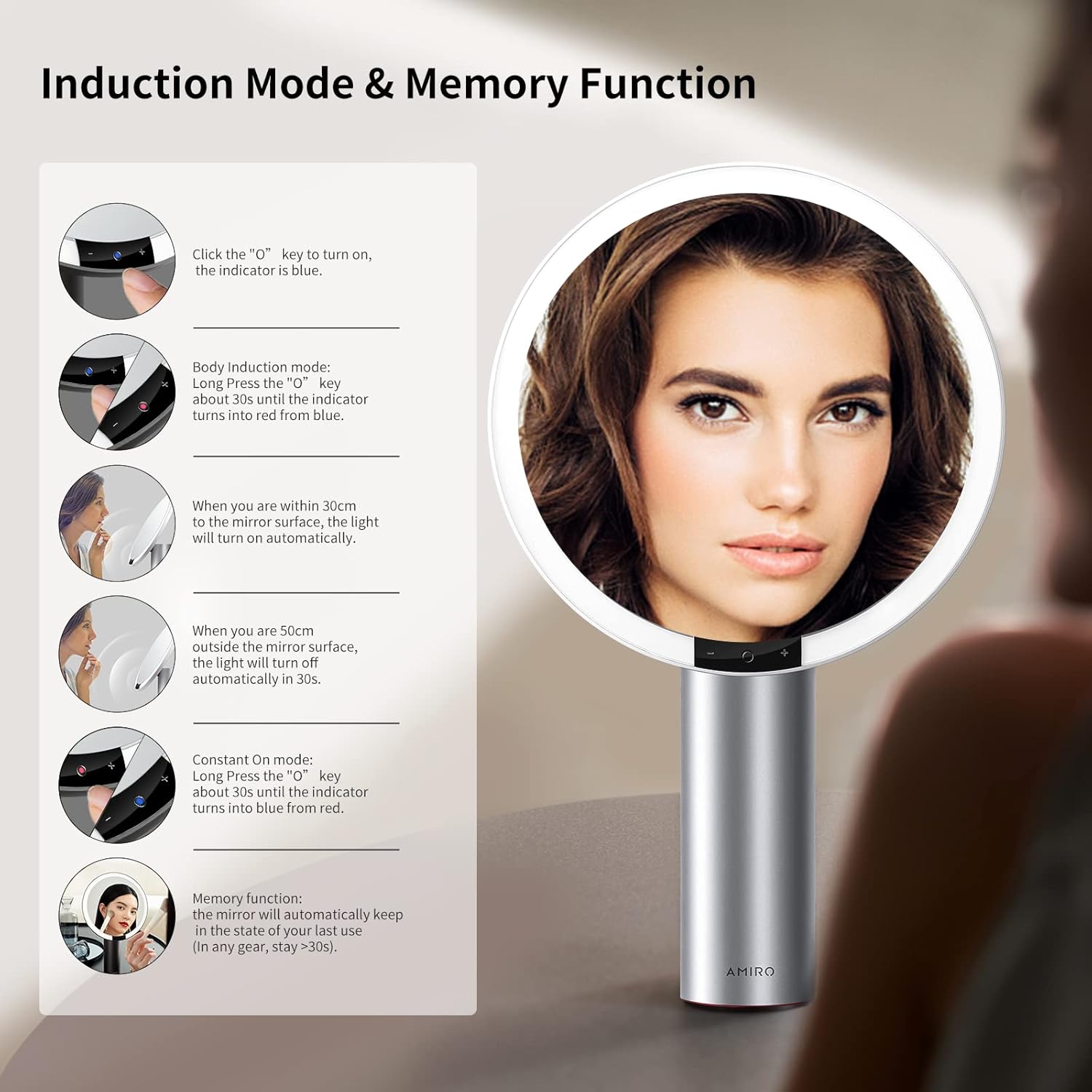
Figure 7: Induction Mode and Memory Function.
Mosebetsi oa Memori
The mirror is designed with a memory function. It will automatically recall the last used brightness and color mode settings when turned on again, provided the mirror was used for more than 10 seconds in the previous session.
6.5 Mirror Rotation
The mirror head can be freely rotated up to 50 degrees to adjust the viewsekhutlo se hlokang.

Figure 8: Free Rotation feature.
7. Tlhokomelo
7.1 Ho hloekisa
- To clean the mirror surface, gently wipe with a soft, lint-free cloth. For stubborn spots, a small amount of glass cleaner can be applied to the cloth (not directly to the mirror).
- Do not use abrasive cleaners or harsh chemicals, as these may damage the mirror or its finish.
- Wipe the body of the mirror with a dry or slightly damp lesela le bonolo.
7.2 Polokelo
Store the mirror in a cool, dry place away from direct sunlight and extreme temperatures when not in use for extended periods.
8. Ho rarolla mathata
If you encounter issues with your AMIRO Lighted Makeup Mirror, refer to the following common problems and solutions:
| Bothata | Lebaka le ka khonehang | Tharollo |
|---|---|---|
| Mirror light does not turn on. | Battery is depleted; Mirror is in Induction Mode and no movement is detected; Power button not pressed correctly. | Charge the mirror fully. Ensure the mirror is in Constant On Mode or activate Induction Mode by approaching the mirror. Short press the center touch button to turn on. |
| Leseli le lerootho haholo kapa le khanya haholo. | Boemo ba khanya bo hloka ho lokisoa. | Long press the '+' or '-' touch buttons to adjust brightness to your preference. |
| Cannot change light color. | Color mode not selected. | Short press the center touch button repeatedly to cycle through Warm, Natural, and Cold White light modes. |
| 10X magnifying mirror does not stay attached. | Weak magnetic connection; Surface not clean. | Ensure both the main mirror surface and the back of the magnifying mirror are clean and dry. Reattach firmly. If the issue persists, contact customer support. |
| Mirror feels unstable or tips easily. | Not placed on a flat, stable surface; Base suction not engaged (if applicable). | Relocate the mirror to a completely flat and stable surface. Ensure the non-slip base is making full contact. |
| Bophelo ba betri bo bokhutšoanyane ho feta kamoo ho neng ho lebelletsoe. | Frequent use at maximum brightness; Battery degradation over time. | Reduce brightness settings for longer battery life. Ensure the mirror is fully charged before each use. If battery life significantly degrades, contact customer support. |
9. Litlhaloso
Detailed technical specifications for the AMIRO 9-inch Lighted Makeup Mirror (Model AML009):
- Mohlala: AML009
- Lebitso: AMIRO
- Boholo ba Seipone: 9 inch
- Kholiso: 10X (detachable mirror)
- Boholo ba Sehlahisoa: 10.7"L x 17"W
- Boima ba Ntho: 2.93 lik'hilograma (1.33 lik'hilograma)
- Thepa ea Frame: Tšepe
- 'Mele: Aluminium
- Mmala: Bosoeu
- Mofuta oa ho Beha: Thaba ea Letlapa
- Lebone: LED e kopantsoeng
- Mefuta ea Mebala: 3 (Warm, Natural, Cold White)
- Maemo a Khanya: 6 (0%-100% adjustable)
- Likarolo tse Khethehileng: Smart Sensor, Touch Control, Memory Function, 50° Free Rotation, Cordless, USB Charging
- Betri: 2200 mAh Lithium Ion (e kenyelelitsoe)
- Boema-kepe ba ho tjhaja: USB-C
- Ho Hlokahala Kopano: Che
- Litšebeliso tse khothalelitsoeng: Makeup application, Personal grooming, Home use

Figure 9: Mirror dimensions and key specifications.
10. Tiisetso le Tšehetso
For warranty information, please refer to the documentation included with your purchase or contact AMIRO customer support directly. If you require assistance with your product, have questions, or need to report an issue, please contact AMIRO customer service through their official channels.
Contact information can typically be found on the product packaging or the official AMIRO websebaka.

