Selelekela
Thank you for choosing the Mistral MSF1650R 16-inch Stand Fan. This manual provides important information regarding the assembly, operation, maintenance, and troubleshooting of your new fan. Please read it thoroughly before use and retain it for future reference.
Litaelo tsa Bohlokoa tsa Tšireletso
- Always ensure the fan is placed on a stable, level surface to prevent it from tipping over.
- Do not operate the fan with a damaged cord or plug. If the cord is damaged, it must be replaced by the manufacturer, its service agent, or similarly qualified persons to avoid a hazard.
- Unplug the fan from the power outlet before cleaning, assembling, or disassembling parts.
- Keep fingers, pencils, or any other objects out of the fan guard when it is operating.
- Do not use the fan near water or in excessively humid environments.
- Sesebelisoa sena ha sea rereloa ho sebelisoa ke batho (ho kenyeletsoa bana) ba nang le matla a fokotsehileng a 'mele, kutlo kapa kelello, kapa ba hlokang boiphihlelo le tsebo, ntle le haeba ba filoe tlhokomelo kapa taelo mabapi le tšebeliso ea sesebelisoa ke motho ea ikarabellang bakeng sa polokeho ea bona.
- Bana ba lokela ho behoa leihlo ho netefatsa hore ha ba bapale ka sesebelisoa.
Lisebelisoa tsa Sehlahisoa
Familiarize yourself with the main parts of your Mistral MSF1650R stand fan.
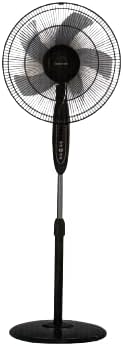
Setšoantšo sa 1: Pele view of the Mistral MSF1650R 16-inch Stand Fan, showing the fan head, control panel, adjustable stand, and round base.

Figure 2: The Mistral MSF1650R stand fan accompanied by its remote control, illustrating the convenience of remote operation.
- Balebeli ba ka Pele
- Fan Blade (5 ABS blades)
- Balebeli ba ka Morao
- Motor Housing
- Lekhotla la taolo
- Palo ea ho Ema e Fetohang
- Motheo
- Remote Control
Litaelo tsa Kopano
Follow these steps to assemble your stand fan:
- Hokela Base: Place the stand pole onto the base and secure it using the provided screw and washer from underneath the base.
- Install the Rear Guard: Position the rear guard onto the motor housing, ensuring it aligns with the locating pins. Secure it with the guard nut.
- Mount the Fan Blade: Slide the fan blade onto the motor shaft, aligning the notch on the blade with the pin on the shaft. Secure it with the blade cap, turning it counter-clockwise.
- Attach the Front Guard: Place the front guard onto the rear guard, aligning the clips. Secure the guards together using the guard ring and clip, ensuring it is tightly fastened around the perimeter.
- Fetola Bophahamo: Loosen the height adjustment knob on the stand pole, extend or retract the pole to the desired height, and then tighten the knob securely.
Litaelo tsa Ts'ebetso
Your Mistral MSF1650R fan can be operated via the control panel on the fan body or the remote control.
Mesebetsi ea Panel ea Taolo:
- Konopo ya HO TULA/TLOA: Tobetsa ho bulela kapa ho tima fan.
- SPEED Konopo: Press repeatedly to cycle through fan speeds: Low, Medium, High.
- Konopo ea MODE: Press to select between Normal, Natural, and Sleep modes.
- Konopo ea TIMER: Press to set the operating timer (up to 7.5 hours). Each press adds 0.5 hours.
- OSC (Oscillation) Button: Press to start or stop the fan head oscillating horizontally.
Mesebetsi ea Remote Control:
The remote control duplicates all functions available on the fan's control panel for convenient operation from a distance.
- Ensure batteries are correctly inserted into the remote control.
- Point the remote control towards the fan's receiver when operating.
- Buttons on the remote correspond to the functions described above (ON/OFF, SPEED, MODE, TIMER, OSC).
Tlhokomelo le Tlhoekiso
Ho hlwekisa kamehla ho tla thusa ho boloka tshebetso ya fene le ho eketsa nako ya yona ya bophelo.
- Hlakola Pele o Hloekisa: Always disconnect the fan from the power supply before attempting any cleaning or maintenance.
- Hloekisa Kantle: Wipe the fan's exterior surfaces with a soft, damp lesela. Se ke oa sebelisa li-abrasive cleaners kapa solvents.
- Clean Fan Blades and Guards: To clean the fan blades and inside the guards, you may need to carefully remove the front guard. Use a soft cloth or a vacuum cleaner with a brush attachment to remove dust. Ensure all parts are dry before reassembling.
- Polokelo: If storing the fan for an extended period, cover it to protect it from dust and store it in a dry, cool place.
Ho batle phoso
Sheba lethathamo le ka tlase bakeng sa litaba tse tloaelehileng le tharollo ea tsona.
| Bothata | Lebaka le ka khonehang | Tharollo |
|---|---|---|
| Fane ha e bulele. | Ha ho phepelo ea motlakase. Fan not plugged in. Konopo ea matla ha e ea totoba. | Sheba sebaka sa motlakase. Netefatsa hore plug e kentsoe ka botlalo. Tobetsa konopo ea ON/OFF. |
| Moea o fokolang. | Lebelo la fan le behiloe tlase haholo. Dust accumulation on blades/guards. | Eketsa lebelo la fan. Clean fan blades and guards as per maintenance instructions. |
| Fene e etsa lerata le sa tloaelehang. | Likarolo tse hlephileng. Ho thijoa ha mahare a fene. | Ensure all assembly screws and nuts are tight. Unplug and check for any foreign objects. |
| Remote control ha e sebetse. | Libetri tse shoeleng. Obstruction between remote and fan. | Fetola libeteri. Ensure clear line of sight to the fan's receiver. |
Litlhaloso
Technical details for the Mistral MSF1650R 16-inch Stand Fan.

Figure 3: Detailed specifications of the Mistral MSF1650R stand fan, including dimensions, power, and features.
| Mohlala | MSF1650R |
| Fan lehare | 5 ABS Fan Blade |
| Moqtage | 220-240V ~ 50Hz |
| Matla | 55W |
| Molumo oa Moea | 66.49 m³/min |
| Phallo e Ntle ea Moea | 3.45 m/s |
| Litekanyo tsa Sehlahisoa | 45 x 15 x 57 cm (D x W x H) |
| Max Bophahamo | 1.3m (Adjustable) |
| Boima bo kahare | 5.85 lik'hilograma |
| Likarolo Tse Khethehileng | Adjustable Height, Remote Controlled, 7.5 Hours Timer, 3 Speed Selection, Normal/Natural/Sleep Modes |
Warranty le Tšehetso
For warranty information or technical support, please refer to the warranty card included with your purchase or contact Mistral customer service. Keep your proof of purchase for warranty claims.
For further assistance, please visit the official Mistral websebaka kapa ikopanye le litsi tsa bona tsa litšebeletso tse lumelletsoeng.


