1. Selelekela
This manual provides essential instructions for the safe and efficient use of your Xiaomi Mi Portable Bluetooth Speaker. Please read this manual thoroughly before using the product and retain it for future reference. The speaker features high-quality sound, True Wireless Stereo (TWS) capability, Bluetooth 5.0 connectivity, and IPX7 waterproofing, making it suitable for various environments.

Setšoantšo: Angled view of the Xiaomi Mi Portable Bluetooth Speaker, highlighting its compact design and control panel.
2. Likahare tsa Sephutheloana
Netefatsa hore lintho tsohle li teng ka har'a sephutheloana:
- Xiaomi Mi Portable Bluetooth Speaker x1
- Charging Cable x1 (USB-C)
- Buka ea Mosebelisi x1
3. Likarolo tsa lihlahisoa
- Molumo oa Boemo bo Phahameng: Delivers clear and balanced audio.
- 'Nete Wireless Stereo (TWS): Connect two speakers for an immersive stereo experience.
- Bluetooth 5.0: Kgokelo ya waelese e tsitsitseng le e sebetsang hantle.
- IPX7 e sa keneleng metsi: Protected against immersion in water up to 1 meter for 30 minutes.
- Nako e telele ea ho bapala: Approximately 13 hours of playback at 50% volume.
- Microphone e hahelletsoeng ka hare: Bakeng sa mohala o sa lefelloeng ka matsoho.
- Kenyo ea AUX: Bakeng sa khokahano ea molumo e nang le waya.
4. Litaolo le Lipontšo
Familiarize yourself with the speaker's control buttons and indicators:
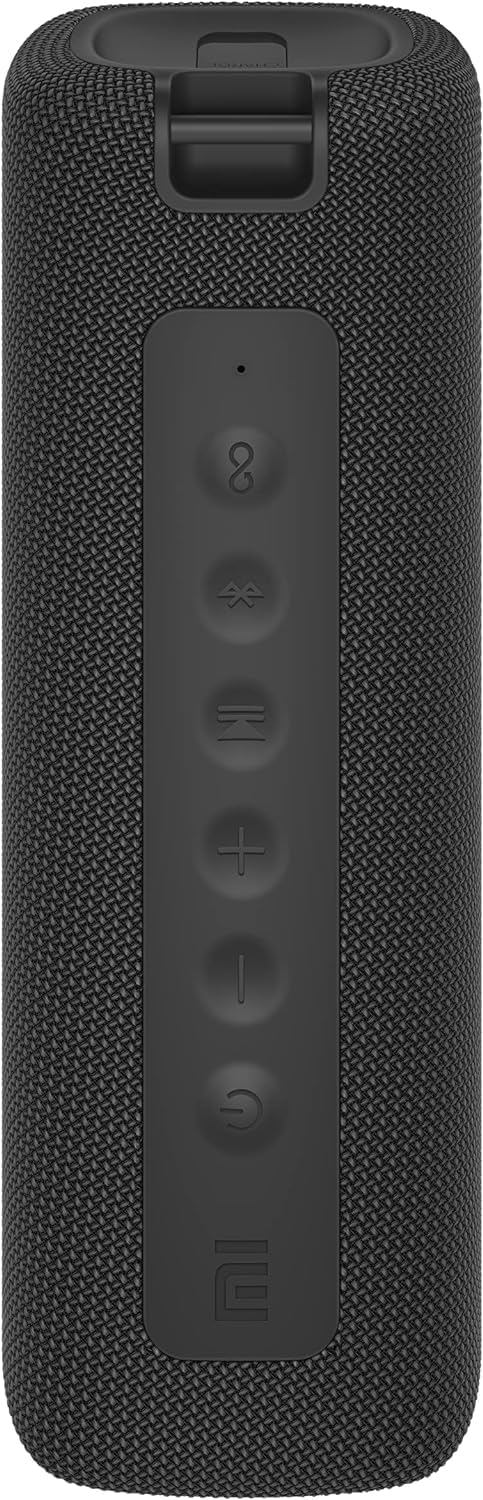
Setšoantšo: Pele view of the speaker with clearly visible control buttons.
| Konopo/ Lesupa | Mosebetsi |
|---|---|
| Konopo ea Matla (⏻) | Press and hold for 2 seconds to power on/off. Short press to play/pause music or answer/end calls. |
| Phatlalatso ea Phahamiso (−) | Short press to decrease volume. Press and hold for previous track. |
| Phahamisa Phahamiso (+) | Short press to increase volume. Press and hold for next track. |
| Konopo ea Bluetooth (Ⓑ) | Tlanya ka bokhutšoanyane ho kenya mokhoa oa ho kopanya Bluetooth. |
| Konopo ea TWS (∞) | Press to initiate True Wireless Stereo pairing with another Mi Portable Bluetooth Speaker. |
| Letšoao la LED | Indicates power status, charging status, and Bluetooth pairing status. |
5. Seta
5.1 Ho lefisa Sebui
- Hokela thapo ya ho tjhaja ya USB-C e fanweng le koung ya ho tjhaja ya sebui.
- Connect the other end of the cable to a 5V 1A USB power adapter (not included) or a computer's USB port.
- Letšoao la LED le tla bontša boemo ba ho tjhaja (mohlala, bofubelu ha o ntse o tjhaja, le tima ha o ntse o tjhaja ka botlalo).
- Tefiso e felletseng e nka lihora tse ka bang 4.
5.2 Ho Bulela/Ho tima
- Ho Matlafatsa: Press and hold the Power button for 2 seconds. You will hear an audible prompt, and the LED indicator will light up.
- Ho tima: Press and hold the Power button for 2 seconds. You will hear an audible prompt, and the LED indicator will turn off.
5.3 Ho hokahanya ha Bluetooth
- Ensure the speaker is powered on. The LED indicator will flash blue, indicating it's in pairing mode.
- Sesebedisweng sa hao (smartphone, tablet, komporo), bula Bluetooth mme o batle disebediswa tse teng.
- Select "Mi Portable Bluetooth Speaker" from the list of devices.
- Once paired, the LED indicator will turn solid blue, and you will hear a confirmation sound.
- The speaker will automatically connect to the last paired device when powered on, if within range.
5.4 Tšebeliso ea 'Nete ea Wireless Stereo (TWS).
To pair two Xiaomi Mi Portable Bluetooth Speakers for stereo sound:
- Netefatsa hore libui ka bobeli li buletsoe 'me ha li hoketsoe sesebelisoa se seng sa Bluetooth.
- On one speaker (this will be the primary speaker), short press the TWS button (∞). The LED indicator will flash.
- On the second speaker, short press the TWS button (∞).
- The two speakers will automatically connect to each other. You will hear a confirmation sound, and the LED indicators on both speakers will turn solid blue.
- Now, connect your device to the primary speaker via Bluetooth as described in section 5.3. The sound will play in stereo through both speakers.
Khokahano ea 5.5 AUX
For wired audio playback:
- Connect a 3.5mm audio cable (not included) from your audio source to the AUX IN port on the speaker.
- Sebui se tla fetohela ho AUX mode.
- Control playback and volume from your audio source device.
6. Litaelo tsa Ts'ebetso
6.1 Ho Bapala 'Mino
- Bapala/Emisa: Tobetsa konopo ea Matla.
- Volume holimo: Short press the Volume Up (+) konopo.
- Buka ea tlase: Short press the Volume Down (−) konopo.
- Pina e Latelang: Press and hold the Volume Up (+) konopo.
- Pina e fetileng: Press and hold the Volume Down (−) konopo.
6.2 Taolo ea Mehala
- Araba/Khaola mohala: Short press the Power button when a call comes in or during a call.
- Hana Mohala: Press and hold the Power button for 2 seconds when a call comes in.
7. Tlhokomelo
- Ho hloekisa: Hlakola sebui ka bonolo, damp lesela. Se ke oa sebelisa li-abrasive cleaners kapa solvents.
- Polokelo: Beha sebui sebakeng se pholileng, se omileng hole le khanya ea letsatsi le mocheso o feteletseng.
- Mathata a Metsi: The speaker is IPX7 waterproof. Ensure the charging port cover is securely closed before exposure to water. Do not submerge the speaker for extended periods or beyond specified depths.
- Tlhokomelo ea Betri: To prolong battery life, avoid fully discharging the speaker frequently. Charge it regularly, even if not in use for long periods.
8. Ho rarolla mathata
| Bothata | Tharollo e ka khonehang |
|---|---|
| Sebui ha se sebetse. | Netefatsa hore betri e tjhajilwe. Hokela mohloling oa motlakase 'me u leke hape. |
| Ha e khone ho para ka Bluetooth. |
|
| Ha ho na molumo kapa molumo o tlase. |
|
| TWS pairing e hloleha. |
|
| Boleng bo tlase ba molumo. |
|
9. Litlhaloso

Setšoantšo: Tlase view of the speaker, displaying model number and certifications.
| Paramethara | Boleng |
|---|---|
| Mohlala | MDZ-36-DB |
| Litekanyo tsa Sehlahisoa | W 213 x D 74 x H 74 mm (approx. 8 x 3 x 3 inches) |
| Khokahano | Bluetooth 5.0, 3.5mm AUX IN |
| Sephetho se lekantsoeng | 2 x 8W (16W total) |
| Tekanyo ea Signal-to-Noise | ≥ 70dB |
| TWS Connection Range | ≤ 5m |
| Lintlha tse sa keneleng metsi | IPX7 |
| Mofuta oa Leshala | Lithium-ion, 3.7V |
| Bokhoni ba Battery | 2600mAh |
| Nako ea ho tjhaja Betri | Hoo e ka bang. Lihora tse 4 |
| Nako ea ho Bapala | Hoo e ka bang. Lihora tse 13 (ka molumo oa 50%) |
| Maqhubu a Range | 80Hz ho isa ho 20KHz |
| E lekantsoe Impedans | 4 Ω |
| Sebaka sa phetiso | 15m |
| Kenyeletso e Lekanyelitsoeng | 5V 1A |
| Boima ba Ntho | 500 Gram (liponto tse 1.1) |
10. Tiisetso le Tšehetso
Bakeng sa tlhahisoleseding e qaqileng ea tiisetso, ka kopo sheba karete ea tiisetso e kenyelelitsoeng sehlahisoa sa hau kapa etela Xiaomi ea semmuso websebaka.
If you encounter any issues not covered in this manual, please contact Xiaomi customer support or visit their official support channels for assistance.


