Selelekela
This manual provides essential information for the setup, operation, maintenance, and troubleshooting of your MSI MPG Trident 3 10SI-002US Small Form Factor Desktop. Please read this manual thoroughly before using your new system to ensure optimal performance and longevity.
Se ka Lebokoseng
Ha o qeta ho pakela, ka kopo netefatsa hore lintho tsohle tse thathamisitsoeng ka tlase li teng 'me li maemong a matle:
- MSI MPG Trident 3 10SI-002US Desktop PC
- Gaming GK30 Keyboard
- Gaming GM11 Mouse
- Adapter ea Matla le Cable
- Vertical Stand (for upright placement)
- Bukana ea Mosebelisi le Litokomane

Image: The MSI MPG Trident 3 10SI-002US desktop PC shown with its accompanying gaming keyboard and mouse.
Sehlahisoa se Felletseview
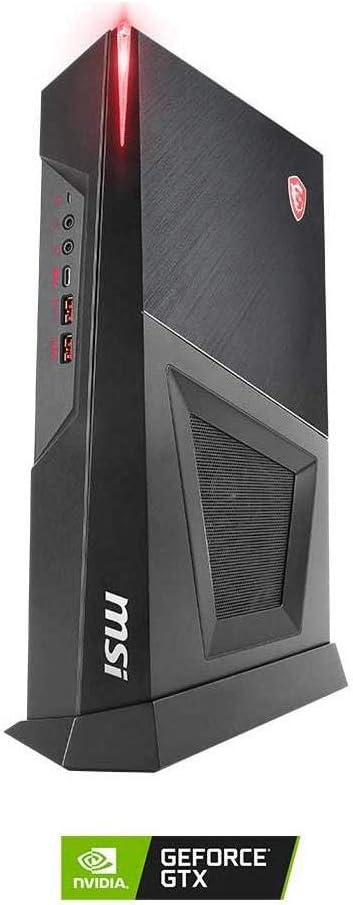
The MSI MPG Trident 3 is a compact gaming desktop designed for performance in a small form factor. Its sleek design allows for both horizontal and vertical placement.
Phanele e ka pele

Setšoantšo: Pele le lehlakoreng view of the desktop, highlighting the power button, USB ports, and audio jacks.
- Konopo ea Matla: To power on/off the system.
- Li-ports tsa USB: For connecting peripherals such as keyboards, mice, and external storage devices.
- Li-jacks tsa molumo: Headphone and microphone ports for audio input/output.
Panele e ka morao
Setšoantšo: Ka morao view of the desktop, displaying the array of connectivity options including video outputs, USB ports, and network port.
- Liphetho tsa Video: HDMI, DisplayPort, and DL-DVI-D for connecting to monitors.
- Li-ports tsa USB: Multiple USB 2.0 and USB 3.0 ports for various devices.
- Port ea Ethernet: For wired network connectivity.
- Maemelo a Mantsoe: Line-in, line-out, and microphone jacks.
- Kenyeletso ea Matla: Bakeng sa ho hokahanya adaptara ea motlakase.
Khetho ea ho beoa
The MSI MPG Trident 3 can be placed both vertically and horizontally to suit your setup.

Image: The desktop PC positioned vertically, showcasing its compact tower design.

Image: The desktop PC positioned horizontally, demonstrating its versatility in placement.
Likaroloana tsa ka hare le ho Pholisa

Setšoantšo: Ea ka hare view of the desktop, illustrating the cooling system for the CPU and GPU, designed for efficient heat dissipation in a small chassis.
The Trident 3 features a specialized cooling system to maintain optimal temperatures for its high-performance components, even within its small form factor. The system is divided into compartments for the CPU and GPU to ensure dedicated airflow.
Official Product Video: 10th Gen Trident 3 Overview
Video: Setsi sa molaoview of the MSI Trident 3, highlighting its design, features, and performance capabilities for the 10th generation models.
Litaelo tsa ho seta
Follow these steps to set up your MSI MPG Trident 3 desktop PC:
- Unpack Components: Carefully remove the PC, keyboard, mouse, power adapter, and any other accessories from their packaging.
- Khetha Sebaka: Decide whether to place the PC vertically using the included stand or horizontally. Ensure adequate ventilation around the unit.
- Kopanya li-peripherals:
- Connect your monitor(s) to the appropriate video output ports (HDMI, DisplayPort, or DL-DVI-D) on the rear panel.
- Connect the gaming keyboard and mouse to the USB ports.
- If using a wired network, connect an Ethernet cable to the Ethernet port.
- Connect any other desired peripherals (e.g., speakers, external hard drives) to the available ports.
- Kopanya Matla: Plug the power cable into the power adapter, then connect the adapter to the PC's power input port. Finally, plug the power cable into a wall outlet.
- Matlafatsa: Press the power button on the front panel of the PC.
- Tlhophiso ea pele: Follow the on-screen instructions to complete the Windows 10 Home operating system setup, including language selection, network configuration, and user account creation.
Litaelo tsa Ts'ebetso
Motlakase/O tima
- Ho Matlafatsa: Press the power button located on the front of the PC.
- Ho Koala: Tobetsa konopo ea Windows Start, ebe u khetha Matla > Koala.
- Ho qala bocha: Click the Windows Start button, then select Power > Restart.
- Ho Robala: Click the Windows Start button, then select Power > Sleep.
Ho sebelisa Sisteme ea Ts'ebetso
Your MSI MPG Trident 3 comes pre-installed with Windows 10 Home. Familiarize yourself with the Windows interface to navigate applications, manage files, and customize settings. Regular updates are recommended for security and performance.
Ho hokela Marang-rang
- Khokahano ea Mehala: Connect an Ethernet cable from your router/modem to the Ethernet port on the PC's rear panel.
- Wireless Connection (Wi-Fi 6):
- Tobetsa letšoao la Wi-Fi ka har'a terei ea sistimi (sekhutlong se ka tlase ho le letona sa skrine).
- Khetha netweke eo u e batlang ea Wi-Fi lethathamong.
- Enter the network security key (password) if prompted, then click "Connect".
Likarolo tsa Ts'ebetso
The MSI MPG Trident 3 10SI-002US is engineered for a responsive computing and gaming experience:
- Motlakase: Powered by an Intel Core i5-10400F processor, providing efficient multi-core performance for gaming and multitasking.
- Litšoantšo: Features an NVIDIA GeForce GTX 1660 Super AERO ITX OC graphics card, delivering smooth visuals and high frame rates for modern games.
- Sehopotso: Equipped with 8GB DDR4 RAM, ensuring smooth operation for applications and games.
- Polokelo: Combines a fast 512GB SSD for quick boot times and application loading, along with a 1TB HDD for ample storage of games, media, and other files.
- Sistimi ea ho Pholisa: Utilizes MSI's Silent Storm Cooling concept, which separates the CPU and GPU into different chambers for optimized airflow and efficient heat dissipation, ensuring stable performance during intense usage.
- Khokahano: Includes Wi-Fi 6 for high-speed wireless internet, and USB Type-C for versatile connectivity with modern devices.
Tlhokomelo
Regular maintenance helps ensure the longevity and optimal performance of your PC:
- Boloka Hloekile: Regularly clean the exterior of the PC with a soft, dry cloth. Use compressed air to clear dust from vents and fans to prevent overheating. Ensure the PC is powered off and unplugged before cleaning.
- Lintlafatso tsa Software: Keep your Windows operating system, drivers (especially graphics drivers), and applications updated to the latest versions for security, stability, and performance improvements.
- Tšireletso ea Antivirus: Install and regularly update antivirus software to protect against malware and other security threats.
- Backup ya data: Nako le nako boloka data ea bohlokoa ho drive ea kantle kapa polokelo ea leru ho thibela tahlehelo ea data.
- Moea oa moea: Ensure the PC has adequate space around its vents for proper airflow. Avoid placing it in enclosed spaces or on soft surfaces that can block ventilation.
Ho batle phoso
If you encounter issues with your MSI MPG Trident 3, consider the following common solutions:
- Ha ho Matla:
- Check if the power cable is securely connected to both the PC and the wall outlet.
- Netefatsa hore lebota lea sebetsa ka ho hokela sesebelisoa se seng.
- Ensure the power adapter is correctly connected.
- Ha ho Pontšo:
- Confirm the monitor is powered on and the video cable is securely connected to both the PC and the monitor.
- Try connecting the monitor to a different video output port on the PC, if available.
- Netefatsa hore mohloli o nepahetseng oa ho kenya o khethiloe ho skrineng sa hau.
- Sisteme ea Hoama/Ho senyeha:
- Qala hape PC.
- Ensure all drivers and the operating system are up to date.
- Check for overheating by monitoring system temperatures (MSI Dragon Center software can assist with this).
- Tshebetso e butle:
- Koala lits'ebetso tse sa hlokahaleng tsa morao-rao.
- Check available storage space on your drives.
- Run a disk cleanup and defragmentation (for HDD) or TRIM (for SSD).
- Ha ho Khokahano ea Marang-rang:
- For wired connections, check the Ethernet cable and router/modem status.
- For wireless connections, ensure Wi-Fi is enabled and you are connected to the correct network. Restart your router/modem.
For further assistance, please refer to the MSI support websebaka kapa ikopanye le litšebeletso tsa bareki.
Litlhaloso
| Karolo | Lintlha |
|---|---|
| Lebitso la Mohlala | MSI MPG Trident 3 10SI-002US |
| processor | Intel Core i5-10400F |
| Chipset | Intel H410 |
| Karete ea Grafiken | NVIDIA GeForce GTX 1660 Super AERO ITX OC (1 x HDMI, 1 x DisplayPort, 1 x DL-DVI-D) |
| RAM | 8GB DDR4 |
| Polokelo | 512GB SSD + 1TB HDD |
| Mokhoa oa tšebetso | Lehae la Windows 10 |
| Khokahano e se nang mohala | Wi-Fi 6 (802.11ax) |
| Li-port tsa USB | USB Type-C, Multiple USB 3.0 and USB 2.0 ports |
| Litekanyo (LxWxH) | 9.9 x 13.93 x 3.84 lisenthimithara |
| Boima ba Ntho | 12.4 liponto |
| Mmala | Ntsho |
Warranty le Tšehetso
Your MSI MPG Trident 3 10SI-002US comes with a Likarolo tsa Selemo se 1 le Warranty ea Basebetsi.
For technical support, driver downloads, and further product information, please visit the official MSI support websebaka:
U ka boela ua etela ho MSI Store on Amazon for product details and accessories.


