Selelekela
Thank you for choosing the Tracer Roadster 4 in 1 Steering Wheel. This manual provides detailed instructions for setting up, operating, maintaining, and troubleshooting your new racing wheel. Please read this manual thoroughly before use to ensure optimal performance and longevity of your device.
The Tracer Roadster 4 in 1 Steering Wheel is designed for an immersive gaming experience, compatible with various platforms including PlayStation 4 and Windows PC. It features a responsive steering wheel, integrated shifter, and a pedal set for realistic control.
Litaba tsa Sephutheloana
- Tracer Roadster 4 in 1 Steering Wheel
- Pedal Set
- Bukana ea mosebelisi (tokomane ena)
Tataiso ea ho seta
Connecting to PlayStation 4 (PS4)
- Connect the steering wheel's USB cable to an available USB port on your PS4 console.
- Power on your PS4 console. The red LED on the steering wheel will illuminate, indicating power.
- Connect the steering wheel to your PS4 controller using a microUSB cable (not included). This step is crucial for authentication.
- Tobetsa ea LEHAE button on the steering wheel. The green LED will illuminate, indicating successful connection and readiness for use.
Connecting to PC (Windows)
- Connect the steering wheel's USB cable to an available USB port on your Windows PC.
- The system should automatically detect and install the necessary drivers. If not, please refer to the manufacturer's websebaka bakeng sa downloads mokhanni.
- Once drivers are installed, the steering wheel will be ready for use with compatible PC racing games.

Figure 1: The Tracer Roadster 4 in 1 Steering Wheel, including the main wheel unit, integrated shifter, and separate pedal set. This image shows the complete setup ready for connection.
Litaelo tsa Ts'ebetso
Taolo ea Wheel Wheel
The steering wheel features a full range of motion for precise control in racing games. It includes various buttons and a D-pad for in-game navigation and actions, mimicking a standard game controller layout.
- Directional Pad (D-Pad): For menu navigation and specific in-game controls.
- Action Buttons (X, Circle, Square, Triangle / A, B, X, Y): Likonopo tse tloaelehileng tsa liketso tsa papali.
- L1/R1, L2/R2 Buttons: Shoulder buttons, often used for shifting gears or other actions.
- Konopo ea HOME: PS4 system menu access.
- PROG Konopo: For programming specific functions (refer to game-specific instructions).
- Touchpad: Integrated touchpad for additional control options, especially on PS4.
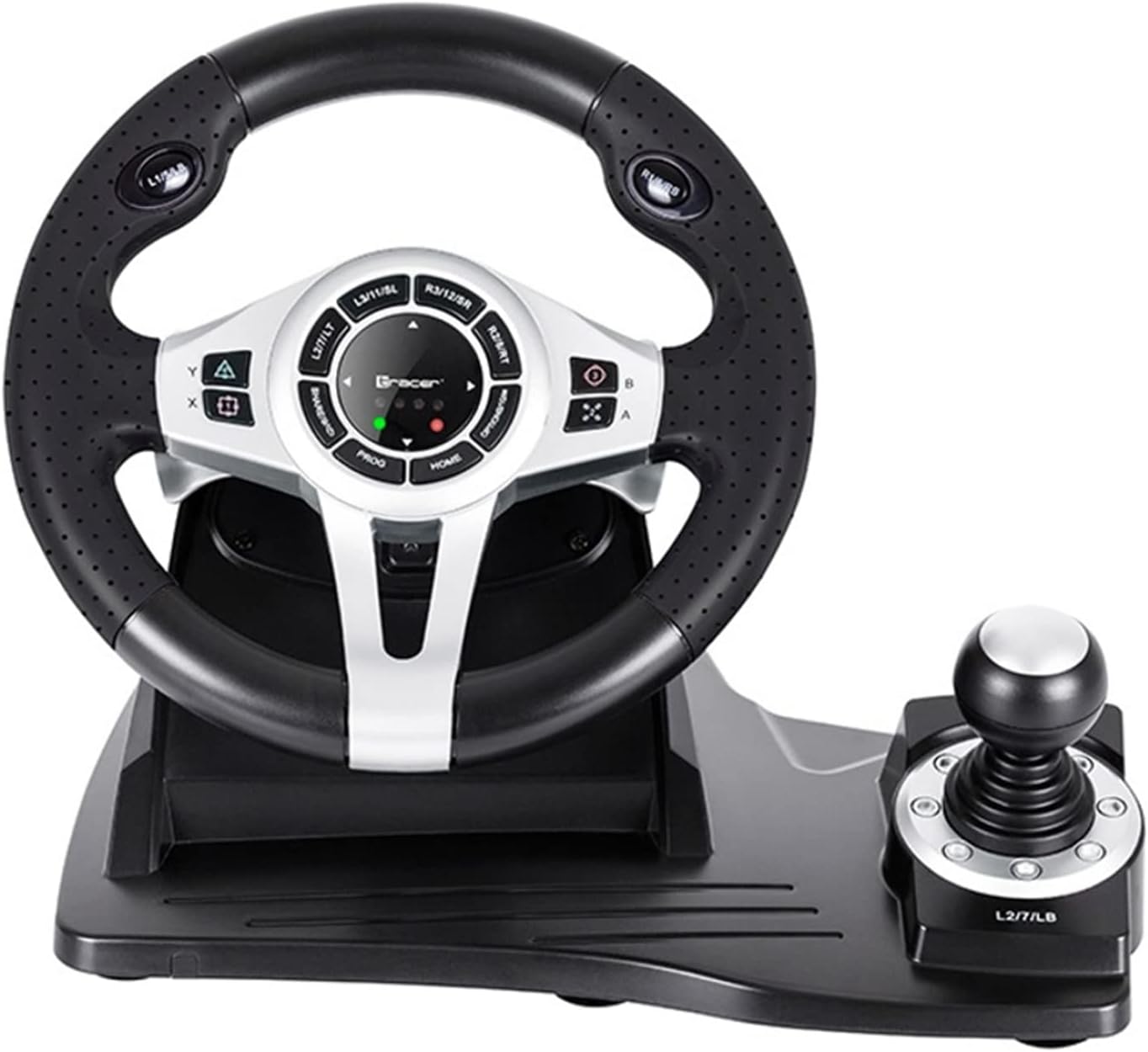
Setšoantšo sa 2: E qaqileng view of the central control panel on the steering wheel, showing the various buttons, D-pad, and indicator lights. The integrated shifter is visible to the right.
Pedal Set
The separate pedal set includes an accelerator and brake pedal for realistic driving simulation. Ensure the pedal set is placed on a stable surface to prevent slipping during intense gameplay.

Figure 3: The standalone pedal unit, featuring both accelerator and brake pedals. The textured base provides grip to prevent movement during use.
Tlhokomelo le Tlhokomelo
- Ho hloekisa: Use a soft, dry cloth to clean the surface of the steering wheel and pedals. For stubborn dirt, a slightly damp Lesela le ka sebelisoa, empa etsa bonnete ba hore ha ho mongobo o kenang likarolong tse ka hare.
- Polokelo: Ha e sa sebelisoe, boloka sesebelisoa sebakeng se phodileng, se omileng hole le khanya ea letsatsi le mocheso o feteletseng.
- Qoba Liquids: Se ke oa beha sesebelisoa metsing kapa marong a mang.
- Tšoara ka Tlhokomeliso: Qoba ho liha kapa ho beha sesebelisoa tlas'a tšusumetso e matla.
Ho batle phoso
| Bothata | Lebaka le ka khonehang | Tharollo |
|---|---|---|
| Steering wheel not recognized by PS4. | Incorrect connection or authentication issue. | Ensure the steering wheel's USB cable is securely connected to the PS4. Verify the microUSB cable connection between the steering wheel and the PS4 controller. Press the LEHAE konopo ka setering. |
| No response from steering wheel on PC. | Drivers not installed or USB port issue. | Try a different USB port. Check Device Manager for driver status. Reinstall drivers if necessary from the manufacturer's websebaka. |
| Lipontšo tsa LED ha li bonese. | No power or connection issue. | Ensure the USB cable is firmly connected to the console/PC. Check if the console/PC is powered on. |
| Lipedale ha li arabe. | Loose connection to the steering wheel. | Verify that the pedal unit's cable is securely plugged into the steering wheel base. |
Litlhaloso
| Sebopeho | Lintlha |
|---|---|
| Brand | Tracer |
| Lebitso la Mohlala | Roadster 4 in 1 |
| Nomoro ea Mohlala | TRAJOY46524 |
| Theknoloji ea Khokahano | USB |
| Lisebelisoa tse lumellanang | PlayStation 4, Windows PC |
| Mofuta oa Molaoli | Lebili la ho tsamaisa |
| Mmala | Ntsho |
| Tšobotsi e Khethehileng | Touchpad |
| Nomoro ea Likonopo | 8 (excluding D-pad and shifter controls) |
| Boima ba Ntho | 2 lik'hilograma |
| Litekanyo tsa Sehlahisoa (L x W x H) | 2.8 x 24.6 x 16.5 cm, |
Warranty le Tšehetso
For warranty information and technical support, please refer to the official Tracer websaete kapa ikopanye le morekisi oa hau. Boloka bopaki ba hau ba theko bakeng sa likopo life kapa life tsa waranti.
Bakeng sa thuso e eketsehileng, o ka etela ho product page on Amazon.com.be.


