1. Sehlahisoa Overview
The ANENG Q1 is a 9999 counts True RMS digital multimeter designed for accurate measurement of various electrical parameters. It features an EBTN black screen with a large, backlit LCD for clear readability in diverse lighting conditions. This device supports both automatic and manual ranging, offering flexibility for different measurement needs. It includes an analog bar graph display for quick visual indication of readings.
Likarolo tsa Bohlokoa:
- Tekanyo ea 'Nete ea RMS: Provides accurate readings for non-sinusoidal waveforms.
- NCV (Non-Contact Voltage) Ho lemoha: For safe identification of live wires without direct contact.
- Tekanyo ea Othomathiki/Matsoho: User-selectable measurement range for convenience and precision.
- Analog Bar Graph: Visual representation of measurement trends.
- Large Backlit LCD: Enhanced visibility in low-light environments.
- Tšireletso e feteletseng: Ensures safety across all measurement ranges.
- Letšoao la Betri e Tlase: E lemosa ha ho hlokahala hore betri e nkeloe sebaka.
- Mosebetsi oa ho Tšoara Boitsebiso: E hoamisa 'malo o bontšitsoeng bakeng sa ho rekota habonolo.
- Motlakase oa Motlakase: E boloka bophelo ba betri.
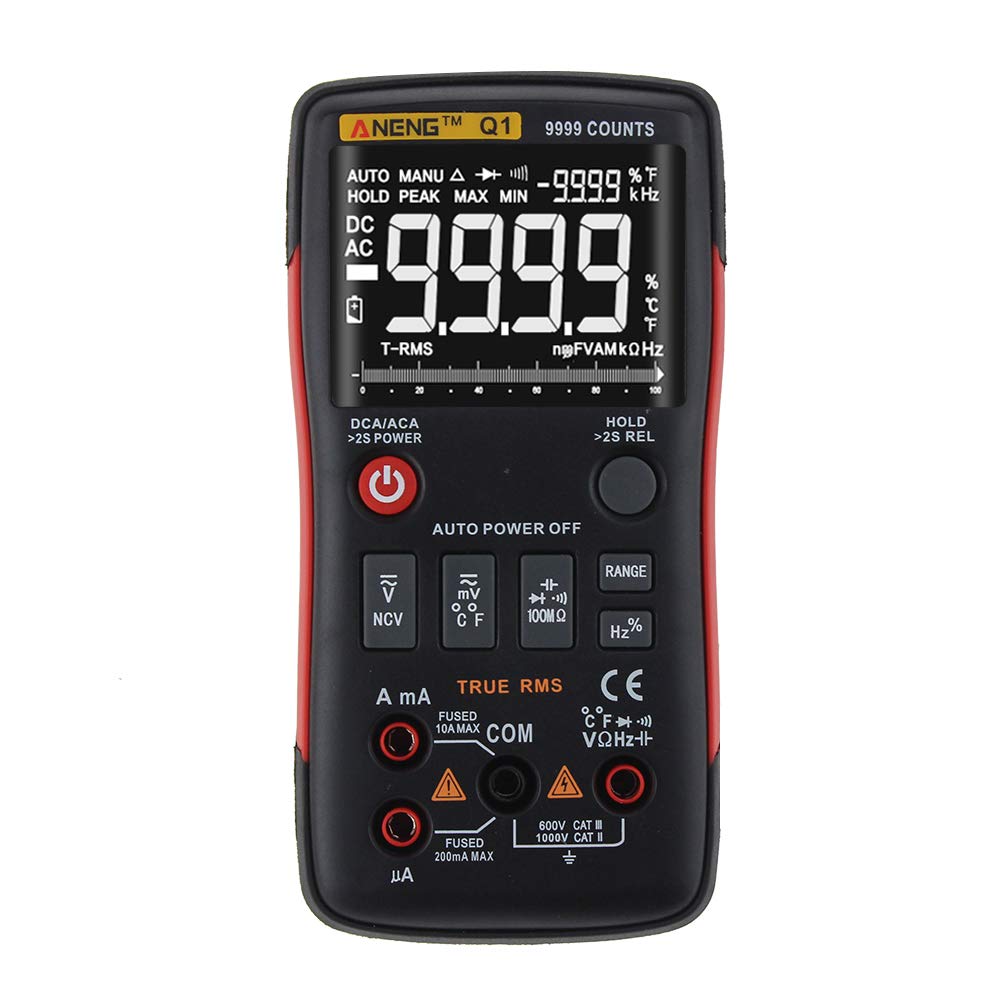
Figure 1: ANENG Q1 Digital Multimeter with its display and function buttons.
2. Boitsebiso ba Tšireletseho
Always observe basic safety precautions when using this multimeter to prevent personal injury or damage to the device. Read and understand all safety information before operation.
- Se ke oa feta palo e kholo ea lintho tse kentsoeng bakeng sa tšebetso efe kapa efe.
- E-ba hlokolosi ha u sebetsa le voltage kaholimo ho 30V AC RMS, tlhoro ea 42V, kapa 60V DC.tage baka kotsi e tshosang.
- Pele o lekanya motlakase, etsa bonnete ba hore potoloho e felisitsoe matla mme multimeter e hokahantsoe ka tatellano.
- Kamehla tima li-lead tsa liteko ho tloha potolohong pele o fetola mesebetsi.
- Inspect test leads for damaged insulation or exposed metal before use. Replace if damaged.
- Do not operate the multimeter if the battery cover is not properly closed.
- Tlosa libeteri hang-hang ha letšoao la betri le tlaase le hlaha ho netefatsa hore ho baloa ka nepo.
- Khomarela likhoutu tsa polokeho ea lehae le ea naha.
3. Seta
3.1 Ho kenya Betri
- Netefatsa hore multimeter e tima.
- Fumana sebaka sa betri ka morao ho sesebelisoa.
- Hlakola sekoaelo sa karolo ea betri ebe u se ntša.
- Insert two 1.5V AA batteries, observing the correct polarity (+/-).
- Tlosa sekoaelo sa betri 'me u se sireletse ka screw.
3.2 Ho kopanya Lieta tsa Tlhahlobo
The multimeter comes with a set of test leads. Always connect the black lead to the 'COM' (Common) jack. Connect the red lead to the appropriate input jack based on the measurement function:
- VΩHz+ jack for Voltage, Resistance, Frequency, Capacitance, Diode, and Continuity measurements.
- mA jack for current measurements up to 999.9mA.
- 10A jack for current measurements up to 10A.

Figure 2: Included test leads and probes.

Figure 3: Complete ANENG Q1 Multimeter kit with accessories.
4. Litaelo tsa Ts'ebetso
The ANENG Q1 multimeter offers both automatic and manual ranging. Press the 'RANGE' button to switch between auto and manual modes. In manual mode, press 'RANGE' repeatedly to cycle through available ranges.
4.1 Ho Bulela/Ho tima
Press the red power button to turn the multimeter on or off. The device features an auto power-off function to conserve battery life after a period of inactivity.
4.2 Ho lekanya AC/DC Moqtage (V)
- Connect the black test lead to the 'COM' jack and the red test lead to the 'VΩHz+' jack.
- Khetha molumotage measurement function (AC V or DC V) using the function button.
- Connect the test probes in parallel across the circuit or component to be measured.
- Bala voltagboleng ho pontšo.
4.3 Measuring AC/DC Current (A/mA/µA)
- Bohlokoa: Ensure the circuit is de-energized before connecting the multimeter for current measurement.
- Connect the black test lead to the 'COM' jack. Connect the red test lead to the 'mA' jack for currents up to 999.9mA, or to the '10A' jack for currents up to 10A.
- Select the current measurement function (AC A or DC A).
- Open the circuit and connect the multimeter in series with the load.
- Re-energize the circuit and read the current value on the display.
4.4 Measuring Resistance (Ω)
- Connect the black test lead to 'COM' and the red test lead to 'VΩHz+'.
- Select the resistance measurement function.
- Ensure the circuit or component is de-energized before measuring resistance.
- Connect the test probes across the component.
- Bala boleng ba ho hanyetsa ponts'ong.
4.5 Measuring Capacitance (F)
- Connect the black test lead to 'COM' and the red test lead to 'VΩHz+'.
- Select the capacitance measurement function.
- Ensure the capacitor is fully discharged before measurement to prevent damage to the multimeter.
- Hokela di-probe tsa teko ho pholletsa le di-terminal tsa capacitor.
- Bala boleng ba capacitance ponts'ong.
4.6 Measuring Frequency (Hz) and Duty Cycle (%)
- Connect the black test lead to 'COM' and the red test lead to 'VΩHz+'.
- Select the frequency/duty cycle measurement function.
- Connect the test probes across the signal source.
- Bala lebelo kapa boleng ba potoloho ea mosebetsi skrineng.
4.7 Measuring Temperature (°C/°F)
- Connect the temperature probe to the appropriate input jacks (usually 'COM' and 'VΩHz+' or dedicated temperature jacks if available).
- Select the temperature measurement function.
- Beha ntlha ea sesebelisoa sa ho lekanya mocheso holim'a kapa haufi le ntho eo mocheso oa eona o lokelang ho lekanyetsoa.
- Bala boleng ba mocheso ponts'ong.
Teko ea Diode ea 4.8
- Connect the black test lead to 'COM' and the red test lead to 'VΩHz+'.
- Select the diode test function.
- Connect the red probe to the anode and the black probe to the cathode of the diode.
- Pontšo e tla bontša vol e ka peletage drop. Reverse the probes; an open circuit (OL) indicates a good diode.
4.9 Tsoelopele Test
- Connect the black test lead to 'COM' and the red test lead to 'VΩHz+'.
- Khetha mosebetsi oa tlhahlobo ea ho tsoela pele.
- Hokela di-probe tsa teko ho pholletsa le potoloho kapa karolo.
- A continuous beep indicates a low resistance path (continuity).
4.10 NCV (Moqolo o sa amaneng le ronatage) Ho lemoha
- Select the NCV function.
- Bring the top of the multimeter close to the conductor or outlet.
- The device will indicate the presence of AC voltage ka alamo e utlwahalang le/kapa sesupo sa pono.
5. Tlhokomelo
5.1 Ho hloekisa
Hlakola nyeoe ka papatsoamp cloth and mild detergent. Do not use abrasives or solvents. Ensure the device is completely dry before use.
5.2 Polokelo
When not in use for extended periods, remove the batteries to prevent leakage. Store the multimeter in a cool, dry place, away from direct sunlight and extreme temperatures. The recommended storage conditions are -20°C to 60°C (-4°F to 140°F) with humidity less than 80% RH.
6. Ho rarolla mathata
- Ha ho Pontšo: Lekola ho kengoa ha betri 'me u netefatse hore libeteri ha li felle. Kenya sebaka ha ho hlokahala.
- Litemana tse Fosahetseng: Verify that the correct function and range are selected. Ensure test leads are properly connected and not damaged. Check battery level.
- 'OL' (Overload) Display: The measured value exceeds the selected range or the maximum input limit. Switch to a higher range or ensure the input is within the device's specifications.
- No Continuity Beep: Check if the circuit is truly continuous and has very low resistance. Ensure test leads are making good contact.
7. Litlhaloso
7.1 Litlhaloso tsa Motlakase

Figure 4: Electrical Specifications - DC and AC Voltage.

Figure 5: Electrical Specifications - DC and AC Current, and Resistance.

Figure 6: Electrical Specifications - Capacitance, Frequency, and Duty Cycle.

Figure 7: Electrical Specifications - Temperature, Diode, Continuity, and NCV.
7.2 General, Mechanical, and Environmental Specifications

Figure 8: General, Mechanical, and Environmental Specifications.
| Paramethara | Boleng |
|---|---|
| Pontšo | 9999 Counts LCD |
| Rang | Auto/Manual |
| Lintho tse bonahalang | ABS+TPE |
| Update Rate | Linako tse 3/Bobeli |
| RMS ea 'nete | Ee |
| Data Hold | Ee |
| Backlight | Ee |
| Letšoao la Battery e tlase | Ee |
| Motlakase oa Auto Off | Ee |
| Paramethara | Boleng |
|---|---|
| Boemo | 146*74*34mm |
| Boima ba 'mele | 125g |
| Mofuta oa Leshala | 2 x 1.5V AA Battery (not included) |
| Paramethara | Boleng |
|---|---|
| Mocheso oa ho sebetsa | 0~40°C |
| Mongobo o sebetsang | <75% RH |
| Mocheso oa polokelo | -20 ~ 60°C |
| Mongobo oa polokelo | <80% RH |
8. Tiisetso le Tšehetso
8.1 Tiisetso
This ANENG Q1 Digital Multimeter comes with a waranti ya selemo se le seng from the date of purchase, covering manufacturing defects. This warranty does not cover damage caused by misuse, accident, unauthorized modification, or normal wear and tear. Please retain your proof of purchase for warranty claims.
8.2 Tšehetso ea Bareki
For technical assistance, troubleshooting, or warranty inquiries, please contact the retailer or manufacturer's customer service. Refer to your purchase documentation for specific contact details.


