1. Selelekela
This manual provides comprehensive instructions for the setup, operation, and maintenance of your Xprinter XP-360B Thermal Label Barcode Printer. Please read this manual thoroughly before using the printer to ensure proper functionality and to prevent damage.
The XP-360B is a high-speed thermal label printer designed for various applications, including barcode printing, shipping labels, and receipt printing. It supports label widths from 20mm to 80mm and offers a maximum print speed of 200mm per second.

Figure 1.1: Xprinter XP-360B Thermal Label Barcode Printer. This image shows the printer from a front-right angle, with labels being fed out of the front slot.
2. Boitsebiso ba Tšireletseho
To ensure safe operation and prolong the life of your printer, please observe the following safety precautions:
- U se ke ua beha printa metsing kapa mongobong o feteletseng.
- Qoba ho beha printa letsatsing le tobileng kapa haufi le mehloli ea mocheso.
- Use only the power adapter supplied with the printer.
- U se ke ua leka ho qhaqha kapa ho lokisa printare ka bouena. Bua le basebetsi ba tšoanelehang ba tšebeletso.
- Beha printa hole le lerole le lithōle.
- Netefatsa hore printa e behiloe sebakeng se tsitsitseng, se bataletseng.
- Tlosa printa ho tsoa ho sokete ea motlakase pele u e hloekisa kapa ha e sa sebelisoe ka nako e telele.
3. Likahare tsa Sephutheloana
Netefatsa hore lintho tsohle li teng ka har'a sephutheloana:
- Xprinter XP-360B Thermal Label Barcode Printer
- Adapter ea Matla
- Cable ea USB
- Bukana ea mosebelisi (tokomane ena)
- CD ea mokhanni (kapa sehokelo sa ho jarolla bakhanni)
4. Sehlahisoa Overview
4.1. Pele View

Setšoantšo sa 4.1: Pele view of the XP-360B printer, showing the label output slot and control buttons.
- Label Output Slot: Where printed labels exit the printer.
- Likonopo tsa ho Laola:
- MATLA: Letšoao la matla.
- PHOSO: Error indicator.
- KHOTHATSO: Pauses or resumes printing.
- FEED: Feeds a blank label.
4.2. Lehlakore View
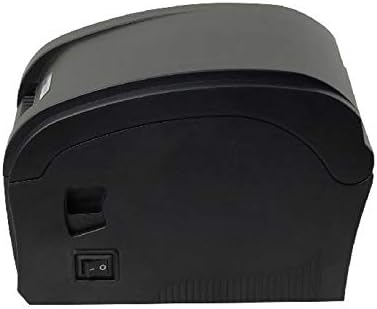
Setšoantšo sa 4.2: Lehlakore view of the XP-360B printer, highlighting the power switch.
- Power switjha: E bulela kapa ho tima printa.
4.3. Ka hare View (Cover Open)

Setšoantšo sa 4.3: Ka hare view of the XP-360B printer with the top cover open, showing the label roll compartment and print head assembly.
- Print Head Assembly: Contains the thermal print head.
- Karolo ea Moqolo oa Li-label: Area for loading the label roll.
- Adjustable Paper Guides: Guides to align the label roll.
5. Seta
5.1. Ho phutholla le ho Beha
- Tlosa printa le disebediswa tsohle ka hloko ho tloha sephuthelong.
- Beha printa sebakeng se tsitsitseng, se bataletseng se nang le moea o lekaneng.
- Ensure there is enough space around the printer for proper operation and maintenance.
5.2. Ho hokela Printer
- Connect the power adapter to the printer's power input port.
- Hokela adaptara ea motlakase sebakeng se loketseng sa motlakase.
- Hokela ntlha e 'ngoe ea thapo ea USB koung ea USB ea printa.
- Hokela pheletsong e 'ngoe ea thapo ea USB ho koung ea USB e fumanehang komporong ea hau.
5.3. Loading Labels
- Netefatsa hore printa e timiloe.
- Bula sekoaelo se kaholimo sa printa.
- Place the label roll into the label compartment, ensuring the labels feed from the bottom of the roll towards the front of the printer.
- Adjust the movable paper guides to fit the width of your label roll snugly, without being too tight.
- Pull a few labels out past the print head and through the label output slot.
- Kwala sekoahelo se ka holimo ka thata ho fihlela se kena sebakeng sa sona.

Figure 5.1: Loading a roll of thermal labels into the XP-360B printer's internal compartment.
5.4. Ho kenya Mokhanni
Before using the printer, you must install the appropriate drivers on your computer. Drivers are typically provided on a CD or can be downloaded from the manufacturer's official websebaka.
- Insert the driver CD into your computer's CD-ROM drive, or navigate to the official Xprinter support website to download the XP-360B drivers.
- Latela litaelo tse skrineng ho phethela ho kenya mokhanni.
- After installation, it is recommended to restart your computer.
6. Litaelo tsa Ts'ebetso
6.1. Ho tima/Ho tima
- To turn on the printer, flip the power switch located on the side of the printer to the 'ON' position. The POWER indicator light will illuminate.
- To turn off the printer, flip the power switch to the 'OFF' position.
6.2. Motheo oa Khatiso
- Netefatsa hore printa e hoketsoe komporong ea hau 'me e buletsoe.
- Open the document or application from which you wish to print labels (e.g., label design software, shipping platform).
- Go to the print settings (File > Hatisa).
- Select "Xprinter XP-360B" as your printer.
- Adjust the paper size and orientation settings to match your labels (e.g., 4x6 inch, portrait/landscape).
- Click "Print". The printer will automatically detect the label gaps and print accordingly.
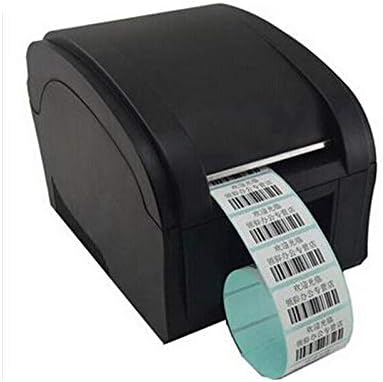
Figure 6.1: The XP-360B printer in operation, feeding out a continuous roll of printed labels.
6.3. Using Control Buttons
- FEED Konopo: Press this button once to feed a single blank label. This is useful for testing label alignment or advancing to the next label.
- KHUTSA Konopo: Press this button to temporarily pause a print job. Press it again to resume printing.
7. Tlhokomelo
Regular maintenance ensures optimal performance and extends the lifespan of your printer.
7.1. Ho hloekisa Hlooho ea Khatiso
The print head should be cleaned regularly, especially if print quality degrades or after printing a large volume of labels.
- Koala printa 'me u e tlose ho tsoa mohloling oa motlakase.
- Bula sekoaelo se kaholimo sa printa.
- Emela metsotso e seng mekae hore hlooho ea khatiso e phole haeba printa e se e sa tsoa sebelisoa.
- Gently wipe the thermal print head surface with an alcohol swab or a lint-free cloth lightly dampe entsoe ka joala ba isopropyl.
- Lumella hlooho ea khatiso hore e ome ka ho feletseng pele u koala sekoahelo le ho kenya printa ka matla.
7.2. Cleaning the Platen Roller
The platen roller helps feed the labels smoothly. Clean it if you notice feeding issues.
- Follow steps 1-3 from "Cleaning the Print Head".
- Rotate the platen roller manually and wipe its surface with an alcohol swab or a lint-free cloth lightly dampe entsoe ka joala ba isopropyl.
- Allow it to dry completely before closing the cover.
8. Ho rarolla mathata
This section addresses common issues you might encounter with your XP-360B printer.
| Bothata | Lebaka le ka khonehang | Tharollo |
|---|---|---|
| Printer ha e sebetse | Power cable loose; Power outlet faulty; Printer fault | Check power cable connection; Try a different outlet; Contact support if problem persists. |
| No printing / Printer offline | USB cable loose; Driver not installed; Printer offline in OS | Check USB connection; Install drivers; Check printer status in computer settings. |
| Poor print quality / Faded prints | Dirty print head; Low quality labels; Incorrect print density settings | Clean the print head (see Section 7.1); Use high-quality thermal labels; Adjust print density in driver settings. |
| Li-label tse sa fepe hantle | Labels loaded incorrectly; Paper guides not adjusted; Dirty platen roller | Re-load labels correctly; Adjust paper guides; Clean platen roller (see Section 7.2). |
| ERROR light is on | Paper jam; Cover open; Print head overheating | Clear any paper jams; Ensure cover is closed properly; Turn off printer and let it cool down. |
9. Litlhaloso
| Sebopeho | Tlhaloso |
|---|---|
| Mohlala | XP-360B |
| Mokhoa oa ho Hatisa | Thermal e otlolohileng |
| Sehokedi | USB |
| Lebelo la ho Hatisa | Ho fihlela ho 200mm / motsotsoana |
| Max Paper Width | 80mm (adjustable from 20mm) |
| Mokhoa oa ho fepa pampiri | Ka ho iketsa |
| Khatiso ea Marang-rang | Tse thapo |
| Khatiso ea Duplex | Che |
| Litekanyo | 25 x 22 x 21 cm, |
| Boima ba 'mele | 2 lik'hilograma |
10. Tiisetso le Tšehetso
Xprinter products are designed for reliability and performance. For specific warranty terms and conditions, please refer to the warranty card included with your product or visit the official Xprinter websebaka.
If you encounter any issues that cannot be resolved using the troubleshooting guide, or if you require technical assistance, please contact Xprinter customer support through their official websebaka sa marang-rang kapa tlhaiso-leseling e fanoeng litokomaneng tsa sehlahisoa sa hau.
Please have your model number (XP-360B) and purchase information ready when contacting support.


