Selelekela
The Insignia NS-SPBTWAVE2-BK Wave 2 Portable Bluetooth Speaker provides high-quality wireless audio streaming from your compatible devices. Designed for versatility, its robust construction and rubberized feet allow for stable placement in both horizontal and vertical orientations. Enjoy hands-free communication with the built-in speakerphone and extended listening sessions thanks to its 12-hour battery life.
This manual provides essential information for setting up, operating, maintaining, and troubleshooting your speaker. Please read it thoroughly before use and retain it for future reference.
Litaba tsa Sephutheloana
Netefatsa hore lintho tsohle li teng ka har'a sephutheloana:
- Insignia NS-SPBTWAVE2-BK Wave 2 Portable Bluetooth Speaker
- USB Charging Cable
- 3.5mm Audio Cable (Auxiliary)
- Tataiso ea ho Seta ka Potlako (kapa litokomane tse tšoanang)
Likarolo tsa Sehlahisoa
- Khokahano e se nang mohala: Connects wirelessly to smartphones, tablets, and other Bluetooth-enabled devices.
- Bophelo bo Bolelele ba Battery: Features a rechargeable 2,000 mAh battery, providing up to 12 hours of playback on a full charge.
- Microphone e hahelletsoeng ka hare: Enables hands-free calling directly through the speaker.
- Auxiliary Audio Input: Allows for wired connection to audio devices via a 3.5mm audio cable.
- Libaka tse Fapaneng: Designed to stand securely in both horizontal and vertical positions.
Likarolo tsa Sebui
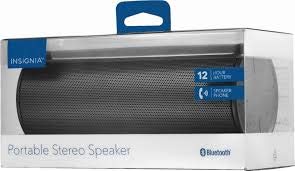
Setšoantšo sa 1: Pele view of the Insignia Wave 2 Speaker in horizontal orientation.

Figure 2: Vertical view of the speaker, illustrating the power button, charging port, and auxiliary input port at the bottom.
Refer to the images above for the location of key components such as the power button, volume controls, Bluetooth indicator, charging port, and auxiliary input.
Tlhophiso
1. Ho lefisa Sepikara
- Connect the small end of the USB charging cable to the charging port on the speaker (refer to Figure 2).
- Connect the large end of the USB charging cable to a USB power adapter (not included) or a powered USB port on a computer.
- The charging indicator light will illuminate. Allow approximately 12 hours for a full charge before first use. The indicator light will change or turn off once charging is complete.
2. Bluetooth pairing
- Ensure the speaker is fully charged. Press and hold the Power button to turn on the speaker. The Bluetooth indicator light will begin to flash, indicating it is in pairing mode.
- On your Bluetooth-enabled device (smartphone, tablet, etc.), navigate to the Bluetooth settings and ensure Bluetooth is enabled.
- Batla available devices. Select "Insignia Wave 2" from the list.
- Once paired, the Bluetooth indicator light on the speaker will become solid, and you may hear an audible confirmation.
- Haeba u botsoa hore u fumane phasewete, kenya "0000".
3. Auxiliary (Wired) Connection
- Connect one end of the 3.5mm audio cable to the AUX input port on the speaker (refer to Figure 2).
- Hokela pheletso e 'ngoe ea thapo ea molumo ea 3.5mm ho jack ea li-headphone kapa koung ea tlhahiso ea molumo ea sesebelisoa sa hau sa molumo.
- The speaker will automatically switch to auxiliary mode when a cable is detected.
Ho sebetsa Sebui
Motlakase/O tima
- To turn on: Press and hold the Power button until the indicator lights illuminate.
- To turn off: Press and hold the Power button until the indicator lights turn off.
Taolo ea Molumo
- Fetola molumo o sebelisa likonopo tsa molumo sebuelanong.
- You can also control the volume from your connected Bluetooth device or auxiliary audio source.
Ho Letsa Matsoho
When connected via Bluetooth, the speaker can be used for hands-free calls:
- Araba mohala: Tobetsa konopo ea Bapala/Emisa/Etsa Pitso hang.
- Qetella mohala: Tobetsa konopo ea Bapala/Emisa/Call hanngoe nakong ea mohala.
- Hana mohala: Press and hold the Play/Pause/Call button.
- Speak clearly towards the speaker's built-in microphone for optimal voice pickup.
Tlhokomelo
- Ho hloekisa: Sebelisa lesela le bonolo, le omileng, le se nang lesela ho hlwekisa bokantle ba sebui. O se ke wa sebedisa dihlatswa-lero tsa metsi, di-aerosol, kapa di-solvent.
- Tlhokomelo ea Betri: To prolong battery life, avoid fully discharging the battery frequently. Recharge the speaker regularly, even if not in use. Avoid exposing the speaker to extreme temperatures (hot or cold).
- Polokelo: When not in use for extended periods, store the speaker in a cool, dry place away from direct sunlight and moisture.
- Mathata a Metsi: Sebui sena ke HA HO Qoba ho pepesehela metsi kapa mongobo o feteletseng.
Ho batle phoso
| Bothata | Tharollo e ka khonehang |
|---|---|
| Sebui ha se bulele. | Netefatsa hore betri e tjhajilwe. Hokela sebui mohloding wa motlakase o sebedisa thapo ya ho tjhaja ya USB. |
| Ha ho molumo o tsoang ho sebui. | Check the volume level on both the speaker and the connected device. Ensure the correct input source (Bluetooth or AUX) is selected. Verify the Bluetooth connection or auxiliary cable. |
| Ha e khone ho para ka Bluetooth. | Ensure the speaker is in pairing mode (flashing Bluetooth indicator). Turn off and on Bluetooth on your device. Move the speaker closer to your device. Forget the speaker from your device's Bluetooth list and try pairing again. |
| Boleng ba molumo bo fosahetseng kapa ho sotha. | Ensure the speaker is within Bluetooth range (approx. 33 ft / 10 m). Reduce the volume on the source device or speaker. Check for interference from other wireless devices. Try a different audio source or file. |
| Microphone ha e sebetse nakong ea mehala. | Ensure the speaker is properly connected via Bluetooth. Speak directly towards the speaker. Check your phone's call settings to ensure audio is routed to the Bluetooth speaker. |
Litlhaloso
- Lebitso la Mohlala: Leqhubu 2
- Nomoro ea Mohlala: NS-SPBTWAVE2-BK
- Theknoloji ea Khokahano: bluetooth
- Bophelo ba Battery: Ho fihlela lihora tse 12
- Mofuta oa Leshala: 1 Lithium Ion (e kenyelelitsoe)
- Nako ea ho tjhaja: Hoo e ka bang lihora tse 12
- Boholo ba Sehlahisoa: 6.8 x 2.8 x 2.8 lisenthimithara (17.3 x 7.1 x 7.1 cm)
- Boima ba Ntho: 1 lik'hilograma
- Mokhoa oa Phatlalatso ea Audio: Setereo
- Tekanyo ea Signal-to-Noise: 80dB
- Microphone e hahelletsoeng ka hare: Ee
- Kenyelletso ea Thuso: Ho joalo (3.5mm)
- Ha e kenele metsi: Che
- Boitsebiso: Plastiki
- UPC: 600603230455
Warranty le Tšehetso
This Insignia NS-SPBTWAVE2-BK Wave 2 Portable Bluetooth Speaker comes with a Tiisetso e Lekanyelitsoeng. For specific terms and conditions of your warranty, please refer to the warranty card included with your purchase or visit the official Insignia websebaka.
For technical support, troubleshooting assistance, or warranty claims, please contact Insignia Customer Service. Contact information can typically be found on the Insignia websaeteng kapa litokomaneng tsa sehlahisoa sa hau.


