Selelekela
The Plantronics M25 Bluetooth headset is designed for convenient wireless communication and audio playback. It features an extended battery life with DeepSleep mode, ensuring readiness when needed. The headset provides whispered alerts for battery status and connection information, and allows for listening to music, internet radio, or navigation directions while managing calls.
Litaba tsa Sephutheloana
Netefatsa hore lintho tsohle li teng ka har'a sephutheloana sa hau:
- Plantronics M25 Bluetooth Headset
- AC Charger (100-240v)
- Clip-on Earloop
Tlhophiso
1. Ho tjhaja Headset
Before first use, fully charge the headset. Connect the AC charger to the headset's charging port. The indicator light will change to show charging status and turn off or change color when fully charged. A full charge can provide up to 5 months of readiness in DeepSleep mode.
2. Ho kopanya le Sesebelisoa
To pair your Plantronics M25 headset with a Bluetooth-enabled device (e.g., smartphone, tablet):
- Netefatsa hore di-headset di tjhajilwe mme di timilwe.
- Press and hold the Call button on the headset until the indicator light flashes red and blue, indicating pairing mode.
- Sesebedisweng sa hao, bulela Bluetooth mme o batle disebediswa tse ntjha.
- Select "Plantronics M25" from the list of available devices.
- Haeba o khothalletsoa ho fumana paskhoutu, kenya "0000" (zero tse 'ne).
- Once paired, the headset's indicator light will stop flashing and a voice prompt will confirm the connection.
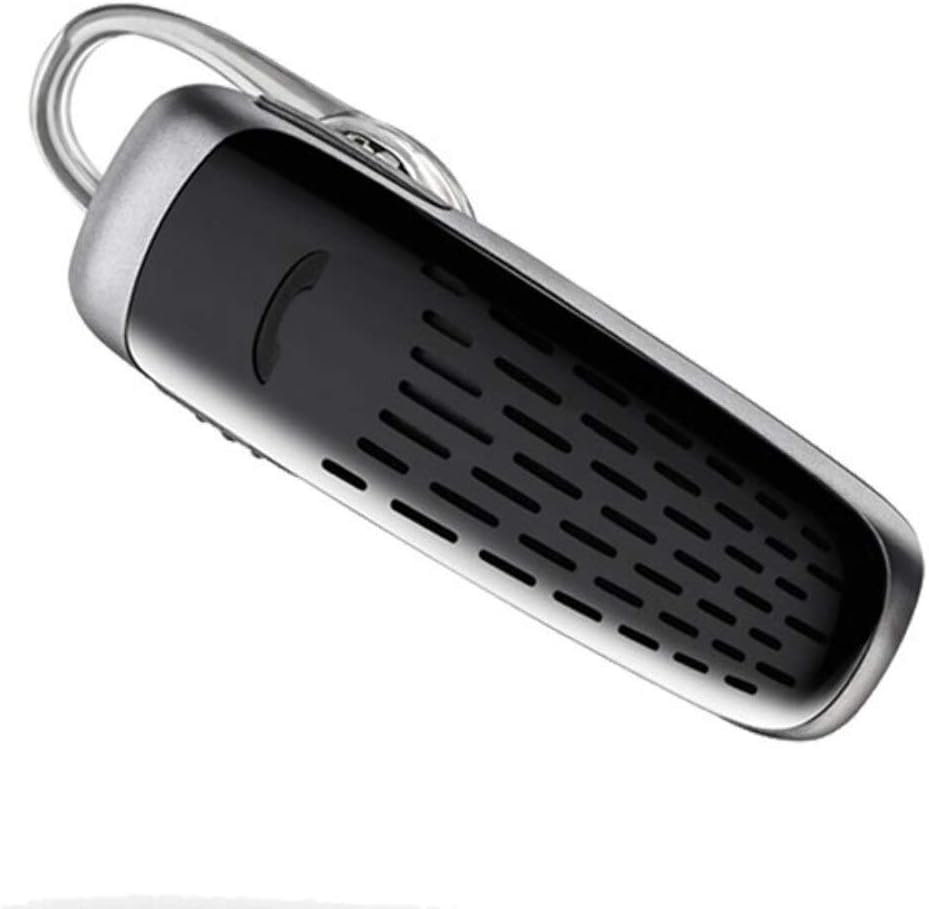
Image: The Plantronics M25 Bluetooth Headset, a compact black and silver device with an earloop, shown from an angled perspective. The call button is visible on the side.
Litaelo tsa Ts'ebetso
Motlakase/O tima
- Matlafatsa: Tobetsa o be o tshware konopo ya Power ho fihlela lebone la sesupo le benya boputswa.
- Tlosa motlakase: Press and hold the Power button until the indicator light flashes red.
Ho etsa le ho amohela mehala
- Araba Mohala: Tobetsa konopo ea Call.
- Qetella Mohala: Tobetsa konopo ea Call.
- Hana Mohala: Tobetsa 'me u tšoare konopo ea Ho letsetsa metsotsoana e 2.
- Hape Nomoro ea ho Qetela: Tobetsa konopo ea ho Letsetsa habeli.
Audio Playback
The headset supports streaming audio from your device, including music, podcasts, and GPS directions.
- Bapala/Emisa: Press the Call button during audio playback.
Mokhoa o tebileng oa ho robala
The headset enters DeepSleep power-saving mode if it is disconnected from your phone for over 90 minutes. To wake it up when it's back in range (within 33 feet), simply tap the Call button.
Tlhokomelo
- Ho hloekisa: Use a soft, dry cloth to clean the headset. Do not use liquid cleaners or aerosols.
- Polokelo: Boloka headset sebakeng se pholileng, se omileng hole le mocheso o feteletseng.
- Tlhokomelo ea Betri: To preserve battery life, avoid fully discharging the battery frequently. Charge the headset regularly, even if not in use.
- Mathata a Metsi: Sesebelisoa sena se Ha e Mamelle Metsi. Avoid exposure to water or excessive moisture.
Ho batle phoso
| Bothata | Tharollo |
|---|---|
| Headset ha e sebetse. | Ensure the headset is charged. Connect it to the AC charger and allow it to charge for at least 30 minutes before attempting to power on. |
| Ha ke khone ho kopanya semamedi sa hlooho le sesebediswa sa ka. |
|
| No audio or low audio volume. |
|
| Headset frequently disconnects. |
|
Litlhaloso
| Sebopeho | Lintlha |
|---|---|
| Lebitso la Mohlala | Plantronics M25 |
| Theknoloji ea Khokahano | bluetooth |
| Theknoloji ea puisano e se nang mohala | bluetooth |
| Lisebelisoa tse lumellanang | Smartphones, Laptops, Desktops, Tablets, Smart Speakers, Televisions |
| Mofuta oa Taolo | Call Control |
| Boima ba Ntho | Li-Ounces tse 0.3 (hoo e ka bang ligrama tse 8.5) |
| Boemo ba ho hanyetsa Metsi | Ha e Mamelle Metsi |
| Maqhubu a Range | 20 ho isa ho 20,000 Hz |
| Battery Life (DeepSleep) | Ho fihlela ho matsatsi a 150 |
| Bluetooth Range | Ho fihlela ho limithara tse 10 (maoto a 33) |
| Ho Bea Litsebe | Tsebeng |
| Sebopeho sa Foromo | One Ear |
| Taolo ea Lerata | Ho Hlakola ha Lerata |
| Litekanyo tsa Sehlahisoa | 1.85 x 0.59 x 0.35 lisenthimithara |
| Mmala | Ntsho |
| Moetsi | Plantronics |
Warranty le Tšehetso
Boitsebiso ba Tiisetso: Please note that this product is sold with No Warranty or Return as per the provided information. Users are advised to verify product condition upon receipt.
For further assistance or inquiries, please refer to the official POLY support channels or visit their website. Contact information may be available on the product packaging or the manufacturer's official websebaka.
Disclaimer: Product specifications and features are subject to change without notice. Always refer to the latest information provided by the manufacturer.


