1. Selelekela
The Meade Autostar #495 electronic controller is an advanced accessory designed for use with Meade DS Series telescopes. This manual provides comprehensive instructions for setting up, operating, and maintaining your Autostar #495 controller, enabling you to easily locate and track celestial objects with precision.
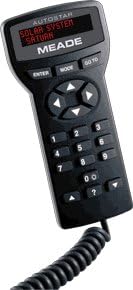
Image: The Meade Autostar #495 Controller. This handheld device features a numeric keypad, directional buttons, and a red LED display. The display currently shows "SOLAR SYSTEM SATURN", indicating its capability to locate celestial bodies. A coiled cable extends from the bottom of the unit for connection to a telescope.
2. Seta
To begin using your Autostar #495 controller, follow these steps to connect it to your Meade DS Series telescope:
- Power Off Telescope: Ensure your Meade DS Series telescope is powered off before connecting the Autostar controller.
- Connect Autostar: Locate the control panel on your DS telescope. Disconnect any existing electronic controller (such as the #492 dual-motor control system, if applicable) and plug the Autostar #495 handbox into the designated port.
- Power On Telescope: Turn on your telescope. The Autostar display should illuminate.
- Initial Alignment: The Autostar will prompt you to perform a quick alignment procedure. Follow the on-screen instructions, which typically involve pointing the telescope at two bright stars or known celestial objects. This alignment usually takes approximately one minute.
- E Loketse ho Sebelisa: Once alignment is complete, the Autostar #495 is ready for operation.
3. Litaelo tsa Ts'ebetso
The Autostar #495 controller simplifies astronomical observation with its intuitive interface and powerful features.
- Go-To Functionality:
Tobetsa ea TSAMAYA button to access the object database. Use the directional arrows and numeric keypad to select from a vast catalog of celestial objects, including planets, stars, galaxies, nebulae, and user-defined objects. Once selected, the telescope will automatically slew to the object's position.
- Digital Readouts and Tracking:
The Autostar provides continuous digital readouts of the telescope's position in Right Ascension and Declination. Once an object is located, the controller automatically tracks it in both axes simultaneously, ensuring the object remains centered in your eyepiece.
- Nine-Speed Dual-Axis Operation:
Use the directional arrow buttons to manually move the telescope. The Autostar offers nine different drive speeds, ranging from very slow (2x sidereal rate) for precise centering to fast (6 degrees per second) for rapid repositioning. You can move the telescope in either or both axes simultaneously.
- Constellation Information:
Explore constellations by pressing the appropriate arrow button (refer to the Autostar manual for specific button functions). The display will provide descriptions of constellation mythology and information about significant objects located within their boundaries.
- User-Defined Objects:
The Autostar #495 allows for the storage of up to 200 user-defined objects, enabling quick access to your favorite or frequently observed celestial targets.
4. Tlhokomelo
Proper care will ensure the longevity and optimal performance of your Autostar #495 controller.
- Ho hloekisa: Use a soft, dry cloth to clean the exterior of the handbox. Avoid abrasive cleaners or solvents, which can damage the finish or display.
- Polokelo: When not in use, store the Autostar controller in a clean, dry environment, away from extreme temperatures and direct sunlight.
- Tlhokomelo ea Lithapo: Avoid kinking or excessively bending the coiled cable. Store it neatly to prevent damage.
5. Ho rarolla mathata
If you encounter issues with your Autostar #495 controller, refer to the table below for common problems and their solutions.
| Bothata | Lebaka le ka khonehang | Tharollo |
|---|---|---|
| Pontšo ea molaoli ha e na letho. | Not properly connected; Telescope not powered on; Faulty cable. | Ensure cable is securely plugged into the telescope's control panel. Verify telescope power. Inspect cable for damage. |
| Telescope does not move or track. | Incorrect alignment; Motors not engaged; Cable issue. | Perform alignment procedure again. Ensure motors are properly connected and engaged. Check cable connection. |
| Go-To function is inaccurate. | Poor alignment; Telescope not level; Incorrect date/time/location settings. | Re-align the telescope carefully. Ensure the telescope is level. Verify that the correct date, time, and observing location are entered into the Autostar. |
| Likonopo ha li arabele. | Software glitch; Physical damage. | Try powering off and on the telescope. If problem persists, contact Meade support. |
6. Litlhaloso
| Sebopeho | Lintlha |
|---|---|
| Nomoro ea Mohlala | #495 |
| Brand | Meade |
| Ho lumellana | Meade DS Series Telescopes |
| Go-To Database | Extensive celestial object database, 200 user-defined objects |
| Mabelo a ho Khanna | 9-speed dual-axis operation (e.g., 2x sidereal to 6 degrees/sec) |
| Litekanyo (Pakete) | 39.37 x 33.53 x 9.91 cm (15.5 x 13.2 x 3.9 lisenthimithara) |
| Boima (Sehlahisoa) | 453.59 g (ponto e 1) |
| UPC | 709942922271 |
7. Tiisetso le Tšehetso
Meade Instruments provides a limited warranty for its products. For specific warranty terms and conditions, please refer to the documentation included with your original purchase or visit the official Meade Instruments websebaka.
For technical support, service, or inquiries regarding your Autostar #495 controller, please contact Meade Instruments customer service. Contact information can typically be found on the Meade websaeteng kapa sephuthelong sa sehlahisoa sa hau.


