
1. Ho fetaview
The Philips TAZ2200 is a versatile portable sound machine designed for enjoying various audio formats. It features a top-loading CD player, a front-loading cassette player, FM radio, Bluetooth 6.0 connectivity, USB playback, and a 3.5mm audio input. Equipped with dynamic bass boost and 6W stereo speakers, it delivers rich sound. The unit can be powered by AC mains or batteries and includes a carrying handle for portability.
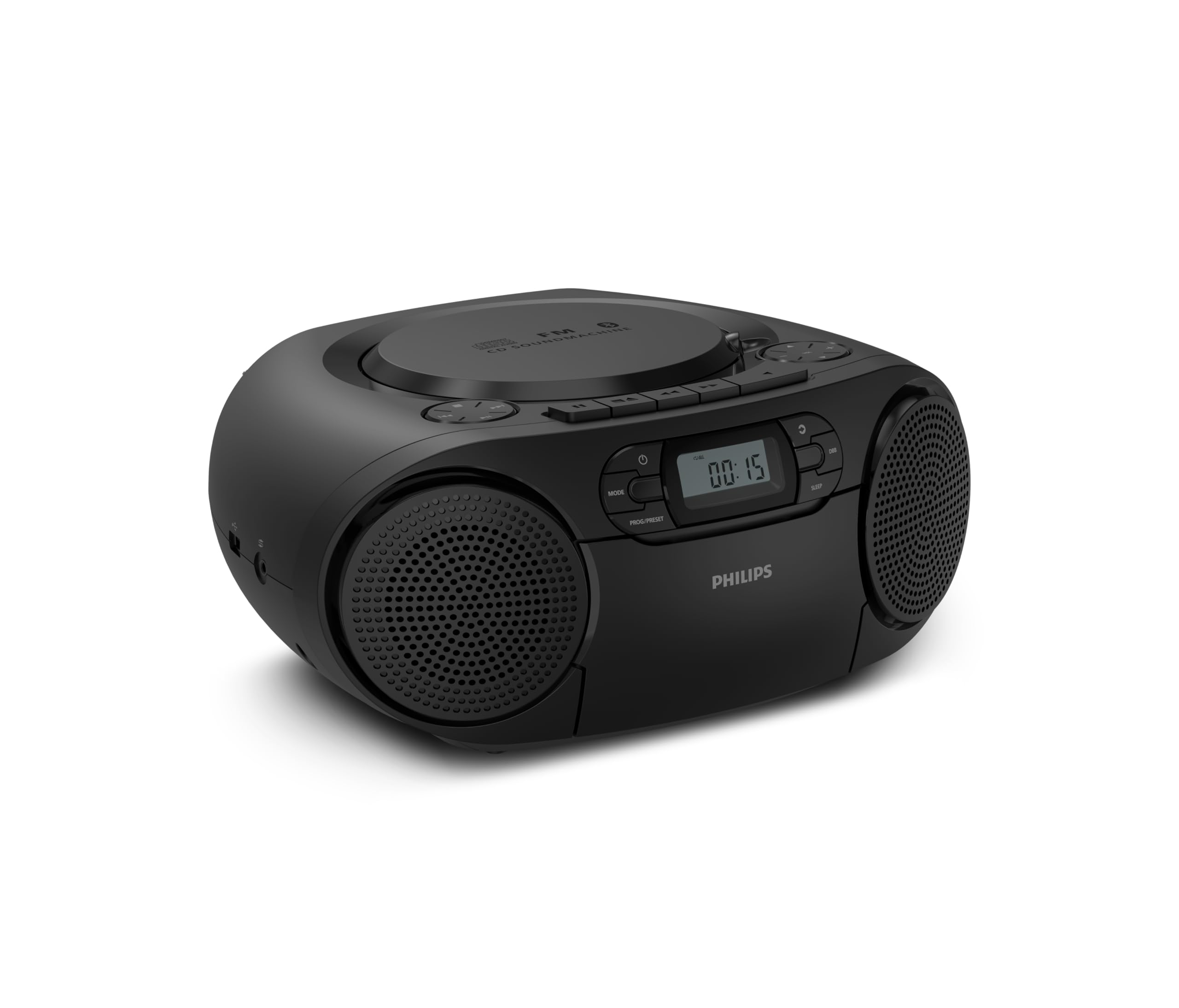
Pele view of the Philips TAZ2200 CD Soundmachine, showing the main display and control buttons.
2. Boitsebiso ba Tšireletseho
Please read these safety instructions carefully before using your device and keep them for future reference. Incorrect use may result in hazards.
- Mohloli oa Matla: Use only the specified power adapter or batteries. Ensure the voltage tsamaisana le ditlhoko tsa yuniti.
- Metsi le Mongobo: U se ke ua beha yuniti pula, mongobo, marothodi, kapa ho fafatsa. U se ke ua beha lintho tse tletseng metsi, joalo ka lipitsa, holim'a yuniti.
- Moea oa moea: Ensure adequate ventilation. Do not block any ventilation openings. Maintain a minimum distance around the unit for sufficient ventilation.
- Mocheso: Se ke oa beha yuniti haufi le mehloli ea mocheso joalo ka li-radiator, lirejista tsa mocheso, litofo, kapa lisebelisoa tse ling (ho kenyeletsoa amplifiers) tse hlahisang mocheso.
- Libetri: Follow correct polarity when inserting batteries. Do not mix old and new batteries, or different types of batteries. Remove batteries if the unit is not used for a long period.
- Ho hloekisa: Unplug the unit from the power outlet before cleaning. Use a soft, dry cloth. Do not use liquid cleaners or aerosol cleaners.
- Litšebeletso: Se ke oa leka ho fana ka sehlahisoa sena u le mong. Fetisetsa litšebeletso tsohle ho basebetsi ba tšoanelehang ba litšebeletso.
3. Se ka Lebokoseng
Ha o ntsha dipakete, ka kopo etsa bonnete ba hore dintho tsohle tse thathamisitsweng ka tlase di teng:
- Philips TAZ2200 CD Soundmachine
- Motlakase oa motlakase
- Tataiso ea ho qala kapele
- Bukana ea Warranty
- Letlapa la polokeho
4. Taolo le Khokelo
Front Panel Controls
The front panel features the main display, power button, mode selection, program/preset buttons, and dynamic bass boost (DBB) control. Playback controls for CD and USB are also located here.

E qaqileng ka pele view showing the display, power, mode, program/preset, and DBB buttons.
Side and Rear Connections
The side of the unit provides a USB port for digital audio playback and a 3.5mm audio input jack for connecting external devices.

Lehlakore view illustrating the USB port and Audio Input jack.
The top of the unit houses the CD compartment and additional playback controls, while the rear features the AC power input and the FM antenna.

Holimo view showing the CD compartment and associated controls.

Ka morao view displaying the AC power input and the telescopic FM antenna.
5. Seta
5.1 Phepelo ea Matla
Matla a AC
- Netefatsa hore yuniti e tingoe.
- Connect the supplied power cable to the AC IN socket on the rear of the sound machine.
- Plug the other end of the power cable into a wall power outlet.
Matla a Battery
For portable use, the unit can operate on 6 x C-type batteries (not included).
- Bula sekoaelo sa kamore ea betri se ka tlase ho yuniti.
- Insert 6 C-type batteries, ensuring correct polarity (+/-) as indicated inside the compartment.
- Koala sekoaelo sa karolo ea betri ka mokhoa o sireletsehileng.
5.2 Phetoho ea Antenna
For optimal FM radio reception, fully extend the telescopic antenna located at the rear of the unit. Adjust its position and angle to achieve the clearest signal.
6. Litaelo tsa Ts'ebetso
6.1 Ts'ebetso e akaretsang
- Tlosa/Tima: Tobetsa ea MATLA konopo ho bulela kapa ho tima yuniti.
- Taolo ea Bolumo: Sebelisa le KHAOLO + or VOL - likonopo ho fetola bophahamo ba modumo.
- Dynamic Bass Boost (DBB): Tobetsa ea DBB button to activate or deactivate the dynamic bass boost feature for enhanced bass sound.
- Khetho ea Mokhoa: Tobetsa ea MOKHOA button repeatedly to switch between CD, Cassette, FM Radio, Bluetooth, USB, and Audio Input modes.
6.2 Ho bapala ka CD
- Open the CD compartment cover on top of the unit.
- Place a CD (CD, CD-R, or CD-RW) with the label side facing up onto the spindle.
- Koala sekoaelo sa karolo ea CD.
- Tobetsa ea MOKHOA konopo ho khetha CD mode.
- Tobetsa ea BAPALA/ KHUTSA konopo ho qala ho bapala.
- Sebelisa le TLAMA likonopo|< or >> |) ho tlola dipina.
- Tobetsa o hatelle |< or >> | to search within a track.
- Tobetsa ea EMA konopo ho emisa ho bapala.
6.3 Ho Bapala Khasete
- Open the cassette compartment door on the front of the unit.
- Kenya theipi ea khasete moo lehlakore le bulehileng le shebileng holimo.
- Koala lemati la karolo ea khasete.
- Tobetsa ea MOKHOA button to select Cassette mode.
- Tobetsa ea BAPALA konopo ho qala ho bapala.
- Sebelisa le PHAKANG PELE or PUSELETSO buttons to quickly advance or rewind the tape.
- Tobetsa ea EMA konopo ho emisa ho bapala.
6.4 FM Radio
- Tobetsa ea MOKHOA button to select FM Radio mode.
- Scan ea Auto: Tobetsa o hatelle PROG/PRESET button to automatically scan and store available FM stations.
- Tokiso ea letsoho: Tobetsa ea TLHOKOMELO likonopo|< or >> |) to manually tune to a desired frequency.
- Ho boloka li-Presets: After tuning to a station, press PROG/PRESET once, then use |< or >> | to select a preset number, and press PROG/PRESET hape ho tiisa.
- Ho hopola li-Presets: Ho FM mode, tobetsa PROG/PRESET repeatedly to cycle through saved preset stations.
6.5 Papali ea Bluetooth
- Tobetsa ea MOKHOA button to select Bluetooth mode. The display will show 'BT' and flash, indicating it's in pairing mode.
- Sesebedisweng sa hao se nang le Bluetooth (smartphone, tablet), kenya tshebetsong Bluetooth mme o batle disebediswa tse fumanehang.
- Select "Philips TAZ2200" from the list of devices.
- Once paired, the unit will emit a confirmation sound, and 'BT' will stop flashing.
- Start playing audio on your connected device. The sound will be streamed to the sound machine.
6.6 Ho bapala ka USB
- Insert a USB flash drive into the USB port on the side of the unit.
- Tobetsa ea MOKHOA konopo ho khetha mokhoa oa USB.
- The unit will automatically detect and begin playing compatible audio files (MP3, WAV, WMA).
- Sebelisa litaolo tsa ho bapala (BAPALA/ KHUTSA, TLAMA, EMA) as you would for CD playback.
6.7 Molumo o Kentsweng (AUX)
- Connect one end of a 3.5mm audio cable (not included) to the AUDIO IN jack on the side of the sound machine.
- Connect the other end of the audio cable to the headphone jack or audio output of your external device (e.g., MP3 player, turntable).
- Tobetsa ea MOKHOA button to select Audio Input mode.
- Start playing audio on your external device. The sound will be played through the sound machine.
7. Tlhokomelo
- Ho hloekisa Yuniti: Hlakola bokantle ba yuniti ka d e bonolo, e nyaneamp lesela. Se ke oa sebelisa li-abrasive cleaners kapa solvents.
- Tlhokomelo ea Sebapali sa CD: Keep the CD compartment clean. If the lens is dirty, use a specialized CD lens cleaner. Avoid touching the lens.
- Tlhokomelo ea Sebapali sa Cassette: Nako le nako hloekisa lihlooho tsa theipi 'me u phunye lirolara ka swab ea k'hothone hanyenyane dampe entsoe ka joala ba isopropyl.
- Phetoho ea Betri: If using batteries, replace all 6 C-type batteries when the unit's performance diminishes or if the unit will not be used for an extended period.
- Polokelo: Ha e sa sebelisoe, boloka sesebelisoa sebakeng se hloekileng, se omileng hole le khanya ea letsatsi le mocheso o feteletseng.
8. Ho rarolla mathata
If you encounter any issues with your Philips TAZ2200, please refer to the table below for common problems and solutions.
| Bothata | Lebaka le ka khonehang | Tharollo |
|---|---|---|
| Ha ho matla | Power cable not connected; Batteries depleted or incorrectly inserted. | Check AC power connection; Replace batteries or ensure correct polarity. |
| Ha ho molumo | Molumo o tlase haholo; Mokhoa o fosahetseng o khethiloe; Li-headphone li hokahane. | Increase volume; Select the correct source mode (CD, FM, BT, etc.); Disconnect headphones. |
| CD ha e bapale | CD inserted incorrectly; CD is dirty or scratched; CD format not supported. | Insert CD with label side up; Clean or replace CD; Ensure CD is CD-R/RW compatible. |
| Cassette not playing | Cassette inserted incorrectly; Tape is damaged. | Insert cassette correctly; Try a different cassette. |
| Kamohelo e mpe ea FM | Antenna not extended or positioned correctly; Weak signal. | Fully extend and adjust the telescopic antenna; Try moving the unit to a different location. |
| Bluetooth ha e hoketsoe | Unit not in pairing mode; Bluetooth device too far; Device already paired with another unit. | Ensure unit is in Bluetooth mode and flashing; Move device closer; Disconnect from other devices. |
| Mathata a ho bapala ka USB | USB drive not inserted correctly; Incompatible file format; USB drive corrupted. | Reinsert USB drive; Ensure files are MP3, WAV, or WMA; Try a different USB drive. |
9. Litlhaloso
| Sebopeho | Tlhaloso |
|---|---|
| Brand | FILIPI |
| Nomoro ea Mohlala | TAZ2200/10 |
| Theknoloji ea Khokahano | Bluetooth 6.0, USB, Audio Input (3.5mm) |
| Mofuta oa Sebui | Stereo (2 speakers) |
| Matla a Output | 6 Watts (boholo) |
| Mecha ea litaba e tšehelitsoeng | CD, CD-R, CD-RW, Cassette, USB (MP3, WAV, WMA) |
| Radio Tuner | Digital FM with 20 presets |
| Mohloli oa Matla | AC (wired), 6 x C-type batteries (not included) |
| Litekanyo (LxWxH) | 24.5 x 28.5 x 12.5 cm, |
| Boima ba 'mele | 1.35 lik'hilograma |
| Mmala | Silevera |
10. Tiisetso le Tšehetso
10.1 Warranty ea Sehlahisoa
This Philips TAZ2200 CD Soundmachine comes with a Waranti ea lilemo tse 2 ho tloha ka letsatsi la theko. Ka kopo, boloka bopaki ba theko ea hau bakeng sa likopo tsa waranti. Tiisetso e koahela mefokolo ea tlhahiso le ho se sebetse hantle tlas'a maemo a tloaelehileng a ts'ebeliso.
10.2 Tšehetso ea Bareki
For technical assistance, troubleshooting beyond this manual, or warranty service, please refer to the contact information provided in the warranty booklet included with your product. You can also visit the official Philips support website for your region for further assistance and FAQs.