
Selelekela
This manual provides essential information for setting up, operating, maintaining, and troubleshooting your REDMI Note 15 Pro+ 5G smartphone. Please read this guide thoroughly to ensure optimal performance and longevity of your device.
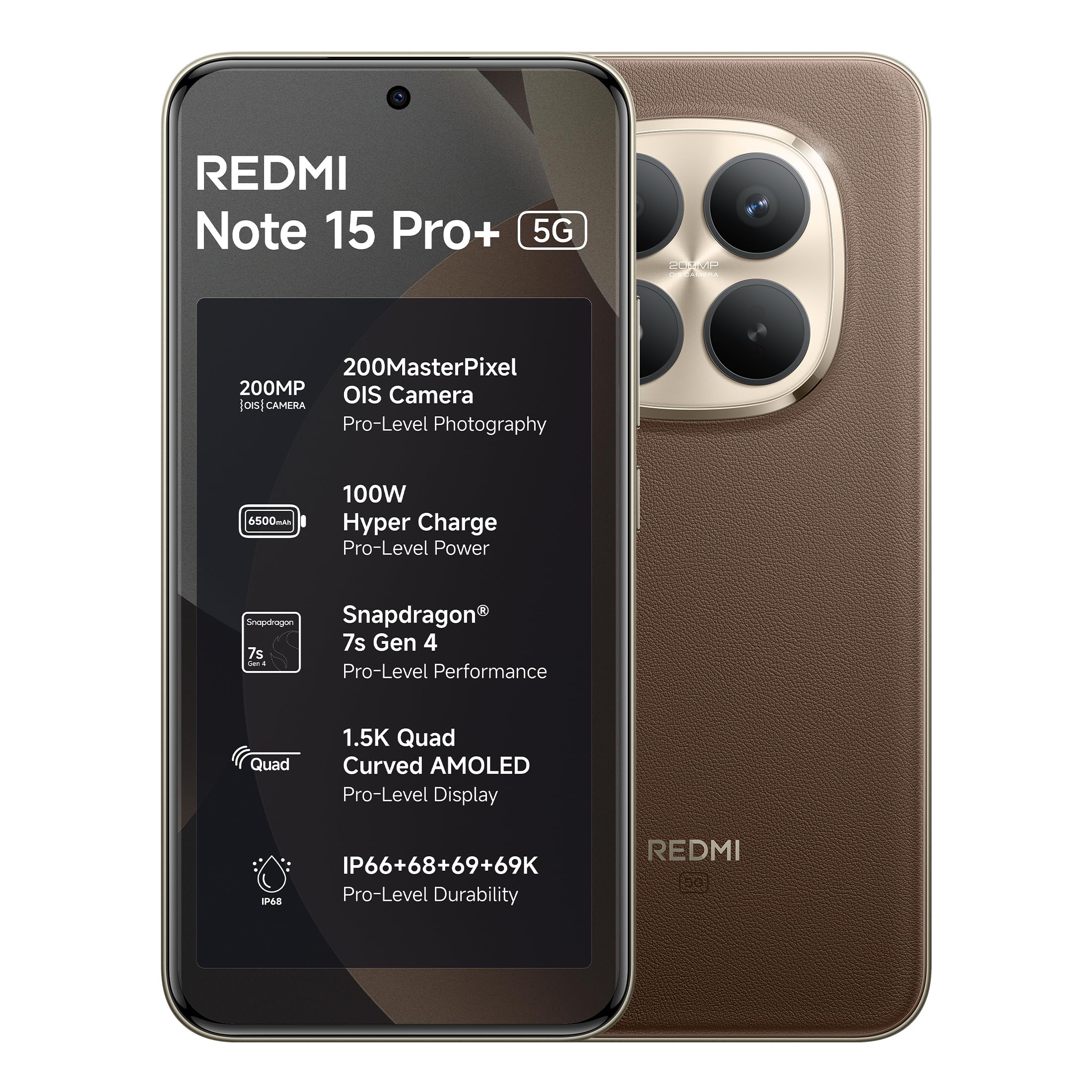
Figure 1: REDMI Note 15 Pro+ 5G (Coffee Mocha)
1. Seta
1.1 Likahare tsa Lebokose
Netefatsa hore lintho tsohle li teng ka har'a sephutheloana sa sehlahisoa:
- REDMI Note 15 Pro+ 5G Smartphone
- Charger
- Cable ea Type-C ea USB
- SIM Eject Tool
- Tataiso ea mosebelisi (tokomane ena)
- Karete ea Tiisetso
- Taba ea Tšireletso
1.2 Ho kenya SIM Card
- Fumana terei ea SIM card lehlakoreng la sesebelisoa.
- Insert the SIM eject tool into the small hole next to the tray and press gently until the tray pops out.
- Beha Nano-SIM card(li)karete tsa hao ka tereing mehokelo ya kgauta e shebile fatshe. Netefatsa tsela e nepahetseng.
- Ka hloko sutumelletsa terei ka har'a sekotjana ho fihlela e hohla ka sesebelisoa.
1.3 Matla a Pele le Tlhophiso
- Press and hold the Power button until the REDMI logo appears.
- Latela litaelo tse skrineng ho khetha puo ea heno, sebaka, le ho hokela marang-rang a Wi-Fi.
- Kena ka ak'haonte ea hau ea Google kapa u thehe e ncha.
- Qetella ts'ebetso ea ho seta, ho kenyeletsoa le ho seta likarolo tsa ts'ireletso joalo ka menoana ea letsoho kapa ho notlolla sefahleho.
2. Ho sebelisa sesebelisoa sa hau
2.1 Pontšo le ho Tsamaisa
The device features a 6.83-inch Quad curved 1.5K Ultra QHD AMOLED display with up to 3200 nits peak brightness. It supports a 120Hz adaptive refresh rate for smooth scrolling and interaction. Eye Protect 2.0 with Triple TÜV Certifications helps reduce eye strain.

Figure 2: Immersive AMOLED Display
2.2 Sistimi ea Khamera
Your REDMI Note 15 Pro+ 5G is equipped with an advanced 200MP ultimate clarity camera system featuring OIS (Optical Image Stabilization) and an HPE 1/1.4" sensor. This camera is designed for capturing detailed photos and 4K videos with natural depth and steady motion.
- Capture Ultra-Sharp Details: Utilize the 200MP mode for maximum resolution.
- Steady Videos: OIS ensures stable video recording, even when moving.
- Portraits: Use portrait mode for natural depth-of-field effects.

Figure 3: 200MasterPixel Camera System
2.3 Tshebetso le Lipapali
Powered by the Snapdragon 7s Gen 4 processor, the device offers smooth performance for daily tasks and gaming. IceLoop cooling technology helps maintain optimal temperatures during intensive use.

Figure 4: Snapdragon 7s Gen 4 Processor
2.4 Battery le ho tjhaja
The 6500mAh Silicon-Carbon battery supports 100W HyperCharge, allowing for rapid charging. It also features 22.5W reverse charging. The battery is designed for advanced 1600 lifecycles, ensuring long-term reliability.

Figure 5: 6500mAh Silicon-Carbon Battery
2.5 Likarolo tsa Molumo
Experience enhanced audio with symmetric stereo speakers and Dolby Atmos® support. The speakers deliver clear sound, suitable for music and calls.

Figure 6: Ultra-Loud, Ultra-Clear Sound
2.6 Xiaomi HyperOS and AI Features
The device runs on Android 15 with Xiaomi HyperOS, offering intelligent AI features and seamless cross-device connectivity. Key features include:
- Offline Communication: Enables device-to-device calling even without cellular or Wi-Fi network coverage, ideal for travel or areas with poor signal.
- Lisebelisoa tsa AI: Integrated AI features like Circle to Search and Gemini Assistance enhance user interaction and productivity.

Figure 7: Powered by Xiaomi HyperOS

Figure 8: Smarter Help with AI Tools

Figure 9: Xiaomi Offline Communication
3. Tlhokomelo
3.1 Ho hloekisa Sesebelisoa sa Hao
To clean your device, use a soft, lint-free cloth. Avoid using abrasive cleaners, solvents, or aerosol sprays directly on the phone. For stubborn marks, slightly dampst lesela le nang le metsi kapa mochini o hloekisang skrine o etselitsoeng lisebelisoa tsa elektronike.
Tlhokomelo ea Battery
The 6500mAh Silicon-Carbon battery is designed for extended longevity with 1600 lifecycles. To maximize battery life:
- Qoba mocheso o feteletseng.
- Use the provided 100W HyperCharge charger and cable for optimal charging.
- Qoba ho ntsha betri ka botlalo kgafetsa.
3.3 Lintlafatso tsa Software
Your device will receive regular software updates, including OS updates for up to 4 years and security patches for up to 6 years. Ensure your device is connected to Wi-Fi and has sufficient battery before initiating updates.
4. Ho Tšoarella le Tšireletso
The REDMI Note 15 Pro+ 5G features a fiberglass back panel and Corning Gorilla Glass Victus 2 for enhanced durability. It boasts an IP69K rating, providing high-level protection against dust and water ingress, including high-pressure water jets and steam cleaning. AI Wet Touch 2.0 ensures screen responsiveness even when wet.

Figure 10: Built-in Protection Features
5. Ho rarolla mathata
Haeba o kopana le mathata ka sesebediswa sa hao, leka mehato e latelang ya motheo ya ho rarolla mathata:
- Sesebediswa ha se arabele: Tobetsa o be o tshware konopo ya Power metsotsoana e ka bang 10 ho qobella ho qala botjha.
- Mathata a Marang-rang: Check if your SIM card is properly inserted. Try toggling Airplane Mode on and off.
- Mathata a App: Close and reopen the app. If the issue persists, clear the app's cache or reinstall it.
- Mathata a ho tjhaja: Ensure the charger and cable are securely connected and undamaged. Try a different power outlet.
- Litšitiso tsa Software: Netefatsa hore software ea sesebelisoa sa hau e nakong.
For more complex issues, refer to the support section or contact customer service.
6. Litlhaloso
| Sebopeho | Lintlha |
|---|---|
| Brand | Redmi |
| Mohlala | Hlokomela 15 Pro+ 5G |
| Mokhoa oa tšebetso | Android 15, Xiaomi HyperOS |
| Memori ea RAM e kentsoeng boholo | 12 GB |
| Bokhoni ba ho Boloka Memori | 256 GB |
| Boholo ba skrine | 6.83 Inche (17.35cm) |
| Mofuta oa Pontšo | AMOLED |
| Mmala | Kofi Mocha |
| Mofuta oa Sehokelo | Mofuta oa USB oa C |
| Boemo ba ho hanyetsa Metsi | Ha e kenelle metsi (IP69K) |
| Rear Facing Camera Photo Sensor Resolution | 200 MP |
| Bokhoni ba Battery | 6500 limilioneamp Lihora |
| Boima ba Ntho | 208 lik'hilograma |
| Litekanyo tsa Ntho (L x W x H) | 16.3 x 7.8 x 0.8 Disentimitara |
| Mofani oa Wireless | E buloe bakeng sa Bajari bohle |
| Theknoloji ea Mehala | 5G |
| Litaba tsa Lebokose | Charger, cable, SIM eject tool, Warranty card, User guide, Protective case |
7. Boitsebiso ba Tiisetso
Your REDMI Note 15 Pro+ 5G comes with a Tiisetso ea moetsi oa lilemo tse 1 bakeng sa sesebelisoa ho tloha letsatsing la theko. Lisebelisuoa tse ka hare ho lebokose, ho kenyeletsa le libeteri, li koahetsoe ke a Tiisetso ea moetsi oa likhoeli tse 6 ho tloha ka letsatsi la theko.
Ka kopo, boloka bopaki ba theko ea hau bakeng sa likopo tsa tiisetso.
8. Tšehetso le Tšebeletso
For technical assistance, service, or warranty claims, please contact Redmi customer support. You can find contact information on the official Redmi website or through the provided warranty card.
Lintlha tsa Moetsi:
DBG Technology (India) Pvt Ltd
PLOT NO-2, BAWAL, SECTOR-8, Rewari, Haryana, 123501.
Tlhahisoleseling ea kantle ho naha:
Xiaomi Technology India Private Limited
Building Orchid. Block E, Embassy Tech Village, Marathahalli Outer Ring Road, Devarabisanahalli, Bengaluru 560103
Redmi aims for efficient service, with many issues resolved quickly. For more details on repair services, refer to the official Redmi support channels.

Figure 11: Support and Repair Services
For information on potential benefits and subscriptions, please scan the QR code provided in your product packaging or visit the official Redmi websaete bakeng sa lintlha. Scan for benefits