
1. Selelekela
This manual provides essential information for the safe and efficient operation of your Aninerel 12000W Solar Hybrid Inverter. Please read this manual thoroughly before installation and use, and retain it for future reference. This inverter is designed to convert 48V DC power from solar panels or batteries into 120V single-phase or 240V split-phase AC power, providing a continuous output of 12,000W and a peak output of 24,000W.

Setšoantšo sa 1: Pele view of the Aninerel 12000W Solar Hybrid Inverter.
2. Boitsebiso ba Tšireletseho
Always observe safety precautions during installation, operation, and maintenance. Failure to follow these instructions may result in serious injury or damage to the equipment.
- Ensure all electrical connections are secure and correctly polarized.
- Do not attempt to open or repair the inverter yourself. Refer to qualified personnel.
- The inverter is equipped with comprehensive protection mechanisms including overvoltage, ho se tsotelletage, reverse polarity, and short circuit protection.
- This unit is UL1741 certified for reliable and safe use.
- Install the inverter in a well-ventilated area, away from flammable materials and moisture. The IP65 dustproof enclosure allows for indoor and semi-outdoor use.

Figure 2: Inverter protection features including overcharge, overload, overcurrent, overvoltage, short circuit, overheat, overspeed, and undervoltagtshireletso.
3. Sehlahisoa Overview
3.1 Likarolo tsa Bohlokoa
- Output & Voltage Flexibility: 12,000W continuous, 24,000W peak output. Converts 48V DC to 120V single-phase or 240V split-phase AC.
- Dual MPPT & High-Efficiency Charging: Two MPPT solar charging controllers with a maximum 220A battery charging current. Supports high-voltage PV arrays up to 500VDC.
- Bokhoni bo Tšoanang: Connect up to 6 units for a maximum output of 72kW. Supports 120V single-phase, 240V split-phase, or 208V three-phase output with multiple units.
- Advanced Design & Operation: Features an OLED light-touch screen for intuitive monitoring and parameter adjustment. WIFI-enabled for real-time status checks.
- Durability & Safety: IP65 dustproof enclosure, smart variable-speed cooling, and comprehensive protection mechanisms. UL1741 certified.
- Ts'ebetso ea lerata le tlase: Incorporates noise reduction technology for quiet performance.
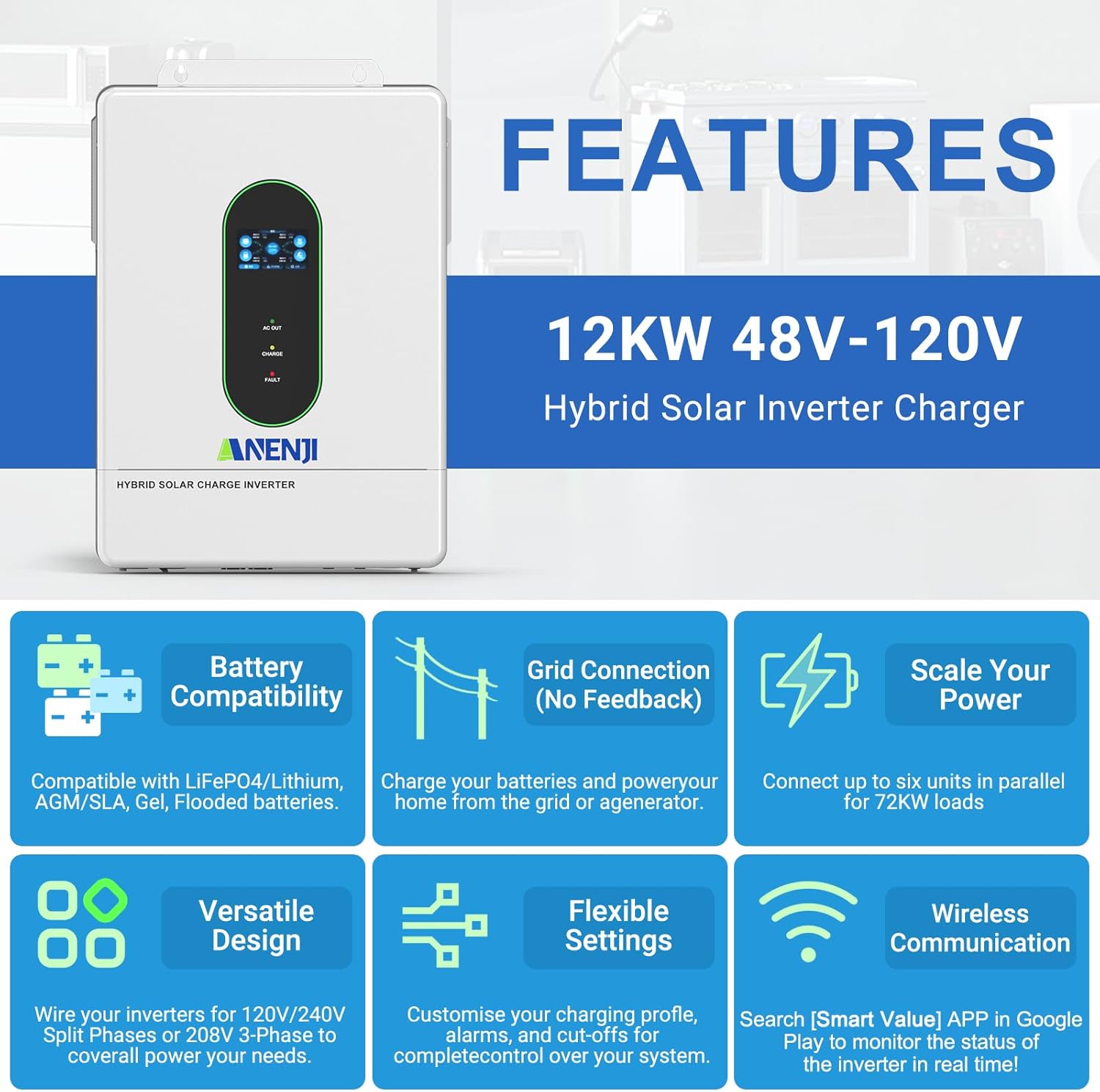
Setšoantšo sa 3: Ho fetaview of key features including battery compatibility, grid connection (no feedback), scalability, versatile design, flexible settings, and wireless communication.

Figure 4: Illustration of the inverter's low-noise operation, comparing its sound level (45dB) to other common sounds.
Likarolo tsa 3.2 tsa Sehlahisoa

Setšoantšo sa 5: Ka botlalo view of the inverter's components and ports.
- Hlahisa skrine
- Mofofisi oa lamp
- AC port output
- Sebaka sa ho kenya AC
- WIFI port (optional)
- Kou ea puisano ea USB
- RS485-1 boema-kepe ba puisano
- RS485-2/CAN communication port
- Kou e ommeng
- CT current sensing for self-consumption (optional)
- ON/OFF switch ea rocker
- Photovoltaic (PV) parameters
- Litekanyetso tsa betri
- Boema-kepe ba puisano e tšoanang (mojule e bapileng feela)
- AC input breaker
- Ho ts'oara sekoti sa fatše
3.3 Lisebelisoa tse kenyellelitsoeng
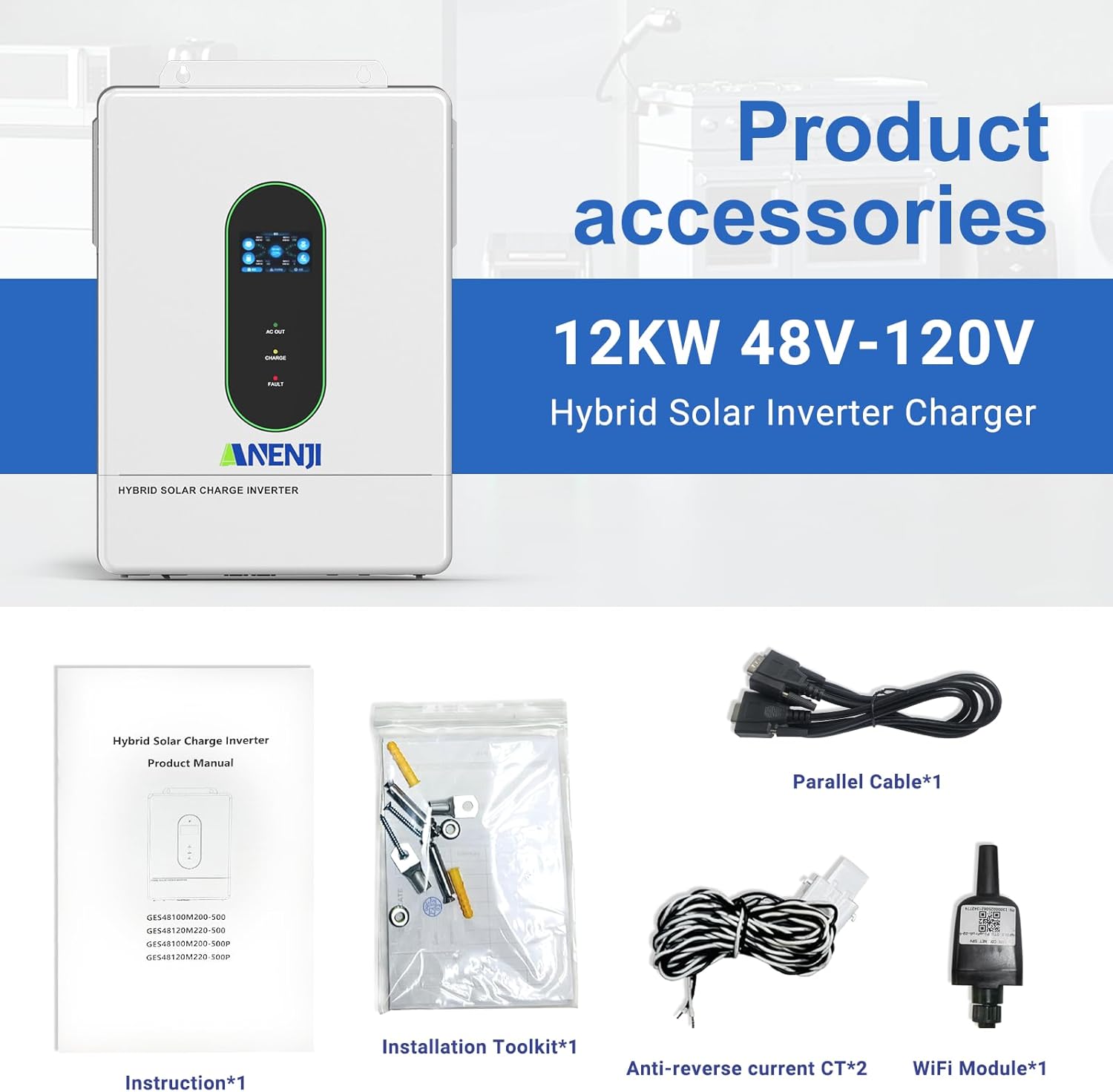
Figure 6: Standard accessories included with the inverter.
- Buka ea Tataiso
- Toolkit ea ho kenya
- Parallel Cable (x1)
- Anti-reverse current CT (x2)
- WIFI Module (x1)
4. Ho kenya
Proper installation is crucial for the inverter's performance and safety. Refer to the detailed wiring diagrams in the full instruction manual for specific connection procedures.
- Ho hlongoa: Securely mount the inverter in a location that allows for adequate ventilation and access for connections.
- Khokahano ea Battery: The inverter is compatible with 48V AGM, GEL, Lead-acid, Li-ion, and LiFePO4 batteries. Ensure correct polarity when connecting.
- Kenyo ea PV: Connect your solar panels to the designated PV input ports. The inverter supports up to 6,000W+6,000W PV input with a maximum of 500VDC.
- Kenyelletso/Sehlahisoa sa AC: Connect the AC input from the grid or generator and the AC output to your loads.
- Ho beha fatše: Ensure the inverter is properly grounded using the grounding screw hold.
- Ts'ebetso ea No-Battery: The inverter supports direct solar-to-load use without a battery, depending on solar availability.

Figure 7: The inverter supports various 48V battery types including GEL, FLD, LI, and SLD.

Setšoantšo sa 8: Example of a single-phase hybrid inverter system showing power supply from grid and selling electricity to the state grid.
5. Setup Preferences
The inverter allows you to configure charging and load priorities to optimize energy management.
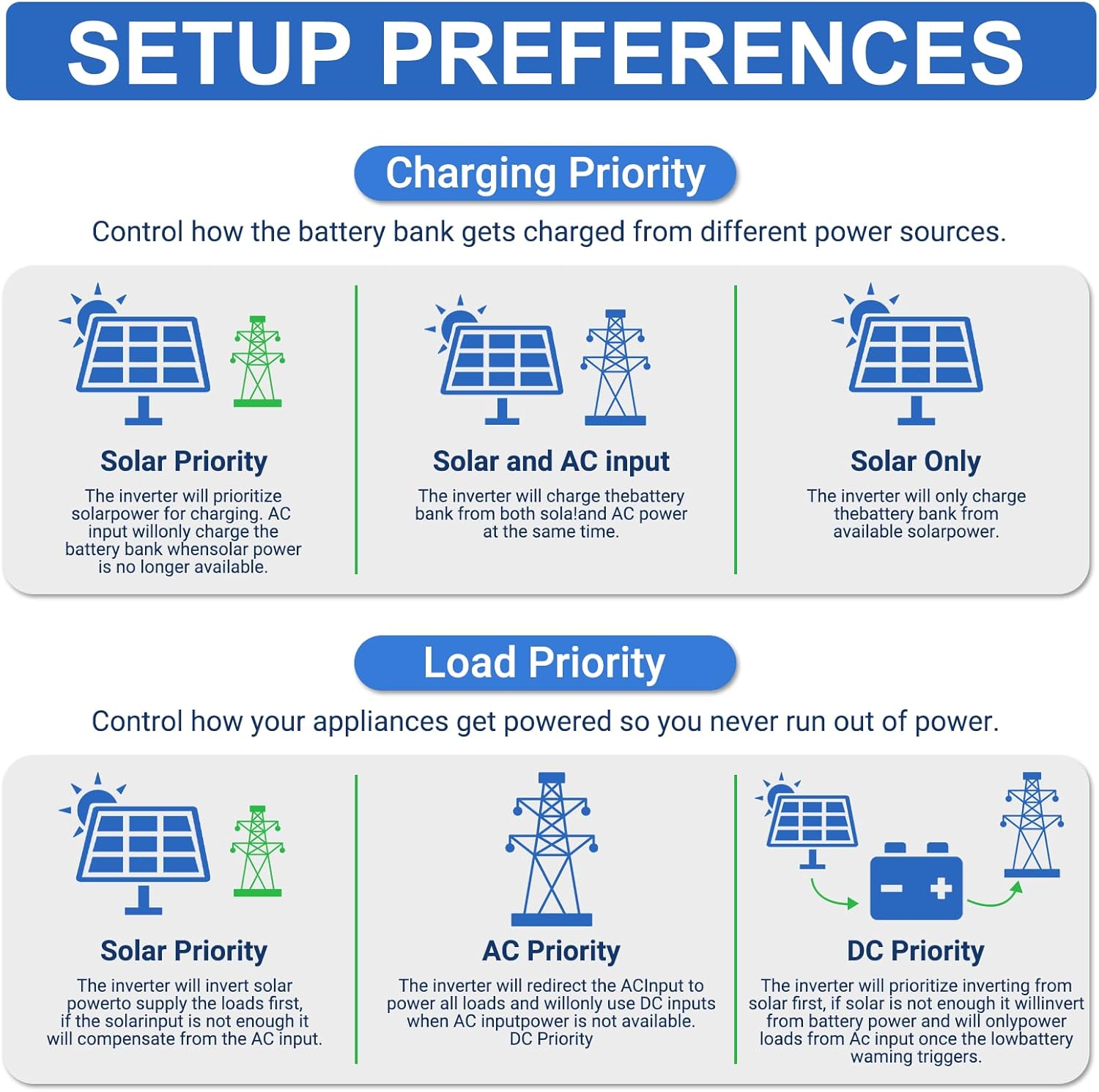
Figure 9: Setup preferences for controlling battery charging and appliance power sources.
5.1 Charging Priority
Control how the battery bank is charged from different power sources:
- Bohlokoa ba Letsatsi: The inverter prioritizes solar power for charging. AC input will only charge the battery when solar power is no longer available.
- Solar and AC Input: The inverter charges the battery bank from both solar and AC power simultaneously.
- Solar Feela: The inverter charges the battery bank exclusively from available solar power.
5.2 Load Priority
Control how your appliances receive power:
- Bohlokoa ba Letsatsi: The inverter supplies the load first with solar power. If solar is insufficient, it will compensate from the AC input.
- AC Priority: The inverter redirects AC input to power all loads and uses DC inputs when AC input power is unavailable.
- DC Priority: The inverter prioritizes drawing power from the battery first. If the battery level is low, it will convert from AC input to power loads.
6. Ts'ebetso
The inverter features an OLED light-touch screen for monitoring and adjusting parameters. The intuitive interface allows for easy control of the system's functions.
- Tlosa/Tima: Use the ON/OFF rocker switch (component 11) to power the unit.
- Tlhokomelo ea Pontšo: The display screen (component 1) shows real-time operational data such as input/output voltage, current, power, and battery status.
- Phetoho ea Paramethara: Navigate through the menu on the OLED screen to customize settings like charging current, output voltage range, and priority modes.
7. Wi-Fi Monitoring
The inverter includes a Wi-Fi module for remote monitoring of its operating status. This allows you to check system performance anytime, anywhere.
- Khoasolla Lisebelisoa: Download the "Smart Value" application from the Google Play Store or Apple App Store.
- Khokahano: Follow the in-app instructions to connect your inverter to the Wi-Fi network.
- Lintlha tsa Nako ea 'Nete: Monitor parameters such as PV input, battery charge/discharge, AC output, and system alerts.
- Web Tlhokomelo: Web-based monitoring is also available at ValueClouds.com.
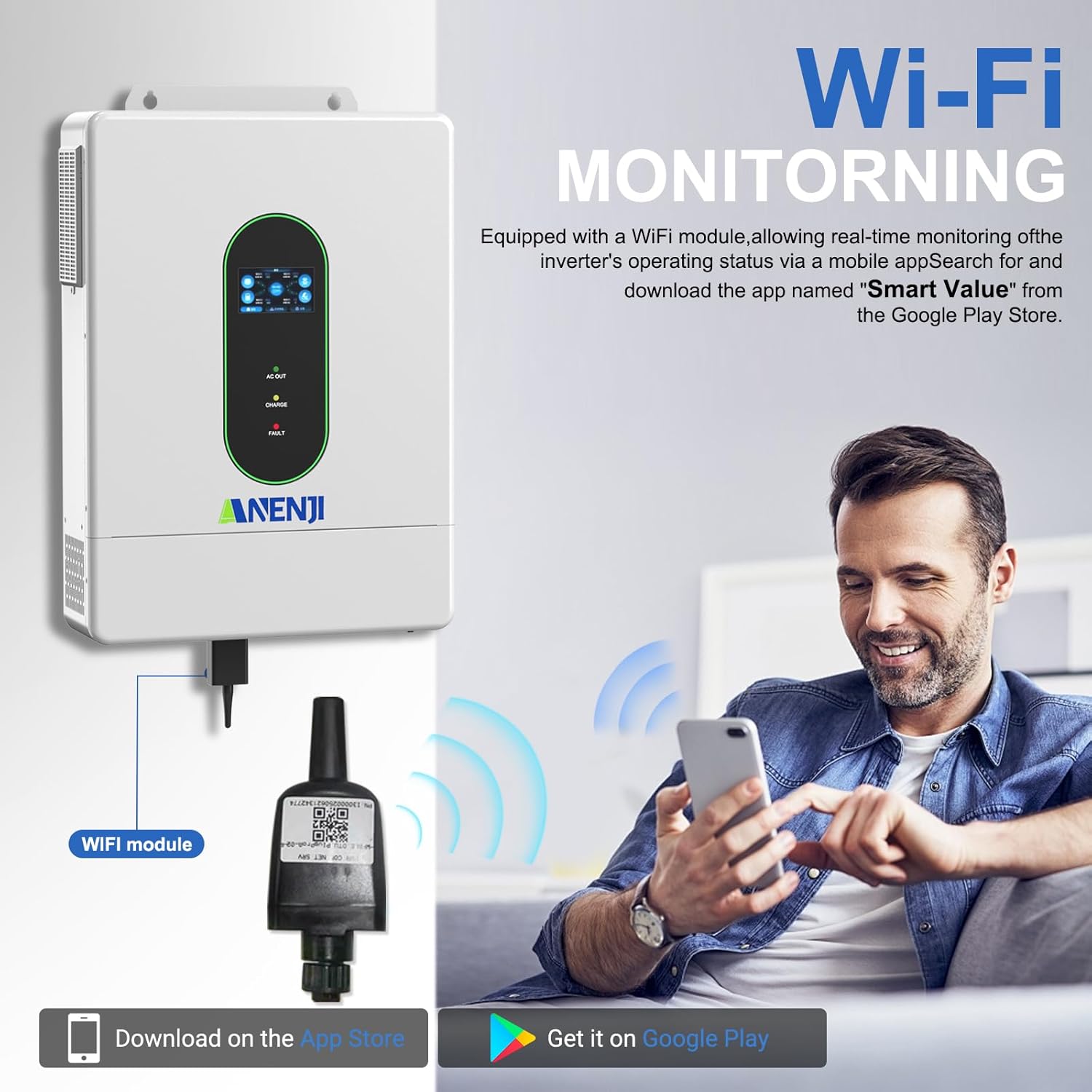
Figure 10: Wi-Fi module connection and mobile app monitoring for the inverter.
8. Khokahano e Tšoanang
The Aninerel 12000W Solar Hybrid Inverter supports parallel connection of up to 6 units to meet higher power demands, expanding the maximum output power to 72kW.

Figure 11: Various parallel connection configurations for single-phase, split-phase, and three-phase systems.
- Single-Phase Parallel: Up to 6 units can be connected in parallel for 120V residential systems, delivering up to 72kW.
- Split-Phase Parallel: For 240V systems, units can be configured in series and parallel. For example, two inverters in each phase (two pairs in split-phase).
- Three-Phase Output: Three units can be configured to achieve 208V three-phase output.
These configurations allow for scalable power solutions for both residential and small commercial solar systems.
9. Tlhokomelo
Tlhokomelo ea kamehla e netefatsa bophelo bo bolelele le ts'ebetso e nepahetseng ea inverter ea hau.
- Ho hloekisa: Periodically clean the exterior of the inverter to prevent dust accumulation, especially around ventilation openings. The IP65 rating provides dust protection.
- Moea oa moea: Ensure that the inverter's cooling system (smart variable-speed fans) operates without obstruction. Avoid blocking air inlets and outlets.
- Litlhahlobo tsa Khokahano: Regularly inspect all electrical connections for tightness and signs of corrosion.
- Lisebelisoa tsa Firmware: Sheba ea moetsi website or the Smart Value app for any available firmware updates to ensure optimal performance and new features.
10. Ho rarolla mathata
If you encounter issues with your inverter, refer to the following general troubleshooting steps. For specific error codes and detailed solutions, consult the comprehensive manual.
- Ha ho Power Output: Check AC input breaker, battery connections, and PV input. Ensure the inverter is switched ON.
- Likhoutu tsa liphoso tse hlahang Pontšong: Note down any error codes displayed on the OLED screen and refer to the manual's troubleshooting section for their meaning and recommended actions.
- Tšireletso e feteletseng: If the inverter trips due to overload, reduce the connected load and restart the unit.
- Betri ha e tjhaje: Verify PV input, MPPT settings, and battery connections. Check battery health.
- Mathata a Khokahano ea Wi-Fi: Ensure the Wi-Fi module is correctly installed and within range of your router. Restart the module and the app.
11. Litlhaloso
Key technical specifications for the Aninerel 12000W Solar Hybrid Inverter (Model ANJ-12000W-LVP-WIFI).

Figure 12: Comprehensive technical specifications of the inverter.
| Paramethara | Boleng |
|---|---|
| Mohlala | ANJ-12000W-LVP-WIFI |
| Rated khumo Power | Split phase 12000VA/12000W, Single phase: 7200VA/7200W (limited by wiring terminals) |
| Max. Matla a Hloahloa | Split phase 18000VA, Single phase: 18000VA |
| Rated di neng di kwalwa Voltage | 120Vac (L1/N, L2/N) / 240Vac (L1/L2) |
| Load Capacity of Motors | 6HP |
| E lekantsoe khafetsa ka AC | 50Hz/60Hz |
| Bokhoni bo Tšoanang | 1~6 units |
| Khumo Voltage Waveform | Sine Wave e hloekileng |
| Tšireletso e Felletseng | 102%<load<125%)+10%: report error, turn off output after 5 minutes; (125%<load<150%)+10%: report error, turn off output after 10 seconds; load>150%)+10%: report error, turn off output after 5 seconds; |
| Mofuta oa Leshala | Lithium/Lead-acid batteries |
| Rated Battery Voltage | 51.2V (Bonyane ba ho qala voltagE 44V) |
| Mains/Generator Input Range | (90Vac~140Vac)±2% |
| Setifikeiti sa Polokeho | UL STD.1741 |
| Max. MPPT Ho tjhaja Hona Jwale | 160A |
| Max. Mains/Generator Charging Current | 160A |
| Max. Hybrid Charge Current | 220A |
| Palo ea MPPT Trackers | 2 |
| Boholo. PV Array Power | 6000W × 2 |
| Max. Kenya Hona Jwale | 22A × 2 |
| Boholo. Phatlalatsotage ea Open Circuit | 500Vdc |
| MPPT Moqtage Range | 90Vdc ~ 500Vdc |
| Max. Bypass Phase Overload Current | 2P, 63A/63A (L1/L2) |
| MPPT Tracking ka katleho | 95% |
| Support Communication | WiFi Modules/RS485/CAN/USB/Dry contact |
| Litekanyo | 24.4 × 17.7 × 5.19 lisenthimithara |
| Boima ba 'mele | 23.8KG / 52.47LB |
12. Tiisetso le Tšehetso
Aninerel is committed to providing excellent customer support. For warranty information, technical assistance, or any inquiries, please contact us through the following channels:
- Lengolo-tsoibila: anenji168@outlook.com
- Mohala/WhatsApp: +86 188 0375 9233
- Lihora tsa Ts'ebetso: PDT: 9 AM - 6 PM
Our technical support team is available to assist with setup, operation, and troubleshooting.

Figure 13: Aninerel customer support contact details.