
Selelekela
This manual provides essential instructions for the safe and efficient operation of your Generic Portable Bluetooth Speaker with Solar Charging, Model B0FVMB2F8H. Please read this manual thoroughly before using the product and retain it for future reference.
Boitsebiso ba Tšireletseho
- Do not expose the speaker to extreme temperatures or direct sunlight for prolonged periods when not in use, especially the solar panel.
- Qoba ho liha kapa ho beha sebui tlas'a tšusumetso e matla.
- Do not disassemble, repair, or modify the speaker yourself. Contact qualified service personnel for any repairs.
- Keep the speaker away from water and liquids, despite its waterproof design, to prevent damage to internal components.
- Use only the specified charging cables and power adapters.
- Boloka moo bana ba ka fihlang teng.
Litaba tsa Sephutheloana
Ka kopo, sheba sephutheloana sa lintho tse latelang:
- Portable Bluetooth Speaker (Model B0FVMB2F8H)
- USB Charging Cable
- Tataiso ea ho Qala ka Potlako
Sehlahisoa se Felletseview
Familiarize yourself with the components of your speaker:
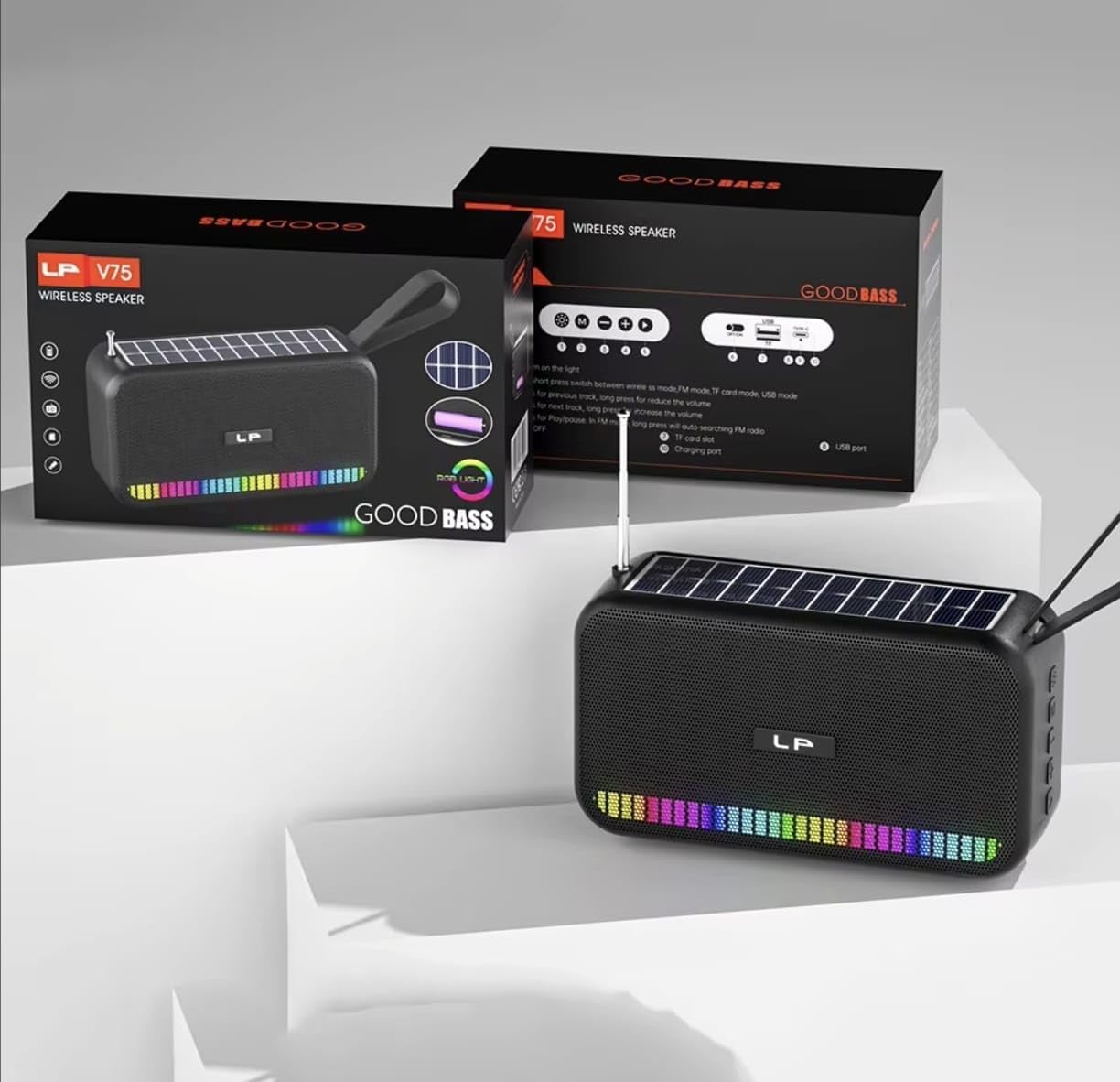
Setšoantšo: Pele view of the portable Bluetooth speaker, highlighting its solar panel, LED light display, and overall dimensions (approximately 170.5mm length, 95mm height, 60mm width).
- Solar Panel: Located on the top surface for solar charging.
- Pontšo ea Leseli la LED: Front-facing lights that synchronize with music.
- Likonopo tsa ho Laola: (Details not provided, assuming standard buttons for power, volume, mode, play/pause).
- Boema-kepe ba USB: For charging and USB drive playback.
- Slot ea TF Card: For TF card playback.
- Boema-kepe ba ho tjhaja: For USB cable charging.
- Antenna: Extendable for FM radio reception.
- Leqhoa la ho Tsamaisa: Bakeng sa ho jarolleha habonolo.

Setšoantšo: Ka morao view of the portable Bluetooth speaker, showing the battery compartment open with a rechargeable battery inserted. Also visible are the USB and charging ports.
Tlhophiso
1. Ho lefisa Sepikara
Your speaker offers two charging methods:
- Ho tjhaja Solar: Place the speaker with the solar panel facing direct sunlight. The charging indicator light will illuminate. Solar charging is ideal for maintaining battery life outdoors but may be slower than USB charging.
- Ho tjhaja USB: Connect the provided USB charging cable to the speaker's charging port and the other end to a USB power adapter (not included) or a computer's USB port. The charging indicator light will show charging status. A full charge typically takes several hours.
Ensure the speaker is fully charged before first use for optimal battery performance.
2. Ho tima/Ho tima
- Ho Matlafatsa: Press and hold the Power button (usually marked with ⏻ or BONAHALA/TSHA) for approximately 3 seconds until you hear an audible prompt or see the LED lights activate.
- Ho tima: Press and hold the Power button again for approximately 3 seconds until the speaker powers down.
Litaelo tsa Ts'ebetso
1. Mokhoa oa Bluetooth
- Kenya Mokhoa oa Bluetooth: Upon powering on, the speaker typically defaults to Bluetooth mode. If not, press the "M" (Mode) button until you hear the "Bluetooth Mode" prompt. The LED indicator will flash, indicating it's ready for pairing.
- Ho kopanya:
- Bulela Bluetooth sesebelisoa sa hau (smartphone, tablet, jj.).
- Batla available Bluetooth devices. The speaker will appear as "B0FVMB2F8H" or a similar name.
- Select the speaker from the list to connect. Once paired, you will hear a confirmation sound, and the LED indicator will stop flashing.
- Taolo ea ho Bapala:
- Bapala/Emisa: Tobetsa konopo ea Play / Pause (d).
- Pina e Latelang: Press the "Next" button (⏭).
- Pina e fetileng: Press the "Previous" button (⏮).
- Volume holimo: Long press the "Next" button or use a dedicated Volume Up button.
- Buka ea tlase: Long press the "Previous" button or use a dedicated Volume Down button.
2. Mokhoa oa seea-le-moea oa FM
- Enter FM Mode: Press the "M" (Mode) button repeatedly until you hear the "FM Radio" prompt.
- Eketsa Antenna: Eketsa antenna ea telescopic ka botlalo bakeng sa kamohelo e ntle.
- Scan ea Auto: Tobetsa o be o tshware konopo ya Bapala/Emisa (d) to automatically scan and save available FM stations. The speaker will cycle through frequencies and store them.
- Switch Stations: Use the "Next" (⏭) and "Previous" (⏮) buttons to navigate through the saved stations.
3. USB / TF Card Playback
- Kenya Media: Insert a USB flash drive into the USB port or a TF (MicroSD) card into the TF card slot. The speaker will automatically detect the media and switch to the corresponding playback mode.
- Taolo ea ho Bapala: Use the Play/Pause, Next, and Previous buttons for controlling playback, similar to Bluetooth mode.
4. LED Light Display
The speaker features dynamic RGB LED lights that can synchronize with your music. Specific controls for the LED lights (e.g., changing patterns, turning off) are not detailed in the product information, but they typically activate automatically with audio playback. If there is a dedicated light button, press it to cycle through modes or turn off the lights.
5. Ho Letsa ho se Na Matsoho
When connected via Bluetooth to a smartphone, the speaker can be used for hands-free calls.
- Araba Mohala: Tobetsa konopo ea Play / Pause (d) once to answer an incoming call.
- Qetella Mohala: Tobetsa konopo ea Play / Pause (d) once to end an ongoing call.
- Hana Mohala: Tobetsa o be o tshware konopo ya Bapala/Emisa (d) to reject an incoming call.
Tlhokomelo
- Ho hloekisa: Use a soft, dry cloth to clean the speaker's surface. Do not use abrasive cleaners, alcohol, or chemical solvents.
- Solar Panel: Keep the solar panel clean and free of dust or debris to ensure efficient charging.
- Polokelo: When not in use for extended periods, store the speaker in a cool, dry place. It is recommended to fully charge the battery every 3 months to prolong its lifespan.
Ho batle phoso
| Bothata | Lebaka le ka khonehang | Tharollo |
|---|---|---|
| Sebui ha se sebetse. | Betri e tlase. | Charge the speaker using the USB cable or place it in direct sunlight. |
| Ha e khone ho para ka Bluetooth. | Bluetooth ha e a bulelwa sesebediswa; sebui ha se maemong a ho kopanya; se hole haholo le sesebediswa. | Ensure Bluetooth is on and the speaker is in pairing mode. Move device closer to speaker (within 10 meters). Forget previous pairings on your device and try again. |
| Ha ho na molumo kapa molumo o tlase. | Volume too low on speaker or connected device; incorrect mode selected. | Increase volume on both the speaker and your connected device. Ensure the correct mode (Bluetooth, FM, USB, TF) is selected. |
| Kamohelo ea seea-le-moea sa FM e fokola. | Antenna not extended; weak signal. | Fully extend the telescopic antenna. Try repositioning the speaker for better signal reception. |
| Karete ea USB/TF ha e bapale. | E fosahetse file format; card/drive not inserted correctly; corrupted media. | Netefatsa molumo files are in a compatible format (e.g., MP3). Reinsert the USB drive or TF card. Try a different USB drive or TF card. |
Litlhaloso
| Nomoro ea Mohlala: | B0FVMB2F8H |
| Theknoloji ea Khokahano: | bluetooth |
| Mohloli oa Matla: | Solar, USB |
| Lihlopha tsa seea-le-moea tse tšehelitsoeng: | FM (87.5-108 MHz) |
| Likarolo tse Khethehileng: | Solar charging, LED light display, Multi-playback options (Bluetooth, FM Radio, USB, TF card) |
| Lisebelisoa tse Lumellanang: | Bluetooth devices, USB devices, TF cards, FM radio signals |
| Mofuta oa Pontšo: | LED |
| Mmala: | Ntsho |
| Moetsi: | China |
Warranty le Tšehetso
Sehlahisoa sena se tla le a Guarantee ea matsatsi a 15 from the date of purchase. This warranty covers manufacturing defects. It does not cover damage caused by misuse, accidents, unauthorized modifications, or normal wear and tear.
For warranty claims or technical support, please refer to the contact information provided by your retailer or the seller "CLASSYSA" on Amazon. Please retain your proof of purchase for warranty validation.