
Selelekela
Thank you for choosing the Rimoody 1 Din Autoradio. This device integrates advanced features such as Wireless CarPlay, Android Auto, a 6.9-inch IPS touchscreen, Bluetooth 5.2, FM radio, and various multimedia options to enhance your driving experience. This manual provides essential information for proper installation, operation, maintenance, and troubleshooting to ensure optimal performance and longevity of your device.
Boitsebiso ba Tšireletseho
- Bala litaelo tsohle ka hloko pele u kenya le ho sebelisa.
- Installation should be performed by a qualified professional to prevent damage to the vehicle or the device.
- Se ke oa sebelisa sesebelisoa ka tsela e tla u sitisa ho khanna. Ka linako tsohle beha polokeho ea litsela pele.
- Qoba ho beha sesebelisoa mochesong o feteletseng, khanya ea letsatsi ka nako e telele, kapa mongobo.
- Use only accessories and parts specified by the manufacturer.
- Disconnect the vehicle's battery before installation to prevent electrical shorts.
Litaba tsa Sephutheloana
Netefatsa hore lintho tsohle li teng ka har'a sephutheloana:
- 1 Car MP5 Player (Autoradio)
- Cable ea Matla a 1
- 1 Horn Cable
- 1 Taolo ea Remote
- 1 Bukana ea Mosebelisi
- 1 Camera (Optional, if included in your purchase)

Setšoantšo: Ho felileview of the Rimoody 1 Din Autoradio package contents, including the main unit, various cables, remote control, user manual, and an optional reverse camera.
Sehlahisoa se Felletseview
The Rimoody 1 Din Autoradio (Model 6286W) is designed to fit standard 1 DIN dashboard openings (178x50 mm). It features a 6.9-inch IPS touchscreen with a resolution of 1280x480, offering vibrant colors and wide viewing angles. Key functionalities include:
- Wireless and Wired CarPlay & Android Auto
- Bluetooth 5.2 for hands-free calls and audio streaming
- FM Radio with automatic search and preset stations
- Mirror Link for screen mirroring from smartphones
- Steering Wheel Control learning function
- Customizable EQ sound effects
- Multi-function USB and Type-C ports for media playback and charging
- Support for optional reverse camera and DVR functions
- Colorful backlight settings
Seta & Tlhophiso
This autoradio is compatible with vehicles equipped with standard 1 DIN dashboard kits (178x50 mm). Professional installation is recommended.
Setšoantšo sa Wiring
Refer to the detailed wiring diagram provided in the image below and in your physical user manual for correct connections. Ensure all connections are secure to prevent malfunctions.
Image: Detailed wiring diagram for the Rimoody 1 Din Autoradio, illustrating connections for power, speakers, audio outputs, camera input, and USB ports.
- Khokelo ea Matla: Connect the power cable (red and yellow wires) to the vehicle's power supply. The black wire is for ground.
- Khokahano ea Sebui: Connect the horn cable to your vehicle's speakers. Ensure correct polarity.
- Reverse Camera (Optional): Connect the reverse camera input (CVBS) to the designated port. The unit will automatically display the camera feed when reverse gear is engaged.
- Antenna: Connect the radio antenna to the unit.
- USB/Mofuta oa C: Connect external devices or charging cables to the USB and Type-C ports.
Litaelo tsa Ts'ebetso
1. CarPlay e se nang mohala le Android Auto
Enjoy seamless smartphone integration. Connect your Apple or Android phone wirelessly via Bluetooth/Wi-Fi or wired via USB to access maps, music, calls, and apps. Activate voice control (Siri/Google Assistant) for navigation, messages, or calls, keeping your focus on the road.
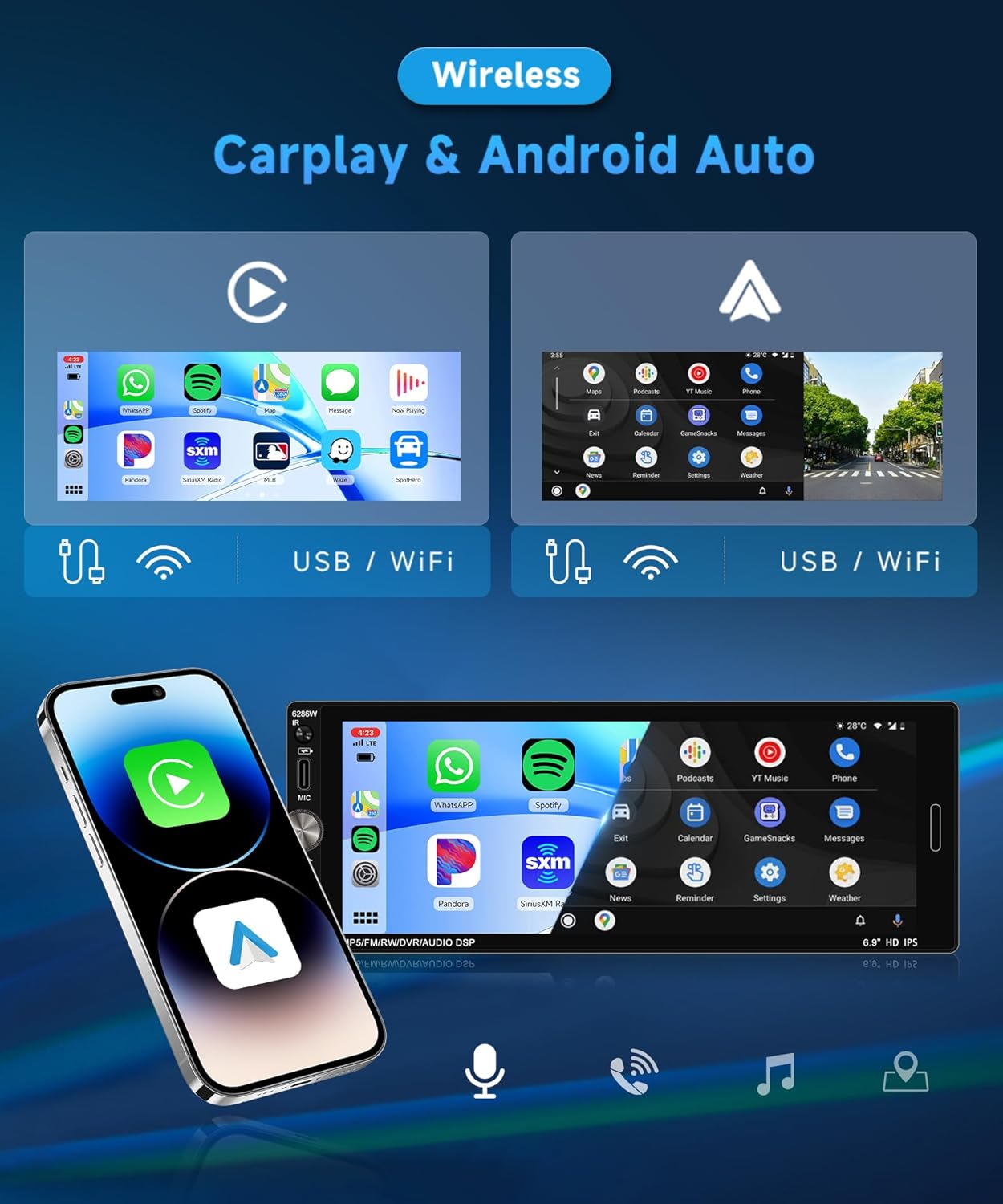
Image: Display of Wireless CarPlay and Android Auto interfaces on the 6.9-inch IPS touchscreen, demonstrating app access and connectivity options.
2. Bluetooth 5.2
Benefit from stable Bluetooth 5.2 connectivity for wireless music streaming, hands-free calls, and contact synchronization. Noise reduction technology ensures clear audio even in noisy environments. To pair, enable Bluetooth on your phone, search for the device (e.g., "Rimoody 6286W"), and connect.
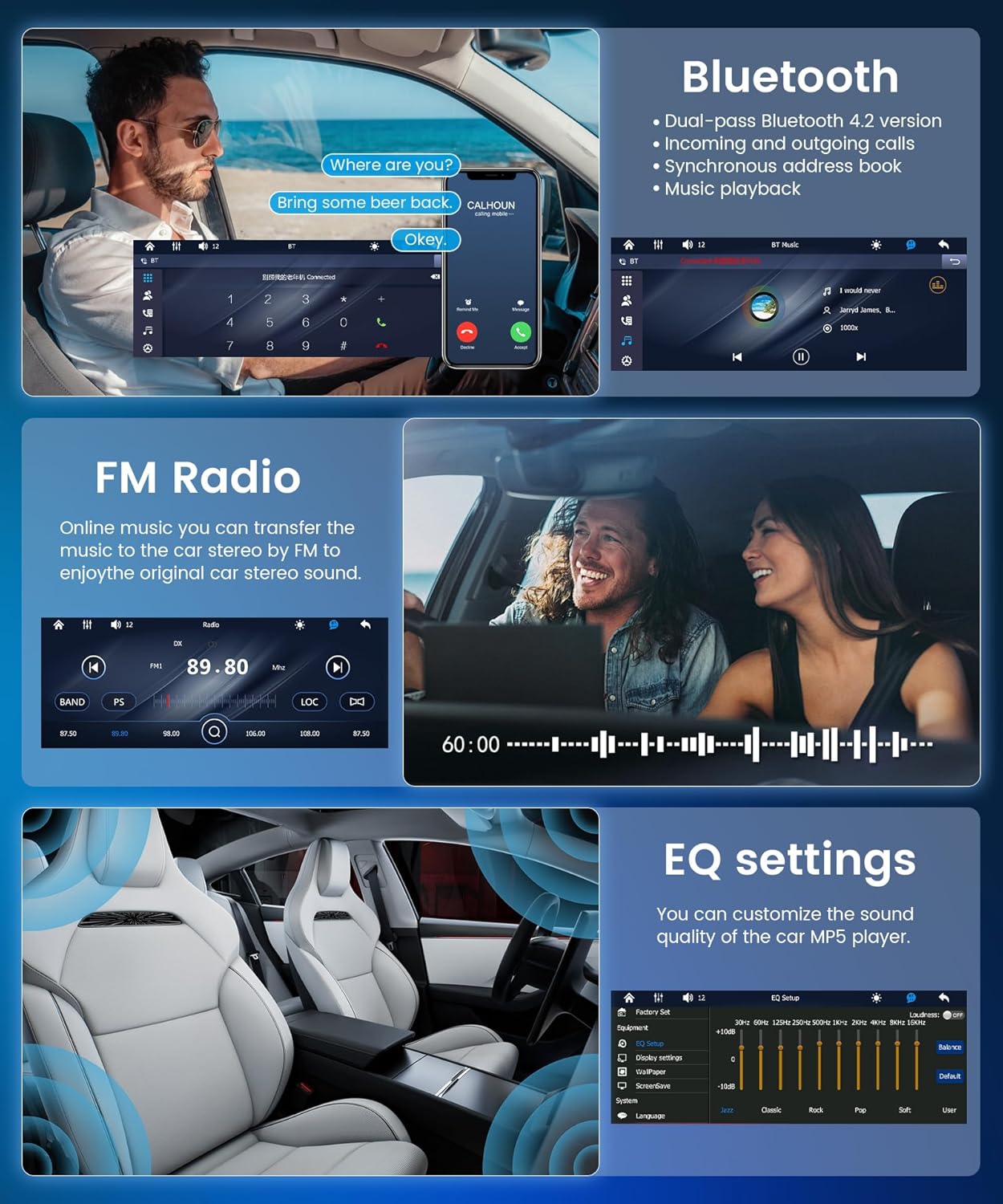
Image: The Bluetooth interface showing an active call, alongside the FM radio tuner and equalizer settings.
3. FM Radio
The integrated FM radio automatically searches and saves up to 18 preset stations. Listen to music, news, and traffic information. Use the auto-search, semi-automatic, or precise tuning functions to find your preferred stations.
4. Mirror Link
Mirror Link duplicates your smartphone screen onto the car's display, providing seamless access to your apps and media. Connect wirelessly via Bluetooth/Wi-Fi or via USB to display maps, videos, or applications on the large touchscreen.

Image: A smartphone screen being mirrored onto the Rimoody Autoradio display, illustrating the Mirror Link feature via USB or WiFi connection.
5. Taolo ea Lebili la ho Setereka
The unit supports a steering wheel button learning function, allowing you to control essential functions directly from your steering wheel for added convenience and safety. Follow the on-screen instructions in the settings menu to program your steering wheel controls.

Image: The steering wheel control setup menu on the autoradio, next to a visual representation of a car's reverse camera view.
6. Litlhophiso tsa EQ
Customize your audio experience with the 10-band equalizer. Adjust bass, treble, and other sound parameters to achieve optimal sound quality. The unit also features a bass filter for an immersive in-car audio experience.
7. Reverse Camera (Optional)
If a reverse camera is connected, the autoradio will automatically display the rear view when the vehicle is put into reverse. This feature enhances safety by providing a clear view of obstacles, aiding in parking and maneuvering.
8. Multimedia Input (USB & Type-C)
Connect your devices to the multi-function USB and Type-C ports to enjoy your favorite music, videos, and photos. These ports also support fast charging for your devices while driving. Compatible formats include MP3/WMA/WAV/APE/FLAC for audio and RM/RMVB/AVI/MP4/MKV/3GP for video.

Image: Visual representation of multimedia input options including TF card, USB, AUX IN, and fast charging, along with the customizable colorful backlight settings.
9. Colorful Backlight Settings
Customize the unit's button backlighting with various color options to match your vehicle's interior or your personal preference.
Tlhokomelo
- Ho hloekisa skrine: Sebelisa lesela le bonolo, le se nang letlapa ho hlakola skrini sa ho thetsa ka bonolo. Se ke oa sebelisa li-abrasive cleaners kapa solvents.
- Tlhoekiso e Akaretsang: Keep the unit free from dust and debris. Use a dry cloth for cleaning the exterior.
- Lintlafatso tsa Software: Sheba ea moetsi website periodically for any available software updates to ensure optimal performance and new features.
- Qoba Liquids: Prevent any liquids from entering the unit, as this can cause severe damage.
Ho batle phoso
| Bothata | Lebaka le ka khonehang | Tharollo |
|---|---|---|
| Ha ho Matla | Wiring e fosahetseng; Fuse e phatlohileng; Bothata ba betri ea koloi. | Check power cable connections; Inspect and replace fuses if necessary; Verify vehicle battery voltage. |
| Ha ho Modumo | Lithapo tsa sepikara li khaotsoe; Molumo o tlase haholo; Mosebetsi oa khutsufatsa o sebetsa; Mohloli o fosahetseng oa molumo. | Check speaker connections; Increase volume; Deactivate mute; Select correct audio source. |
| Khokelo ea Bluetooth e hlolehile | Bluetooth not enabled on phone/unit; Device out of range; Interference. | Ensure Bluetooth is active on both devices; Move devices closer; Restart both devices. |
| CarPlay/Android Auto Ha e hokahane | Incorrect USB cable; Phone software outdated; App not installed/updated. | Use original or certified USB cable; Update phone OS and CarPlay/Android Auto app; Restart phone and unit. |
| Kamohelo e mpe ea seea-le-moea sa FM | Antenna ha e kopane; Sebaka sa pontšo se fokolang; Tšitiso. | Ensure antenna is properly connected; Try tuning manually; Move to an area with better signal. |
Litlhaloso
- Mohlala: 6286W
- Lintho tse hlahang skrineng: IPS
- Moqtage: DC 12V
- Motlakase: F133
- Boholo ba skrini: 6.9 inch
- Qeto: 1280 x 480
- Sehokela sa Seipone: E tsamaellana
- Sehlopha sa Radio: FM
- Radio Chip: QN8035
- Output Power: 45W (per channel), 180W total
- Thempereichara ea ho sebetsa: -10 ~ 60 °C
- Mofuta oa Bluetooth: 5.2
- Lebone la Morao-rao le Mebala: E tsamaellana
- Phetoho ea Kenyelletso: CVBS
- Matla AmpLifier Chip: TDA7388
- Maqhubu a Radio: 87.5-108 MHz
- Liforomo tsa Audio: MP3 / WMA / WAV / APE / FLAC
- Mefuta ea Lifitio: RM/RMVB/AVI/MP4/MKV/3GP
- Libopeho tsa Litšoantšo: JPG, BMP, PNG
- Lipuo tse Tšehetsoeng: English, Chinese, Spanish, Portuguese, Russian, Italian, German, French, Turkish, Czech, Arabic, Polish, Hebrew
- Theknoloji ea Khokahano: AUX, USB, Type C
- Mofuta oa taolo: Manual Control, Remote Control
- Lisebelisoa tse Lumellanang: Smartphone, Tablet, Personal Computer, Game Console, Car Display
- Mokhoa oa Phatlalatso ea Audio: Setereo
- Tlhophiso ea Seteishene se Potileng: 4.0
Warranty & Support
This Rimoody Autoradio comes with a Tiisetso ea moetsi oa lilemo tse 2. Ka kopo, boloka bopaki ba theko ea hau bakeng sa likopo tsa waranti.
For technical support, troubleshooting assistance, or warranty inquiries, please contact Rimoody customer service through the retailer where you purchased the product or visit the official Rimoody websaete bakeng sa lintlha tsa ho ikopanya.
When contacting support, please have your product model (6286W) and purchase details ready.