
1. Selelekela
Thank you for choosing the OUKITEL P1500E PLUS Portable Power Station. This device is a high-capacity, versatile power solution designed to provide reliable electricity for various applications, including home backup, outdoor camping, travel, and emergency situations. With a robust 1536Wh LiFePO4 battery and an 1800W continuous AC output (3600W peak), it ensures your essential devices remain powered.
This manual provides important information regarding the safe operation, setup, maintenance, and troubleshooting of your P1500E PLUS. Please read it thoroughly before using the product to ensure optimal performance and safety.

Image: OUKITEL P1500E PLUS Portable Power Station in an outdoor setting, showcasing its compact design and portability.
2. Litaelo tsa Tšireletso
To ensure safe operation and prolong the lifespan of your OUKITEL P1500E PLUS, please adhere to the following safety guidelines:
- Do not disassemble, repair, or modify the unit. Incorrect assembly may lead to fire, explosion, or injury.
- Keep the device away from fire, heat sources, and direct sunlight to prevent overheating.
- Do not use or store the device in bathrooms or areas exposed to water or high humidity.
- Sebelisa feela mehala ea mantlha kapa e netefalitsoeng le lisebelisoa.
- Avoid dropping, impacting, or subjecting the device to strong vibrations.
- Boloka moo bana le liphoofolo tse ruuoang lapeng li fihlang teng.
- The integrated LiFePO4 battery features a SuperSafe Battery Management System (BMS) that provides protection against short circuits, over-temperature, over-charge, and other potential hazards.
- Netefatsa hore moea o kena hantle nakong ea tšebeliso le ho tjhaja ho thibela ho chesa haholo.
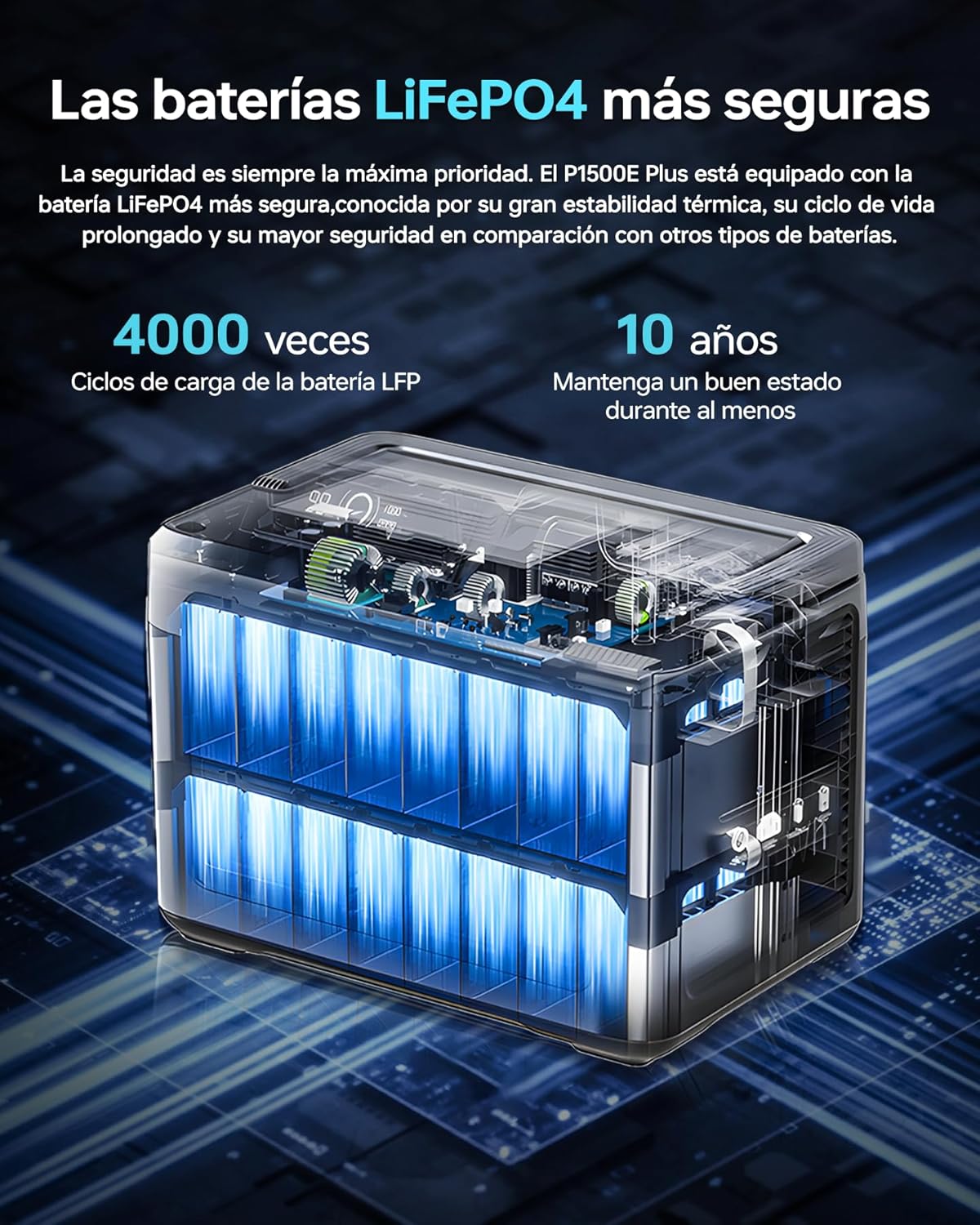
Setšoantšo: Ka hare view of the OUKITEL P1500E PLUS LiFePO4 battery cells, highlighting the safety and longevity of the battery technology. The text on the image indicates '4000 cycles' and '10 years' lifespan.
3. Likahare tsa Sephutheloana
Ka kopo, hlahloba dikahare tsa sephutheloana ha o bula lebokose. Haeba dintho dife kapa dife di le siyo kapa di senyehile, ikopanye le tshehetso ya bareki.
- 1 x OUKITEL P1500E PLUS Portable Power Station
- 2 x PV100 Foldable Solar Panels
- 1 x AC Power Cable
- 1 x MC4 to XT60 Cable
- 1 x Bluetooth Pairing Pin
- 1 x Karete ea Tiisetso
- 1 x Buka ea Mosebelisi

Image: Diagram showing the contents of the OUKITEL P1500E PLUS package, including the power station, AC charging cable, MC4-XT60 cable, and manual.
4. Sehlahisoa Overview
4.1. Likou le Litaolo
The OUKITEL P1500E PLUS is equipped with a variety of output and input ports to accommodate diverse charging needs:
- AC Outputs (x4): 1800W continuous, 3600W peak.
- USB-A QC3.0 (x2): Quick Charge for compatible devices.
- USB Type-C PD20W (x1): Power Delivery for smaller devices.
- USB Type-C PD100W (x1): High-speed Power Delivery for laptops and larger devices.
- DC5521 Outputs (x2): For DC-powered appliances.
- Car Charging Port (x1): 12V/10A output.
- Leseli la LED: Integrated for illumination.

Setšoantšo: Ka botlalo view of the OUKITEL P1500E PLUS ports and controls, labeling AC outputs, USB ports, DC outputs, and the car charging port.
4.2. Sebopeho sa Pontšo
The clear digital display provides real-time information about the power station's status:
- 1. Discharge Remaining: Time remaining for discharge.
- 2. High Temperature Protection: Sesupo sa ho chesa haholo.
- 3. Low Temperature Protection: Indicator for low temperature.
- 4. Fan Status: Indicates fan operation.
- 5. Power Status: Boemo ba ho tjhaja betri.
- 6. UPS Mode: Indicates Uninterruptible Power Supply mode.
- 7. PV Charging Mode: Indicates solar charging.
- 8. Total Input Power: Current power input in watts.
- 9. Total Output Power: Current power output in watts.
- 10. Cigarette Lighter (12V) Output: Indicator for car port use.
- 11. DC (12V) Output: Indicator for DC output use.
- 12. Mokhoa o khutsitseng: Indicator for quiet operation.
- 13. Fast Charging Mode: Indicator for rapid charging.
- 14. Slow Charging Mode: Indicator for slower, battery-preserving charging.
- 15. Tšireletso e Felletseng: Indicator for excessive load.
- 16. USB Output: Indicator for USB-A output use.
- 17. PD Output: Indicator for USB-C Power Delivery output use.
- 18. Sephetho sa AC: Indicator for AC output use.
- 19. Frequency Switching: Allows switching between 50Hz/60Hz.
- 20. WiFi / Bluetooth: Connection status for app control.

Image: Diagram illustrating the OUKITEL P1500E PLUS display interface and its indicators, with numbered labels corresponding to their functions.
5. Seta
5.1. Ho tjhaja ha Pele
Before first use, fully charge the OUKITEL P1500E PLUS. Connect the AC power cable to the input port and plug it into a wall outlet. The display will show the charging status. It is recommended to fully charge the unit every 3 months if not in regular use.
5.2. Ho hokahanya Liphanele tsa Letsatsi
To charge using solar power, connect the PV100 solar panels to the power station using the MC4 to XT60 cable. Ensure the solar panels are placed in direct sunlight for optimal charging efficiency. The display will indicate solar charging activity.
6. Litaelo tsa Ts'ebetso
6.1. Ho tjhaja Seteishene sa Motlakase
The P1500E PLUS offers flexible charging options:
- Ho tjhaja AC: Connect the AC cable to a wall outlet. Supports fast charging (Max 1200W) and slow charging (Max 500W). Fast charging can fully charge the unit in approximately 1 hour and 40 minutes.
- Ho tjhaja Solar: Connect solar panels via the MC4 to XT60 cable. The unit supports up to 500W solar input.
- Ho tjhaja koloi: Use a car charger (not included) to charge from your vehicle's 12V/24V outlet.

Image: OUKITEL P1500E PLUS charging via AC power from a wall outlet and simultaneously via foldable solar panels. The image indicates charging times for AC (1h 40m), Solar (3h 20m), Car (12h/6h), and combined AC+Solar (59 minutes).
6.2. Discharging (Using Outputs)
Ho matlafatsa disebediswa tsa hao:
- Press the main power button to turn on the power station.
- Press the respective output button (AC, DC, USB) for the port you wish to use. The indicator light for that output will illuminate.
- Connect your device to the appropriate port.
- When finished, turn off the output ports and then the main power button.
6.3. Mosebetsi oa UPS
The P1500E PLUS features an Uninterruptible Power Supply (UPS) function with a switchover time of less than 10 milliseconds. This ensures continuous operation for sensitive devices like PCs, servers, and freezers during sudden power outages kapa voltage drops, preventing data loss and downtime.

Image: OUKITEL P1500E PLUS providing UPS backup to a computer setup during a simulated power outage, demonstrating its ability to maintain power for critical devices. The text on the image highlights 'UPS without interruptions of 1800W <10ms'.
6.4. Taolo ea App
Control your P1500E PLUS remotely via the dedicated mobile application. Use the Bluetooth pairing pin to connect your device. The app allows you to:
- Monitor battery status and power consumption.
- Adjust discharge limits.
- Select charging speed (fast or slow).
- Turn outputs on/off.

Image: A user controlling the OUKITEL P1500E PLUS via a smartphone app in an outdoor setting, demonstrating the convenience of remote management. The text on the image indicates 'Smart control via application'.
7. Tlhokomelo
Proper maintenance ensures the longevity and performance of your power station:
- Polokelo: Store the unit in a cool, dry place, away from direct sunlight and extreme temperatures. For long-term storage, charge the battery to 50-80% every 3 months.
- Ho hloekisa: Sebelisa lesela le omileng, le bonolo ho hloekisa bokantle ba yuniti. U se ke ua sebelisa litlhoekiso tse khorofo kapa li-solvent.
- Tlhokomelo ea Betri: Avoid fully discharging the battery frequently. While LiFePO4 batteries are robust, maintaining a charge between 20% and 80% can extend their overall lifespan.
- Moea oa moea: Netefatsa hore masoba a moea a hloekile lerōle le lithōle ho thibela ho chesa haholo.
8. Ho rarolla mathata
If you encounter issues with your OUKITEL P1500E PLUS, refer to the following common problems and solutions:
| Bothata | Lebaka le ka khonehang | Tharollo |
|---|---|---|
| Yuniti ha e bulele | Battery is completely discharged; Power button not pressed correctly. | Charge the unit using AC power; Press and hold the power button for 3 seconds. |
| No output from AC/DC/USB ports | Output port not activated; Overload protection triggered; Device not compatible. | Press the corresponding output button; Reduce the load; Check device power requirements. |
| Lebelo le butle la ho tjhaja | Slow charging mode activated; Low solar input; High ambient temperature. | Switch to fast charging mode via app or unit settings; Ensure solar panels are in direct sunlight; Move to a cooler environment. |
| Overheat warning on display | Excessive load; Poor ventilation; High ambient temperature. | Reduce the connected load; Ensure ventilation openings are clear; Move to a cooler environment. |
If the problem persists, please contact OUKITEL customer support.
9. Litlhaloso
| Sebopeho | Tlhaloso |
|---|---|
| Nomoro ea Mohlala | P1500E PLUS |
| Brand | OUKITEL |
| Mofuta oa Leshala | LiFePO4 |
| Bokhoni | 1536Wh (480000 mAh) |
| AC Output | 1800W (Continuous), 3600W (Peak) |
| Mabenkele a AC | 4 |
| Sesebelisoa sa USB-A | 2 x QC3.0 |
| Sephetho sa USB-C | 1 x PD20W, 1 x PD100W |
| Tlhahiso ea DC | 2 x DC5521, 1 x Car Charging Port (12V/10A) |
| Kenyo ea AC (Ho tjhaja) | Max 1200W (Fast), Max 500W (Slow) |
| Keletso ea letsatsi | Boholo ba 500W |
| UPS Switchover Time | <10ms |
| Litekanyo (L x W x H) | 38.6 x 22.8 x 30.5 cm (15.2 x 9.0 x 12.0 lisenthimithara) |
| Boima ba 'mele | Hoo e ka bang 14.2 kg (31.3 lbs) |
| Recommended Sebelisa | Residential, Camping, Emergency |
10. Tiisetso le Tšehetso
The OUKITEL P1500E PLUS Portable Power Station comes with a Waranti ea lilemo tse 2 ho tloha ka letsatsi la theko. Tiisetso ena e akaretsa liphoso tsa tlhahiso le ts'ebetso tlas'a ts'ebeliso e tloaelehileng.
Warranty ha e koahele:
- Damage caused by misuse, abuse, or improper operation.
- Damage caused by unauthorized disassembly, repair, or modification.
- Damage caused by natural disasters or external forces.
- Ho qhoma ho tloaelehileng.
For warranty claims, technical support, or any questions regarding the use of your OUKITEL P1500E PLUS, please contact OUKITEL customer service. Please have your purchase receipt and product model number ready when contacting support.