
Selelekela
This manual provides essential information for setting up, operating, maintaining, and troubleshooting your Apple iPhone 17. This device is a renewed, unlocked US Version with 256GB storage and eSIM capability. Please read these instructions carefully to ensure optimal performance and longevity of your device.
Sesebelisoa Ho fetaview
The Apple iPhone 17 features a sleek design and powerful capabilities. Below are images highlighting key aspects of the device.
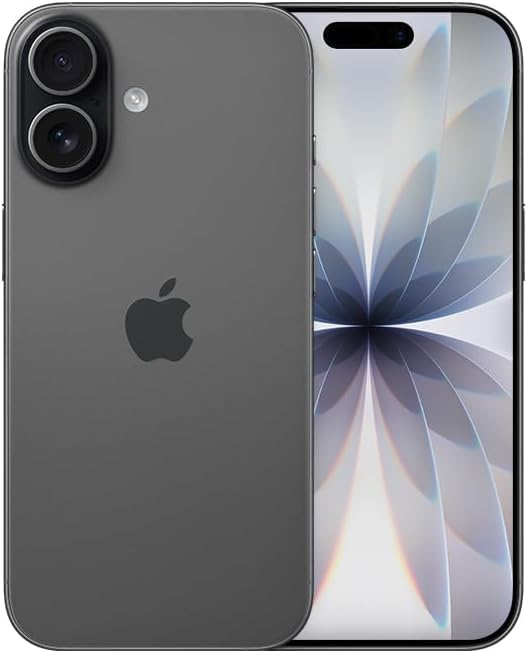
Setšoantšo: Pele view of the Apple iPhone 17 in Black. This image displays the device's screen and overall form factor.

Image: Close-up of the dual camera system on the rear of the Apple iPhone 17. This highlights the camera lenses and flash module.

Setšoantšo: Side profile of the Apple iPhone 17, showing the power button and volume controls. This view emphasizes the device's slim design.
Tlhophiso
Follow these steps to set up your renewed Apple iPhone 17:
- Tšebelisano 'moho: This phone is unlocked and compatible with GSM and CDMA networks (e.g., AT&T, T-Mobile, Sprint, Verizon, US Cellular, Cricket, Metro, Tracfone, Mint Mobile). Before proceeding, verify compatibility with your chosen carrier.
- eSIM Activation: The iPhone 17 uses an eSIM. Your carrier will provide instructions for activating the eSIM. Often, this involves scanning a QR code. Important: Do not discard any QR stickers provided with your device, as they may be essential for eSIM activation.
- Matlafatsa: Press and hold the power button on the side of the device until the Apple logo appears.
- Tlhophiso ea pele: Follow the on-screen prompts to select your language, region, connect to a Wi-Fi network, and transfer data from a previous device if applicable.
- Lisebelisoa: The device includes a generic (Mfi certified) charger and charging cable. Headphones and a physical SIM card are not included.
Operating Your iPhone 17
Your iPhone 17 runs on iOS 18, offering a user-friendly interface and a wide range of features.
Navigation ea Motheo
- Skrine sa Lehae: Swipe up from the bottom of the screen to return to the Home Screen.
- App Switcher: Swipe up from the bottom and pause in the middle of the screen to view bula lisebelisoa.
- Setsi sa Taolo: Swipe down from the top-right corner to access quick settings.
- Litsebiso: Swipe down from the top-center to view litsebiso.
Likarolo tsa Khamera
The iPhone 17 is equipped with a powerful camera system:
- Khamera e ka morao: 48 MP sensor with LED flash and 10x digital zoom for high-quality photos and videos.
- Khamera e ka Pele: Single front-facing camera for selfies and video calls.
- Ho Nka Lifitio: Supports 1080p and 4k video recording.
Pontšo le Khokahano
- Hlahisa: 6.3-inch OLED display with 2622 x 1206 resolution and a 120Hz refresh rate, providing vibrant visuals and smooth scrolling.
- Khokahano: Supports 5G cellular technology, Bluetooth, NFC, USB Type C, and Wi-Fi for seamless communication and data transfer.
Security and Additional Features
- Tšireletso ea Biometric: Face Recognition for secure unlocking and authentication.
- Likarolo tse Eketsehileng: Includes Always On Display, Built-In GPS, Dual SIM capability (via eSIM), and Wireless Charging.
Livideo Tse Thusang
Video: A comparison between the iPhone 17 and another phone model, highlighting design and features. This video is provided by Ersbit.
Video: Re e tšepahalangview of the Apple iPhone 17, discussing its performance and user experience. This video is provided by Dimitri.
Video: Tlhahlobo e qaqilengview of the Apple iPhone 17, covering various aspects of the device. This video is provided by Bonfashion.
Video: A short clip showcasing the Lavender color variant of the iPhone 17. This video is provided by Veronika.
Video: Demonstrating the Apple iPhone 17 in daily use scenarios. This video is provided by Ericka Garcia Garcia.
Video: A design comparison between the iPhone 17 Pro and the standard iPhone 17. This video is provided by Ersbit.
Video: Ho fetaview of the iPhone Air and iPhone 17's overall design. This video is provided by Ersbit.
Tlhokomelo
Proper maintenance ensures the longevity and performance of your iPhone 17.
- Bophelo bo Botle ba Battery: Your renewed iPhone 17 is guaranteed to have a minimum battery capacity of 80%. To preserve battery life, avoid extreme temperatures and excessive charging cycles.
- Ho hloekisa: Use a soft, lint-free cloth to clean the screen and exterior. Avoid abrasive materials or harsh chemicals.
- Lintlafatso tsa Software: Regularly update your iOS to the latest version to benefit from security patches, new features, and performance improvements.
- Taolo ea polokelo: Nako le nako review le ho hlakola ho sa hlokahale files, apps, and media to optimize storage and performance.
Ho batle phoso
If you encounter issues with your iPhone 17, consider the following common solutions:
- Mathata a Khokahano ea Marang-rang: If you experience problems with calls, texts, or data, first ensure your eSIM is properly activated with your carrier. Some carriers may have specific requirements or known compatibility issues. Contact your carrier's support for assistance.
- Sesebelisoa ha se arabe: Perform a force restart. The exact steps may vary slightly by iOS version, but typically involve pressing and quickly releasing the Volume Up button, then the Volume Down button, then pressing and holding the Side button until the Apple logo appears.
- Khaello ea Battery: Check battery usage in Settings to identify apps consuming significant power. Adjust settings like screen brightness, background app refresh, and location services to optimize battery life.
- Mathata a App: If an app is not functioning correctly, try closing and reopening it. If the issue persists, delete and reinstall the app, or check for app updates in the App Store.
- Litšitiso tsa Software: Ensure your device is running the latest iOS version. If problems persist, consider backing up your data and performing a factory reset.
Litlhaloso
Detailed technical specifications for the Apple iPhone 17 (256GB, Unlocked, Renewed):
| Sebopeho | Tlhaloso |
|---|---|
| Brand | apole |
| Lebitso la Mohlala | iPhone 17 |
| Mokhoa oa tšebetso | iOS 18 |
| Bokhoni ba ho Boloka Memori | 256 GB |
| Memori ea RAM e kentsoeng boholo | 8 GB |
| Mohlala oa CPU | A-Series |
| CPU lebelo | 3.7 GHz |
| Boholo ba skrine | 6.3 lisenthimithara |
| Mofuta oa Pontšo | OLED |
| Qeto | 2622 x 1206 Pixels |
| Refresh Rate | 120 Hz |
| Display Pixel Density | 460 Pixels Per Inch (PPI) |
| Mofani oa Wireless | notletsoe |
| Theknoloji ea Mehala | 5G |
| Theknoloji ea Khokahano | Bluetooth, NFC, USB, Wi-Fi |
| Palo ea Sebaka sa Karete ea SIM | E Sim |
| Mofuta oa Sehokelo | Mofuta oa USB oa C |
| Rear Facing Camera Photo Sensor Resolution | 48 MP |
| Number of Rear Facing Cameras | 1 |
| Number of Front Cameras | 1 |
| Khamera Flash | LED |
| Nyenyefatsa Digital | 10.0 |
| Qeto ea ho nka video | 1080p, 4k |
| Bokhoni ba Battery | 3600 limilioneamp Lihora |
| Tlhaloso ea Battery | Lithium-Ion |
| Biometric Security Feature | Tlhokomeliso ea Sefahleho |
| Likarolo tse Eketsehileng | Always On Display, Built-In GPS, Dual SIM, Factory Unlocked, Wireless Charging |
| Boemo ba ho hanyetsa Metsi | Ha e Mamelle Metsi |
| Boima ba Ntho | 14.88 lik'hilograma |
| Litekanyo tsa Ntho | 6 x 4 x 2 lisenthimithara |
| Selemo sa Mohlala | 2025 |
| UPC | 756613503987 |
Warranty le Tšehetso
Your renewed Apple iPhone 17 is covered by a 90-Day Amazon Renewed Guarantee. This warranty ensures that your device is in excellent working condition and provides options for replacement or refund if issues arise within the warranty period.
For further assistance, please refer to the following:
- Thuso e Nchafalitsoeng ea Amazon: Visit the Amazon Renewed Store for information regarding your purchase and warranty claims.
- Apple Support: For general iOS and device functionality questions, visit the official Apple Support websebaka.
- Tšehetso ea Mokhanni: Contact your mobile carrier for any network-related issues, eSIM activation, or service plan inquiries.