
1. Selelekela
Welcome to your ZOMBIES CAT Mgall X22 Clip-On Wireless Headphones. This manual provides detailed instructions for the proper setup, operation, and maintenance of your new device. Please read this manual thoroughly before use to ensure optimal performance and longevity.
Se ka Lebokoseng
- Mgall X22 Clip-On Wireless Headphones (with charging case)
- Thapo ea ho tjhaja
- Earrings (removable accessory)
- Eartips (if applicable, for comfort/fit)
- Bukana ea mosebelisi (tokomane ena)

Setšoantšo sa 1.1: Ho fetaview of Mgall X22 features and design, including the handbag-style charging case and clip-on earbuds.
2. Sehlahisoa Overview
The Mgall X22 headphones combine a unique handbag-style charging case with open-ear clip-on earbuds, offering both fashion and functionality. They feature advanced Bluetooth 6.0 connectivity for stable audio and dual AI noise-canceling microphones for clear calls.
Likarolo tsa Bohlokoa
- Moralo oa Sekotwana sa Litsebe tse Butsoeng: Provides comfort and situational awareness without blocking the ear canal.
- Bluetooth 6.0: Ensures fast pairing, seamless audio, and ultra-low latency.
- Dual AI Noise-Canceling Microphones: Enhances voice clarity by suppressing ambient noise during calls.
- Molumo o Ikhethang oa Stereo: Delivers crisp highs and rich bass with advanced digital audio tuning.
- LED HD Digital Display: Shows real-time battery levels for the charging case and earbuds.
- Bophelo ba Battery bo Atolositsoeng: Up to 6 hours of playtime per charge, with a total of 40 hours using the charging case.
- Luxury Leather Texture: The charging case features a stylish, handbag-inspired design.
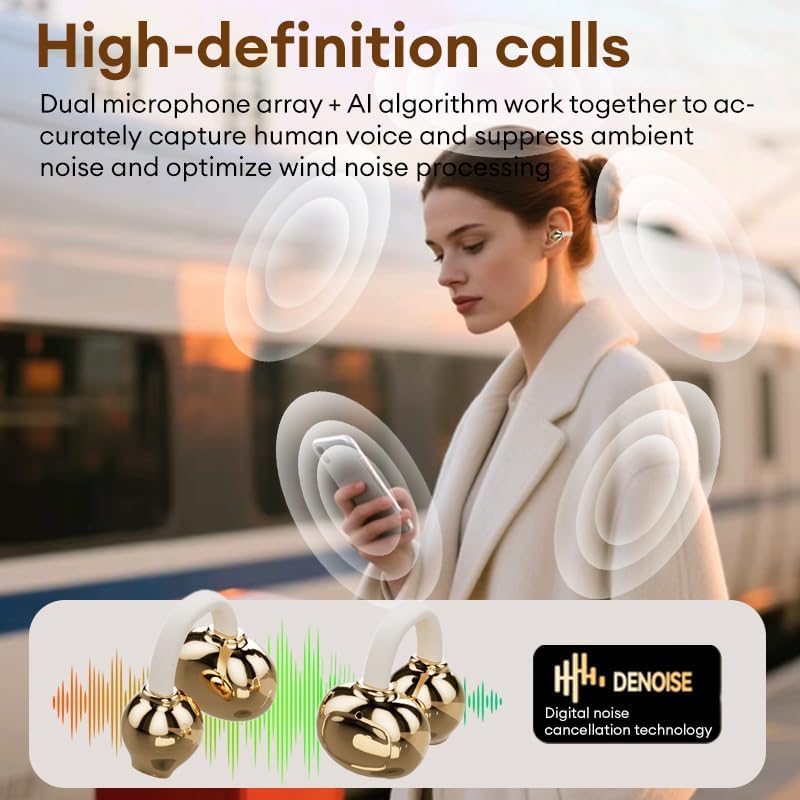
Image 2.1: The Mgall X22 charging case and earbuds, highlighting the unique design.
3. Seta
3.1 Ho tjhaja Sesebediswa
Before first use, fully charge your Mgall X22 headphones and charging case. The charging case has an LED HD digital display that indicates the battery percentage. The earbuds also show their charging status on the display when placed inside the case.
- Connect the provided charging cable to the charging port on the case and a suitable USB power source.
- Pontšo ea LED e tla bontša tsoelo-pele ea ho tjhaja.
- Tefiso e felletseng bakeng sa khetla le li-earbud hangata li nka lihora tse ka bang 6.

Image 3.1: The LED digital display on the charging case showing battery status.
3.2 Ho hokahanya ha Bluetooth
To connect your Mgall X22 headphones to your device (e.g., smartphone, tablet):
- Netefatsa hore li-earbud li tjhajiloe 'me li kentsoe ka har'a lebokose la ho tjhaja.
- Bula mokotla oa ho tjhaja. Li-earbud li tla kena mokhoeng oa ho para ka bohona.
- On your device, go to Bluetooth settings and turn Bluetooth on.
- Batla available devices and select "Mgall X22" from the list.
- Ha o se o hokahantsoe, o tla utloa molumo oa tiiso, 'me li-earbud li tla be li loketse ho sebelisoa.
The headphones utilize Bluetooth 6.0 for a stable and efficient connection.
4. Litaelo tsa Ts'ebetso
4.1 Ho Roala Li-Earbud
The Mgall X22 earbuds feature an open-ear clip-on design. Gently clip each earbud onto your ear, ensuring a comfortable and secure fit. The open-ear design allows you to hear your surroundings while enjoying audio.

Image 4.1: Proper placement of the clip-on earbuds for comfortable wear.
4.2 Taolo ea ho ama
The Mgall X22 earbuds are equipped with touch controls for easy management of music and calls. Specific touch functions may vary slightly, but common controls include:
- Bapala/Emisa: Tobetsa hang feela ho li-earbud.
- Pina e Latelang: Tobetsa habeli tsebeng e ka ho le letona.
- Pina e fetileng: Tlanya habeli tsebeng e ka letsohong le letšehali.
- Araba/Khaola mohala: Tobetsa hanngoe ho earbud nakong ea mohala o kenang kapa mohala o sebetsang.
- Hana Mohala: Tobetsa 'me u hatelle eebud efe kapa efe nakong ea mohala o kenang.
- Sebelisa Mothusi oa Lentsoe: Tlanya gararo ho e 'ngoe ea li-earbud.
4.3 Ho etsa le ho amohela mehala
The dual AI noise-canceling microphones ensure clear communication during calls. Refer to the touch controls section for managing calls.

Image 4.2: High-definition call clarity with dual microphone array and AI algorithm.
4.4 Ho bapala ka molumo
Enjoy immersive stereo sound with crisp highs and rich bass. The advanced directional design minimizes sound leakage, providing a private listening experience. Control playback using the touch controls.

Image 4.3: The Mgall X22 headphones are suitable for both work and entertainment.
5. Tlhokomelo
5.1 Ho hloekisa
- Hloekisa li-earbud le mokotla oa ho tjhaja khafetsa ka lesela le bonolo, le omeletseng, le se nang lint.
- Se ke oa sebelisa li-abrasive cleaners, solvents, kapa aerosol sprays.
- Qoba ho fumana mongobo ka har'a masoba leha e le afe.
5.2 Polokelo
- Ha li sa sebelisoe, boloka li-earbud ka mokotlaneng oa tsona oa ho tjhaja ho li sireletsa le ho li boloka li tjhajiloe.
- Boloka sesebelisoa sebakeng se pholileng, se omileng, hole le mocheso o feteletseng le letsatsi le tobileng.
6. Ho rarolla mathata
If you encounter any issues with your Mgall X22 headphones, please refer to the following common solutions:
| Bothata | Tharollo |
|---|---|
| Li-earbud ha li kopane | Ensure earbuds are charged. Turn off and on your device's Bluetooth. Place earbuds back in case, close, then open to re-enter pairing mode. |
| Ha ho na molumo o tsoang ho li-earbud | Check volume levels on both earbuds and connected device. Ensure earbuds are properly paired. Try reconnecting. |
| Chelete ea ho tjhaja ha e lefelle | Verify the charging cable is securely connected to both the case and power source. Try a different cable or power adapter. |
| Boleng bo bobe ba mohala | Ensure microphones are not obstructed. Move closer to your connected device. Avoid environments with excessive background noise. |
7. Litlhaloso
Below are the technical specifications for the Mgall X22 Clip-On Wireless Headphones:
| Sebopeho | Lintlha |
|---|---|
| Lebitso la Mohlala | X2202+TYEJPS03 |
| Brand | ZOMBIES CAT |
| Theknoloji ea Khokahano | Wireless (Bluetooth) |
| Bluetooth Version | 6.0 |
| Bluetooth Range | 10 metres |
| Sebopeho sa Earpiece | Qetella |
| Ho Bea Litsebe | Tsebe e Bulehileng |
| Taolo ea Lerata | Hybrid Noise Cancellation (noise_reduction) |
| Bophelo ba Battery (Earbuds) | Ho fihlela lihora tse 6 |
| Kakaretso ea nako ea ho bapala (le mokotla) | Ho fihlela lihora tse 40 |
| Nako ea ho tjhaja | Hoo e ka bang lihora tse 6 |
| Mofuta oa Taolo | Touch Control |
| Lintho tse bonahalang | Plastiki |
| Lisebelisoa tse lumellanang | iPhone (and other Bluetooth-enabled devices) |
8. Pontšo ea Sehlahisoa
Watch this video for a visual guide on handling and using your Mgall X22 headphones, including removing earbuds from the case and attaching the earring accessory.
Video 8.1: A demonstration of the Mgall X22 headphones, showcasing the charging case, earbuds, and the removable earring accessory. The video displays both beige and black versions of the product.
9. Tiisetso le Tšehetso
For warranty information or technical support, please refer to the documentation included with your purchase or contact the seller directly. Keep your proof of purchase for any warranty claims.