
Selelekela
This manual provides detailed instructions for the setup, operation, and maintenance of your SPYPOINT FORCE-PRO 30 Megapixel 4K Trail Camera. Designed for outdoor monitoring, this camera captures high-resolution photos and videos, making it ideal for wildlife observation and security. Please read this manual thoroughly to ensure proper use and optimal performance of your device.
Litaba tsa Sephutheloana
Verify that all items listed below are present in your package. If any items are missing or damaged, please contact SPYPOINT customer support.
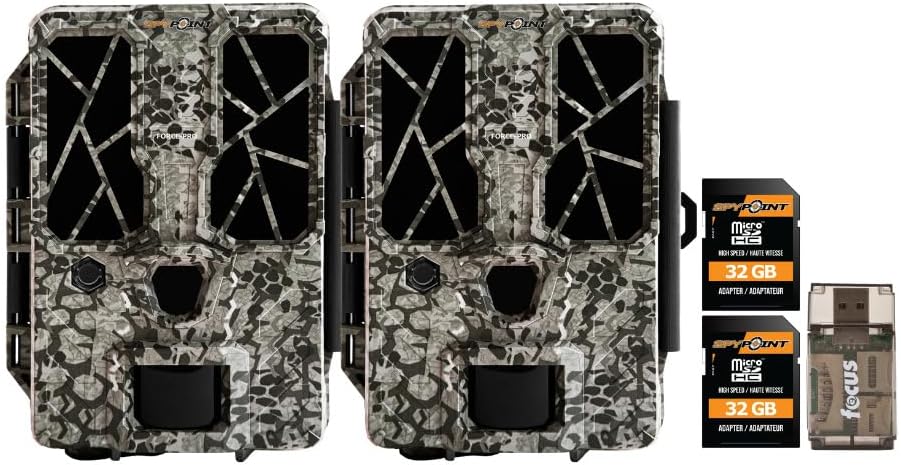
- 2 x SPYPOINT FORCE-PRO 30 Megapixel Trail Camera
- 2 x SPYPOINT MicroSD 32GB Ultra High Speed Class 10 Memory Card
- 1 x Focus All-In-One High Speed Card Reader

Sehlahisoa se Felletseview
The SPYPOINT FORCE-PRO is a robust trail camera designed for reliable performance in outdoor environments. It features advanced imaging capabilities and user-friendly controls.
Likarolo tsa Bohlokoa
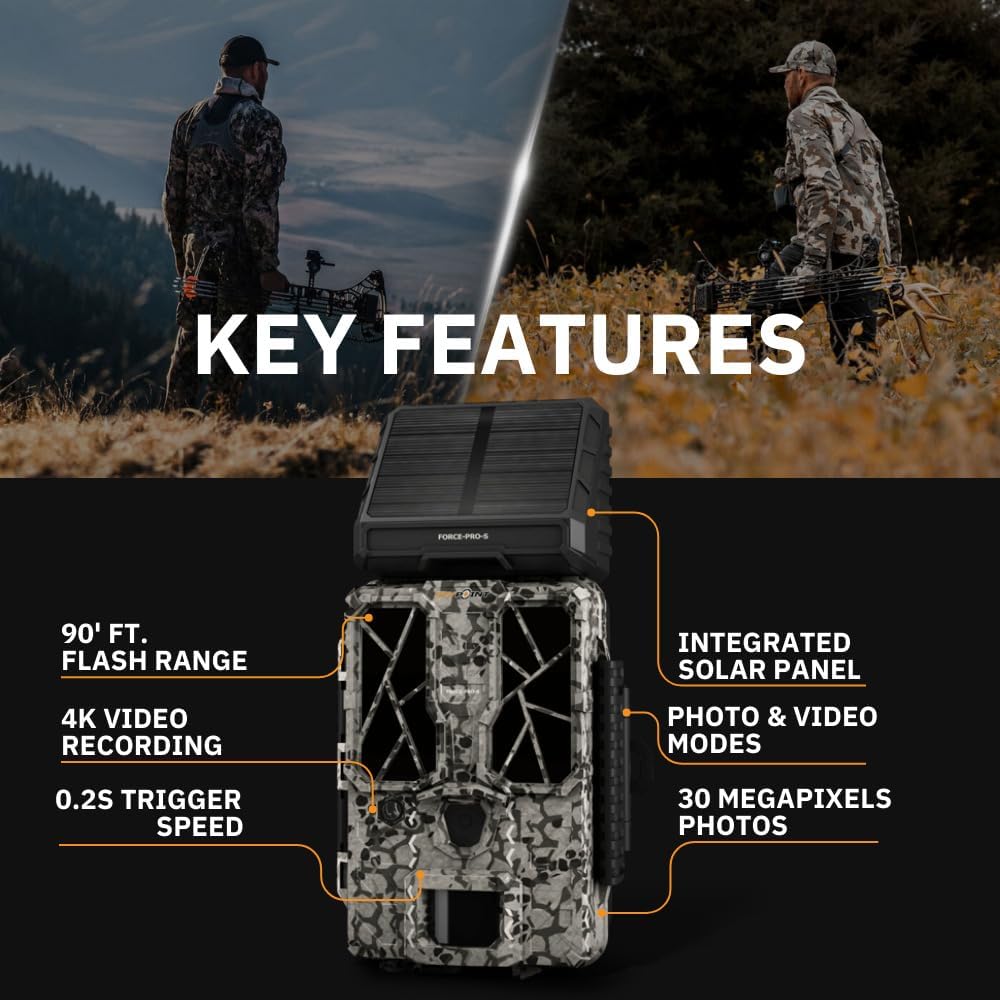
- Qeto e Phahameng: 30 Megapixel photos and 4K video recording with sound.
- Lebelo le Potlakileng la ho Qhekella: Ultra-fast 0.2-second trigger speed to capture quick movements.
- Sebaka se Pharalletseng sa ho Hlahisoa: 110-foot detection range.
- Powerful Flash: 90-foot flash range with 54 LEDs for clear night images.
- Panel e kopaneng ea Solar: For extended battery life and reduced maintenance.
- Dual-SIM Cellular: Automatically connects to the best available network for reliable transmission (if cellular model).



Tlhophiso
1. Power Source Installation
The FORCE-PRO camera is equipped with an integrated solar panel for charging its internal battery. For initial setup or extended use without sufficient sunlight, an external power source can be used.
- Betri e ka Hare: Ensure the camera's internal battery is charged. The integrated solar panel will charge it during daylight hours.
- Matla a Kantle (O ka ikhethela): If using an external 12V power source (not included), connect it to the camera's 12V jack.
2. Ho Kena Karete ea MicroSD
A MicroSD card is required to store photos and videos. Two 32GB MicroSD cards are included in this bundle.
- Locate the MicroSD card slot on the camera.
- Kenya karete ea MicroSD moo likhokahano tsa khauta li shebileng ka morao ho khamera ho fihlela e tobetsa sebakeng sa eona.
- To remove, press the card gently until it springs out.
3. Matla a Pele le Tlhophiso ea Motheo
- Turn the camera ON using the power switch.
- Follow the on-screen prompts (if available) or refer to the camera's menu for initial settings such as date, time, and language.
- Format the MicroSD card through the camera's menu for optimal performance.
4. Ho kenya Khamera
The camera can be mounted using a strap, tripod, or other compatible mounting accessories. While specifications mention 'Tabletop Mount', for outdoor use, secure mounting is crucial.
- Khetha sebaka se fanang ka leseli le hlakileng view ea sebaka se lakatsehang sa ho beha leihlo.
- Ensure the camera is securely fastened to prevent movement from wind or animals.
- Position the camera to avoid direct sunlight into the lens, which can cause overexposure.
Litaelo tsa Ts'ebetso
Mekhoa ea khamera
- Mokhoa oa foto: Captures still images when triggered.
- Mokhoa oa Video: Records video clips when triggered.
- Senepe + Mokhoa oa Video: Captures a photo followed by a video clip.
Fetola Litlhophiso
Access the camera's menu using the built-in screen and navigation buttons to customize settings:
- Qeto: Select desired photo (up to 30MP) and video (up to 4K) resolution. Higher resolutions consume more storage.
- Qetella ho lieha: Beha tieho pakeng tsa di-trigger tse latellanang.
- Kutloisiso: Adjust the motion sensor sensitivity to suit the environment and avoid false triggers.
- Lihora tsa Ts'ebetso: Define specific times the camera should be active.
- Letsatsi/Nako Stamp: Enable or disable the date and time overlay on images/videos.
Khutlisa Lintlha
- Karete ea MicroSD: Remove the MicroSD card from the camera and insert it into the included Focus All-In-One High Speed Card Reader. Connect the card reader to a computer to access files.
- SPYPOINT App: For cellular models, use the SPYPOINT mobile application to view and manage captured media remotely. The app also allows for camera settings adjustments and firmware updates.
Tlhokomelo
- Ho hloekisa: Regularly clean the camera lens and housing with a soft, dry cloth. Avoid abrasive materials or harsh chemicals.
- Hlahloba Betri: Monitor battery levels, especially during periods of low sunlight. The integrated solar panel helps maintain charge, but supplemental charging may be needed.
- Lisebelisoa tsa Firmware: Periodically check for and install firmware updates via the SPYPOINT app or websebaka sa marang-rang ho netefatsa ts'ebetso e ntle ka ho fetisisa le phihlello ea likarolo tse ncha.
- Polokelo: When not in use, store the camera in a cool, dry place away from direct sunlight.
Ho batle phoso
- Camera Not Triggering: Check motion sensor sensitivity, ensure no obstructions, and verify battery level.
- Setšoantšo se Fosahetseng/Boleng ba Video: Clean the lens, check resolution settings, and ensure proper lighting conditions.
- Mathata a Matla: Ensure the internal battery is charged or an external power source is properly connected. Check for any damage to power cables.
- Liphoso tsa karete ea MicroSD: Reformat the MicroSD card (backing up data first) or try a different card. Ensure the card is properly inserted.
- Connectivity Problems (Cellular Models): Verify cellular signal strength in the camera's location. Check your SPYPOINT app for data plan status.
Litlhaloso
| Sebopeho | Tlhaloso |
|---|---|
| Mohlala | MATLA-MOLA |
| Qeto ea Lifoto | 30 megapixels |
| Qeto ea Video | 4K |
| Lebelo la ho qala | 0.2 metsotsoana |
| Sebaka sa ho Khetholla | 110 maoto |
| Flash Range | 90 maoto |
| Li-LED | 54 |
| Mohloli oa Matla | Integrated Solar Panel, Corded Electric (external 12V option) |
| Khokahano | USB, Wired (for data transfer), Cellular (for remote management) |
| Lintho tse bonahalang | Plastiki |
| Ho hanyetsa Metsi | Ha e kene metsi |
| Mofuta oa Tsepamiso | Auto Focus |
| UPC | 196271434986 |
Warranty le Tšehetso
For warranty information, technical support, or service inquiries, please refer to the official SPYPOINT webwebosaete kapa ikopanye le lefapha la bona la litšebeletso tsa bareki ka kotloloho. Boloka bopaki ba theko ea hau bakeng sa likopo tsa waranti.
MOEKETSI SEPONTS'O Websebaka: www.spypoint.com