
voijump M681
voijump Professional Wireless Microphone Instruction Manual
Mohlala: M681
1. Selelekela
Thank you for choosing the voijump Professional Wireless Microphone. This compact and versatile lavalier microphone system is designed to deliver broadcast-quality audio for content creators, vloggers, podcasters, and anyone needing clear sound for video recording, interviews, and live streaming. Featuring instant plug-and-play functionality, intelligent noise reduction, and broad compatibility with iPhone, iPad, and Android devices, this system ensures high-quality audio capture with ease.
2. Se ka Lebokoseng
Ka kopo, sheba litaba tsa sephutheloana ho netefatsa hore lintho tsohle li teng:
- 2 Mini Mic Wireless Microphones
- 1 Receiver (Lightning & USB-C)
- 1 Type-C to Lightning Adapter
- 2 High-Density Sponge Tips
- 2 Deadcat Windshields
- Cable ea 1 ea ho tjhaja USB
- 1 Bukana ea Mosebelisi

Image: All components included in the voijump Professional Wireless Microphone package.
Video: An unboxing of the voijump Professional Wireless Microphone, demonstrating the contents and initial impressions.
3. Sehlahisoa Overview
The voijump wireless microphone system consists of two mini microphones (transmitters) and one receiver. Each component is designed for ease of use and portability.

Image: The compact and portable design of the voijump wireless microphones.

Image: Dimensions and weight of the mini microphone, emphasizing its lightweight nature.
Microphone (Transmitter) Features:
- Li-Windshields tsa Microphone: (Furry deadcat or sponge tips) Reduces wind noise and plosives.
- Sebaka sa ho tjhaja USB: For charging the microphone.
- Sekoaelo sa Microphone: For attaching to clothing.
- Konopo ea Matla: To turn the microphone on/off.
- Microphone Indicator: E bonts'a boemo ba motlakase le khokahano.
Likarolo tsa Moamoheli:
- Sehokelo sa Sesebelisoa: USB-C or Lightning (depending on the adapter used) to connect to your phone/device.
- Phone Charging Port: Allows charging of your phone/device while the receiver is connected.
4. Seta
The voijump wireless microphone system is designed for instant plug-and-play operation, requiring no Bluetooth pairing or app installation.
- Hokela Moamoheli: Plug the receiver directly into the charging port of your smartphone, tablet, or laptop. Use the appropriate adapter (USB-C or Lightning) for your device.
- Power On the Microphone(s): Press and hold the power button on each mini microphone you intend to use. The microphone indicator light will turn green, indicating it is powered on and ready to connect.
- Khokahano e Ikemetseng: The microphone(s) will automatically connect to the receiver within approximately 1.3 seconds. The indicator light on the microphone will remain solid green once connected.
- Qala ho Rekota: Open your device's camera or recording app and begin recording. The audio will now be captured by the wireless microphone(s).
Tlhokomeliso bakeng sa Basebelisi ba Android: Before using the microphone, please ensure the "OTG" function is enabled on your Android device. This setting is usually found in your device's system settings under 'Connected devices' or 'USB preferences'.
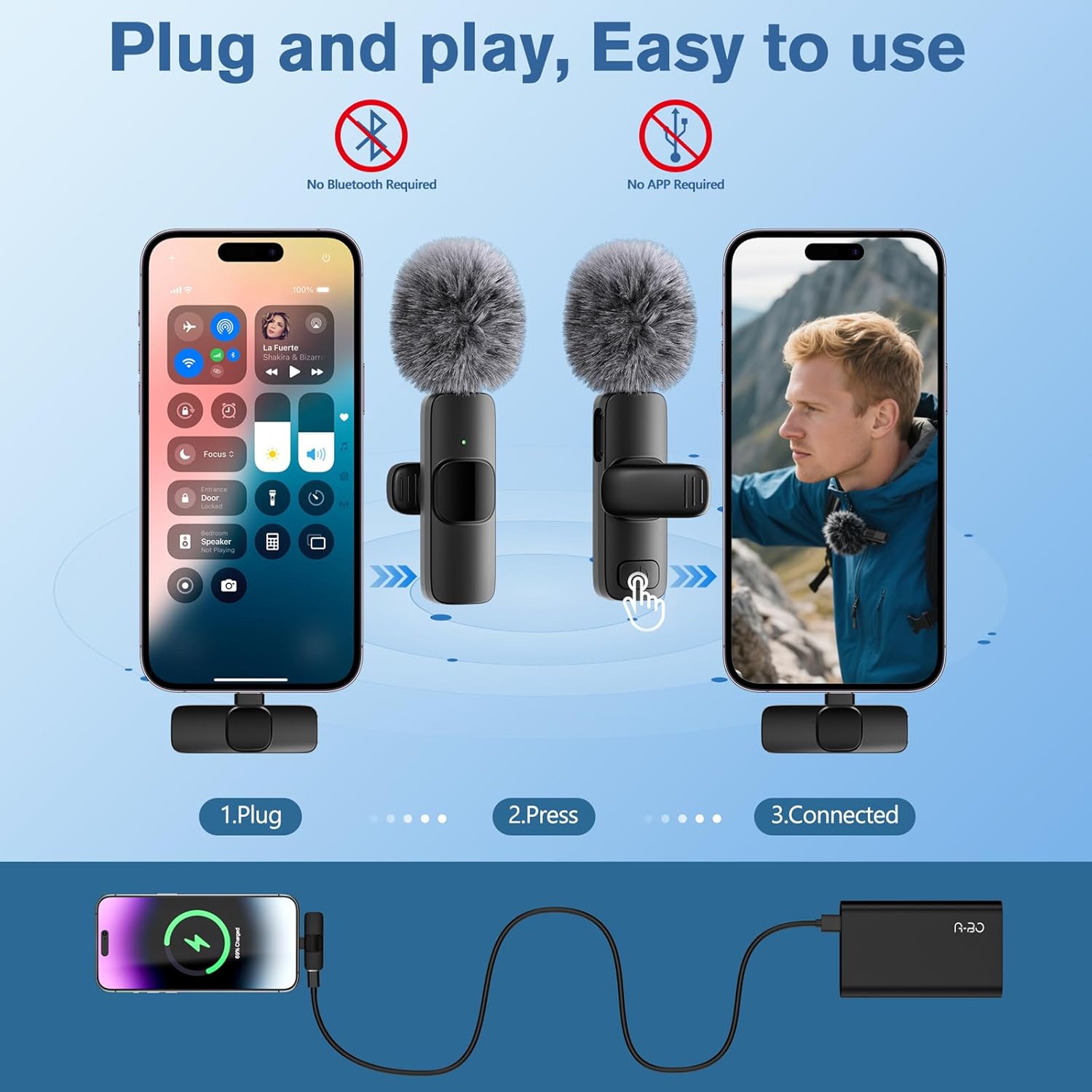
Image: Visual guide for the simple plug-and-play setup process.
Video: A short demonstration of the microphone's plug-and-play functionality, showing immediate readiness for use.
5. Litaelo tsa Ts'ebetso
Mosebetsi oa Bulisa:
During recording, a short press of the microphone's power button will toggle the mute function. The indicator light will change to a flashing green when muted and solid green when unmuted.
Charging While Recording:
The receiver features a pass-through charging port, allowing you to charge your smartphone or tablet simultaneously while recording. This ensures uninterrupted creative sessions.
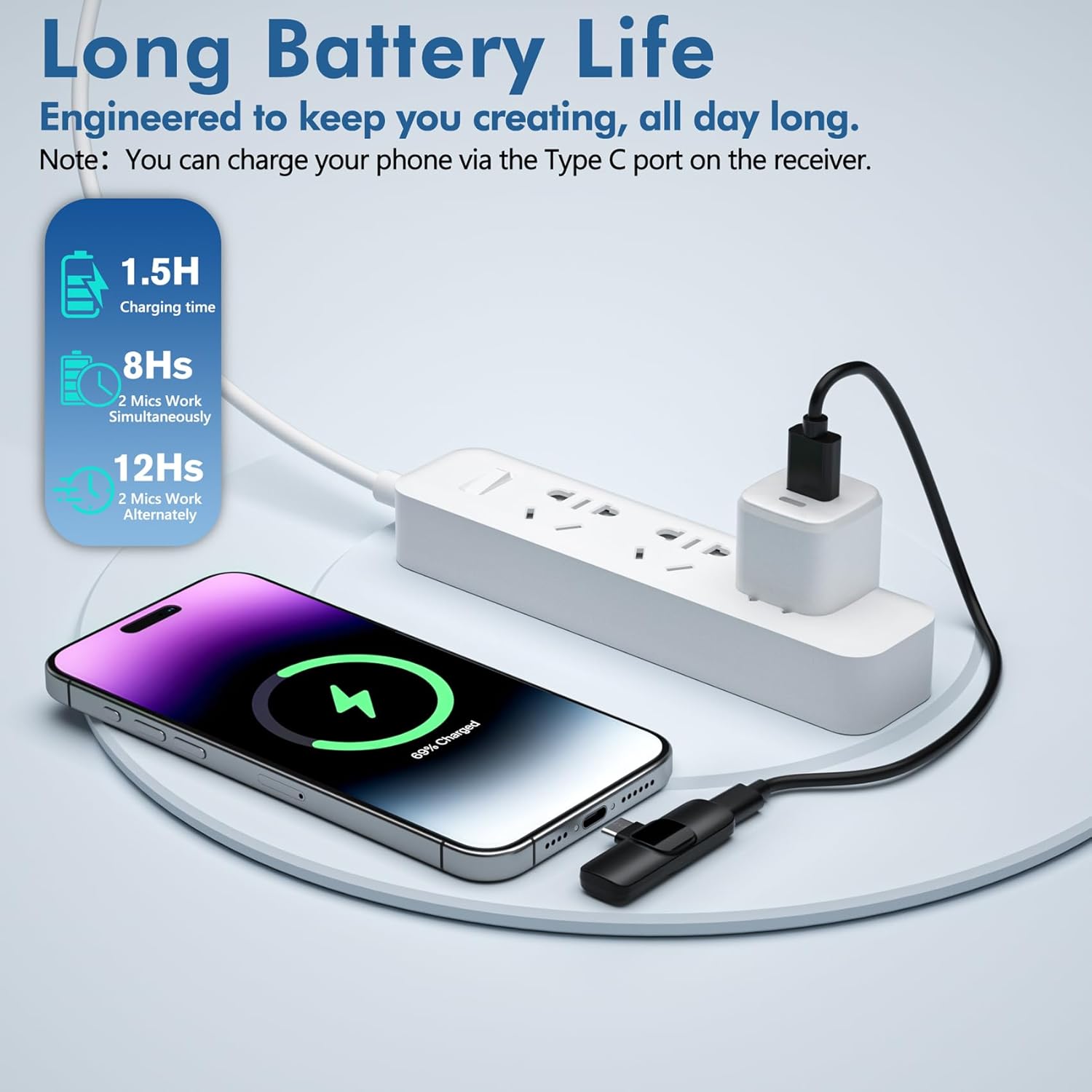
Image: Illustrates charging a phone via the receiver's port during recording.
Microphone Charging:
To charge the mini microphones, use the provided USB charging cable. Connect the cable to the microphone's USB charging port and a power source. The indicator light will show charging status.

Image: Details on battery life and charging time for the microphones.
6. Ho lumellana
The voijump Professional Wireless Microphone system is broadly compatible with a variety of devices:
- Li-iPhones: All iPhones with Lightning or USB-C ports (e.g., iPhone 7/Plus, 8/Plus, X/XR/XS/XS Max, 11/Pro/Pro Max, 12/Mini/Pro/Pro Max, 13/Mini/Pro/Pro Max, 14/Plus/Pro/Pro Max, 15/Plus/Pro/Pro Max, 16/Pro/Pro Max).
- Li-iPads: iPad mini series, iPad series, iPad Air series.
- Lisebelisoa tsa Android: Smartphones and tablets with USB-C ports. (Remember to enable OTG function if required by your device).
- Lilaptop: Compatible with laptops featuring USB-C ports.

Image: Demonstrates compatibility with various iPhone and Android devices.

Image: Detailed compatibility list for iPhone and iPad models, with a note for Android OTG function.
7. Likarolo tsa Bohlokoa
- Boleng ba Mantswe a Setsebi: Delivers broadcast-quality 48kHz/24-bit audio.
- Omnidirectional Sound & Noise Reduction: Equipped with an upgraded intelligent AI chip and 360° omnidirectional pickup mode. Includes high-density anti-spray sponge and windproof deadcat windshields to cut plosives and wind interference for crystal-clear indoor/outdoor recordings.
- Extended Range & Long Battery Life: Features 2.4GHz wireless transmission technology, providing a 66ft (20 meters) barrier-free effective distance. The rechargeable microphones last for 12 hours in single-mic mode or 8 hours in dual-mic sessions.
- E bobebe ebile e tšoarella: Made of high-quality materials, weighing less than an ounce, making it extremely portable and suitable for everyday use.

Image: Demonstrates the active noise cancellation technology for clear sound quality.

Image: Highlights the intelligent noise reduction features.

Image: Illustrates the 66ft wireless reception range in an outdoor setting.
Video: Pontšo ea video ea papatsoasing the features and benefits of the voijump wireless microphone system.
8. Tlhokomelo
- Ho hloekisa: Use a soft, dry cloth to clean the microphone and receiver. Do not use liquid cleaners or aerosols.
- Polokelo: Boloka sesebelisoa sebakeng se phodileng, se omeletseng hole le letsatsi le mocheso o feteletseng.
- Windshields: The sponge tips and deadcat windshields can be gently cleaned with mild soap and water, then air-dried completely before re-use.
9. Ho rarolla mathata
| Bothata | Lebaka le ka khonehang | Tharollo |
|---|---|---|
| Ha ho na molumo kapa boleng bo tlase ba molumo | Microphone not powered on; Receiver not properly connected; Android OTG function disabled; Device audio input not set to external microphone. | Ensure microphone is powered on (solid green light). Re-plug the receiver firmly into your device. For Android, enable OTG in settings. Check your recording app's settings to ensure external microphone input is selected. |
| Lerata le tsitsitseng kapa la tšitiso | Environmental interference; Microphone too far from source; Loose connection. | Ensure you are within the 66ft operating range. Check for strong electromagnetic interference sources. Ensure the receiver is securely plugged in. Use the appropriate windshield (deadcat for outdoor, foam for indoor) to minimize noise. |
| Maekerofounu ha e hokahane | Microphone not powered on; Receiver not recognized by device. | Press and hold the microphone power button until the green light appears. Try unplugging and re-plugging the receiver. Restart your recording device. |
| Bophelo ba betri e khutšoanyane | Microphone not fully charged; Using dual microphones for extended periods. | Ensure microphones are fully charged before use (approx. 1.5 hours). Note that dual-mic usage provides 8 hours, while single-mic usage provides 12 hours. |
10. Litlhaloso
| Sebopeho | Lintlha |
|---|---|
| Lebitso la Mohlala | Wireless Microphones (M681) |
| Ntho ea Foromo ea Microphone | Lavalier |
| Theknoloji ea Khokahano | Wireless (2.4GHz) |
| Mofuta oa Sehokelo | Lehalima, USB Type-C |
| Polar Pattern | Omnidirectional |
| Tekanyo ea Signal-to-Noise | 78dB |
| Boima ba Ntho | 2.4 ounces (for the system) |
| Litekanyo tsa Sehlahisoa | 0.39 x 0.59 x 2.17 inches (per microphone) |
| Mohloli oa Matla | Matla a Battery |
| Bophelo ba Battery | Up to 12 hours (single mic), 8 hours (dual mic) |
| Range e se nang mohala | Ho fihla ho maoto a 66 (20 metres) |
| Lintho tse bonahalang | Plastiki |
| Likarolo Tse Khethehileng | 1-Touch Recording, Battery Indicator Light, Clip, Lightweight, Noise Reduction |
11. Tiisetso le Tšehetso
For warranty information, technical support, or any inquiries regarding your voijump Professional Wireless Microphone, please refer to the manufacturer's official website or contact their customer service directly. Details can typically be found in the packaging or on the product page where you made your purchase.
Ask a question about this manual
Ask about setup, troubleshooting, compatibility, parts, safety, or missing instructions. Manuals+ will review the question and use this page’s manual context to help answer it.