
1. Selelekela
The MiBOXER ML5 5-in-1 LED Controller is designed for versatile smart lighting applications, integrating Matter over WiFi and 2.4GHz wireless control. This controller supports five output modes: RGB, RGBW, RGB+CCT, CCT, and single color, offering flexibility for various LED strip configurations. It is compatible with the Matter protocol, enabling broad interoperability with smart home ecosystems such as Apple Home, Google Home, Amazon Alexa, and Samsung SmartThings. This manual provides essential information for the safe installation, operation, and maintenance of your ML5 controller.
2. Boitsebiso ba Tšireletseho
- Ensure power is disconnected before installation or maintenance to prevent electric shock.
- Sesebelisoa sena se etselitsoe ho sebelisoa ka tlung feela. Qoba ho pepesehela mongobo kapa mocheso o feteletseng.
- Se ke oa feta bophahamo bo itseng bo boletsoengtage (DC12V~48V).
- Consult a qualified electrician if you are unsure about any installation steps.
- Boloka sesebelisoa hole le bana.
3. Sehlahisoa Overview
3.1 Likarolo tsa Bohlokoa
- Certified Matter Over WiFi: Supports Matter standard protocol for multi-platform collaboration.
- Wide Compatibility: Works with products from different brands that comply with the Matter ecosystem.
- Simple Configuration: Easy pairing via QR code.
- 5-in-1 Functionality: Supports RGB, RGBW, RGB+CCT, CCT, and single color LED strips.
- 2.4G RF Wireless Control: Allows control via MiBOXER 2.4GHz remotes.
- Keletso Voltage: DC12V~48V.
3.2 Se ka Lebokoseng
- 1 x MiBOXER ML5 5-in-1 LED Controller
Likarolo tsa 3.3 tsa Sehlahisoa

Setšoantšo sa 3.3.1: Holimo view of the MiBOXER ML5 controller, showing input terminals, output terminals, and control buttons (Link, Frequency, Mode).

Setšoantšo sa 3.3.2: Angled view of the MiBOXER ML5 controller, highlighting its compact design and connection points.

Setšoantšo sa 3.3.3: The MiBOXER ML5 controller alongside its retail packaging and a small instruction leaflet.
4. Litlhaloso
| Sebopeho | Lintlha |
|---|---|
| Brand | MIBOXER |
| Nomoro ea Mohlala | ML5 |
| Mmala | Bosoeu |
| Tšebeliso ea Ka hare/Kantle | Ka hare |
| Tšobotsi e Khethehileng | 2.4G RF wireless, Matter Over WiFi |
| Mofuta oa Mohloli oa Leseli | LED |
| Mohloli oa Matla | DC12V~48V (LED) |
| Lintho tse bonahalang | Plastiki |
| Boima ba Ntho | 2.72 lik'hilograma |
| Bolelele ba Ntho | 30 Meters (Control Distance) |

Setšoantšo sa 4.1: Dimensional drawing of the ML5 controller (124mm x 38mm x 23mm) and its packaging (125mm x 39mm x 29mm), with a gross weight of 0.078 KGS.
5. Ho seta le ho kenya
5.1 Lits'oants'o tsa Wiring
The ML5 controller supports various LED strip configurations. Ensure correct polarity and voltage matching for your LED strips. Connect the DC12V~48V power supply to the input terminals and the LED strip to the corresponding output terminals.

Setšoantšo sa 5.1.1: Connection diagrams for Single Color (V+, W), Dual White (V+, CW, WW), and RGB (V+, R, G, B) LED strip configurations. An AC to DC power adapter is shown connecting to the controller's input.

Setšoantšo sa 5.1.2: Connection diagrams for RGBW (V+, R, G, B, W) and RGB+CCT (V+, R, G, B, CW, WW) LED strip configurations. An AC to DC power adapter is shown connecting to the controller's input.
5.2 Pairing and Network Connection
The ML5 controller supports Matter over WiFi and 2.4GHz RF pairing.
- Matter pairing: Long press the "Link" button for 3 seconds to activate Matter pairing mode. Follow the instructions in your Matter-compatible smart home app (e.g., Apple Home, Google Home, Amazon Alexa, Samsung SmartThings) to scan the QR code on the device for easy pairing.
- 2.4GHz RF Remote Pairing: Short press the "Link" button 3 times to activate 2.4GHz remote pairing mode. Refer to your MiBOXER 2.4GHz remote's manual for specific pairing instructions.
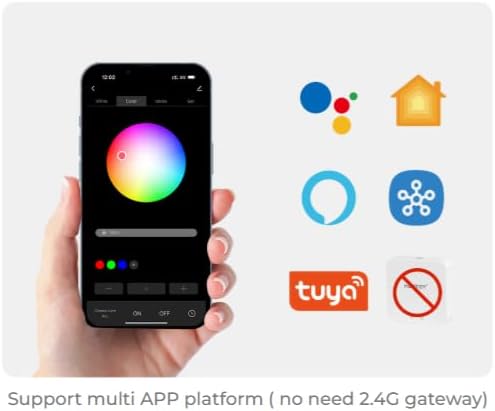
Setšoantšo sa 5.2.1: Illustration of a smartphone app interface for controlling LED lighting, featuring a color wheel and compatibility logos for Google Home, Apple Home, Amazon Alexa, Samsung SmartThings, and Tuya.
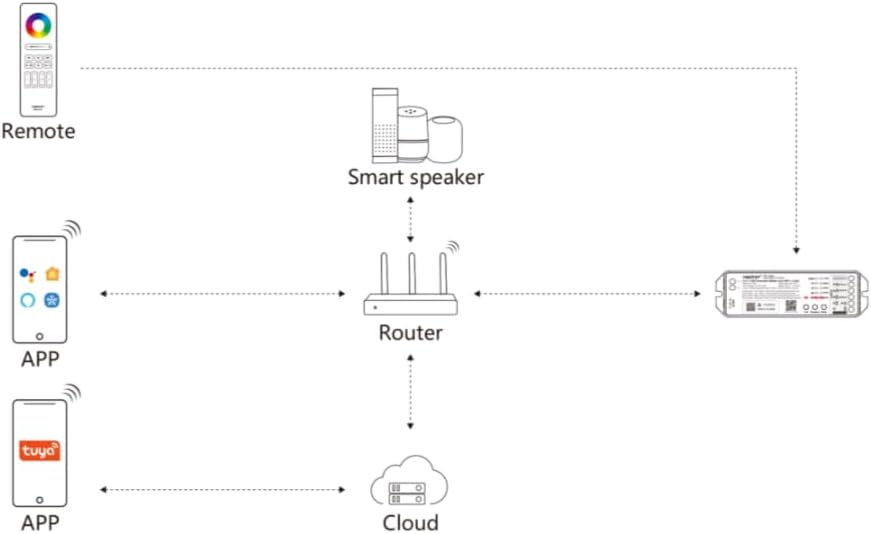
Setšoantšo sa 5.2.2: Diagram illustrating the ML5 controller's connectivity: it connects to a router, which then allows control via mobile apps (Matter-compatible and Tuya) and smart speakers (e.g., Alexa, Google Assistant).
6. Litaelo tsa Ts'ebetso
6.1 Khetho ea Mokhoa
- Ho Fetola Mekhoa ea ho Output: Short press the "Mode" button to cycle through the five output modes (RGB, RGBW, RGB+CCT, CCT, Single Color). Ensure the connected LED strip matches the selected mode.
6.2 Taolo ea App
Once paired with your smart home ecosystem via Matter, you can control the ML5 controller using your preferred smart home app. Functions typically include:
- Turning lights On/Off.
- Adjusting brightness (dimming).
- Changing colors (for RGB, RGBW, RGB+CCT modes).
- Adjusting color temperature (for CCT, RGB+CCT modes).
- Setting scenes and schedules.
6.3 2.4GHz RF Remote Control
If paired with a MiBOXER 2.4GHz RF remote, you can control the controller directly. Refer to your specific remote's manual for detailed button functions, which typically include:
- Bula/E tima.
- Phetoho ea khanya.
- Color selection.
- Mode switching (e.g., dynamic effects).
7. Tlhokomelo
- Hloekisa sesebediswa ka lesela le bonolo, le omileng. O se ke wa sebedisa dikhemikhale tse bohale kapa dihlwekisi tse kgohlang.
- Etsa bonnete ba hore moea o nepahetseng o pota-potile molaoli ho thibela mocheso o feteletseng.
- Regularly check all connections for security and integrity.
8. Ho rarolla mathata
| Bothata | Lebaka le ka khonehang | Tharollo |
|---|---|---|
| LED strip not lighting up. | No power, incorrect wiring, faulty LED strip. | Check power supply connection. Verify wiring matches the selected mode. Test LED strip with another power source if possible. |
| Cannot pair with Matter app. | Controller not in pairing mode, WiFi issue, incorrect QR code scan. | Long press "Link" button for 3 seconds. Ensure your smartphone is on the same 2.4GHz WiFi network. Rescan QR code. |
| 2.4GHz remote not working. | Remote not paired, remote battery low, interference. | Short press "Link" button 3 times to enter pairing mode, then pair with remote. Replace remote battery. Reduce interference sources. |
| Incorrect colors or modes. | Wrong output mode selected. | Short press "Mode" button to cycle to the correct output mode for your LED strip. |
9. Tiisetso le Tšehetso
MiBOXER products are designed for reliability and performance. For warranty information and technical support, please refer to the official MiBOXER websaete kapa ikopanye le morekisi oa hau. Boloka rasiti ea hau ea theko bakeng sa likopo tsa tiisetso.
Bakeng sa thuso e eketsehileng, o ka etela ho MiBOXER Store on Amazon.