
1. Selelekela
This manual provides essential information for the safe and efficient use of your Reality Leuchten Munoz R54891165 LED Table Lamp. Please read these instructions carefully before first use and retain them for future reference.
Sehlahisoa se Felletseview
The Munoz LED Table Lamp is a modern, portable lighting solution featuring a durable metal construction and a sophisticated design. It incorporates an energy-efficient LED light source and offers convenient touch control for adjustable brightness. Its battery-powered design allows for flexible placement without the need for a constant power outlet.
Litaba tsa Sephutheloana
- Munoz LED Table Lamp (Model R54891165)
- USB Charging Cable
- Buka ea litaelo (tokomane ena)
2. Seta
Follow these steps to prepare your lamp bakeng sa tšebeliso ea pele.
Ho phutha
Carefully remove all components from the packaging. Inspect the lamp and accessories for any signs of damage. If any damage is found, do not proceed with setup and contact customer support.
Ho tjhaja ha Pele
Before initial use, fully charge the lamp's internal battery. Connect the provided USB charging cable to the lamp's charging port and to a suitable USB power source (e.g., computer USB port, USB wall adapter). The charging time is approximately 7 to 9 hours for a full charge.

Setšoantšo: Ka tlase view oa lamp, highlighting the USB charging port for battery replenishment.

Image: Informative graphic illustrating key features: 4-level touch control, battery operation, USB charging, typical charging duration (7-9 hours), and approximate operating time (8-10 hours).
3. Litaelo tsa Ts'ebetso
The Munoz LED Table Lamp features intuitive touch control for power and brightness adjustment.
Phetoho ea ho Bula/Ho tima Matla le Khanya
Lamp is equipped with a 4-level touch function. To operate:
- Ho Bulela: Lightly touch the sensor located on the top of the lamp moriti. The lamp will illuminate at its lowest brightness setting.
- Ho Fetola khanya: Continue to lightly touch the sensor to cycle through the three available brightness levels.
- Ho Tima: After cycling through all brightness levels, a subsequent touch will turn the lamp tima.

Image: Close-up of the lamp's top, indicating the location of the touch sensor for control.
4. Litaelo tsa ho tjhaja
To ensure optimal performance and battery longevity, follow these charging guidelines.
Ho nchafatsa betri
- Kopanya lamp ho mohloli oa matla oa USB o sebelisa thapo e fanoeng ea USB.
- A full charge typically takes 7 to 9 hours.
- Ha e qosoa ka botlalo, lamp provides approximately 8 hours of illumination at maximum brightness.
- Qoba ho tjhaja betri ho feta tekano ka nako e telele.
Lamp can be used while charging, but it is recommended to charge it fully before portable use.
5. Tlhokomelo
Proper care will help maintain the appearance and functionality of your lamp.
Ho hloekisa
- Etsa bonnete ba hore lamp is turned off and disconnected from any charging source before cleaning.
- Hlakola lamp ka lesela le bonolo, le omeletseng.
- For stubborn marks, a slightly damp lesela le ka sebelisoa, le lateloa ke ho omisoa hang-hang.
- U se ke ua sebelisa li-abrasive cleaners, solvents, kapa lik'hemik'hale tse bohale, kaha li ka senya qetello.
Polokelo
Haeba u boloka lamp for an extended period, ensure the battery is partially charged (around 50%) to preserve battery health. Store in a cool, dry place away from direct sunlight and extreme temperatures.
6. Ho rarolla mathata
If you encounter issues with your lamp, refer to the following common problems and solutions.
| Bothata | Lebaka le ka khonehang | Tharollo |
|---|---|---|
| Lamp ha e bulele. | Betri e felile. | Lefisa lamp fully using the provided USB cable. |
| Lamp ha e bulele. | Touch sensor not responding. | Ensure your finger makes full contact with the touch sensor. Try cleaning the sensor area. |
| Lamp ha e lefise. | Thapo ea USB kapa bothata ba mohloli oa motlakase. | Check if the USB cable is securely connected. Try a different USB port or power adapter. Ensure the power source is active. |
| Short operating time after full charge. | Battery degradation or high brightness setting. | Battery life naturally decreases over time. Using lower brightness settings will extend operating time. |
Haeba bothata bo ntse bo tsoela pele ka mor'a ho leka litharollo tsena, ka kopo ikopanye le ts'ehetso ea bareki.
7. Litlhaloso
Detailed technical specifications for the Munoz LED Table Lamp.
| Brand | RL LIVE YOUR LIGHT |
| Nomoro ea Mohlala | R54891165 |
| Moetsi | 'Nete Leuchten |
| Litekanyo (L x W x H) | 13 x 13 x 21 cm, |
| Boima ba 'mele | 385 g |
| Lintho tse bonahalang | Tšepe |
| Tšebeliso ea Matla | 1.3 Watts |
| Flux e khanyang | 120 lumens |
| Mocheso oa Mobala | 3000 Kelvin |
| Mofuta oa Mohloli oa Leseli | LED e kopantsoeng |
| Fetola Mofuta | Touch Control (4 levels) |
| Mohloli oa Matla | Matla a Battery (USB e ka nchafatsoa) |
| Nako ea ho tjhaja | Hoo e ka bang. Lihora tse 7-9 |
| Operating Time (Max Brightness) | Hoo e ka bang. Lihora tse 8 |
| Sehlopha sa Matla a Matla | E |

Image: Technical drawing with precise dimensions of the lamp, including height, shade diameter, and base diameter.
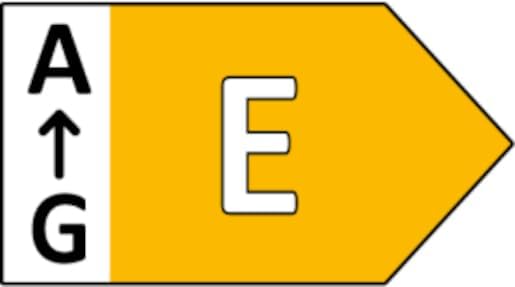
Image: Energy efficiency label indicating the product's energy class as E.
8. Boitsebiso ba Tšireletseho
Ka kopo ela hloko mehato e latelang ea ts'ireletso ho thibela kotsi kapa tšenyo ea sehlahisoa.
- This product is designed for indoor use only. Do not expose to rain or moisture.
- Se ke oa leka ho qhaqholla kapa ho fetola lamp. This may void the warranty and pose safety risks.
- Boloka lamp away from heat sources, direct sunlight, and flammable materials.
- Sebelisa feela thapo ea USB e fanoeng bakeng sa ho tjhaja.
- U se ke ua qoelisa lamp metsing kapa lero lefe kapa lefe.
- The integrated LED light source is not replaceable. If the LED fails, the entire luminaire must be replaced.
- Sehlahisoa sena se na le mohloli o bobebe oa sehlopha sa E.
- Boloka moo bana le liphoofolo tse ruuoang lapeng li fihlang teng.
9. Tiisetso le Tšehetso
For warranty information and customer support, please refer to the retailer or manufacturer's official website where the product was purchased. Specific warranty terms may vary by region and retailer.
For technical assistance or inquiries not covered in this manual, please contact the manufacturer, Reality Leuchten, or your point of purchase.