
Renogy 12V 40A DC-DC Battery Charger
Renogy 12V 40A DC-DC Battery Charger User Manual
Model: 12V 40A DC-DC Battery Charger
Lebitso: Renogy
1. Litaelo tsa Tšireletso
Please read all instructions and warnings in this manual before installation and operation. Failure to follow these instructions may result in electrical shock, fire, or severe injury. Keep this manual for future reference.
- Always wear appropriate personal protective equipment, including eye protection, when working with batteries.
- Ensure all connections are tight and secure to prevent loose connections that can cause excessive heating.
- Do not operate the charger in wet or damp maemo.
- Keep flammable materials away from the charger and batteries.
- Ensure adequate ventilation around the charger to prevent overheating.
- This charger is designed for 12V battery systems only. Do not connect to other voltage litsamaiso.
2. Sehlahisoa Overview
The Renogy 12V 40A DC-DC Battery Charger is an intelligent converter designed to charge various battery types, including flooded, gel, AGM, and lithium batteries. It features built-in alternator detection and smart charging strategies to protect your vehicle's starting battery and ensure efficient charging of your service battery.
Lintlha tsa bohlokoa li kenyelletsa:
- Starting Battery Protection: Integrated alternator detection ensures charging only occurs when the engine is running.
- Moralo o Bonolo ebile o Ikopantse: Wall-mounted design for easy installation and safe terminal spacing.
- Smart Bluetooth Control: Remote control of charging parameters via the DC Home app and Renogy One Core (with BT-2 module).
- Comprehensive Electronic Protection: Prevents overcharge, short-circuit, overheating, and overvoltage.
- Tšebeliso ea Battery ea Lithium: Intelligent activation and deactivation for optimal lithium battery performance.

Figure 1: Renogy 12V 40A DC-DC Battery Charger
3. Ho kenya
The charger features a wall-mounted design for straightforward installation. Ensure the installation location provides adequate ventilation and is protected from moisture.
3.1 Boitsebiso ba Karolo

Figure 2: User-friendly layout of the Renogy DC-DC charger, highlighting the positive and negative input/output terminals, battery setting button, and RS485 communication port. The design ensures safe distance between terminals to minimize short-circuit risks.
3.2 Setšoantšo sa Wiring
Connect the charger between your vehicle's starting battery and your service battery. Ensure correct polarity for all connections.

Figure 3: Wiring diagram illustrating the connection of the Renogy 12V 40A DC-DC Battery Charger between a 12V starter battery and a 12V service battery. It also shows the connection for both traditional and smart alternators, with the IGN signal cable required only for smart alternators.
3.3 Alternator Protection
The charger includes built-in alternator detection to prevent overcharging the starting battery. Charging only proceeds when the engine is running.

Figure 4: Illustration of the alternator protection mechanism. The charger detects when the alternator is running and continues charging the service battery. When the alternator is off, charging stops, safeguarding the starter battery from discharge.
4. Litaelo tsa Ts'ebetso
4.1 Khetho ea Mofuta oa Betri
The charger is compatible with most battery types. You can adjust charging parameters by setting the battery type to 'User Mode' via the DC Home app.
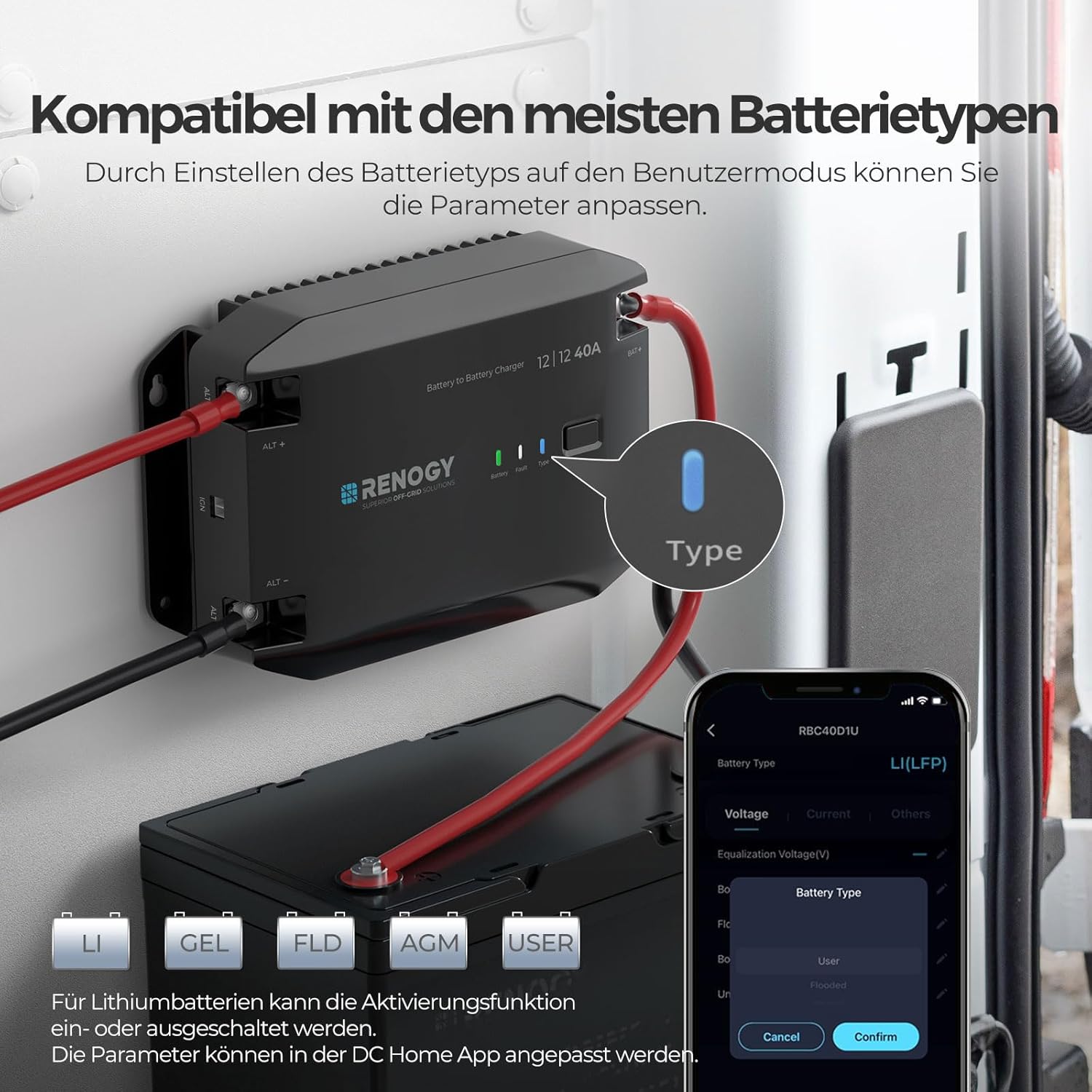
Figure 5: The DC Home app interface for selecting battery types, including Lithium, Gel, Flooded, AGM, and a customizable User mode. For lithium batteries, the activation function can be enabled or disabled, and parameters can be adjusted via the app.
4.2 Smart Bluetooth Control
Utilize the advanced BT-2 Bluetooth module to remotely monitor and control charging parameters through the DC Home app and Renogy One Core. The app also records up to 365 days of data for comprehensive ecosystem monitoring.

Figure 6: Illustration of smart control capabilities, emphasizing the convenience of Bluetooth connectivity for remote monitoring and parameter adjustment.

Figure 7: The Renogy BT-2 Bluetooth Module, which connects to the charger via an RJ45 communication port, enabling wireless monitoring and control.
4.3 Lithium Battery Activation
The charger features intelligent lithium battery activation. This function can be easily activated or deactivated via the DC Home app to ensure optimal battery performance and extend lifespan.

Figure 8: The DC Home app interface demonstrating the ability to enable or disable lithium battery activation. This feature prevents unnecessary charging cycles on healthy batteries and restores low-voltage lithium batteries.
5. Tlhokomelo
Regular maintenance ensures the longevity and optimal performance of your Renogy DC-DC Battery Charger.
- Ho hloekisa: Periodically clean the exterior of the charger with a dry cloth. Ensure no dust or debris accumulates in the cooling fins.
- Tlhahlobo ea Khokahano: Regularly inspect all wiring connections for tightness and corrosion. Loose connections can lead to overheating and damage.
- Moea oa moea: Ensure the area around the charger remains clear and unobstructed to allow for proper airflow and heat dissipation.
- Lisebelisoa tsa Firmware: Check the Renogy website or DC Home app for any available firmware updates to ensure your charger has the latest features and improvements.
5.1 Quieter Cooling Solution
The charger is designed with natural heat dissipation, resulting in noise-free operation at reduced noise levels (30dB).

Figure 9: The charger's heat sink design, contributing to its quiet and efficient natural cooling system, operating at approximately 30dB.
5.2 Khanyetso ea Corrosion
The compact and corrosion-proof design makes this charger suitable for marine environments.

Figure 10: The Renogy DC-DC charger installed in a boat, demonstrating its compact and corrosion-proof design with IP32 moisture resistance, making it ideal for humid marine environments.
6. Ho rarolla mathata
Haeba u na le mathata ka tjhaja ea hau, sheba mathata le litharollo tse latelang:
- Chaja ha e sebetse: Ensure the engine is running and the alternator is providing sufficient voltage. Check all wiring connections for proper contact and polarity.
- Ho tjhaja butle: Verify that the correct battery type is selected in the DC Home app. Check for any voltage drops in the wiring due to undersized cables or loose connections.
- Ho chesa haholo: Ensure the charger has adequate ventilation and is not covered. Check for any blockages in the cooling fins. If overheating persists, reduce the load or consult support.
- Mathata a Khokahano ea Bluetooth: Ensure the BT-2 module is properly connected and within range. Restart the DC Home app or the charger if necessary.
- Betri ha e fihle ho tjhaja e felletseng: Confirm the battery type settings are correct. For lithium batteries, ensure the activation function is enabled if needed.
For persistent issues, please contact Renogy customer support.
7. Litlhaloso
Technical specifications for the Renogy 12V 40A DC-DC Battery Charger:
| Sebopeho | Tlhaloso |
|---|---|
| Mohlala | 12V 40A DC-DC Battery Charger |
| Brand | Renogy |
| Mmala | Ntsho |
| Lintho tse bonahalang | Plastiki |
| Mofuta oa Pontšo | Pontšo ea Dijithale |
| Tšebelisano ea Battery | Flooded, Gel, AGM, Lithium |
| GTIN (UPC) | 840315221802 |
| Litekanyo (Hoo e ka bang) | L236.5 x W152.5 x H58.4 limilimithara |
| Tšebeliso e Ntle ea ho tjhaja | 94% |
| Boiketsi ba ho iphepa | <0.2A |
| Setifikeiti | FCC, CE, RoHS, UKCA, ECE R10 |

Figure 11: Physical dimensions of the Renogy 12V 40A DC-DC Battery Charger, indicating its compact size for various installations.

Figure 12: Comprehensive protection and certifications for the Renogy DC-DC charger, ensuring safety and compliance with international standards.
8. Warranty & Ts'ehetso
This Renogy 12V 40A DC-DC Battery Charger comes with a Waranti ea lilemo tse 2. For warranty claims, technical support, or any questions regarding the product, please contact Renogy customer service through their official websaete kapa lintlha tsa ho ikopanya tse fanoeng ha u reka.
Bakeng sa lisebelisoa tse eketsehileng le lintlha tsa sehlahisoa, etela Renogy Brand Store.
Ask a question about this manual
Ask about setup, troubleshooting, compatibility, parts, safety, or missing instructions. Manuals+ will review the question and use this page’s manual context to help answer it.