
1. Selelekela
This manual provides instructions for the Generic universal replacement remote control, designed for use with a wide range of Samsung Smart TVs. This infrared remote offers a convenient and direct replacement for your original Samsung TV remote, requiring no complex setup or programming.
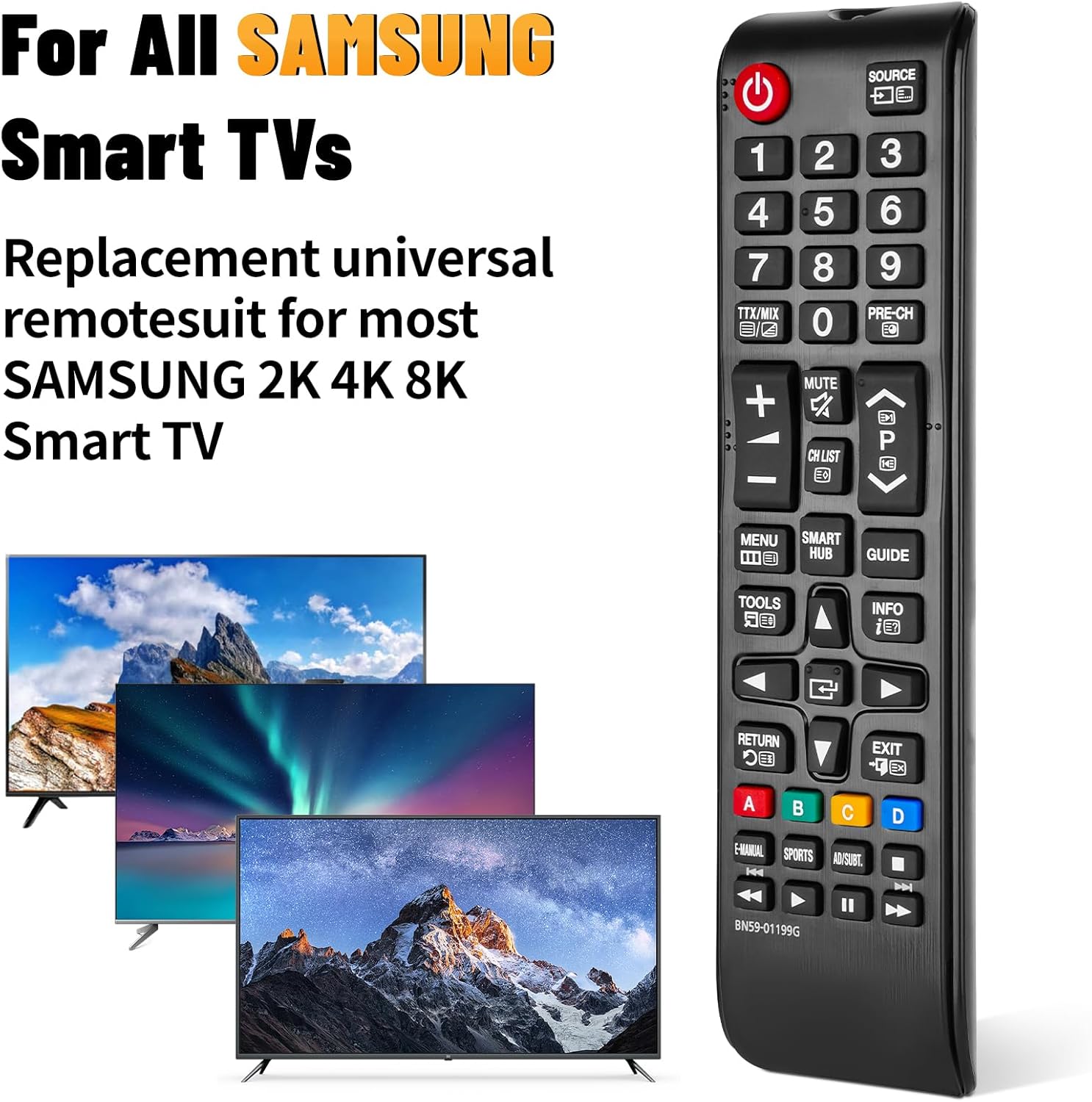
Image: The universal remote control compatible with various Samsung Smart TV models.
2. Seta
2.1 Ho kenya Betri
To begin using your remote control, you must first install two AAA batteries. Batteries are not included with this product.
- Beha sekoaelo sa betri ka morao ho remote control.
- Slide the cover downwards or press the release tab (if present) to remove it.
- Kenya libeteri tse peli tsa AAA, ho netefatsa hore li-terminal tse ntle (+) le tse mpe (-) li lumellana hantle le matšoao a ka hare ho karolo.
- Replace the battery compartment cover by sliding it back into position until it clicks securely.

Image: Step-by-step guide for installing AAA batteries into the remote control.
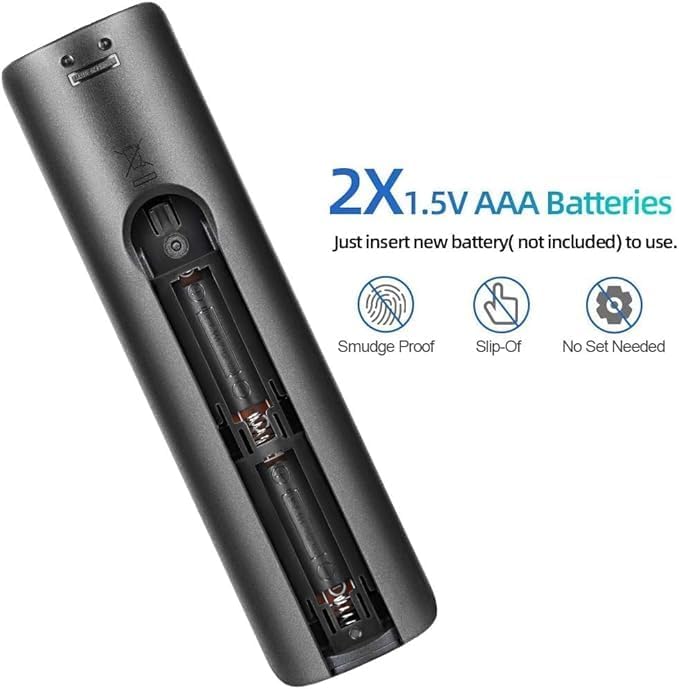
Setšoantšo: Ka botlalo view of the battery compartment, showing correct battery placement.
Tlhokomeliso: Libetri ha li kenyelelitsoe.
2.2 Tšebeliso ea Pele
This remote control is designed for immediate use with compatible Samsung Smart TVs. No additional programming, pairing, or setup is required after battery installation. Simply point the remote at your TV and begin operating it.
3. Litaelo tsa Ts'ebetso
The remote control provides full functionality for your Samsung Smart TV. Ensure there are no obstructions between the remote and the TV's infrared receiver for optimal performance.
3.1 Mesebetsi ea Likonopo e Fetaview
Refer to the image below for a visual guide to the remote's buttons and their primary functions:

Image: Front, side, and back views of the remote control, highlighting its layout and dimensions.
- Konopo ea Matla (⏻): Ho bulela kapa ho tima TV.
- Konopo ea Mohloli: E khetha mehloli ea ho kenya (HDMI, AV, joalo-joalo).
- Likonopo tsa Nomoro (0-9): Khetho e tobileng ea kanale.
- TTX/MIX, PRE-CH: Teletext and previous channel functions.
- Phatlalatso ea Phahamiso/Ho Tlase (+/-): Adjusts TV volume.
- Konopo ea semumu: Mutes or unmutes TV audio.
- Channel Up/Down (CH LIST, P): E fetola likanale tsa TV.
- Konopo ea Menu: E fihlella lenane la mananeo a TV.
- Konopo ea Smart Hub: Opens the Samsung Smart Hub for apps and streaming services.
- Konopo ea Tataiso: E bonts'a tataiso ea lenaneo la elektroniki.
- Konopo ea Lisebelisoa: Accesses quick settings or tools menu.
- Konopo ea Boitsebiso: E bonts'a tlhahisoleseling mabapi le lenaneo la hajoale kapa tlhahiso.
- Letlapa la ho Tsamaisa (Hodimo/Fase/Letsadi/Ka ho le letona/kena): Navigates menus and selects options.
- Khutlela Konopo: E kgutlela skrineng kapa lenaneng le fetileng.
- Konopo ea Tsoa: E tswa ho menu kapa tshebediso ya hajwale.
- Likonopo tsa 'Mala (A, B, C, D): Functionality varies by TV model and application.
- E-MANUAL, SPORTS, AD/SUBT: Accesses e-manual, sports mode, or audio description/subtitle options.
- Litaolo tsa ho Bapala (Bapala, Khutsa, Emisa, Fetisetsa Pele ka Potlako, Khutlela morao): E laola ho bapala ha media.
3.2 Sebaka sa Ts'ebetso
The remote control operates effectively within a range of up to 10 meters (approximately 32 feet) from the television. Ensure a clear line of sight between the remote and the TV's infrared sensor for optimal performance.
4. Ho lumellana
This universal replacement remote control is compatible with a wide range of Samsung Smart TVs, including:
- All Samsung LED, QLED, SUHD, UHD, HDR, LCD, Frame, Curved, Solar HDTV, 3D, 4K, and 8K Smart TVs.
- Compatible with Samsung TV series from 2017, 2018, 2019, 2020, 2021, and 2022.
It serves as a replacement for many original Samsung remote models, including but not limited to:
- BN59-01199G, BN59-01312G, BN59-01310A, BN59-01266A, BN59-01259E, BN59-01330A, BN59-01329A, BN59-01298A, BN59-01298H, BN59-01292A, BN59-01241A, BN59-01293A, BN59-01357A, BN59-01199F, BN59-01301A, BN59-01289A.
5. Tlhokomelo
- Ho hloekisa: Use a soft, dry cloth to clean the remote control. Avoid using liquid cleaners or abrasive materials, as they may damage the surface or internal components.
- Phetoho ea Battery: Replace batteries when the remote's response becomes sluggish or it stops functioning. Always replace both batteries at the same time with new AAA alkaline batteries.
- Polokelo: If the remote will not be used for an extended period, remove the batteries to prevent leakage and potential damage. Store the remote in a cool, dry place.
- Qoba kgahlamelo: Do not expose the remote control to direct sunlight, extreme temperatures, high humidity, or water.
6. Ho rarolla mathata
- Remoutu Ha e Arabe:
- Hlahloba hore na libeteri li kentsoe ka nepo ka polarity e nepahetseng (+/-).
- Replace old batteries with new AAA alkaline batteries.
- Ensure there are no obstructions between the remote and the TV's infrared sensor.
- Confirm the remote is pointed directly at the TV.
- Sebaka se Sekhutšoanyane sa Ts'ebetso:
- Fetola libeteri ka tse ncha.
- Netefatsa hore ha ho mehloli ea mabone a matla (joaloka khanya ea letsatsi kapa mabone a khanyang a fluorescent) a sitisang seamoheli sa IR sa TV.
- Specific Buttons Not Working:
- This remote is a universal replacement. While it covers most functions, some highly specific or advanced features of original remotes might not be directly mapped. Refer to your TV's manual for alternative access to such functions if needed.
7. Litlhaloso
| Sebopeho | Lintlha |
|---|---|
| Brand | Kakaretso |
| Lebitso la Mohlala | BN59-01199G |
| Theknoloji ea Khokahano | Infrared |
| Lisebelisoa tse lumellanang | Samsung LCD LED HDTV 3D Curved Frame Solar Smart TVs |
| Boholo ba Nomoro ea Lisebelisoa tse Tšehetsoeng | 5 |
| Mofuta oa Molaoli | Taolo ea Likonopo |
| Button Quantity | 25 |
| Boholo Range | Limithara tse 10 (maoto a 32) |
| Mofuta oa Leshala | 2 x AAA Alkaline batteries (not included) |
| Litekanyo tsa Ntho (L x W x H) | 0.7"L x 0.39"Bophara x 2.63"Bophara (haufinyane) |
8. Tšehetso
For any questions regarding your Generic universal replacement remote control, please contact our customer service. We aim to provide professional after-sale service and will respond to inquiries within 12 hours on working days.
Ka kopo sheba tokomane ea hau ea theko bakeng sa lintlha tse tobileng tsa puisano.