
1. Selelekela
This manual provides detailed instructions for the Symcode Wearable Glove Barcode Scanner. This device is designed for efficient, hands-free barcode scanning, featuring dual wireless connectivity (Bluetooth 6.0 & 2.4G) and a long-lasting battery. It is suitable for various applications including warehouses, retail, and logistics, offering fast decoding of 1D, 2D, and QR codes.
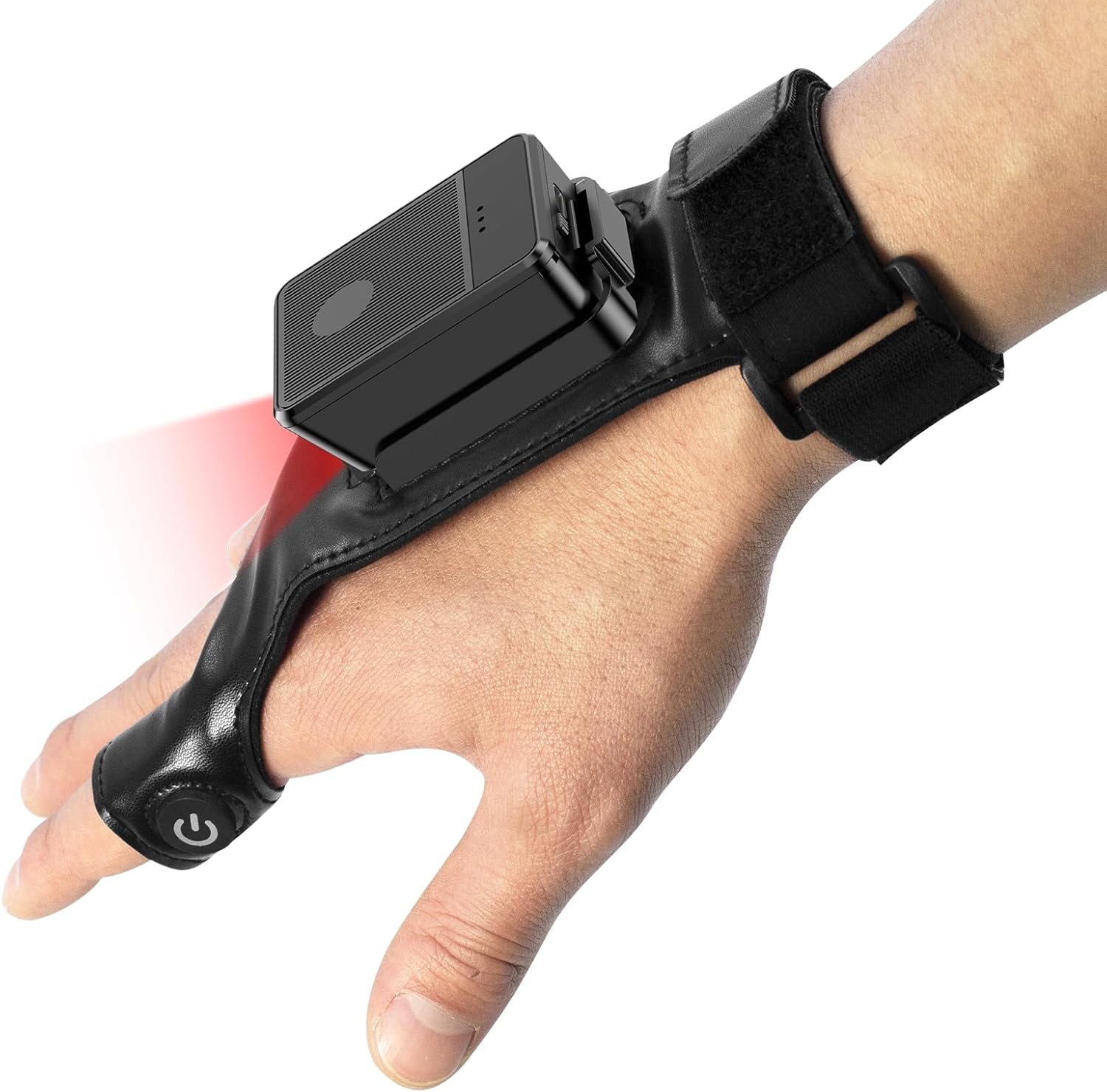
This image shows the Symcode Wearable Glove Barcode Scanner attached to a user's hand, demonstrating its ergonomic, hands-free design. The scanner unit is positioned on the back of the hand, with the scanning beam visible.
2. Boitsebiso ba Tšireletseho
- O se ke wa beha sesebediswa maemong a mocheso o feteletseng, mongobo, kapa dintho tse senyang.
- Avoid direct eye exposure to the scanning light.
- Se ke oa leka ho qhaqholla kapa ho lokisa sesebelisoa ka bouena. Ikopanye le basebetsi ba tšoanelehang bakeng sa tšebeletso.
- Use only the provided charging cable and adapter to prevent damage.
3. Likahare tsa Sephutheloana
Ka kopo, sheba litaba tsa sephutheloana ha u se u fumana. Haeba ho na le lintho tse sieo kapa li senyehile, ikopanye le morekisi oa hau.
- Symcode Wearable Glove Barcode Scanner
- USB Charging Cable
- 2.4G Wireless Dongle
- Bukana ea Mosebelisi
4. Sehlahisoa Overview
The Symcode Wearable Glove Barcode Scanner consists of a compact scanning unit and an adjustable glove-style strap. The scanning unit features a durable trigger button, indicator lights, and a charging port. The glove is designed for comfort and secure fit, allowing for hands-free operation.

E haufi-ufi view of the scanner on a hand, highlighting the red scanning beam and the durable resin material of the trigger button located on the index finger. The image also shows a roll of barcode labels, indicating its primary function.
5. Seta
5.1 Ho tjhaja Sesebediswa
Before first use, fully charge the scanner. Connect the USB charging cable to the scanner's charging port and to a power source (e.g., computer USB port or USB wall adapter). The charging indicator light will show charging status. A full charge takes approximately 5 hours.
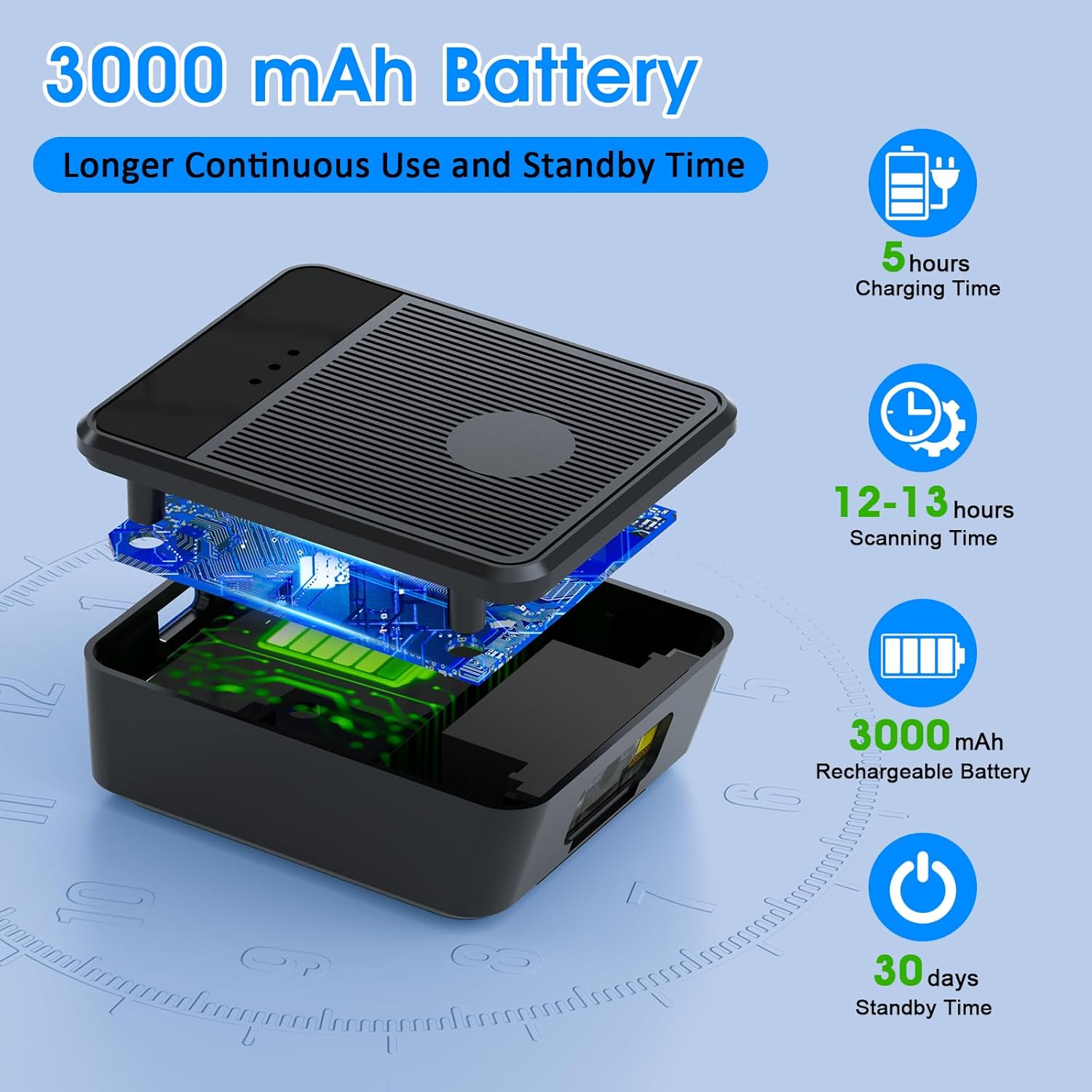
Ho phatloha view diagram of the scanner unit, emphasizing its 3000 mAh rechargeable battery. Accompanying text indicates a 5-hour charging time, 12-13 hours of continuous scanning, and 30 days of standby time.
5.2 Wearing the Scanner
Slide your hand into the glove, ensuring the scanner unit is positioned comfortably on the back of your hand. Adjust the strap for a secure fit. The trigger button should align with your index finger for easy access.

Two workers are shown in a warehouse environment, handling boxes. One worker is actively using the wearable barcode scanner on their hand to scan a package, demonstrating the hands-free benefit of the device during logistics operations.
5.3 Ho hokela ho Sesebediswa
The scanner supports two wireless connection methods:
5.3.1 2.4G Wireless Dongle Connection
- Plug the 2.4G wireless dongle into a USB port on your computer or compatible device.
- Turn on the scanner. It should automatically pair with the dongle.
- A successful connection is indicated by a specific light pattern or sound (refer to device indicators).
5.3.2 Khokahano ea Bluetooth 6.0
- Bulela sekena.
- Activate Bluetooth on your host device (e.g., smartphone, tablet, computer).
- Batla available Bluetooth devices and select the Symcode scanner from the list.
- Pairing may require a confirmation or a default PIN (check device documentation for specific PIN if required).
6. Litaelo tsa Ts'ebetso
6.1 Motheo oa Scanning
To scan a barcode, point the scanner's beam at the barcode and press the trigger button located on your index finger. A successful scan will typically be indicated by a beep, a vibration, or a change in the indicator light.
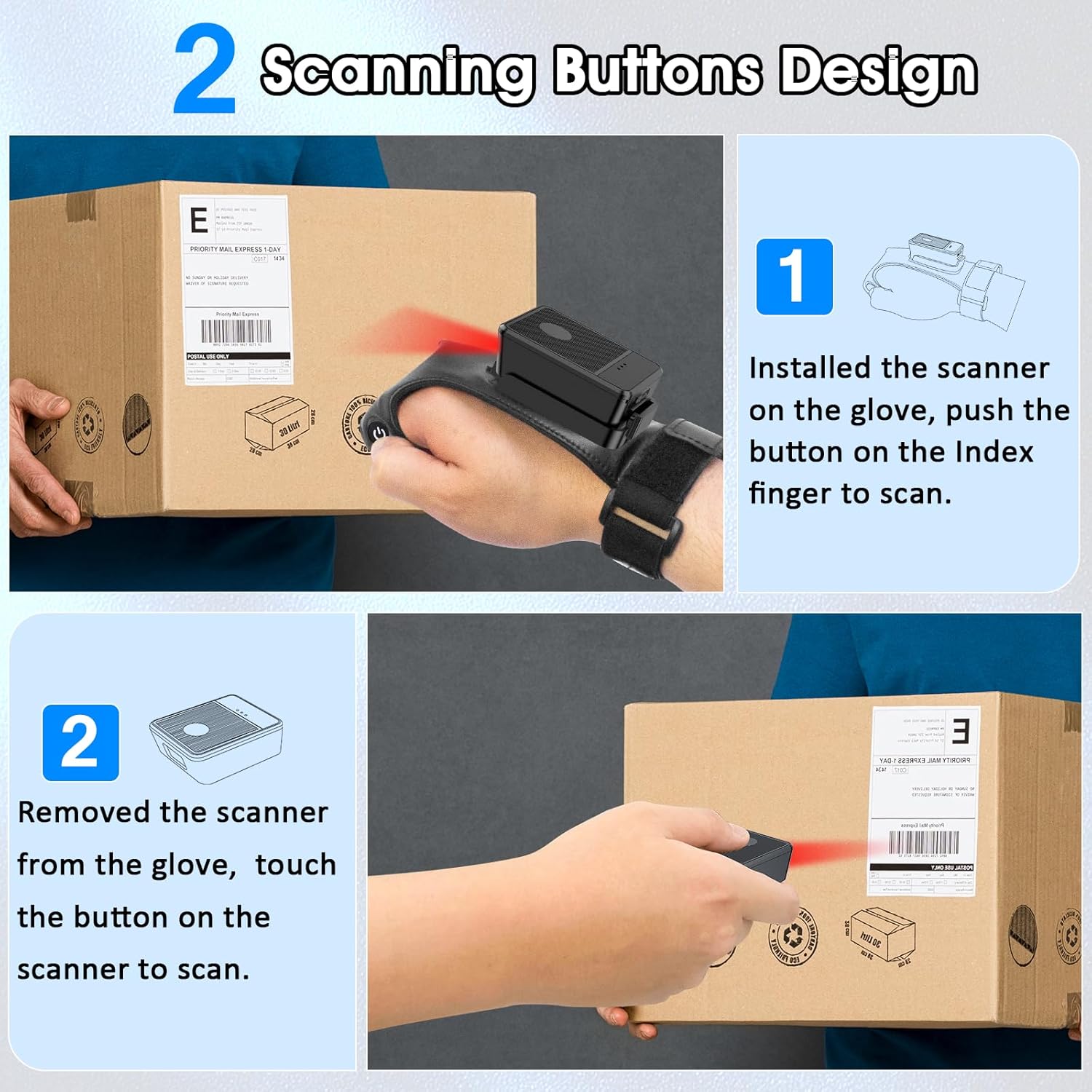
This diagram illustrates two ways to use the scanner: 1) installed on the glove, scanning with the index finger button, and 2) removed from the glove, scanning by touching the button directly on the scanner unit. Both methods are shown with the scanner pointed at a package.
6.2 Mekhoa ea ho sebetsa
The scanner supports two operational modes:
6.2.1 Instant Upload Mode
In this mode, scanned barcode data is immediately transmitted to the connected host device. This is ideal for real-time inventory updates or point-of-sale transactions.
6.2.2 Offline Storage Mode
This mode allows the scanner to store up to 50,000 barcodes internally when not connected to a host device or when connectivity is intermittent. Data can then be uploaded to a computer or POS system at a later time.
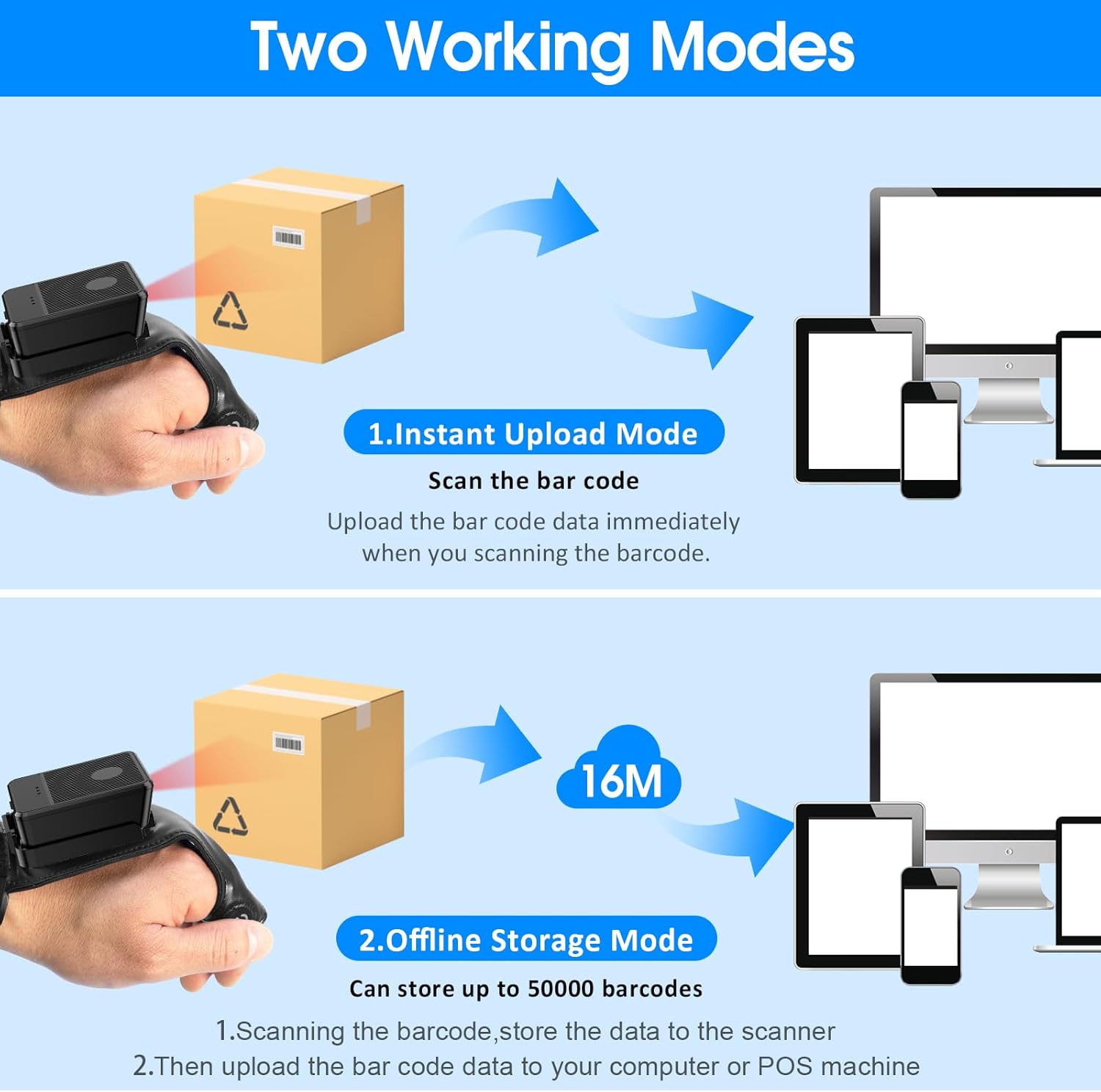
This image explains the two operational modes: Instant Upload Mode, where scanned data is immediately sent to a connected device, and Offline Storage Mode, which allows storing up to 50,000 barcodes internally before uploading them to a computer or POS system.
6.3 Ho Etsa Litlhophiso tsa ho Itlhophisa
The scanner allows for customization of various settings, including:
- Molumo: Enable or disable the audible beep for successful scans.
- Tšisinyeho: Enable or disable vibration alerts for successful scans, useful in quiet environments.
- Mesebetsi ea Keyboard: Add keyboard functions such as TAB or Enter after each scan for seamless data entry into applications.
Refer to the quick setup guide or manufacturer's website for specific programming barcodes to adjust these settings.
7. Tlhokomelo
- Ho hloekisa: Use a soft, dry cloth to clean the scanner's exterior. For stubborn dirt, slightly dampen lesela ka metsi. U se ke ua sebelisa lik'hemik'hale tse bohale kapa li-abrasive cleaners.
- Polokelo: Store the scanner in a cool, dry place away from direct sunlight and extreme temperatures when not in use.
- Tlhokomelo ea Betri: Ho lelefatsa bophelo ba betri, qoba ho ntsha betri ka botlalo kgafetsa. Chaja sesebelisoa khafetsa, le haeba se sa sebelisoe kamehla.
8. Ho rarolla mathata
8.1 Scanner Not Turning On
- Ensure the battery is charged. Connect the scanner to a power source and allow it to charge for at least 30 minutes before attempting to turn it on again.
8.2 Unable to Connect Wirelessly
- 2.4G Khokahano: Verify the 2.4G dongle is securely plugged into the host device. Try plugging it into a different USB port. Ensure the scanner is within range of the dongle.
- Khokahano ea Bluetooth: Ensure Bluetooth is enabled on your host device. Delete any previous pairings for the scanner and attempt to pair again. Ensure the scanner is in pairing mode (refer to device indicators).
- Restart both the scanner and the host device.
8.3 Sekenara se sa Baleng Li-Barcode
- Ensure the barcode is clean, undamaged, and clearly printed.
- Adjust the distance and angle between the scanner and the barcode.
- Check if the scanner is in the correct working mode (Instant Upload or Offline Storage).
- Verify that the barcode type is supported by the scanner (1D, 2D, QR codes are supported).
9. Litlhaloso
| Brand | symcode |
| Mohlala | Wearable Glove Barcode Scanner (B0F1FSMWCD) |
| Theknoloji ea Khokahano | 2.4G, Bluetooth 6.0 |
| Lisebelisoa tse lumellanang | Desktop, Laptop, Tablet, Smartphone (Windows XP/7/8/10, Android, iOS) |
| Mohloli oa Matla | Matla a Battery |
| Mofuta oa Leshala | 1 betri ea lithium Polymer (e kenyelelitsoe) |
| Bokhoni ba Battery | 1100mAh (Product Description) / 3000mAh (Image) - Note: Discrepancy in source data, refer to product packaging for accurate capacity. |
| Nako ea Ts'ebetso e Tsoelang Pele | Up to 10 hours (Product Description) / 12-13 hours (Image) - Note: Discrepancy in source data, refer to product packaging for accurate time. |
| Nako ea ho tjhaja | Hoo e ka bang. Lihora tse 5 |
| Nako ea ho ema | Ho fihlela ho matsatsi a 30 |
| Lebelo la ho skena | Up to 300 scans per second |
| Sebaka sa ho hlahloba | 2 ho isa ho 4.9 maoto |
| Offline Storage Capacity | Up to 50,000 barcodes |
| Boima ba Ntho | 5 lik'hilograma |
| Litekanyo tsa sephutheloana | 7.48 x 3.74 x 2.44 lisenthimithara |
10. Boitsebiso ba Tiisetso
This Symcode product is covered by a manufacturer's warranty. For specific warranty terms, duration, and conditions, please refer to the warranty card included with your product or visit the official Symcode websebaka. Boloka bopaki ba hau ba theko bakeng sa likopo tsa waranti.
11. Tšehetso ea Bareki
If you encounter any issues or have questions regarding your Symcode Wearable Glove Barcode Scanner, please contact Symcode customer support. Contact details can typically be found on the product packaging, the official Symcode websebaka sa marang-rang, kapa ka morekisi oa hau.