
Selelekela
This manual provides essential information for the proper setup, operation, and maintenance of your My Arcade Sonic The Hedgehog Joystick Player. Please read this manual thoroughly before using the product to ensure a safe and enjoyable gaming experience.
Sehlahisoa se Felletseview
The My Arcade Sonic The Hedgehog Joystick Player is a portable retro gaming console featuring classic SEGA titles. It offers an authentic arcade experience with a joystick and dedicated buttons.
Likarolo tsa Bohlokoa:
- Officially licensed SEGA game console.
- High-resolution 3.5-inch full-color display.
- E kenyeletsa Sonic the Hedgehog le Sonic the Hedgehog 2.
- 3.5mm headphone jack for private audio.
- Sebui se hahelletsoeng kahare se nang le taolo ea molumo.
- Khanya ea skrine e feto-fetohang.
- Powered by 4 AA batteries (not included) or USB-C cable (not included).
Likaroloana:
- Gaming Console Unit
- Joystick
- Action Buttons (A, B, C)
- Konopo ea Lehae
- Credit/Start Button
- Taolo ea Bolumo (+/-)
- Taolo ea Khanya
- 3.5mm Headphone Jack
- USB-C Power Input (5V IN)
- Battery Compartment (requires 4 AA batteries)

The My Arcade Sonic The Hedgehog Joystick Player, a portable retro gaming console.
Tlhophiso
Powering the Console:
- Kenya Betri: Locate the battery compartment on the back of the console. Insert 4 AA batteries (not included), ensuring correct polarity.
- USB-C Power (Optional): Alternatively, connect a USB-C cable (not included) to the 5V IN port on the back of the console to power it.
Tšebeliso ea Pele:
- Peel off the protective screen sticker before use.
- Turn on the console using the power switch located on the back.

Ka morao view of the console, highlighting the battery compartment, USB-C port, and headphone jack.
Litaelo tsa Ts'ebetso
Game Selection and Start:
- Once powered on, use the joystick to navigate and select your desired game (Sonic the Hedgehog or Sonic the Hedgehog 2) from the main menu.
- Tobetsa ea START/CREDIT button to add virtual coins and begin the game.
- To skip the Sonic demo mode, press the START/CREDIT konopo.
Litaolo:
- Joystick: E laola motsamao oa sebapali.
- Action Buttons (A, B, C): Perform in-game actions such as jumping or attacking.
- Taolo ea Molumo (+/-): Adjust the sound level of the built-in speaker using the buttons on the back of the console.
- Khanya ea skrine: Adjust the screen brightness using the dedicated button on the back.
- Li-headphone Jack: For private listening, connect 3.5mm headphones to the headphone jack on the back.
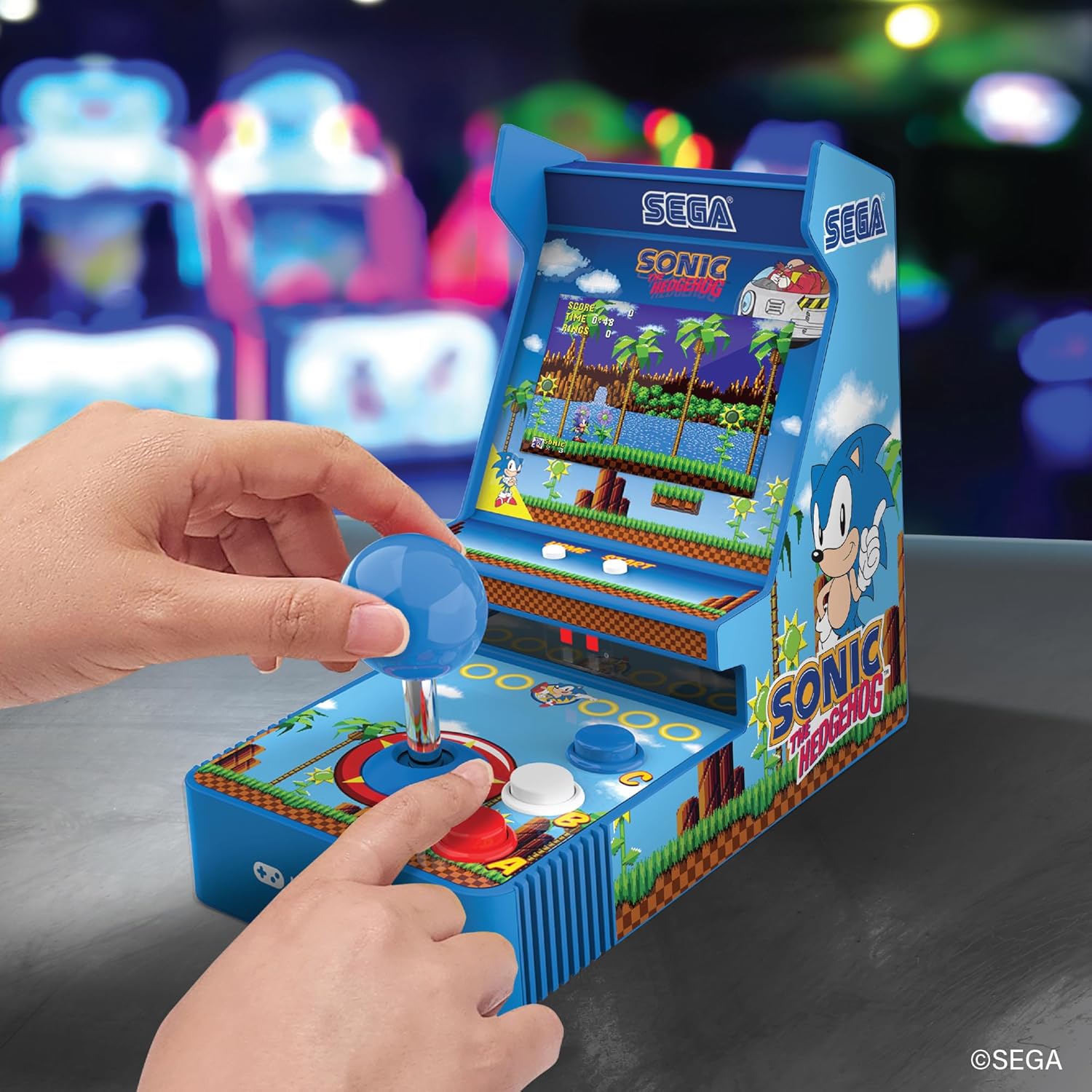
Pele view of the console, showing the joystick, action buttons, and screen during gameplay.
Official video demonstrating the My Arcade Sonic Arcade Game in action, showcasing gameplay and features.
Tlhokomelo
To ensure the longevity of your My Arcade Sonic The Hedgehog Joystick Player, follow these simple maintenance guidelines:
- Keep the console clean by wiping it with a soft, dry cloth. Avoid using abrasive cleaners or solvents.
- Store the console in a cool, dry place away from direct sunlight and extreme temperatures.
- If not in use for an extended period, remove the AA batteries to prevent leakage.
Ho batle phoso
If you encounter any issues with your My Arcade Sonic The Hedgehog Joystick Player, refer to the following common solutions:
- Console does not power on: Ensure that fresh AA batteries are correctly installed or that the USB-C cable is securely connected to a power source.
- Game does not start from demo mode: Tobetsa ea START/CREDIT button to exit demo mode and begin gameplay.
- Ha ho molumo: Check the volume control buttons on the back of the console. If headphones are connected, ensure they are fully plugged in and functioning correctly.
- Screen is dim: Adjust the screen brightness using the dedicated button on the back of the console.
If problems persist, please contact My Arcade customer support for further assistance.
Litlhaloso
| Sebopeho | Lintlha |
|---|---|
| Litekanyo tsa Sehlahisoa | 4"L x 6.8"W x 7.6"H |
| Mofuta oa Molaoli | Joystick |
| Boima ba Ntho | 0.63 lik'hilograma (lik'hilograma tse 1.39) |
| Boholo ba skrine | 3.5 lisenthimithara |
| Mohloli oa Matla | 4 AA batteries (not included) or USB Type C (not included) |
| Sesebelisoa sa Hardware | Mofuta oa USB oa C |
| Mofuta oa Pontšo | LCD |
| Lintho tse bonahalang | Plastiki |
| Bokhoni ba ho Boloka Memori | 4 MB |
| Nomoro ea Mohlala | DGUNL-7157 |
| UPC | 845620071579 |
Boitsebiso ba Tšireletseho
- Ha e loketse bana ba ka tlase ho lilemo tse 3 ka lebaka la likarolo tse nyane.
- Kamehla hlokomela bana ba banyenyane nakong ea tšebeliso.
- Do not expose the console to water or excessive moisture.
- Avoid dropping or subjecting the console to strong impacts.
- Use only recommended battery types and ensure correct installation.
Warranty le Tšehetso
For warranty information or technical support, please refer to the official My Arcade websebaka kapa ikopanye le lefapha la litšebeletso tsa bareki. Boloka rasiti ea hau ea theko e le bopaki ba hore u rekile.