
1. Selelekela
Kea leboha ha u rekileasing the MLWSHR Digital LED Alarm Clock Model 8808. This device combines a digital alarm clock with a thermo-hygrometer, offering dual alarms, snooze function, date and year display, 12/24 hour switch, weekday settings, Daylight Saving Time (DST) functionality, auto-dimmable display with three brightness levels, and a convenient 5V1A USB output for charging other devices. Please read this manual carefully to ensure proper use and maintenance of your new alarm clock.
2. Boitsebiso ba Tšireletseho
- Boloka sesebelisoa hole le metsi le tikoloho ea mongobo o phahameng.
- Se ke oa beha sesebelisoa mochesong o feteletseng kapa khanya ea letsatsi ka nako e telele.
- Use only the provided USB Type-C cable for power.
- U se ke ua leka ho qhaqha kapa ho lokisa sesebelisoa ka bouena. Ikopanye le tšehetso ea bareki haeba ho hlaha mathata.
- Ensure proper ventilation when using the USB output to charge other devices.
3. Likahare tsa Sephutheloana
- MLWSHR Digital LED Alarm Clock Model 8808
- Thapo ea Matla ea USB Type-C
- Bukana ea Mosebelisi
4. Sehlahisoa Overview
Familiarize yourself with the main components and controls of your alarm clock.
This image displays the front of the MLWSHR Digital LED Alarm Clock, highlighting the time display, weekday indicators, temperature in Celsius, humidity percentage, and dual alarm icons. It also points to the Daylight Saving Time (DST) indicator.

This image illustrates the side and back of the alarm clock, detailing the USB Type-C input for primary power, the battery compartment for 3x AAA backup batteries (not included), and the USB-A output (5V1A) for charging other devices. It also shows the control buttons located on the top edge.
Litaolo:
- SET Konope: E kena mokgweng wa ho seta nako, letsatsi le dialamo.
- UP (+) Button: Increases values during setting, adjusts brightness.
- DOWN (-) Button: Decreases values during setting, adjusts brightness.
- SNOOZE/LIGHT Button: Activates snooze, adjusts display brightness.
- Konopo ea ALARM 1: Activates/deactivates Alarm 1, enters Alarm 1 setting.
- Konopo ea ALARM 2: Activates/deactivates Alarm 2, enters Alarm 2 setting.
- 12/24HR Button: Switches between 12-hour and 24-hour time formats.
- °C/°F Konopo: Switches between Celsius and Fahrenheit temperature display.
5. Seta
5.1 Phepelo ea Matla
The MLWSHR Digital LED Alarm Clock can be powered in two ways:
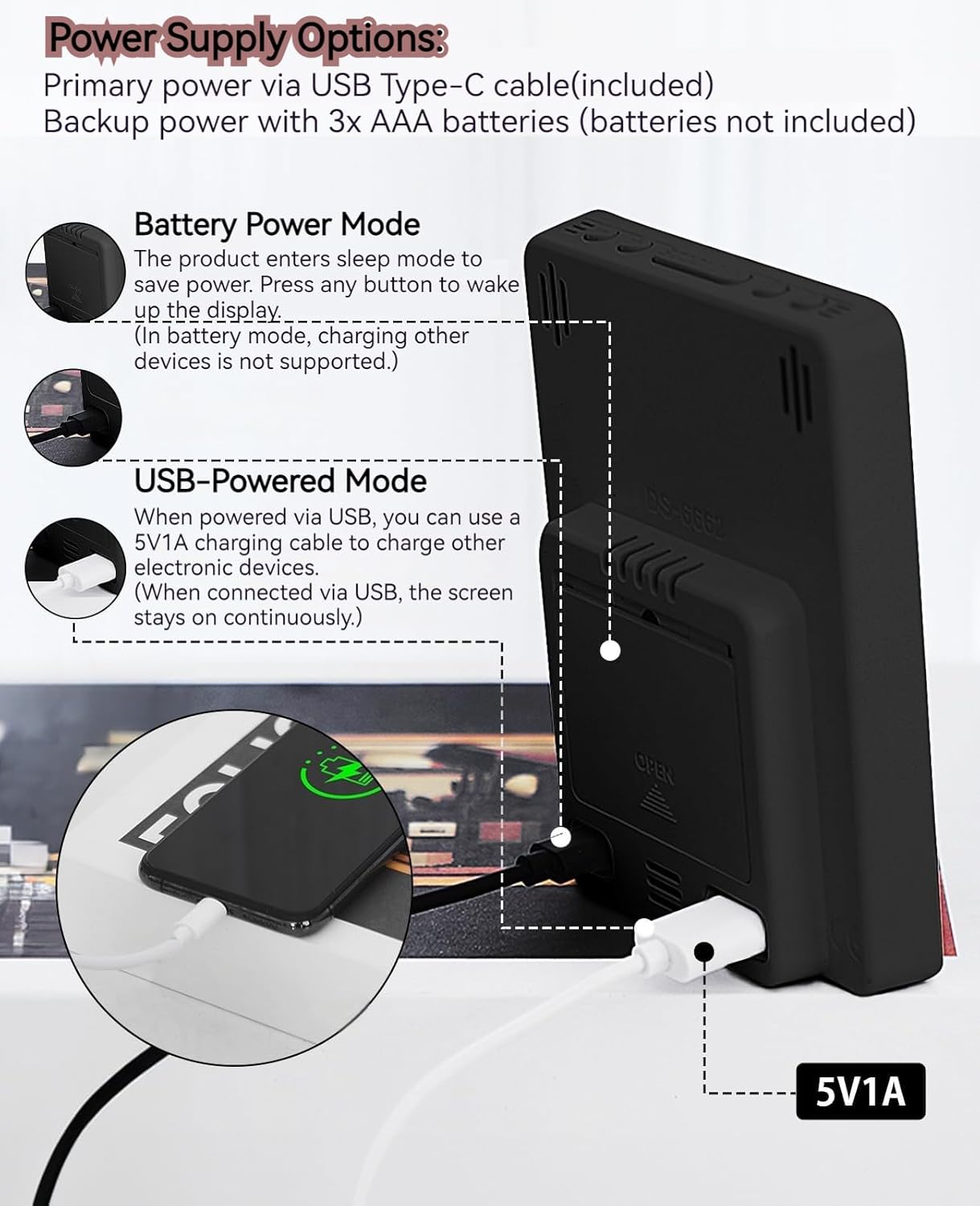
- Primary Power (USB Type-C): Connect the provided USB Type-C cable to the clock's input port and plug the other end into a 5V1A USB power adapter (not included). When powered via USB, the display will remain continuously on.
- Backup Power (3x AAA Batteries): Insert 3 AAA batteries (not included) into the battery compartment on the back of the clock. In battery-only mode, the display will enter sleep mode to conserve power. Press any button to temporarily activate the display. Note that the USB output for charging other devices is not supported when operating on battery power alone.
5.2 Nako ea Pele le Letsatsi la ho Beha
After connecting power, the clock will typically display a default time. To set the correct time and date:
- Tobetsa o hatelle HLOKOMELA konopo metsotsoana e 3 ho kenya mokhoa oa ho beha nako. Linomoro tsa lihora li tla benya.
- Sebelisa le PHAHAMA (+) or TLAS'A (-) likonopo ho fetola hora.
- Tobetsa HLOKOMELA hape ho netefatsa hora le ho fetela ho tlhophiso ea motsotso. Linomoro tsa motsotso li tla benya.
- Sebelisa le PHAHAMA (+) or TLAS'A (-) likonopo ho lokisa metsotso.
- Tsoela pele ho tobetsa HLOKOMELA to cycle through and set the Year, Month, and Day using the PHAHAMA (+) or TLAS'A (-) buttons for adjustment.
- After setting the Day, press HLOKOMELA lekhetlo la ho qetela ho tsoa ho mokhoa oa ho seta.
6. Litaelo tsa Ts'ebetso
6.1 Phetoho ea Sebopeho sa Lihora tse 12/24
Tobetsa ea 12/24HR button to toggle between 12-hour (with AM/PM indicator) and 24-hour time formats.
This video demonstrates various features of the MLWSHR Digital LED Alarm Clock, including the time, temperature, humidity, weekday display, auto/manual brightness adjustment, 12/24 hour switch, and the easy-to-use buttons and USB-C input/USB-A output.
6.2 Ho Beha Lialamo (Alamo ea 1 le Alamo ea 2)
The clock features two independent alarms. Each alarm can be set for specific days of the week (Monday-Friday, Monday-Saturday, or Monday-Sunday).

This image illustrates the dual alarm functionality, showing how each alarm can be customized to ring on specific days of the week: Monday to Friday, Monday to Saturday, or every day. It highlights the alarm icons and weekday indicators on the display.
- Tobetsa ea ALARAMU 1 or ALARAMU 2 button to select the desired alarm. The alarm icon will appear on the display.
- Press and hold the selected TLHOKOMELO button for 3 seconds to enter alarm setting mode. The hour digits will flash.
- Sebelisa le PHAHAMA (+) or TLAS'A (-) likonopo ho lokisa hora ea alamo.
- Tobetsa ea TLHOKOMELO konopo hape ho netefatsa hora le ho fetela ho tlhophiso ea motsotso.
- Sebelisa le PHAHAMA (+) or TLAS'A (-) dikonopo ho lokisa metsotso ya alamo.
- Tobetsa ea TLHOKOMELO button again to set the alarm frequency (e.g., Mon-Fri, Mon-Sat, Mon-Sun). Use PHAHAMA (+) or TLAS'A (-) ho kgetha.
- Tobetsa ea TLHOKOMELO button one last time to exit alarm setting mode.
- To turn an alarm ON or OFF, simply press the corresponding ALARAMU 1 or ALARAMU 2 button briefly. The alarm icon will appear (ON) or disappear (OFF) from the display.
Mosebetsi oa 6.3 Snooze
When an alarm sounds, you can activate the snooze function for a temporary delay.

This image shows the clock's snooze button and how it functions. When the alarm rings, a brief press of the snooze button will delay the alarm for 5 minutes. Holding the button for more than two seconds will turn off the alarm for that day.
- Ha alamo e lla, tobetsa konopo TSOTSANG / LESELI button briefly. The alarm will pause and ring again after 5 minutes.
- To turn off the alarm for the current day, press and hold the TSOTSANG / LESELI button for more than 2 seconds, or press any other button (except TSOTSANG / LESELI).
6.4 Phetoho ea Khanya
The clock features an auto-dimmable display and three manual brightness levels.
- Auto Dimmable: The built-in light sensor automatically adjusts the display brightness based on ambient light conditions. This is the default setting.
- Khanya ea letsoho: Tobetsa konopo ea TSOTSANG / LESELI button to cycle through 3 manual brightness levels (L-01, L-02, L-03).
- To return to auto-dimmable mode, continue pressing the TSOTSANG / LESELI button until 'L-AU' appears on the display.
6.5 Thermometer & Hygrometer
The clock displays indoor temperature and humidity levels.

This image highlights the temperature and humidity readings on the clock's display. It also provides guidance on ideal humidity levels and suggests actions (humidifier/dehumidifier) if levels are too low or too high. The temperature detection range is 23°F to 122°F (-5°C to 50°C) with an error margin of ±2°F.
- Temperature Unit Switch: Tobetsa ea ° C / ° F. button to switch between Celsius and Fahrenheit temperature display.
- The temperature range is 23°F to 122°F (-5°C to 50°C) with an error margin of ±2°F.
- The humidity measurement error is within ±5%.
6.6 USB Power Output (5V1A)
The clock features a USB-A output port (5V1A) that can be used to charge other electronic devices.

This image demonstrates the use of the clock's USB-A output port to charge a smartphone. The clock provides a 5V1A output, making it a convenient charging station. This feature is only available when the clock is powered via its USB Type-C input.
- Connect your device's charging cable to the USB-A output port on the back of the alarm clock.
- Ensure the alarm clock is powered via its USB Type-C input for this feature to function. The USB output is not active when the clock is running on battery power alone.
6.7 Daylight Saving Time (DST)
The clock supports Daylight Saving Time adjustment.
- To activate or deactivate DST, press and hold the DST button (if available, or refer to the SET button sequence for DST in specific models). The DST indicator will appear or disappear.
7. Tlhokomelo
- Hloekisa oache ka lesela le bonolo, le omeletseng. Se ke oa sebelisa li-abrasive cleaners kapa solvents.
- If the clock will not be used for an extended period, remove the AAA batteries to prevent leakage.
- Keep the USB ports free from dust and debris.
8. Ho rarolla mathata
| Bothata | Lebaka le ka khonehang | Tharollo |
|---|---|---|
| Display is off or intermittent. | Running on battery power in sleep mode, or no power. | Press any button to activate display in battery mode. Connect USB Type-C cable for continuous display. Check USB power source. |
| USB output not charging devices. | Clock is running on battery power, or USB cable is faulty. | Ensure the clock is connected to primary USB Type-C power. Try a different USB cable. |
| Alamo ha e lle. | Alamo ha e sebetse kapa e setilwe ka phoso. | Check if the alarm icon is displayed. Re-set the alarm time and frequency. |
| Temperature reading is inaccurate. | Environmental factors or sensor error. | Allow time for the sensor to stabilize. Ensure the clock is not near heat sources or vents. Note the ±2°F error margin. |
| Cannot set time/date. | Not in setting mode, or buttons are unresponsive. | Press and hold the SET button for 3 seconds. Ensure the clock has stable power. |
9. Litlhaloso
- Lebitso: MLWSHR
- Nomoro ea Mohlala: 8808
- Mofuta oa Pontšo: LED
- Mohloli oa Matla: USB Type-C (5V1A) / 3x AAA Batteries (backup)
- Boholo ba Sehlahisoa: 3.54"W x 4.72"H
- Likaroloana: Dual Alarms, Snooze, Thermo-Hygrometer, Date & Year Display, 12/24 Hour Switch, Weekdays, DST, Auto Dimmable (3 levels), USB Output (5V1A)
- Boitsebiso: Eco-friendly Plastic
- Tšebeliso ea Ka hare/Kantle: Ka hare
10. Warranty & Ts'ehetso
The MLWSHR Digital LED Alarm Clock Model 8808 comes with a Warranty ea Selemo se 2 ho tloha ka letsatsi la theko. Tiisetso ena e akaretsa liphoso tsa tlhahiso le ho se sebetse hantle tlas'a ts'ebeliso e tloaelehileng.
For technical support, warranty claims, or any questions regarding your product, please contact MLWSHR customer service through the retailer's platform or visit our official website for contact information. Please have your purchase receipt and model number ready when contacting support.