
1. Selelekela
Welcome to the user manual for your Emerson CKSS7071 Sunrise Smartset Alarm Clock Radio. This device is designed to enhance your daily routine with its unique features, including a sunrise simulation, soothing sound options, Bluetooth connectivity, and an 8-color dimmable LED display. Please read this manual thoroughly to understand the full functionality and ensure proper use and care of your new alarm clock radio.
Video ea 1: Fetileview of the Emerson CKSS7071 Sunrise Smartset Alarm Clock Radio. This video demonstrates the key features and design of the product.
2. Boitsebiso ba Bohlokoa ba Tšireletseho
- Bala litaelo tsohle pele u sebelisa sesebelisoa.
- Boloka litaelo tsena bakeng sa ho li sebelisa nakong e tlang.
- Se ke oa sebelisa sesebelisoa sena haufi le metsi.
- Hloekisa feela ka lesela le omeletseng.
- Se ke oa thibela menyetla efe kapa efe ea moea. Kenya ho latela litaelo tsa moetsi.
- Se ke oa kenya haufi le mehloli efe kapa efe ea mocheso joalo ka li-radiator, lirejista tsa mocheso, litofo, kapa lisebelisoa tse ling (ho kenyeletsoa amplifiers) tse hlahisang mocheso.
- Sireletsa thapo ea motlakase hore e se ke ea tsamauoa kapa e penngoa, haholo-holo ha li-plug, litšepe tse bonolo, le moo li tsoang teng.
- Sebelisa feela liphutheloana/lisebelisoa tse boletsoeng ke moetsi.
- Tlosa sesebelisoa sena nakong ea sefefo sa lehalima kapa ha se sa sebelisoe ka nako e telele.
- Fetisetsa lits'ebeletso tsohle ho basebetsi ba tšoanelehang. Ts'ebeletso e hlokahala ha lisebelisoa li senyehile ka tsela efe kapa efe, joalo ka thapo ea phepelo ea motlakase kapa plug e senyehile, mokelikeli o tšolohile kapa lintho li oele ka har'a lisebelisoa, sesebelisoa se pepesehetse pula kapa mongobo, ha se sebetse ka mokhoa o tloaelehileng. , kapa e lahliloe.
3. Likahare tsa Sephutheloana
Netefatsa hore lintho tsohle li teng ha u bula sephutheloana:
- Emerson CKSS7071 Sunrise Smartset Alarm Clock Radio
- Adapter ea Matla a AC
- Bukana ea Mosebelisi
4. Sehlahisoa Overview
4.1 Ka pele View

Setšoantšo sa 1: Pele view of the alarm clock, featuring the digital time display and the sunrise simulation light panel.
The front of the unit features the main 1.2-inch LED time display and the large circular light panel for sunrise simulation and ambient lighting. Indicators for AM/PM, Alarm 1/2, and Bluetooth status are also visible.
4.2 Lehlakore View (Litaolo)
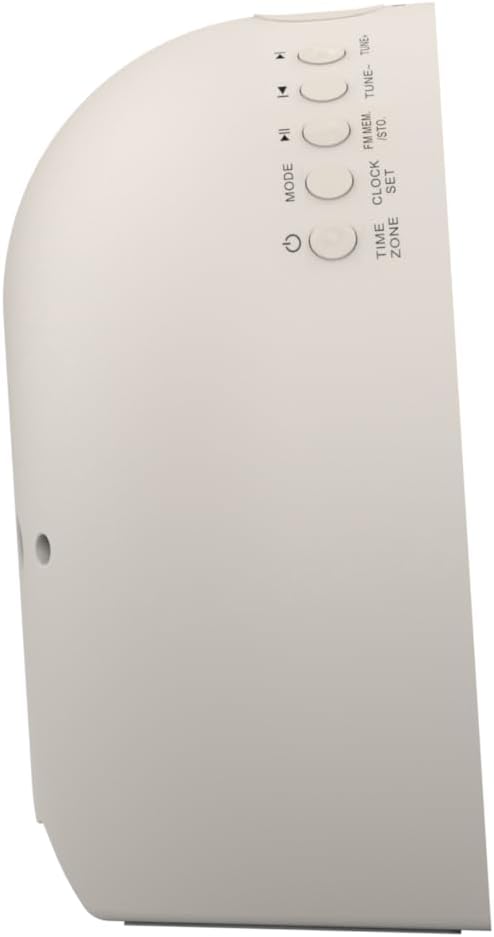
Setšoantšo sa 2: Lehlakore view of the alarm clock, highlighting the control buttons for various functions.
The side panel houses the primary control buttons, including Power, Mode, Clock Set, Time Zone, Tune/Skip, and Volume controls. These buttons are used for setting time, alarms, and navigating audio functions.
4.3 Morao View

Setšoantšo sa 3: Ka morao view of the alarm clock, showing the speaker grille and power connection port.
The rear of the unit features the main speaker grille and the power input port for connecting the AC adapter.
5. Seta
5.1 Khokelo ea Matla
- Plug the AC power adapter into the DC IN jack located on the back of the unit.
- Plug the other end of the adapter into a standard wall outlet (AC 100-240V, 50/60Hz).
- Yuniti e tla sebetsa ka bo eona.
5.2 SmartSet Automatic Time Setting
The SmartSet system automatically sets the correct time and date as soon as you plug in the unit. It also maintains time and alarm settings during power disruptions or outages, provided the button cell battery is installed.
5.3 Ho kenya Bettery Backup
A button cell battery (CR2032, included) is required for battery backup. This ensures that time and alarm settings are retained during a power outage.
- Fumana karolo ea betri e ka tlase ho yuniti.
- Bula sekwahelo sa karolo ya betri.
- Insert one CR2032 button cell battery, ensuring the correct polarity (+/-).
- Koala sekoaelo sa karolo ea betri ka mokhoa o sireletsehileng.
6. Litaelo tsa Ts'ebetso
6.1 Setting the Clock Manually
- Tobetsa o hatelle SETLOKOANA SETEKO konopo. Linomoro tsa hora li tla benya.
- Sebelisa le TUNE -/+ dikonopo ho fetola hora. Tobetsa SETLOKOANA SETEKO ho tiisa.
- Linomoro tsa motsotso li tla benya. Sebelisa TUNE -/+ dikonopo ho lokisa metsotso. Tobetsa SETLOKOANA SETEKO ho tiisa.
- Tswela pele ka tshebetso ena ho beha selemo, kgwedi le letsatsi.
- Tobetsa SETLOKOANA SETEKO again to exit time setting mode.
6.2 Ho Beha Lialamo (Alamo ea 1 le Alamo ea 2)
The unit features dual alarms. Follow these steps for each alarm:
- Tobetsa o hatelle ALARAMU 1 or ALARAMU 2 konopo. Dinomoro tsa hora ya alamo di tla benya.
- Sebelisa le TUNE -/+ buttons to adjust the alarm hour. Press the respective TLHOKOMELO konopo ho netefatsa.
- The alarm minute digits will flash. Use the TUNE -/+ buttons to adjust the alarm minutes. Press the respective TLHOKOMELO konopo ho netefatsa.
- Select the alarm source (Buzzer, FM Radio, or Soothing Sound). Press the respective TLHOKOMELO konopo ho netefatsa.
- Adjust the alarm volume using the VOL - / + buttons. Press the respective TLHOKOMELO konopo ho netefatsa.
- The alarm is now set. The alarm indicator (AL1 or AL2) will appear on the display.
6.3 Ketsiso ea Letsatsi
The sunrise simulation feature gradually brightens the light panel before your set alarm time, mimicking a natural sunrise to gently wake you.
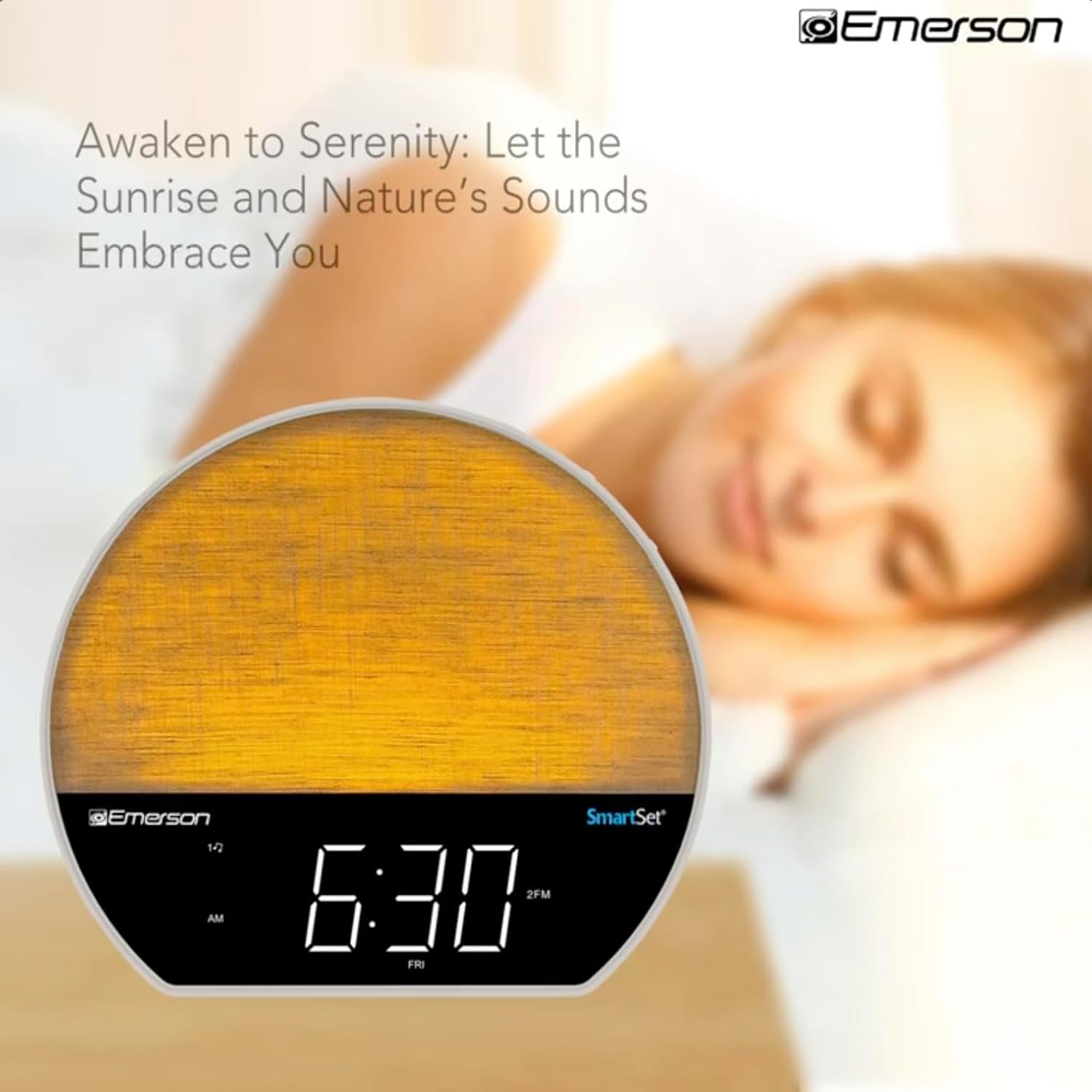
Setšoantšo sa 4: The alarm clock simulating a sunrise with a warm, increasing matla a khanya.
To activate, ensure the sunrise option is selected during alarm setup. The light will begin to brighten 30 minutes before the alarm sounds.
6.4 Soothing Sounds and White Noise
The unit includes 6 soothing sounds and white noise to help with relaxation or waking up.
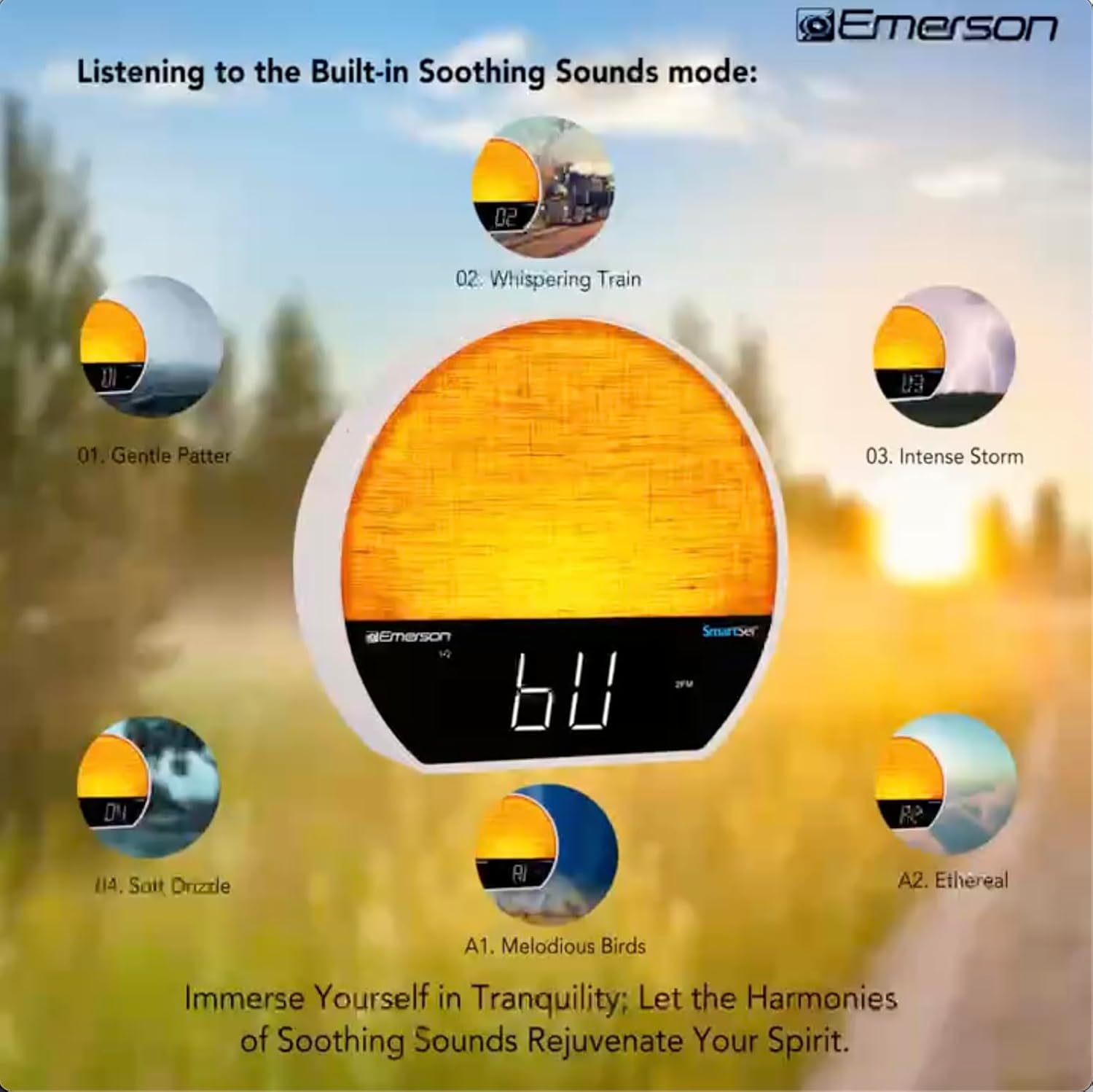
Setšoantšo sa 5: Visual representation of the six soothing sound modes available on the alarm clock.
- Tobetsa ea MOKHOA button repeatedly until the Soothing Sound mode is selected.
- Sebelisa le TUNE -/+ buttons to cycle through the available sounds (e.g., Gentle Patter, Whispering Train, Intense Storm, Soft Drizzle, Melodious Birds, Ethereal, White Noise).
- Fetola molumo u sebelisa file ea VOL - / + likonopo.
6.5 Mosebetsi oa Bluetooth Speaker
Hokela smartphone ea hau kapa sesebelisoa se seng se nang le Bluetooth ho phallela molumo ntle le mohala.

Setšoantšo sa 6: The alarm clock in Bluetooth mode, paired with a mobile device for audio streaming.
- Tobetsa ea MOKHOA button until 'BT' appears on the display, indicating Bluetooth mode.
- On your device, enable Bluetooth and search for 'Emerson CKSS7071'.
- Select the device to pair. A confirmation tone will sound upon successful pairing.
- You can now play audio from your device through the alarm clock's speaker.
6.6 Ts'ebetso ea seea-le-moea sa FM
Tune into your favorite FM radio stations.
- Tobetsa ea MOKHOA button until 'FM' appears on the display.
- Tobetsa ea TUNE -/+ buttons briefly to manually tune to a station.
- Tobetsa o hatelle TUNE -/+ dikonopo tsa ho skena ka bohona bakeng sa seteishene se latelang se fumanehang.
- Ho boloka seteishene, tobetsa o be o tshware FM MEM konopo ho fihlela nomoro e seng e setilwe e phatsima. TUNE -/+ ho kgetha nomoro e seng e setilwe, ebe o tobetsa FM MEM hape ho boloka.
6.7 LED Decor and Dimmer Control
Customize the ambient light with 8 different colors and adjust the brightness.

Setšoantšo sa 7: The alarm clock demonstrating its 8-color dimmable LED decor options.
- Tobetsa ea KHANYA button to cycle through the 8 available colors or turn the light off.
- To adjust the brightness of the LED decor light, press and hold the KHANYA button. The brightness will cycle through 5 levels. Release the button at your desired brightness.
Taolo ea Dimmer ea Pontšo ea 6.8
Adjust the brightness of the 1.2-inch LED time display.

Setšoantšo sa 8: The alarm clock illustrating the five distinct levels of display luminescence.
Tobetsa ea FIHLELANG button (often combined with another function, refer to button labels) to cycle through 4 levels of display brightness (Bright, Moderate, Dim, Faint).
Nako ea Boroko ea 6.9
Set a timer for the audio to automatically turn off after a specified duration.

Setšoantšo sa 9: The alarm clock set for a sunset sleep timer, providing a harmonious end to the day.
- While audio is playing (FM or Soothing Sound), press the ROBALA konopo.
- Khafetsa tobetsa konopo ea ROBALA button to cycle through available sleep timer durations (e.g., 15, 30, 60, 90 minutes, or OFF).
- The audio will automatically turn off after the selected time.
Mosebetsi oa 6.10 Snooze
Ha alamo e lla, tobetsa konopo TS'OANANG konopo (hangata konopo e kgolo hodimo) ho kgutsisa alamo ka nakoana metsotso e mmalwa. Alamo e tla lla hape kamora nako ya ho kgutsisa.
7. Tlhokomelo
7.1 Ho hloekisa
- Kamehla ntša yuniti ho tsoa mohloling oa motlakase pele o hloekisa.
- Sebelisa lesela le bonolo, le omeletseng ho hloekisa bokantle ba bokantle.
- O se ke wa sebedisa di-cleaner tsa metsi, di-cleaner tse kgopang, kapa di-spray tsa dikhemikhale, kaha tsena di ka senya qetello.
7.2 Phetoho ea Betri
If the time and alarm settings are not retained during a power outage, the button cell backup battery may need to be replaced. Follow the instructions in section 5.3 to replace the CR2032 battery.
8. Ho rarolla mathata
| Bothata | Lebaka le ka khonehang | Tharollo |
|---|---|---|
| Yuniti ha e sebetse. | Adapter ea motlakase ha e hoketsoe kapa e na le phoso. | Ensure the AC adapter is securely plugged into the unit and a working wall outlet. |
| Time/Alarm settings lost after power outage. | Backup battery is dead or not installed. | Install or replace the CR2032 button cell battery (see section 5.3). |
| Alamo ha e lle. | Alarm is not activated or volume is too low. | Ensure the alarm is set and activated (AL1/AL2 indicator on). Increase alarm volume. |
| Sesebediswa sa Bluetooth ha se kgone ho hokela. | Unit not in Bluetooth mode or device too far. | Ensure the unit is in Bluetooth mode ('BT' displayed). Move your device closer to the unit. Try unpairing and re-pairing. |
| Kamohelo e mpe ea seea-le-moea sa FM. | Antena ha e atolosoe kapa ha e sitisoe. | Extend the FM wire antenna fully and reposition it for better reception. Avoid placing near other electronic devices. |
| Pontšo e khanya/e fifetse haholo. | Display dimmer setting needs adjustment. | Tobetsa ea FIHLELANG button to cycle through brightness levels (see section 6.8). |
9. Litlhaloso
| Sebopeho | Lintlha |
|---|---|
| Nomoro ea Mohlala | CKSS7071 |
| Mohloli oa Matla | AC 100-240V, 50/60Hz (via AC adapter) |
| Backup ea Battery | Betri ea sele ea konopo ea CR2032 e 1 x (e kenyelelitsoe) |
| Mofuta oa Pontšo | Pontšo ea LED ea lisenthimithara tse 1.2 |
| Bluetooth Version | V5.4 |
| Melumo e thobang | 6 Nature Sounds + White Noise |
| LED Decor Colors | 8 Dimmable Colors |
| Litekanyo tsa Lihlahisoa (W x D x H) | 7.09" x 3.15" x 6.37" |
| Boima ba 'mele | Ha ea hlalosoa |
10. Boitsebiso ba Tiisetso
Emerson products are manufactured to the highest quality standards. This product is covered by a limited warranty against defects in materials and workmanship for a period of one (1) year from the original date of purchase. This warranty does not cover damage caused by misuse, accident, unauthorized modification, or normal wear and tear. Proof of purchase is required for all warranty claims. Please retain your receipt.
11. Tšehetso ea Bareki
If you have any questions, require assistance, or experience issues with your Emerson CKSS7071 Sunrise Smartset Alarm Clock Radio, please contact our customer support team.
- Websebaka: Visit the official Emerson websebaka sa li-FAQ le lisebelisoa tsa tšehetso.
- Lengolo-tsoibila: Sheba sephutheloana sa sehlahisoa sa hau kapa ofisiri website for customer service email contact.
- Mohala: Sheba sephutheloana sa sehlahisoa sa hau kapa ofisiri websebaka sa marang-rang bakeng sa linomoro tsa mohala tsa tšebeletso ea bareki.
Please have your model number (CKSS7071) and proof of purchase ready when contacting support.