
Selelekela
Thank you for choosing the KLIM K7 Cassette Tape Player and MP3 Converter. This device allows you to enjoy your classic cassette tapes and convert them into digital MP3 files for modern playback. It features a built-in microphone for recording, an integrated speaker, and a rechargeable battery for portability. This manual provides detailed instructions for setup, operation, and maintenance of your KLIM K7.
Sehlahisoa se Felletseview
Likarolo tsa Bohlokoa
- Cassette to MP3 Converter: Effortlessly convert cassette tapes to digital MP3 files directly onto an SD card.
- Moralo o nkehang habonolo: Lightweight and compact for on-the-go listening.
- Microphone e hahelletsoeng ka hare: Record audio directly to the SD card.
- Sepikara se Ahelletsoeng ka hare: Share your audio without external devices.
- Betri e ka nchafatsoang hape: Integrated 1000mAh battery provides extended playback.
- SD Card Player: Bapala MP3 files bolokoa kareteng ea SD.
- 3.5mm Earphone Jack: For private listening with included earphones.
Lisebelisoa le Litaolo tsa Sesebelisoa
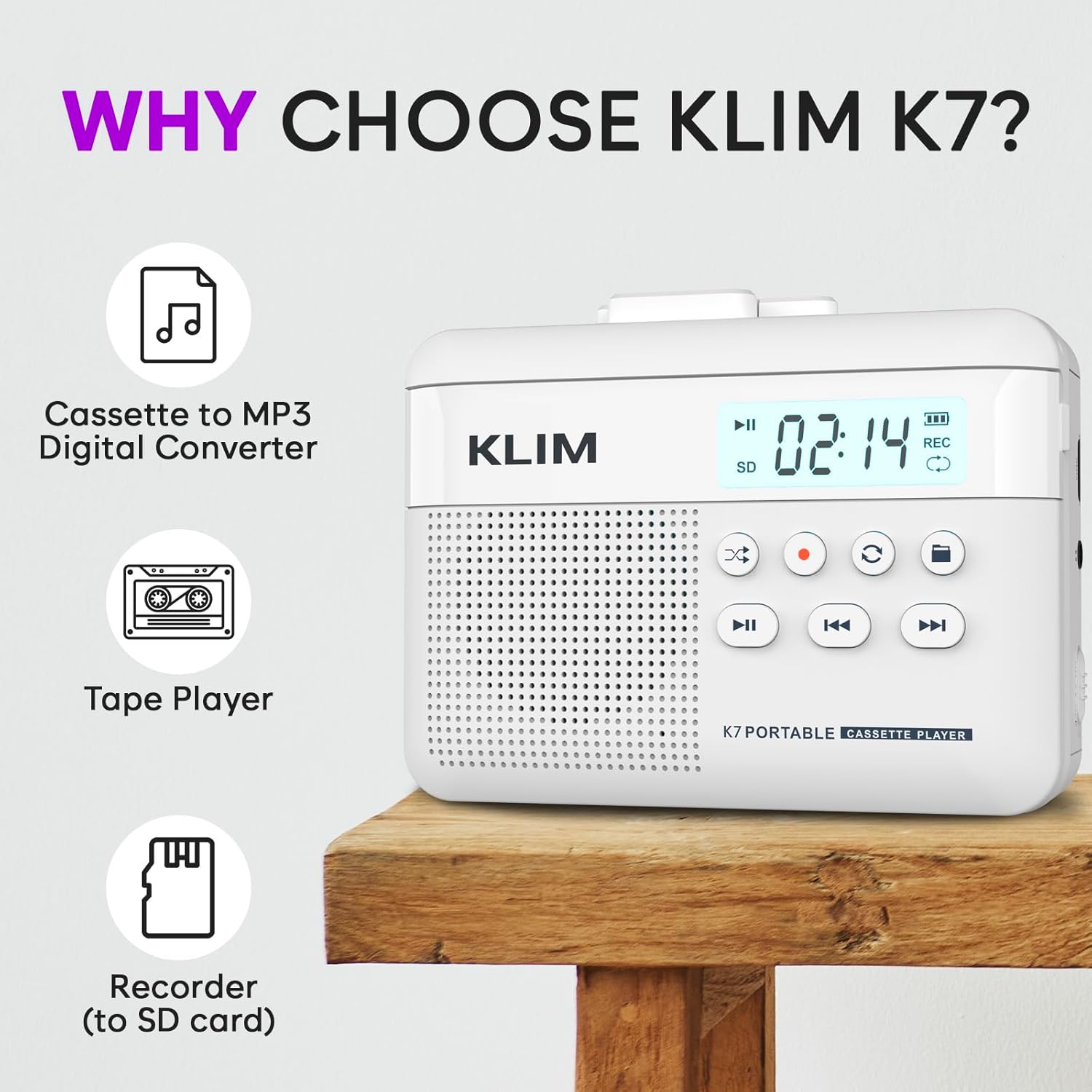
Setšoantšo sa 1: Pele view of the KLIM K7 Cassette Player, showing the speaker grille, LCD display, and control buttons (Play/Pause, Rewind, Fast Forward, Stop, Record, Mode, Folder, Loop).
- Pontšo ea LCD: Shows track number, recording status, and battery level.
- Sebui: Sebui se kopaneng bakeng sa ho bapala molumo.
- Play/Pause Button (►▮): E qala kapa e emisa ho bapala.
- Rewind Button (◀◀): Rewinds the cassette tape or navigates backward through MP3 tracks.
- Fast Forward Button (►►): Fast forwards the cassette tape or navigates forward through MP3 tracks.
- Stop Button (■): E emisa ho bapala kapa ho rekota.
- Record Button (●): Initiates or stops recording.
- Mode Button (↻): Switches between cassette playback and SD card MP3 playback.
- Folder Button (🖿): Navigates through folders on the SD card.
- Loop Button (⟳): Repeats the current track or all tracks.

Setšoantšo sa 2: Lehlakore view of the KLIM K7 Cassette Player, highlighting the SD card slot, 3.5mm headphone jack, and On/Off switch.
- Sebaka sa Karete ea SD: Insert your Micro SD card here for recording and MP3 playback.
- 3.5mm Headphone Jack: Connect the included earphones or other standard headphones.
- On/Off Swichi: E matlafatsa kapa e tima sesebelisoa.
- Taolo ea Bolumo: E fetola boemo ba tlhahiso ea molumo.

Setšoantšo sa 3: Holimo view of the KLIM K7 Cassette Player with the cassette compartment open, showing the tape mechanism.
- Kamore ea Khasete: Insert your cassette tapes here.
- Cassette Door Release: Opens the cassette compartment.
Tlhophiso
1. Ho tjhaja Betri
Before first use, fully charge the KLIM K7. The device comes with a 1000mAh rechargeable battery.
- Locate the Type-C USB charging port on the side of the device.
- Connect the included Type-C USB cable to the charging port and the other end to a USB power adapter (not included) or a computer's USB port.
- The charging indicator on the LCD display will show charging status. A full charge typically takes approximately 2 hours.

Setšoantšo sa 4: The KLIM K7 connected to a Type-C USB cable for charging.
2. Ho kenya Karete ea SD
An SD card (16GB included) is required for converting tapes to MP3 and for recording with the built-in microphone.
- Locate the SD card slot on the side of the device (refer to Figure 2).
- Ka bonolo kenya karete ea Micro SD ka har'a sekotjana moo likhoele tsa khauta li shebileng tlase ho fihlela e tobetsa sebakeng sa eona.
- To remove, push the SD card inward until it clicks, then release, and it will eject.

Setšoantšo sa 5: Inserting the Micro SD card into the KLIM K7.
3. Ho kenya theipi ea khasete
- Press the Cassette Door Release button to open the cassette compartment.
- Insert your cassette tape with the open side facing upwards and the tape reels aligned with the player's mechanism.
- Kwala lemati la karolo ea khasete ka thata ho fihlela le penya.
Litaelo tsa Ts'ebetso
1. Playing Cassette Tapes
- Ensure the device is powered on using the On/Off switch.
- Insert a cassette tape as described in the Setup section.
- Tobetsa ea Play/Pause (►▮) konopo ho qala ho bapala.
- Fetola molumo ka ho sebelisa taolo ea molumo.
- Sebelisa le Rewind (◀◀) le Fast Forward (►►) dikonopo tsa ho tsamaya theiping.
- Tobetsa ea Emisa (■) konopo ea ho emisa ho bapala.
2. Converting Cassette Tapes to MP3
KLIM K7 e lumella phetoho e tobileng ea molumo oa khasete ho MP3 files kareteng ea SD e kentsoeng, ntle le ho hloka komporo kapa software e eketsehileng.
- Ensure an SD card is inserted and the device is powered on.
- Insert the cassette tape you wish to convert.
- Tobetsa ea Play/Pause (►▮) button to start playing the tape.
- Tobetsa nako e telele the Record (●) button. The 'REC' indicator on the LCD display will illuminate, indicating that recording has started.
- Ho emisa ho rekota, tobetsa konopo Record (●) button again. The 'REC' indicator will turn off. The recorded audio will be saved as an MP3 file kareteng ea SD.
- You can then remove the SD card and use the included SD card reader to transfer the MP3 files to a computer or other device.

Setšoantšo sa 6: Visual guide for converting cassette audio to MP3 files.
3. Using the Built-in Microphone for Recording
The KLIM K7 can also record audio directly from its built-in microphone to the SD card.
- Ensure an SD card is inserted and the device is powered on.
- Tobetsa ea Mode (↻) button until the device is in SD card mode (no cassette playing).
- Tobetsa nako e telele the Record (●) button. The 'REC' indicator will light up, and the device will start recording audio from its microphone.
- Ho emisa ho rekota, tobetsa konopo Record (●) button again. The 'REC' indicator will turn off, and the recording will be saved as an MP3 file.

Setšoantšo sa 7: Using the KLIM K7's built-in microphone for recording.
4. Playing MP3 Files ho tloha Karete ea SD
- Ensure an SD card with MP3 files is inserted and the device is powered on.
- Tobetsa ea Mode (↻) button to switch to SD card playback mode. The LCD display will show track information.
- Tobetsa ea Play/Pause (►▮) konopo ho qala ho bapala.
- Sebelisa le Rewind (◀◀) le Fast Forward (►►) likonopo tsa ho tlola lipina.
- The Folder (🖿) button allows navigation through different folders on the SD card.
- The Loop (⟳) button can be used to repeat the current track or all tracks.
- Fetola molumo ka ho sebelisa taolo ea molumo.
- Tobetsa ea Emisa (■) konopo ea ho emisa ho bapala.

Setšoantšo sa 8: Enjoying audio with the KLIM K7 and included earphones.
Tlhokomelo
Proper maintenance ensures the longevity and optimal performance of your KLIM K7.
- Ho hloekisa: Sebelisa lesela le bonolo, le omileng ho hloekisa bokantle ba sesebelisoa. U se ke ua sebelisa li-cleaner tsa metsi kapa li-solvent.
- Kamore ea Khasete: Nako le nako hloekisa lihlooho tsa theipi 'me u phunye lirolara ka swab ea k'hothone hanyenyane dampened with isopropyl alcohol to prevent audio quality degradation. Ensure the device is off and dry before use.
- Polokelo: Boloka sesebelisoa sebakeng se phodileng, se omeletseng hole le letsatsi le mocheso o feteletseng.
- Tlhokomelo ea Betri: For long-term storage, charge the battery to about 50% every few months to maintain battery health.
Ho batle phoso
If you encounter any issues with your KLIM K7, please refer to the following common solutions:
| Bothata | Lebaka le ka khonehang | Tharollo |
|---|---|---|
| Sesebelisoa ha se sebetse. | Betri e felile. | Charge the device using the provided Type-C USB cable. |
| Ha ho na molumo nakong ea ho bapala k'hasete. | Molumo o tlase haholo kapa li-headphone ha lia hokahanngoa hantle. | Increase the volume. Ensure headphones are fully plugged into the 3.5mm jack. |
| Recording to MP3 fails or produces no file. | SD card is full, not inserted correctly, or corrupted. | Check SD card insertion. Ensure sufficient space on the SD card. Try reformatting the SD card (this will erase all data). |
| Poor audio quality from cassette. | Dirty tape heads or worn-out cassette tape. | Clean the tape heads and pinch rollers. Try a different cassette tape to determine if the issue is with the tape itself. |
| Sesebelisoa sea hoama kapa ha se arabele. | Phoso ea nakoana ea software. | Turn the device off and then on again. If the issue persists, allow the battery to fully discharge and then recharge. |
Litlhaloso
- Boholo ba Sehlahisoa: 4.76 x 3.61 x 1.56 lisenthimithara
- Boima ba Ntho: 9.9 lik'hilograma
- Betri: Betri e le 1 ea Lithium Ion (e kenyelelitsoe), 1000mAh
- Nako ea ho tjhaja: Hoo e ka bang lihora tse 2
- Polokelo: Supports Micro SD card (16GB included)
- Audio Output: Built-in speaker, 3.5mm headphone jack
- Sebopeho sa ho Rekota: MP3

Setšoantšo sa 9: Dimensions of the KLIM K7 Cassette Player.
Warranty le Tšehetso
KLIM is committed to producing quality electronics. The KLIM K7 Cassette Tape Player comes with a Tiisetso ea lilemo tse 5. If you encounter any problems with your device, please contact KLIM customer support for assistance.
Merero e meng ea tšireletso e ka fumaneha bakeng sa ho rekoa:
- Leano la Tšireletso la Lilemo tse 2: $3.99 (one-time)
- Leano la Tšireletso la Lilemo tse 3: $5.99 (one-time)
- NEW Complete Protect: $16.99 (monthly)
Bakeng sa tšehetso e eketsehileng, etela KLIM Store on Amazon.