
Xtorm FS405
Xtorm FS405 Solar Powerbank 20W – 10.000 mAh User Manual
Mohlala: FS405
Selelekela
The Xtorm FS405 Fuel Series Solar Powerbank 20W – 10.000 mAh is designed to provide portable power for your electronic devices, offering the flexibility to charge via USB-C or its integrated solar panel. This power bank is built for outdoor adventures, featuring a durable, splash-resistant design and a powerful LED flashlight.
Boitsebiso ba Tšireletseho
- Do not expose the power bank to extreme temperatures (above 45°C or below -10°C).
- Qoba ho dihela, ho di qhaqha, kapa ho leka ho lokisa sesebediswa ka bowena.
- Keep away from water, except for the specified splash resistance (IPX4). Do not submerge.
- Sebelisa feela mehala e netefalitsoeng ea ho tjhaja le li-adapter.
- Boloka moo bana ba ka fihlang teng.
- Lahla sehlahiswa ka boikarabelo ho ya ka melao ya lehae.
Litaba tsa Sephutheloana
Ka kopo, sheba sephutheloana sa lintho tse latelang:
- Xtorm FS405 Solar Powerbank
- Cable ea ho tjhaja ea USB-C (0.30m)
- Bukana ea Mosebelisi
Sehlahisoa se Felletseview

Pele View: Shows the main solar charging panel and the Xtorm logo. The robust casing is visible around the edges.

Morao View (LED Off): Displays the textured back casing and the integrated LED light panel in its off state.
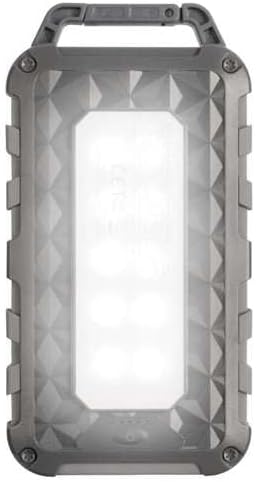
Morao View (LED On): Shows the powerful LED light panel fully illuminated, indicating the flashlight function is active.

Holimo View: Highlights the sturdy integrated carabiner handle, designed for easy attachment to bags or gear.
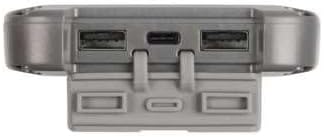
Tlase View: Displays the USB-C PD input/output port and two USB-A Quick Charge 3.0 output ports, protected by a cover.
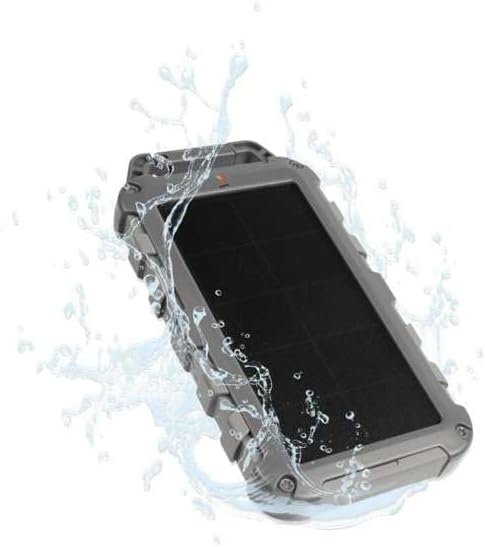
Durability Feature: Illustrates the power bank's splash-resistant design, suitable for outdoor conditions (IPX4 rated).
Tlhophiso
Tefiso ea Pele
Before first use, it is recommended to fully charge the Xtorm FS405 Solar Powerbank via the USB-C port for optimal performance.
- Connect the provided USB-C cable to the USB-C port on the power bank.
- Connect the other end of the USB-C cable to a compatible USB wall adapter (not included) or a computer's USB port.
- The LED indicators on the power bank will show the charging status. A full charge via USB-C typically takes approximately 2 hours.
Litaelo tsa Ts'ebetso
Ho lefisa Banka ea Matla
The Xtorm FS405 can be charged using two methods:
1. Via USB-C (Recommended for Fast Charging)
- Connect the power bank to a USB-C power source using the included cable.
- The power bank will begin charging. This method provides the fastest charging speed for the power bank itself.
2. Via Solar Panel
The integrated solar panel allows for convenient charging when outdoors. For best results, place the power bank directly under strong sunlight.
- Place the solar panel facing direct sunlight.
- A small indicator light (usually green) will illuminate when solar charging is active.
- Note on Solar Charging Speed: Solar charging is a supplementary method and is significantly slower than USB-C charging. Factors like season, location, time of day, and cloud cover heavily influence charging speed.
Approximate solar charging times for a full charge:
- Spring/Summer (mostly sunny day): Hoo e ka bang matsatsi a 10
- Autumn/Winter (mostly sunny day): Hoo e ka bang matsatsi a 20
Solar charging is not effective on mostly cloudy days.
Ho tjhaja Lisebelisoa tsa Kantle
The power bank features one USB-C PD (Power Delivery) output and two USB-A Quick Charge 3.0 outputs.

Bokhoni ba ho tjhaja kapele: The power bank can charge compatible smartphones, such as an iPhone 14 or 12/13, up to 50% in approximately 30 minutes using the 20W USB-C PD output.
- Connect your device's charging cable to one of the available output ports (USB-C or USB-A) on the power bank.
- Kopanya karolo e 'ngoe ea thapo ho sesebelisoa sa hau.
- Banka ea motlakase e tla qala ho tjhaja sesebelisoa sa hau ka bo eona.
- The LED indicators on the power bank will show the remaining battery level.
The 10,000mAh capacity is sufficient to charge most smartphones at least 2 times.
Sebelisa toche LED
The Xtorm FS405 includes a powerful integrated LED flashlight on its back.
- Locate the power button (usually on the side or near the ports).
- Press and hold the power button for a few seconds to turn the flashlight ON.
- Press and hold the power button again to turn the flashlight OFF.
Tlhokomelo
- Hloekisa banka ea motlakase ka lesela le bonolo, le omeletseng. U se ke ua sebelisa lik'hemik'hale tse thata kapa lisebelisoa tse senyang.
- Boloka banka ea motlakase sebakeng se phodileng, se omileng ha se sa sebelisoe.
- For long-term storage, charge the power bank to about 50-70% every 3-6 months to preserve battery health.
- Ensure the port covers are properly sealed when exposed to water splashes.
Ho batle phoso
Power Bank Ha e Tefise
- Cheka Cable: Ensure the USB-C cable is securely connected to both the power bank and the power source. Try a different cable.
- Sheba Mohloli oa Matla: Verify that the wall adapter or USB port is functioning correctly.
- Ho tjhaja Solar: For solar charging, ensure the panel is in direct, strong sunlight. Remember solar charging is slow and not effective in low light or cloudy conditions.
Sesebelisoa ha se tjhaje ho tsoa Power Bank
- Sheba Tefiso ea Power Bank: Netefatsa hore banka ea motlakase e na le tefiso e lekaneng.
- Sheba Lithapo: Use the original charging cable for your device and ensure it's properly connected to both the power bank and your device. Try a different cable.
- Tšebelisano: Verify that your device is compatible with USB charging.
- Qala hape: Disconnect and reconnect the device.
Lebone ha le sebetse
- Sheba Tefiso ea Power Bank: Ensure the power bank has some charge remaining.
- Ts'ebetso e nepahetseng: Ensure you are pressing and holding the power button correctly to activate the flashlight.
Litlhaloso
| Sebopeho | Lintlha |
|---|---|
| Mohlala | FS405 |
| Brand | Xtorm |
| Letoto | Fuel Series 4 |
| Bokhoni ba Battery | 10,000 mAh (Lithium Polymer) |
| Max Power Output | 20 W |
| Output 1 (USB-C PD) | 20 W |
| Output 2 (USB-A QC 3.0) | 18 W |
| Output 3 (USB-A QC 3.0) | 18 W |
| Palo ea Litholoana | 3 |
| Mofuta oa ho Kena | USB-C PD |
| Matla a Solar Panel | 1 W (SunPower cells) |
| Litekanyo (L x W x H) | 17 cm x 9 cm x 2 cm |
| Boima ba 'mele | 289 g |
| Lintho tse bonahalang | PC, ABS |
| Ho hanyetsa Metsi | IPX4 (Splash Resistant) |
| Tochi e kopantsoeng | Ee |
| Battery Charge Time (USB-C) | Hoo e ka bang. Lihora tse 2 |
Warranty le Tšehetso
For warranty information and customer support, please refer to the Xtorm official webwebosaete kapa ikopanye le morekisi oa lehae. Boloka bopaki ba theko ea hau bakeng sa likopo life kapa life tsa tiisetso.
Ts'ehetso ea Marang-rang: www.motsala.eu
Ask a question about this manual
Ask about setup, troubleshooting, compatibility, parts, safety, or missing instructions. Manuals+ will review the question and use this page’s manual context to help answer it.