

1. Selelekela
The VERTU H1 Diamonds Smart Watch combines sophisticated design with advanced smart technology. Crafted with aerospace-grade carbon fiber and a sapphire crystal display, this smartwatch offers durability and clarity. It features comprehensive health monitoring, over 100 sports modes, and seamless connectivity with Android devices.
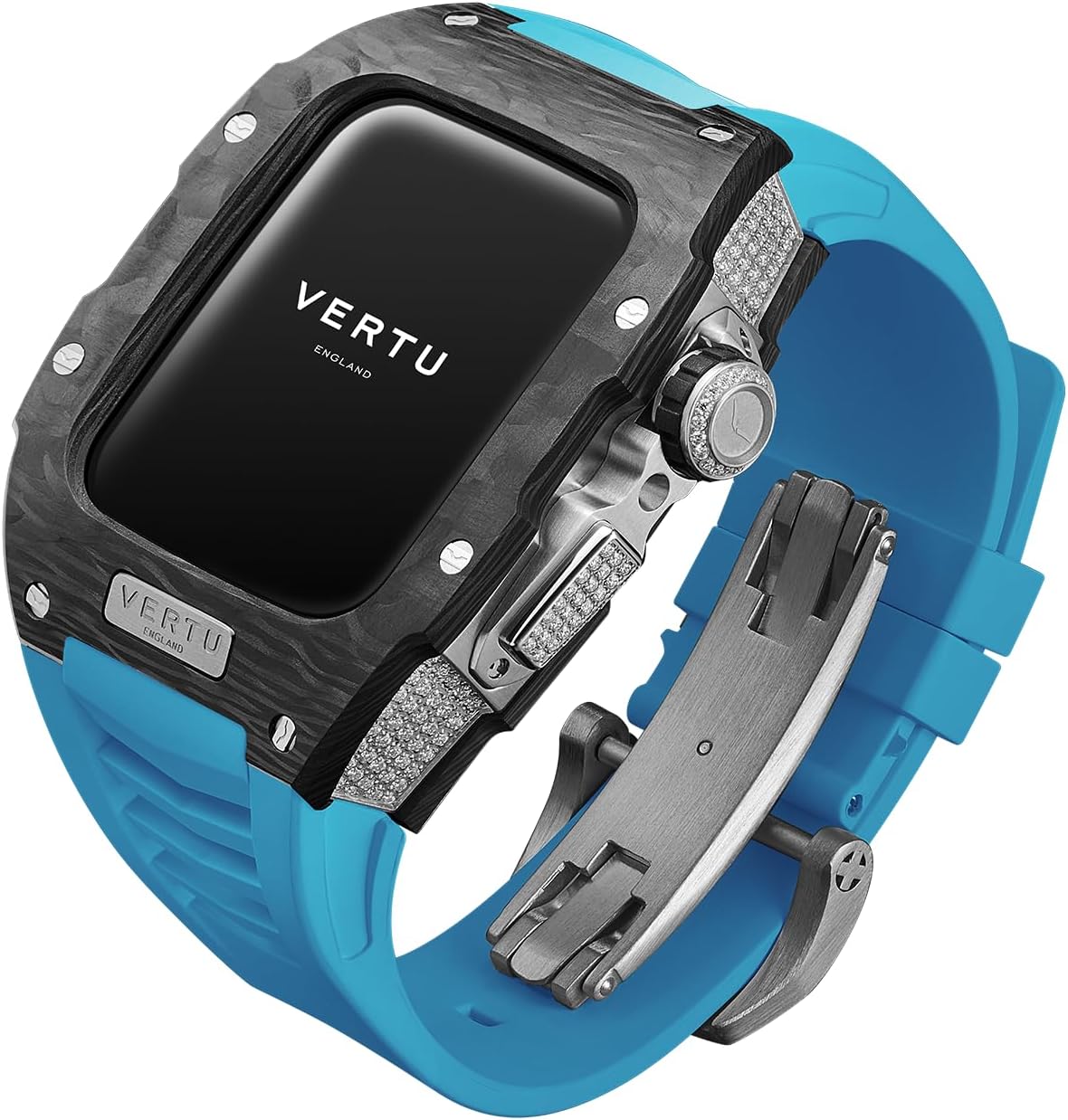
Image: The VERTU H1 Diamonds Smart Watch, showcasing its design and materials.
Se ka Lebokoseng
- METAWATCH 1 Smart Watch
- Chaja e se nang mohala
- Bukana ea Mosebelisi
2. Seta
2.1 Ho tjhaja Sesebediswa
Before initial use, fully charge your VERTU H1 Smart Watch. Connect the wireless charger to a power source and place the watch onto the charging pad. The watch display will indicate charging status.
2.2 Ho Matlafatsa/Ho tima
- Matlafatsa: Press and hold the side button until the VERTU logo appears.
- Tlosa motlakase: Press and hold the side button, then select 'Power Off' on the screen.
2.3 Pairing with Your Android Device
- Download the official VERTU companion application from the Google Play Store on your Android smartphone.
- Netefatsa hore Bluetooth e kenelletse ho smartphone ea hau.
- Open the VERTU application and follow the on-screen instructions to search for and pair with your METAWATCH 1.
- Netefatsa kopo ea ho para oache ea hau le smartphone.


Image: The watch display showing the pairing process and successful connection to a smartphone.
3. Ho Sebetsa Oache ea Hao e Bohlale
3.1 Ho Tsamaisa le Pontsho
The VERTU H1 features a 1.85-inch sapphire crystal display for clear visuals. Navigate through menus by swiping across the touchscreen. The side crown and button provide additional control for various functions.

Image: Close-up of the watch face, highlighting the sapphire crystal display.
3.2 Likarolo tsa Puisano
- Araba/Letsa: Once paired, you can answer incoming calls directly from your watch or initiate calls using the watch interface.
- Litsebiso: Receive notifications for messages, emails, and other app alerts directly on your wrist.
3.3 Tlhokomelo ea Bophelo bo Botle
The watch provides continuous, real-time monitoring of key health metrics.
- Sekhahla sa Pelo: Monitor your heart rate throughout the day and during workouts.
- Mali a Oksijene (SpO2): Track your blood oxygen levels to assess overall well-being.
- Ho Latela Boroko: Scientifically monitors sleep quality, including deep sleep and light sleep phases.

Image: The watch screen showing health synchronization data, including heart rate and sleep patterns.
3.4 Mekhoa ea Lipapali
With over 100 built-in sports modes, the watch tracks your activity with advanced data detection functionalities.
- Select your desired sport from the watch menu.
- The watch will record real-time data such as duration, distance, calories burned, and heart rate.

Image: The watch screen displaying various sports mode options like outdoor running, indoor running, and outdoor walking.
3.5 Likarolo tse Bohlale
- Customized Chip: The integrated chip manages multitasking, call answering, text messaging, and AI functions for hands-free convenience.
- Intelligent Life Butler: Provides reminders for hydration, sedentary alerts, and other personalized health prompts.
- Tšehetso ea lipuo tse ngata: The watch supports 22 UI languages and 41 message languages.
- Lintlafatso tsa OTA: Supports Over-The-Air updates for software enhancements and new features.
Video: Pontšo ea semmuso ea video ea sehlahisoaasing the design and various features of the VERTU H1 Smart Watch.
4. Tlhokomelo le Tlhokomelo
4.1 Litaelo tsa ho Hloekisa
Ho boloka chebahalo le tšebetso ea oache ea hau:
- Hlakola mokotla oa oache le lebanta ka lesela le bonolo, damp lesela.
- Avoid using harsh chemicals, abrasive materials, or solvents.
- Netefatsa hore likhokahano tse tjhajang li hloekile ebile li omme pele u tjhaja.
4.2 Khanyetso ea Metsi (IP68)
The VERTU H1 Smart Watch is IP68 rated, providing protection against dust and water immersion up to 1.5 meters for 30 minutes. It is suitable for daily wear and activities like swimming, but not recommended for diving or high-pressure water activities.
4.3 Material Care
- Nyeoe ea Fiber ea Khabone: The aerospace-grade carbon fiber is highly durable. Avoid extreme impacts to prevent damage.
- Sapphire Crystal Display: While highly scratch-resistant, sapphire can still be damaged by extreme force. Avoid direct contact with sharp objects.
- Fluoroelastomer (FKM) Strap: The FKM strap is resistant to extreme temperatures and corrosion. Clean regularly to prevent buildup from sweat and dirt.

Image: Close-up of the watch case, highlighting the carbon fiber material.
5. Ho rarolla mathata
5.1 Watch Not Powering On
- Ensure the watch is fully charged. Place it on the wireless charger for at least 30 minutes.
- Leka ho tobetsa le ho tshwara konopo e ka thoko metsotsoana e 10-15 ho qobella ho qala botjha.
5.2 Ha e khone ho Kopanya le Fono
- Verify Bluetooth is enabled on your smartphone and the watch.
- Ensure the VERTU companion app is installed and updated to the latest version.
- Restart both your watch and smartphone, then attempt pairing again.
- If issues persist, try unpairing the watch from your phone's Bluetooth settings and re-pairing through the app.
5.3 Lipalo tse sa Nepahalang tsa Bophelo bo Botle
- Netefatsa hore oache e aparoa hantle letsohong la hao, empa eseng e thata haholo.
- Hloekisa di-sensor tse ka morao ho oache.
- Qoba ho sisinyeha ho feteletseng nakong ea litekanyo bakeng sa ho nepahala ho hoholo.
5.4 Bophelo bo Bokhutšoanyane ba Betri
- Reduce screen brightness and screen-on time.
- Disable unnecessary notifications or background app refresh.
- Limit continuous health monitoring if not required.
6. Litlhaloso
| Sebopeho | Lintlha |
|---|---|
| Lebitso la Mohlala | METAWATCH 1 |
| Boholo ba skrine | 1.85 lisenthimithara |
| Mofuta oa Pontšo | Crystal ea Sapphire |
| Nyeoe ea Nyeoe | Aerospace-grade Carbon Fiber |
| Strap Material | Fluoroelastomer (FKM) |
| Ho hanyetsa Metsi | IP68 |
| Khokahano | bluetooth |
| Bokhoni ba Battery | 260 Amp Lihora |
| Likarolo Tse Khethehileng | Activity Tracker, GPS, Heart Rate/Blood Oxygen Detection, Phone Call, Sedentary Reminder |
| Ho lumellana | Sistimi ea Android |
7. Tiisetso le Tšehetso
7.1 Warranty ea Sehlahisoa
Your VERTU H1 Diamonds Smart Watch is covered by a manufacturer's warranty against defects in materials and workmanship. Please refer to the warranty card included with your product for specific terms, conditions, and duration of coverage. Keep your proof of purchase for warranty claims.
7.2 Tšehetso ea Bareki
For technical assistance, troubleshooting, or service inquiries, please contact VERTU customer support. Contact information can typically be found on the official VERTU websaeteng kapa kareteng ea tiisetso e fanoeng le sehlahisoa sa hau.