
1. Selelekela
The Fuers WLAN Water Leak Detector (Model WFSJ01) is designed to provide real-time monitoring for water leaks and drips in your home or office. This device connects to your 2.4 GHz Wi-Fi network and sends instant notifications to your smartphone via the Tuya app, allowing for prompt action to prevent potential water damage. Its robust design and dual detection capabilities make it an essential tool for safeguarding your property.
2. Boitsebiso ba Tšireletseho
- Se ke oa beha sesebelisoa mochesong o feteletseng kapa mahlaseli a letsatsi.
- Boloka sesebelisoa hole le bana le liphoofolo tse ruuoang lapeng.
- Use only the specified battery type (2 x AAA batteries).
- Netefatsa polarity e nepahetseng ea betri nakong ea ho kenya.
- Lahla libeteri tse sebelisitsoeng ho latela melao ea lehae.
- Do not attempt to disassemble or repair the device yourself. Contact support if needed.
3. Likahare tsa Sephutheloana
- 1 x Fuers WLAN Water Leak Detector (Model WFSJ01)
- 2 x AAA Batteries
- 1 x Buka ea Mosebelisi
4. Sehlahisoa Overview
The Fuers WLAN Water Leak Detector features a compact design with advanced sensors for reliable water detection. It operates wirelessly and integrates with the Tuya Smart Life app for remote monitoring and alerts.
Likarolo tsa Bohlokoa:
- Smart Monitoring & Remote Notifications: Connects via 2.4 GHz Wi-Fi to send real-time alerts to your smartphone.
- Dual Detection Modes: Equipped with rear sensors for leak detection and a front probe for small drip detection.
- 100dB Local Alarm: Emits a loud audible alarm upon water detection.
- Boemo ba IP67 bo sa keneleng metsi: Designed for long-term use in humid environments.
- Lintho tse tšoarellang tsa ABS: High-quality construction ensures longevity and resistance to breakage.
- E Tsamaisa Betri: Operates on 2 AAA batteries (included) for flexible placement and continuous protection during power outages.
- Tlhokomeliso ea Betri e Tlaase: Sends app notifications when batteries need replacement.
Likaroloana:
The device consists of a main body housing the electronics, battery compartment, and an audible alarm. It features two types of sensitive probes:
- Li-Sensors tse ka morao: For detecting widespread water leaks.
- Front Probe: Specifically designed for detecting small drips.

Image: The Fuers Water Leak Detector with its battery compartment open, revealing two AAA batteries and illustrating the front and rear sensitive probes.
5. Seta
5.1 Ho kenya Betri
- Gently twist the cover of the device counter-clockwise to open it.
- Confirm the positive (+) and negative (-) poles inside the battery compartment.
- Insert the two AAA batteries, ensuring correct polarity.
- Align the cover and twist clockwise to tighten and secure it.

Image: A four-step visual guide demonstrating how to open the device cover, confirm battery polarity, insert AAA batteries, and securely close the cover.
5.2 App Pairing (Tuya Smart Life)
- Download the "Tuya Smart" or "Smart Life" app from your smartphone's app store (iOS or Android).
- Ngodisa kapa o kene ka akhaonteng ea hau.
- Ensure your smartphone is connected to a 2.4 GHz Wi-Fi network. The device does not support 5 GHz Wi-Fi.
- Bula sesebelisoa ebe o tobetsa letšoao la "+" ho eketsa sesebelisoa se secha.
- Select "Security & Video Surveillance" > "Water Leak Sensor (Wi-Fi)" or search for "Water Leak Sensor".
- Follow the on-screen instructions to put the device into pairing mode (usually involves pressing and holding a button on the device until an indicator light flashes).
- Enter your Wi-Fi network password in the app.
- Wait for the device to connect. Once connected, you can rename the device and assign it to a specific room.
6. Litaelo tsa Ts'ebetso
Once set up, the Fuers WLAN Water Leak Detector continuously monitors for water presence. It features two primary detection methods:
- Ho Fumana Leak: The rear sensors detect larger water leaks, triggering a 100dB alarm and sending an immediate app notification.
- Ho lemoha ho rotha ha metsi: The front probe is designed to detect small drips, ideal for placement under faucets or pipes. This also triggers the alarm and app notification.
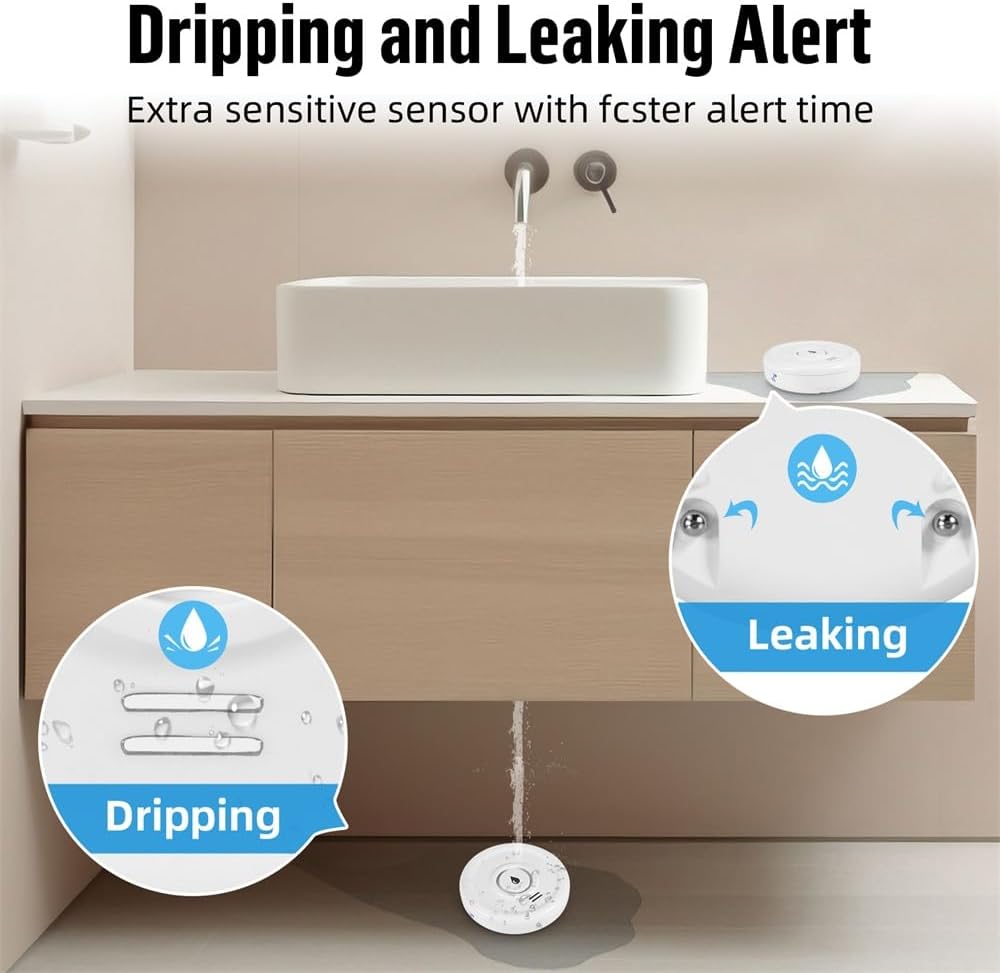
Image: A visual representation of the device's ability to detect both small drips and larger leaks, highlighting its versatile sensing capabilities.
Receiving Alerts:
When water is detected, the device will:
- Emit a loud 100dB audible alarm.
- Send a real-time push notification to your smartphone via the Tuya Smart Life app.

Image: The water leak detector placed on a wet surface, indicating a leak, while a smartphone displays a 'Water Leakage Alarm' notification from the app.
You can customize notification settings within the Tuya Smart Life app. The app also allows you to view the device's status and battery level.
7. Tlhokomelo
7.1 Phetoho ea Betri
The device operates on 2 AAA batteries with a standby time of up to two years. The app will send a low battery warning notification to your smartphone when the batteries need replacement. To replace batteries, follow the steps in Section 5.1.

Image: The Fuers Water Leak Detector with its battery compartment open, showing two AAA batteries and a graphical representation of battery life, indicating up to 2 years of standby time.
7.2 Ho hloekisa
Wipe the device with a soft, dry cloth. Do not use abrasive cleaners or immerse the device in water (beyond its intended IP67 rating for detection) as this may damage internal components.
8. Ho rarolla mathata
| Bothata | Lebaka le ka khonehang | Tharollo |
|---|---|---|
| Device not connecting to Wi-Fi | Incorrect Wi-Fi password; Not a 2.4 GHz network; Device too far from router; Pairing mode not activated. | Verify Wi-Fi password. Ensure router is 2.4 GHz. Move device closer to router. Re-enter pairing mode as per app instructions. |
| Ha ho litsebiso tsa app | App notifications disabled; Device offline; Low battery. | Check app notification settings. Verify device is online in the app. Replace batteries if low battery warning is present. |
| Alamo ha e lle | Low battery; Device malfunction. | Kenya libeteri sebakeng sa tsona. Haeba bothata bo ntse bo tsoela pele, ikopanye le tšehetso ea bareki. |
| Mekhosi ea bohata | Condensation or high humidity; Device placed on a damp bokahodimo. | Ensure placement is on a dry surface. Avoid areas with excessive condensation. |
9. Litlhaloso
- Nomoro ea Mohlala: WFSJ01
- Boholo: 20mm (L) x 50mm (W) x 65mm (H)
- Mohloli oa Matla: 2 x AAA Batteries (e kenyelelitsoe)
- Khokahano e se nang mohala: Wi-Fi 2.4 GHz (IEEE 802.11b/g/n)
- App e tsamaellanang: Tuya Smart / Smart Life
- Molumo oa Alamo: 100dB
- Lintlha tse sa keneleng metsi: IP67
- Boitsebiso: Plastiki ea boleng bo holimo ea ABS
- Max Range (Wireless): Limithara tse 20 (tse sa thijoang)
- Theknoloji ea Sensor: Ikopanye le Sensora
- Mofuta oa Kemiso: Floor/Surface Mount

Image: The Fuers Water Leak Detector partially submerged in water, demonstrating its IP67 waterproof and durable construction.
10. Tiisetso le Tšehetso
This product comes with a standard manufacturer's warranty. For detailed warranty information, please refer to the documentation included with your purchase or contact the retailer. For technical support, troubleshooting assistance, or any inquiries regarding your Fuers WLAN Water Leak Detector, please visit the official Fuers websebaka kapa ikopanye le lefapha la litšebeletso tsa bareki.
Lisebelisoa tsa Marang-rang:
- Sesebelisoa sa Smart sa Tuya: www.tuya.com/app
- Smart Life App: www.smartlife.com/app


