
1. Selelekela
This manual provides detailed instructions for the proper use and maintenance of your Flysocks PF270 Golf Rangefinder. Please read this manual thoroughly before operating the device to ensure optimal performance and longevity.
1.1 Sehlahisoa se Felletseview
The Flysocks PF270 is a high-precision laser rangefinder designed for golf, hunting, and other outdoor activities. It features slope compensation, flagpole lock with vibration, 7X magnification, and a magnetic strip for convenient attachment.

Image 1.1: Flysocks PF270 Golf Rangefinder and Carrying Case
The image displays the Flysocks PF270 Golf Rangefinder, a compact black and green device, alongside its protective black carrying case. The rangefinder features two optical lenses and a prominent 'SLOPE' switch.
1.2 Likahare tsa Sephutheloana
Netefatsa hore lintho tsohle li teng ka har'a sephutheloana sa hau:
- Flysocks PF270 Laser Golf Rangefinder x1
- Portable Soft Case x1
- Charging Cable (USB-A to USB-C) x1
- Mountaineering Buckle x1
- Lesela la Microfiber x1
- Buka ea Mosebelisi x1

Setšoantšo sa 1.2: Dikahare tsa Sephutheloana
This image shows all items included in the Flysocks PF270 package: the rangefinder itself, its retail box, a portable soft case, a USB charging cable, a mountaineering buckle, a microfiber cleaning cloth, and the user manual.
2. Boitsebiso ba Tšireletseho
Ka kopo ela hloko mehato e latelang ea tšireletso ho thibela kotsi kapa tšenyo ea sesebelisoa:
- Tšireletso ea Laser: This device uses an invisible Class 1 laser. Do not stare directly into the laser beam or point it at others.
- Tšireletso ea Mahlo: Avoid direct eye exposure to the laser.
- Bana: Beha sesebelisoa moo bana ba ka fihlang teng.
- Mocheso: Se ke oa beha sesebelisoa mochesong o feteletseng kapa khanya ea letsatsi ka nako e telele.
- Khahlamelo ea Metsi: The device is IP54 weatherproof, meaning it is resistant to splashes and dust. It is not designed for submersion or heavy rain.
- Ho qhaqha: Do not attempt to disassemble or modify the rangefinder. This will void the warranty and may cause damage.
3. Likarolo tsa lihlahisoa
The Flysocks PF270 Golf Rangefinder incorporates several advanced features for precise measurements:
- Lekhalo la Tekanyo: 5-1200 yards (approximately 4.5-1097 meters).
- Ho nepahala: ±0.3 yards at 300 yards.
- Kholiso: 7X for clear viewing of distant targets.
- Matšeliso a Moepa: Calculates adjusted distance based on elevation changes. Features a physical ON/OFF switch for tournament legality.
- Flagpole Lock with Vibration: Provides a short vibration when the flag is successfully targeted, distinguishing it from background objects.
- Mokhoa o Tsoelang Pele oa ho Scan: Allows for scanning multiple targets quickly.
- Mothalo oa Magnetic: Integrated magnet for convenient attachment to golf carts or metal surfaces.
- Betri e ka nchafatsoang hape: Built-in 1000mAh Lithium-Ion battery.
- Mekhoa e Mengata ea Tekanyo: Includes distance, height, angle, and speed.
- Phetoho ea Yuniti: Easily switch between Yards, Meters, and Feet.
- Fast Readout: Measurements displayed in as little as 0.1 seconds.
- Ergonomic and Anti-Slip Design: Provides a secure and comfortable grip.
- IP54 Boemo ba leholimo: Resistant to dust and water splashes.

Setšoantšo sa 3.1: Likarolo tsa Bohlokoa li Fetileview
This image highlights the main features of the laser rangefinder through icons: 1200 Yards range, Slope Measurement, Flag Lock Vibration, 7X Magnification, Magnetic Stripe, LCD Display, Rechargeable, and 8 Modes.

Image 3.2: Detailed Feature Set
Pontšo ea litšoantšoasing the rangefinder's capabilities: 1200 Yard range, Slope Switch, 8 Modes, 7X Magnifications, Magnetic Stripe, and Rechargeable functionality, presented with corresponding icons.
4. Seta
4.1 Ho tjhaja Betri ea Pele
Before first use, fully charge the rangefinder's built-in battery.
- Locate the USB-C charging port on the side of the device.
- Connect the provided USB-A to USB-C charging cable to the rangefinder and a compatible USB power source (e.g., computer USB port, wall adapter).
- The battery indicator on the display will show charging progress. A full charge typically takes 2-3 hours.
- Ha thapo e se e tjhaetsoe ka botlalo, khaola thapo.

Image 4.1: Charging the Rangefinder
The image shows the Flysocks PF270 rangefinder with a USB-C cable plugged into its charging port. The internal display indicates battery charge levels (5%, 20%, 40%) and charging status (In Charging, Fully Charged, Power Status).
4.2 Ho Bulela/Ho tima
- To power on, press the Power/Measurement button (usually located on top).
- The device will automatically power off after 30 seconds of inactivity to conserve battery. Press any button to wake it up.
4.3 Eyepiece Adjustment
Rotate the eyepiece to adjust the focus until the display and target appear clear.

Image 4.2: Adjustable Eyepiece and Unit Switching
This image illustrates the 7X magnification, the adjustable eyepiece for clear optics, and the ability to switch measurement units between Yards, Meters, and Feet on the rangefinder.
5. Litaelo tsa Ts'ebetso
5.1 Mekhoa ea ho lekanya
The rangefinder offers various measurement modes. Press the 'Mode' button to cycle through them.
- Tekanyo ea Sebaka: Standard mode for measuring linear distance to a target.
- Mokhoa o tšekaletseng: Measures horizontal distance.
- Tekanyo ea Lebelo: E lekanya lebelo la ntho e tsamayang.
- Tekanyo ea Boima: Calculates the height of an object.

Image 5.1: Distance, Horizontal, and Speed Measurement
This image displays three different views through the rangefinder's eyepiece, illustrating Distance Measurement (up to 1200Yd), Horizontal Mode (activated by short pressing the Mode Button), and Speed Measurement (activated by short pressing the Mode Button to enter Speed Mode).

Image 5.2: Continuous Scan, Height Modes, and Auto-Off
The image shows the Continuous Scan Mode (press and hold Mode Button to target multiple objects), Two Modes for Height (Auto Height & Two Point Height), and the Energy-Saving LCD Auto-Off feature (30s inactivity, press any button to wake).
5.2 Matšeliso a Moepa
The slope compensation feature adjusts the measured distance based on the incline or decline to the target, providing a more accurate 'play as' distance for golf.
- To activate or deactivate slope compensation, use the physical 'SLOPE' switch located on the side of the rangefinder.
- When the slope function is active, the adjusted distance will be displayed along with the linear distance and angle.
- For tournament play, ensure the slope function is switched OFF to comply with regulations.

Image 5.3: Slope Compensation Mode
This image provides diagrams demonstrating how the rangefinder measures both linear and ballistic (slope-adjusted) distances for uphill and downhill shots, with corresponding display readouts.

Image 5.4: Tournament Legal Slope Switch
A diagram illustrating the physical Slope ON/OFF button on the rangefinder, emphasizing its importance for complying with golf tournament rules regarding slope-adjusted measurements.
5.3 Flagpole Lock with Vibration
This feature helps to accurately target the flagpole by providing a tactile confirmation.
- Aim the crosshairs at the flagpole.
- Press and hold the Power/Measurement button.
- Slowly sweep the rangefinder across the flagpole.
- Once the flagpole is detected and locked, the device will vibrate briefly, and the distance will be displayed.
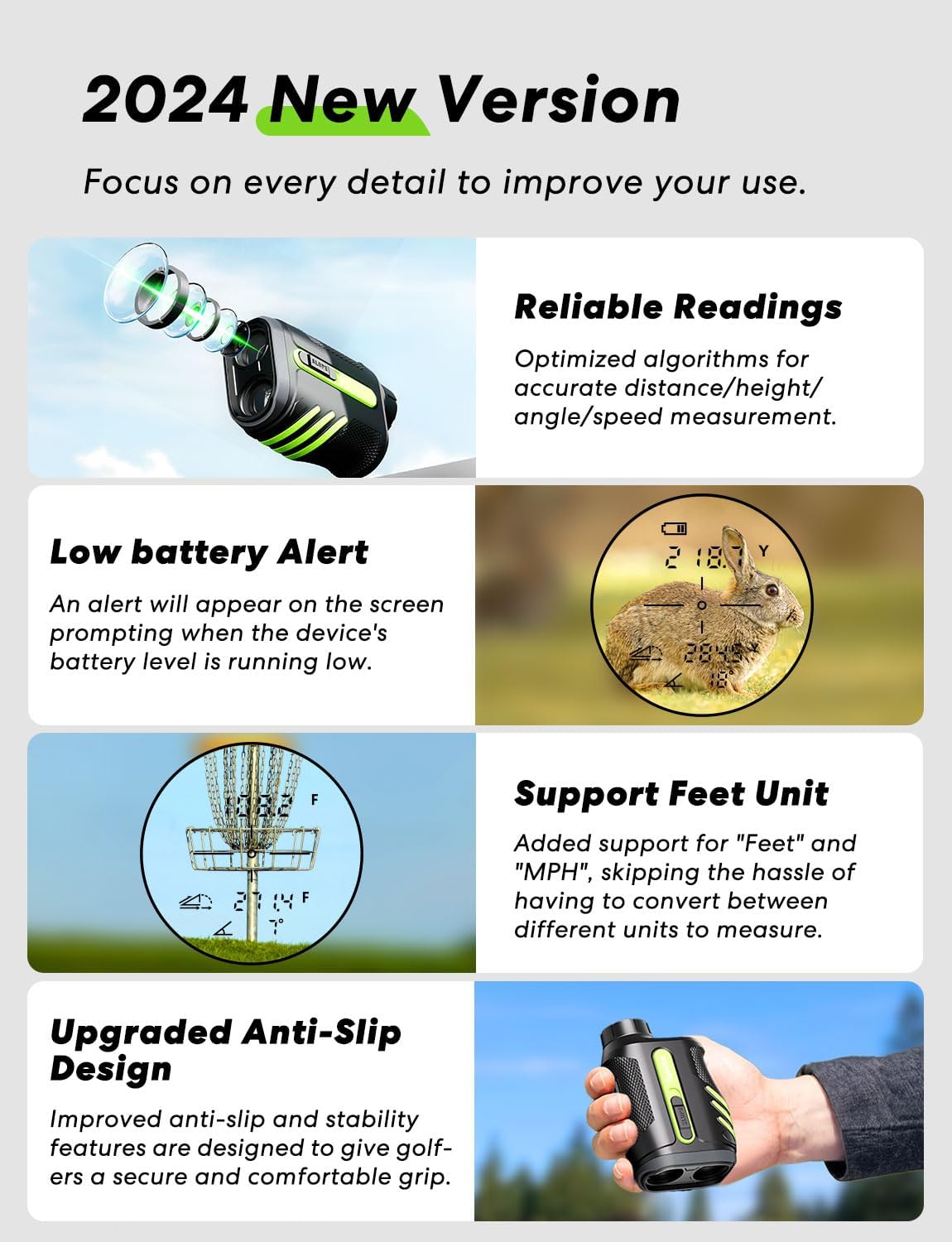
Image 5.5: Flagpole Lock with Vibration in Use
A man is shown looking through the Flysocks PF270 rangefinder, with an overlay demonstrating the flagpole lock feature. The display shows a target locked onto a flag, accompanied by vibration indicators, confirming the target is within 250 yards.

Image 5.6: Lock with Vibration Indicators
This image presents two views through the rangefinder's display, illustrating the 'Flagpole Lock' (up to 250 yards) and 'Flag Lock' (up to 350 yards) features, both indicated by vibration symbols, confirming accurate target acquisition.
5.4 Ho Fetola ha Yuniti
To change the measurement unit (Yards, Meters, Feet), press and hold the 'Mode' button for approximately 3 seconds until the unit changes on the display.
6. Ho tjhaja le Betri
The Flysocks PF270 is equipped with a built-in 1000mAh Lithium-Ion battery.
- Nako ea ho tjhaja: Hoo e ka bang lihora tse 2-3 bakeng sa tefo e felletseng.
- Bophelo ba Battery: Provides power for approximately 40,000 uses per full charge.
- Koala The device automatically powers off after 30 seconds of inactivity to conserve battery.
- Tlhokomeliso ea Battery e Tlaase: An alert will appear on the screen when the battery level is low.

Image 6.1: Low Battery Alert and Feet Unit Support
This image shows the rangefinder's display indicating a low battery alert and demonstrating support for 'Feet' as a measurement unit, useful for activities like disc golf.
7. Tlhokomelo
Proper care ensures the longevity and performance of your rangefinder.
- Lilense tsa ho hloekisa: Use the provided microfiber cloth to gently clean the lenses. Do not use abrasive materials or harsh chemicals.
- Ho Hloekisa 'Mele: Wipe the body of the device with a soft, damp lesela.
- Polokelo: Store the rangefinder in its protective soft case when not in use. Keep it in a cool, dry place away from direct sunlight and extreme temperatures.
- Mathata a Metsi: The device is IP54 weatherproof, offering protection against dust and splashing water. Avoid exposing it to heavy rain or submerging it in water.

Image 7.1: IP54 Weatherproof and Performance
This image emphasizes the rangefinder's IP54 weatherproof rating, its fast and reliable readings (optimized algorithms for distance, height, angle, speed), and the low battery alert feature with 30s auto-off.
8. Ho rarolla mathata
Sheba karolo ena bakeng sa lintlha tse tloaelehileng le tharollo ea tsona.
| Bothata | Lebaka le ka khonehang | Tharollo |
|---|---|---|
| Sesebelisoa ha se sebetse. | Betri e tlase. | Charge the battery fully (refer to Section 4.1). |
| Litemana tse sa nepahalang. | Lens is dirty; target is too small or reflective; environmental interference (fog, heavy rain). | Clean lenses with microfiber cloth; ensure stable aim; avoid use in adverse weather conditions. |
| Cannot lock on target (e.g., flagpole). | Target is too far; unstable hand; background interference. | Ensure target is within range; use a steady hand or brace; sweep slowly across the target. |
| Display is dim or unclear. | Eyepiece not focused; low battery. | Adjust the eyepiece (refer to Section 4.3); charge the battery. |
| USB-C charging not working with C-to-C cable. | Device requires USB-A to USB-C cable. | Use the provided USB-A to USB-C charging cable. |
9. Litlhaloso
| Sebopeho | Tlhaloso |
|---|---|
| Nomoro ea Mohlala | PF270 |
| Tekanyo Range | 5 - 1200 Yards |
| Ho nepahala | ±0.3 Yards (at 300 yards) |
| Kgodiso | 7X |
| Lebelo la Tekanyo | 0.1 metsotsoana |
| Mofuta oa Leshala | Built-in 1000mAh Lithium-Ion Polymer |
| Boema-kepe ba ho tjhaja | USB-C |
| Nako ea ho tjhaja | Lihora tse 2-3 |
| Koala ka ho iketsa | 30 metsotsoana |
| Litekanyo (L x W x H) | 11.1 x 7.29 x 4.5 cm (4.37 x 2.87 x 1.77 lisenthimithara) |
| Boima ba 'mele | 212 g (7.5 oz) |
| Lintho tse bonahalang | Plastiki |
| Mmala | Lefifi + le Lefubelu |
| Ho hanyetsa Metsi | Boemo ba leholimo ba IP54 |
10. Tiisetso le Tšehetso ea Bareki
Flysocks is committed to providing high-quality products and excellent customer service.
10.1 Boitsebiso ba Tiisetso
Your Flysocks PF270 Golf Rangefinder is covered by a 2-year maintenance warranty for quality-related issues from the date of purchase. Please retain your proof of purchase for warranty claims. This warranty does not cover damage caused by misuse, accidents, unauthorized modifications, or normal wear and tear.

Image 10.1: 2-Year Unconditional Warranty
An icon depicting a wrench, symbolizing the provision of a 2-year unconditional warranty for the product.
10.2 Tšehetso ea Bareki
For any questions, concerns, or technical assistance, please contact our customer service team:
- Tšebeletso ea bareki ba inthaneteng: E fumaneha 24/7.
- Tšehetso ea tekheniki: Lifetime technical support is provided for your product.
Please refer to the contact information provided on the Flysocks official website or your purchase platform for the most current support channels.

Image 10.2: 24/7 Technical Support
An icon featuring a headset, indicating the availability of 7*24 hours technical support for users.