
Selelekela
This manual provides detailed instructions for the setup, operation, and maintenance of your BUFFBEE RS11 Radio Alarm Clock. Please read this manual thoroughly before using the device to ensure proper function and to maximize your user experience. Keep this manual for future reference.
Litaba tsa Sephutheloana
Ha o qeta ho pakela, ka kopo netefatsa hore lintho tsohle tse thathamisitsoeng ka tlase li teng 'me li maemong a matle:
- 1 x BUFFBEE RS11 Radio Alarm Clock
- 1 x Adapter ea Matla a DC
- 1 x Buka ea Mosebelisi (tokomane ena)
- 1 x CR2032 Battery (pre-installed or included separately for backup)
Sehlahisoa se Felletseview
The BUFFBEE RS11 is a compact device combining an alarm clock, FM radio, and a 7-color night light. It features a clear digital display and intuitive controls.

Setšoantšo sa 1: Pele view of the BUFFBEE RS11 Radio Alarm Clock, displaying the digital time and accessible control buttons on top.

Setšoantšo sa 2: Internal structure highlighting the 5W Hi-Fi speaker, designed for clear and authentic sound reproduction.
Tlhophiso
1. Khokelo ea Matla
- Connect the provided DC power adapter to the 'DC 5V' port on the back of the alarm clock.
- Plug the adapter into a standard wall outlet. The display will illuminate, and the clock will be ready for initial setup.
2. Backup Battery Installation
The BUFFBEE RS11 includes a CR2032 battery for backup, which preserves time and alarm settings during a power outage.
- Fumana karolo ea betri e ka tlase ho yuniti.
- Kenya betri ea CR2032 lehlakore le letle (+) le shebile holimo.
- Koala kamore ea betri ka mokhoa o sireletsehileng.
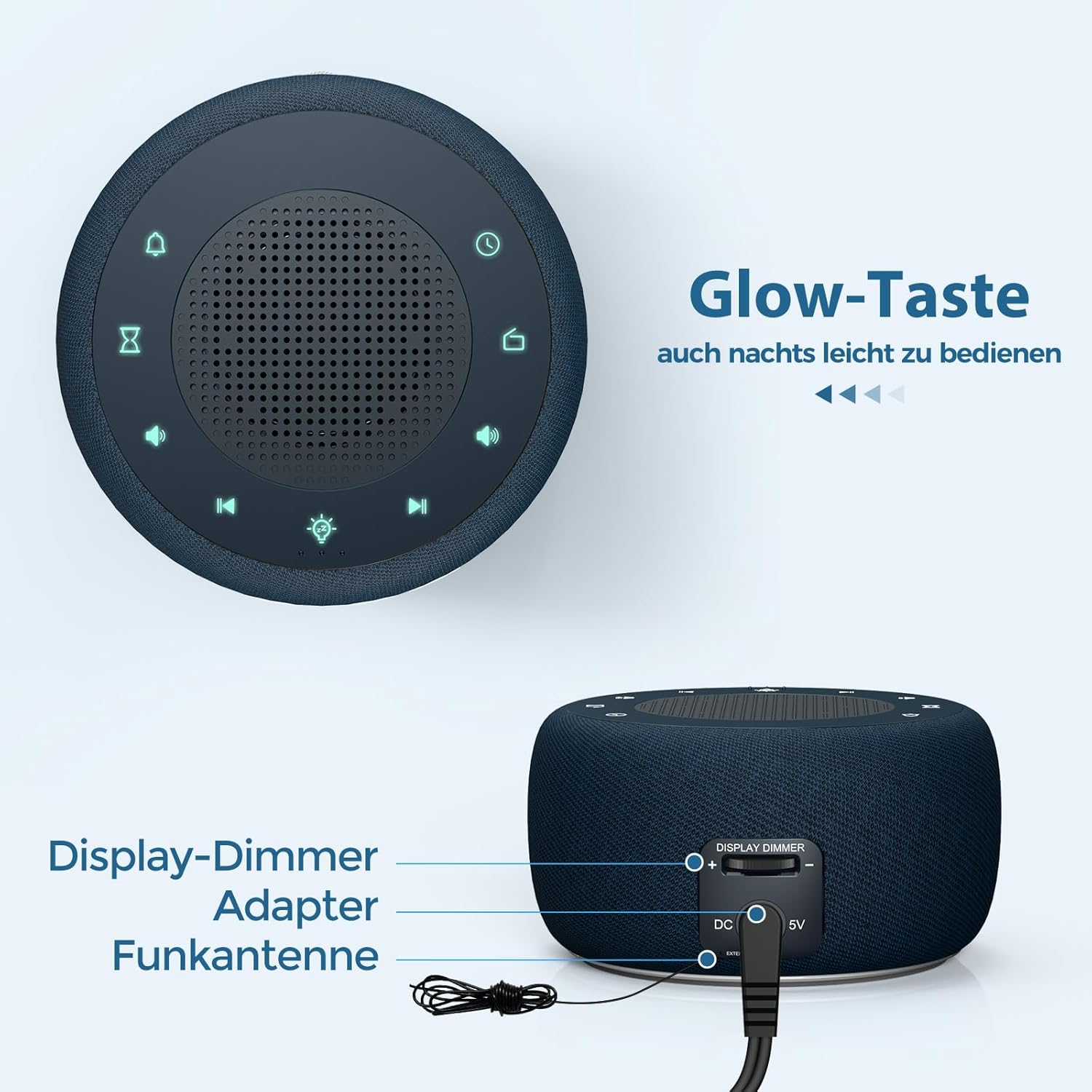
Setšoantšo sa 3: Rear panel connections, showing the display dimmer control, DC 5V power input, and FM antenna port.
Litaelo tsa Ts'ebetso
1. Ho Ipehela Nako
- Press and hold the 'Time Set' button (often indicated by a clock icon) until the hour digits begin to flash.
- Sebelisa dikonopo tsa '+' le '-' ho fetola hora.
- Press the 'Time Set' button again to switch to minute adjustment. Use '+' and '-' to set the minutes.
- Press 'Time Set' once more to confirm and exit time setting mode.
2. Ho beha Alamo
- Press and hold the 'Alarm Set' button (often indicated by an alarm clock icon) until the alarm hour digits flash.
- Use the '+' and '-' buttons to adjust the alarm hour.
- Press 'Alarm Set' again to switch to alarm minute adjustment. Use '+' and '-' to set the alarm minutes.
- Press 'Alarm Set' to select the alarm tone. Options include: Bird sounds, Piano, Beep, or FM Radio.
- Press 'Alarm Set' once more to confirm and exit alarm setting mode.
- To activate/deactivate the alarm, briefly press the 'Alarm Set' button. An alarm icon will appear/disappear on the display.

Setšoantšo sa 4: Wake-up options with four distinct alarm tones, including the option to wake to your favorite radio station.
3. Ts'ebetso ea Seea-le-moea (FM)
- Press the 'Radio' button (often indicated by a radio icon) to turn the FM radio on or off.
- Use the 'Previous Track' and 'Next Track' buttons (often indicated by ◀◀ and ▶▶ icons) to tune to different FM stations.
- Press and hold the 'Previous Track' or 'Next Track' buttons to automatically scan for the next available station.
- Adjust the volume using the 'Volume Up' and 'Volume Down' buttons (often indicated by '+' and '-' speaker icons). The volume can be adjusted in 16 levels.

Setšoantšo sa 5: Enjoying the radio alarm clock, featuring a 0-120 minute sleep timer and 0-30 levels of adjustable volume.
4. Mosebetsi oa Leseli la Bosiu
- Press the 'Night Light' button (often indicated by a light bulb icon) to turn the night light on or off.
- Press the 'Night Light' button repeatedly to cycle through the 7 available colors.
- To activate the sleep timer for the night light (or radio), press the 'Sleep Timer' button (often indicated by an hourglass icon).
- Use the '+' and '-' buttons to set the desired duration (0-120 minutes). The night light/radio will automatically turn off after the set time.

Setšoantšo sa 6: The 7-color night light feature, with options to turn on/off and change colors.
5. Display Brightness Adjustment (Dimmer)
The display brightness can be adjusted from 0% to 100% to suit your preference.
- Locate the 'Display Dimmer' control on the back of the unit (refer to Figure 3).
- Slide the control to increase or decrease the display brightness.
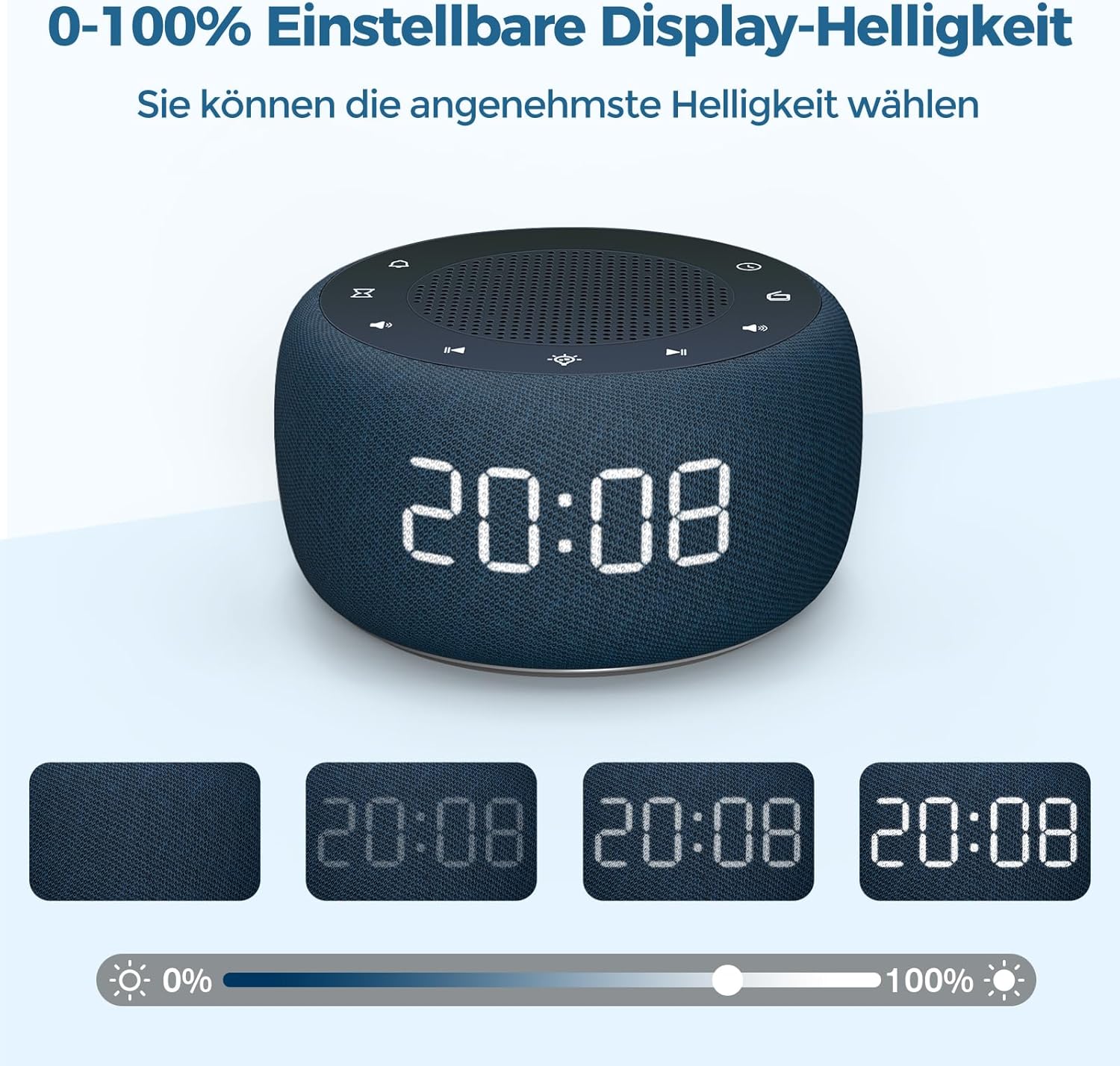
Setšoantšo sa 7: Demonstrating the 0-100% adjustable display brightness, allowing users to select their preferred comfort level.
6. Luminous Buttons
The control buttons on the top of the unit are designed to illuminate for 5 seconds when pressed, making operation easier in low-light conditions.
7. 12/24 Hora Format
To switch between 12-hour and 24-hour time formats, briefly press the '12/24H' button (if available, or often combined with the 'Time Set' button by a quick press after setting time).
Tlhokomelo
- Ho hloekisa: Sebelisa lesela le bonolo, le omileng ho hloekisa bokaholimo ba oache ea alamo. U se ke ua sebelisa li-cleaner tsa metsi kapa thepa e khorofo.
- Polokelo: If storing the device for an extended period, disconnect it from power and remove the backup battery. Store in a cool, dry place.
- Phetoho ea Betri: The CR2032 backup battery should be replaced periodically (e.g., every 1-2 years) to ensure settings are retained during power outages.
Ho batle phoso
| Bothata | Lebaka le ka khonehang | Tharollo |
|---|---|---|
| Pontšo ha e na letho. | Ha ho khokahano ea motlakase. | Ensure the DC power adapter is securely plugged into the unit and a working wall outlet. |
| Alamo ha e lle. | Alarm is not activated or volume is too low. | Check if the alarm icon is visible on the display. Increase alarm volume. |
| Kamohelo e mpe ea seea-le-moea. | FM antenna not extended or poor signal area. | Extend the FM antenna fully. Reposition the unit for better reception. |
| Nako/litlhophiso tse lahlehileng ka mor'a ho felloa ke matlatage. | Backup battery is dead or not installed. | Install or replace the CR2032 backup battery. |
Litlhaloso
- Mohlala: RS11
- Lebitso: BUFFBEE
- Litekanyo (L x W x H): 9.5 x 3.81 x 6 cm (hoo e ka bang 3.74 x 1.5 x 2.36 inch)
- Boima ba 'mele: 340 grams (approximately 0.75 lbs)
- Motlakase: 5 Watts
- Leseli la Maqhubu a FM: 87.5-108 MHz
- Mofuta oa Pontšo: Dijithale
- Mebala ea Leseli la Bosiu: 7
- Betri ea bekapo: CR2032 (e kenyelelitsoe)
- Mohloli oa Matla: Cable Electric (DC Adapter)
Warranty le Tšehetso
This product comes with a standard manufacturer's warranty. For specific warranty details, please refer to the documentation provided at the time of purchase or contact BUFFBEE customer support. If you encounter any issues not covered in this manual, please contact our customer service for assistance.