
1. Selelekela
Thank you for choosing EZVALO Under Cabinet and Puck Lights. This manual provides detailed instructions for the installation, operation, and maintenance of your new lighting system. Please read this manual thoroughly before use to ensure proper function and longevity of the product.
Lisebelisoa tsa Sehlahisoa
- EZVALO Under Cabinet Bar Lights
- EZVALO Puck Lights
- Remote Control
- Mounting Hardware (Sticker Mounting Disks, Mounting Strips)
- USB Charging Cable (3-in-1 for Puck Lights)
2. Ho seta le ho kenya
2.1 Charging the Lights
Before initial use, fully charge both the bar lights and puck lights.
- Bar Lights: Connect the USB charging cable to the charging port on the bar light and a suitable USB power adapter (not included). A red light indicates charging, and a green light indicates a full charge.
- Puck Lights: Use the provided 3-in-1 USB charging cable to charge multiple puck lights simultaneously. Connect the cable to the charging port on each puck light and a USB power adapter.
Note: The bar lights feature a 1100mAh battery, offering up to 52 hours of continuous lighting or 60 days in Auto mode. Puck lights have a 2000mAh battery, lasting up to 19 hours at maximum brightness.
2.2 Ho kenngwa
Both bar lights and puck lights offer wireless installation options.
- Sehlomathiso sa Magnetic: The lights have built-in magnets. They can be directly attached to any magnetic metal surface.
- Adhesive Mounting: For non-magnetic surfaces, use the provided mounting hardware.
- Hloekisa bokaholimo bo batloang ba ho kenya ka botlalo ho netefatsa hore bo omme ebile ha bo na lerōle kapa mafura.
- Peel off the protective film from the adhesive side of the mounting strips (for bar lights) or sticker mounting disks (for puck lights).
- Firmly press the adhesive side onto the clean surface.
- Attach the light to the magnetic side of the mounting strip/disk. The lights can be easily removed for recharging or repositioning.
3. Ts'ebetso
3.1 Bar Light Control Options

Tlhaloso ea setšoantšo: This image displays the side of an EZVALO bar light with a toggle switch labeled "ON/OFF/AUTO". Below it, a remote control is shown with buttons for ON, OFF, dimming, and timer functions. The image illustrates the physical controls and remote capabilities for the bar lights.
- Fetolela Phetoho: Located on the side of the bar light.
- BULELA: Light remains continuously on.
- TIMA: Light remains off.
- KETSAHALO: Activates motion sensor mode. The light will turn on automatically when motion is detected in a dark environment.
- Remote Control:

Tlhaloso ea setšoantšo: This image shows a hand holding the remote control, pointing towards several EZVALO bar lights installed under kitchen cabinets. The remote has buttons for ON, OFF, timer settings (30s, 60s), and dimming. Icons for Timer, Dimming, and 16ft Distance are displayed below, indicating the remote's capabilities.
- ON/TIMA: Laeta kapa u tima mabone.
- Ho khanya: Fetola maemo a kganya.
- Mosebetsi oa Sebali: Set the lights to turn off automatically after a specified duration (e.g., 5 min, 15 min, 30 min, 45 min, 60 min). Note: Timer function is disabled in Always On mode.
3.2 Motion Sensor Function (Bar Lights & Puck Lights)
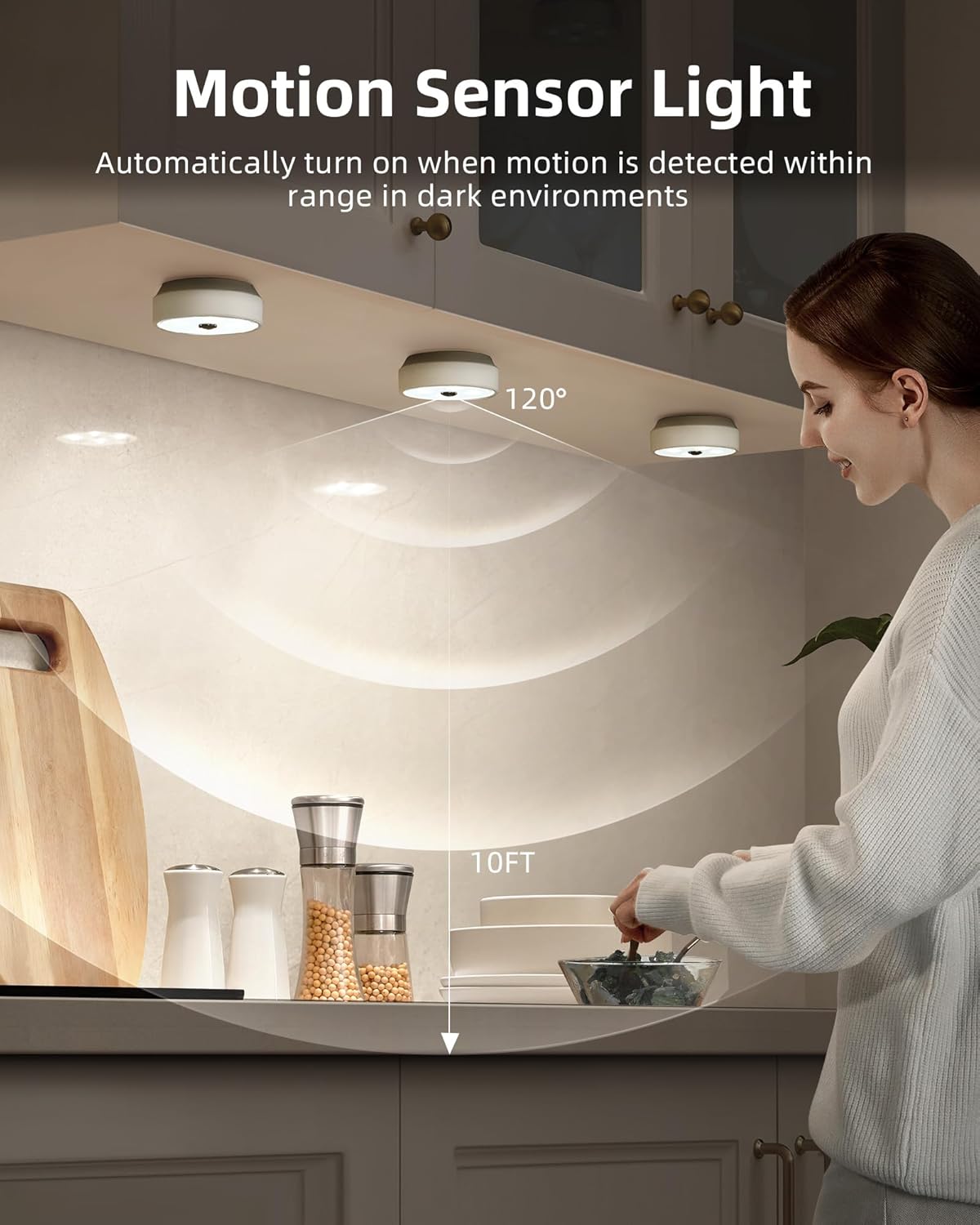
Tlhaloso ea setšoantšo: This image illustrates the motion sensor functionality of the EZVALO puck lights installed under kitchen cabinets. A person is reaching into a cabinet, and the lights are illuminated. A diagram shows a 120° detection angle and a 10ft detection range, indicating how the motion sensor operates.
- The motion sensor activates the light when movement is detected within a 10ft (3 meters) range.
- For puck lights, the detection angle is 120°.
- To conserve energy, the lights will only activate in dark environments. They will not turn on if there is sufficient ambient daylight.
- Puck lights automatically turn off approximately 25 seconds after the last detected movement.
3.3 Puck Light Group Control (with Remote)
The remote control for puck lights allows for grouping and synchronized control.
- Puck lights can be assigned into 2 groups for separate control.
- All puck lights within the same group can be dimmed and turned On/Off in unison using the remote, eliminating the need to adjust each light individually.
3.4 Adjusting Light Temperature (Puck Lights)
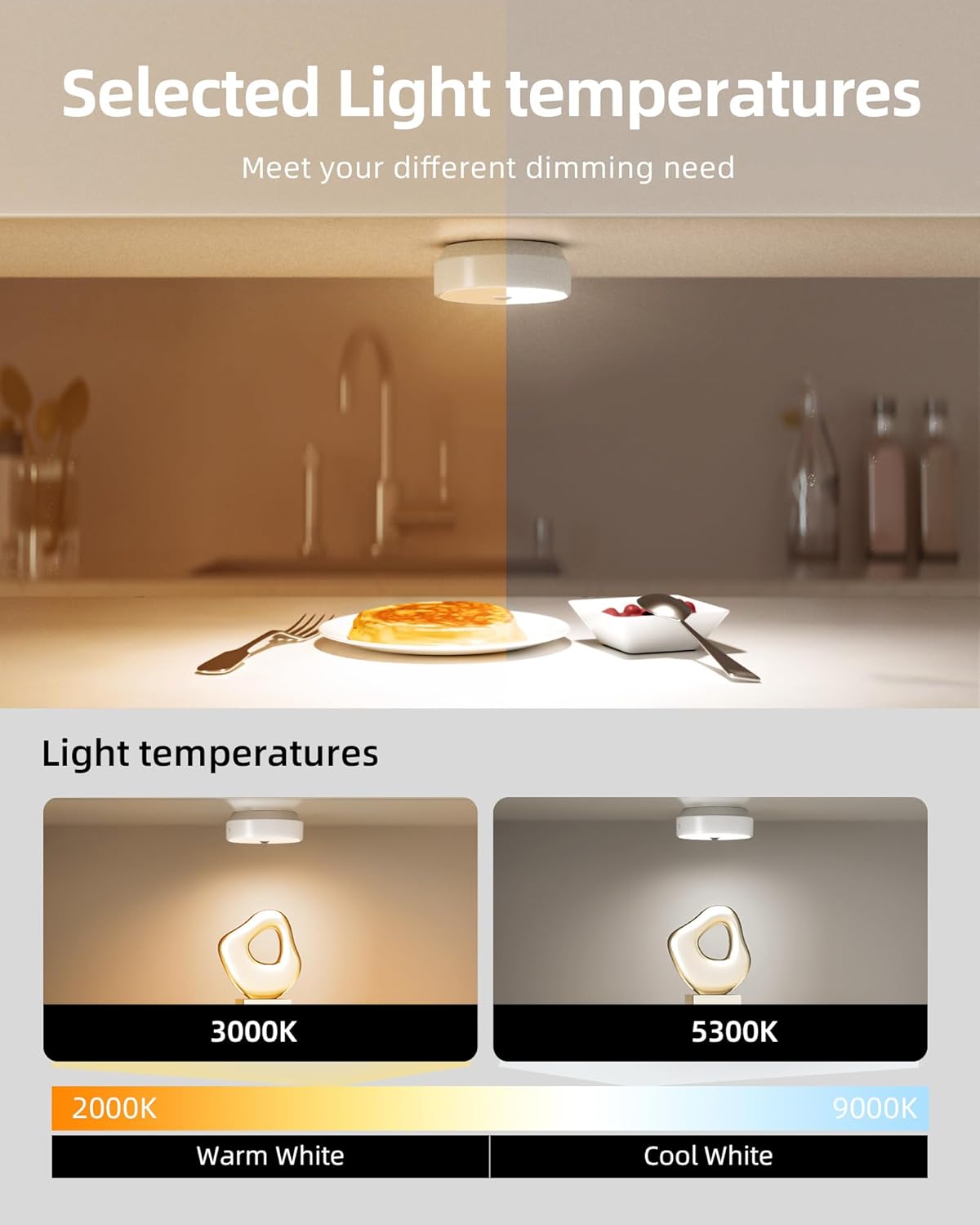
Tlhaloso ea setšoantšo: This image demonstrates the adjustable light temperatures of the EZVALO puck lights. The top half shows a kitchen counter with warm lighting, while the bottom half shows two puck lights illuminating a surface, one at 3000K (Warm White) and another at 5300K (Cool White). A color temperature scale from 2000K to 9000K is also depicted.
Puck lights offer adjustable light temperatures to suit different preferences and environments.
- Use the remote control to cycle through available color temperatures, typically ranging from warm white (e.g., 3000K) to cool white (e.g., 5300K).
4. Tlhokomelo
4.1 Ho hloekisa
To maintain the appearance and functionality of your lights:
- Ensure the lights are turned off before cleaning.
- Wipe the surfaces with a soft, dry cloth.
- For stubborn marks, a slightly damp lesela le ka sebelisoa, la lateloa ke lesela le omeletseng.
- Do not use abrasive cleaners, solvents, or harsh chemicals, as these can damage the finish or electronic components.
Tlhokomelo ea Battery
The lights are equipped with rechargeable lithium-polymer batteries. Follow these guidelines for optimal battery life:
- Recharge the lights when the brightness noticeably diminishes.
- Qoba ho fedisa betri ka botlalo kgafetsa.
- If storing the lights for an extended period, charge them to about 50% every few months.
- U se ke ua beha libeteri mochesong o feteletseng.
5. Ho rarolla mathata
| Bothata | Lebaka le ka khonehang | Tharollo |
|---|---|---|
| Leseli ha le khanye. | Betri e felile. Light is in OFF mode. Insufficient darkness (in AUTO mode). | Hlahisa lebone hape. Check the toggle switch/remote to ensure it's in ON or AUTO mode. Ensure the environment is dark enough for the motion sensor to activate. |
| Sensor ea ho sisinyeha ha e sebetse. | Light is not in AUTO mode. Environment is too bright. Obstruction blocking sensor. | Set the light to AUTO mode using the toggle switch or remote. The sensor only activates in dark conditions. Netefatsa hore sensor ha e na litšitiso. |
| Remoutu control ha e arabe. | Remote battery is low/dead. Ntle le sebaka. Tšitiso lipakeng tsa remote le khanya. | Replace remote battery (if applicable) or ensure remote is charged. Move closer to the lights (max 16ft range). Ensure a clear line of sight. |
| Lights dim unexpectedly. | Betri e tlase. | Recharge the lights. |
6. Litlhaloso
| Sebopeho | Lintlha |
|---|---|
| Brand | EZVALO |
| Nomoro ea Mohlala | 02.L22.00007 |
| Mohloli oa Leseli | LED |
| Khanya | 40 lumen (per light, typical) |
| Mmala o Lesedi | White (Adjustable for Puck Lights) |
| Mohloli oa Matla | Battery Powered (Rechargeable Lithium-Polymer) |
| Bar Light Battery Capacity | 1100mAh |
| Puck Light Battery Capacity | 2000mAh |
| Mokhoa oa ho Laola | Remote Control, Toggle Switch (Bar Lights) |
| Likarolo Tse Khethehileng | Motion Sensor, Dimmable, Timer Function, Group Control (Puck Lights) |
| Motion Sensor Range | 10 ft (limithara tse 3) |
| Puck Light Sensor Angle | 120° |
| Mofuta oa Tlhophiso | Magnetic, Adhesive (Surface Mount) |
| Lintho tse bonahalang | Iron, Metal, Plastic |
| Boemo ba ho hanyetsa Metsi | Ha e Hanele Metsi (Tšebeliso ea Ka Hare Feela) |
| Mofuta oa kamore | Indoor (Home, Kitchen, Bathroom, Bedroom, Office, Cabinet) |
7. Boitsebiso ba Tšireletseho
- Se ke oa qhaqha kapa oa fetola sehlahisoa.
- Keep away from water and high humidity environments as the product is not water resistant.
- U se ke ua pepesetsa khanya ea letsatsi kapa mocheso o phahameng.
- Boloka moo bana ba ka fihlang teng.
- Use only the specified charging cables.
8. Tšehetso ea Bareki
For any questions, technical support, or warranty inquiries, please contact EZVALO customer service through the retailer's platform or visit the official EZVALO websebaka.