
Selelekela
Kea leboha ha u rekileasing the LDNIO Portable Wireless Bluetooth Speaker GTS-1393. This manual provides essential information for the safe and efficient use of your speaker. Please read these instructions carefully before use and retain them for future reference.
Boitsebiso ba Bohlokoa ba Tšireletseho
- U se ke ua pepesetsa sebui mochesong o feteletseng, letsatsing le tobileng, kapa mongobo o phahameng.
- Qoba ho liha kapa ho beha sebui tlas'a tšusumetso e matla.
- Do not disassemble, repair, or modify the speaker yourself. Contact qualified service personnel for any repairs.
- Beha sebui hole le metsi le maro a mang.
- Sebelisa feela thapo e boletsoeng ea ho tjhaja le adaptara ea matla.
- Dispose of the battery and speaker according to local regulations.
Litaba tsa Sephutheloana
Ka kopo netefatsa hore lintho tsohle li teng ka har'a sephutheloana sa hau:
- LDNIO Portable Wireless Bluetooth Speaker GTS-1393
- USB Charging Cable (x1)
- Tjhajwang e Lithium Battery (500mAh)
- Remote Control
- Motho ea ts'oereng
- Bukana ea mosebelisi (tokomane ena)
Sehlahisoa se Felletseview
Itlwaelanye le dikarolo le ditaolo tsa sebui. Note: The image below displays a similar model (GTS-1173) for illustrative purposes. The functionality described in this manual applies to the GTS-1393 model.
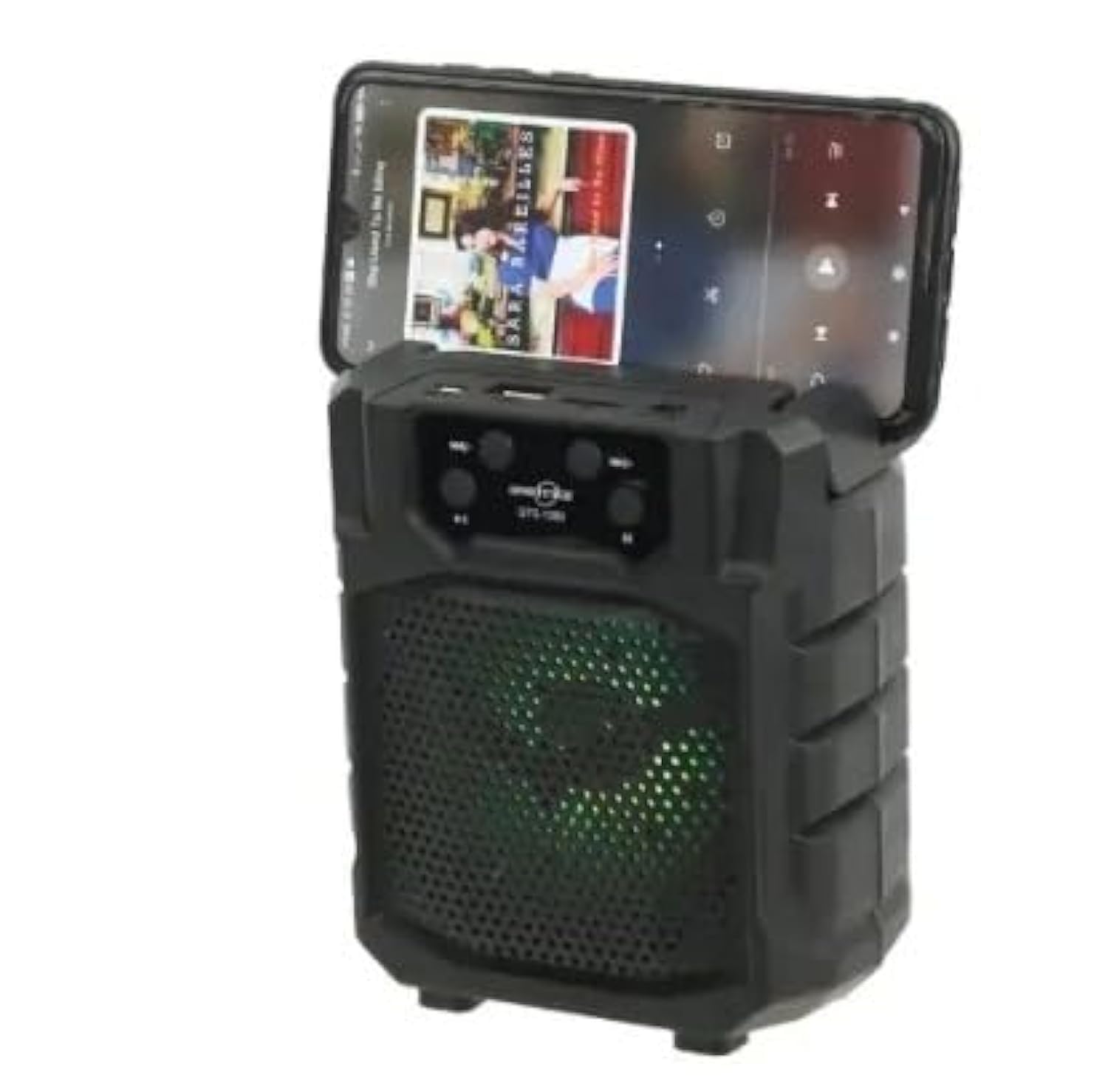
Setšoantšo: Pele view of a portable wireless Bluetooth speaker, model GTS-1173, featuring control buttons at the top and a speaker grille with multi-color LED lights. This image is for illustrative purposes, showing a similar product design to the GTS-1393.
Controls and Ports (Based on typical speaker design and OCR from image):
- Konopo ea Matla: Usually long press to turn on/off.
- Konopo ea Mokhoa (M): Short press to switch between Bluetooth, FM Radio, USB, and TF card modes.
- Konopo ea ho Bapala/Emisa: E laola ho bapala ha media.
- Previous Track / Volume Down (-): Tobetsa ka bokhutshwane bakeng sa pina e fetileng, tobetsa nako e telele ho fokotsa modumo.
- Next Track / Volume Up (+): Tobetsa ka bokhutshwane bakeng sa pina e latelang, tobetsa nako e telele ho eketsa modumo.
- Boema-kepe ba USB: Bakeng sa ho bapala hape ha USB flash drive.
- Slot ea TF Card: For MicroSD/TF card playback.
- Boema-kepe ba ho tjhaja: Bakeng sa ho hokela thapo ya ho tjhaja ya USB.
Tlhophiso
1. Ho lefisa Sepikara
- Connect the small end of the provided USB charging cable to the charging port on the speaker.
- Hokela ntlha e kholoanyane ea thapo ea USB ho adaptara ea motlakase ea USB (ha e kenyelelitsoe) kapa koung ea USB ea khomphutha.
- Lebone la sesupo sa ho tjhaja le tla bonesa (mmala o ka fapana) ho bontsha hore sebui se a tjhaja.
- Once fully charged, the indicator light may change color or turn off. Disconnect the charging cable.
2. Ho tima/Ho tima
- To power on: Long press the Konopo ea Matla until you hear an audible prompt or see the indicator lights activate.
- To power off: Long press the Konopo ea Matla again until the speaker powers down.
Litaelo tsa Ts'ebetso
1. Bluetooth Mode (Default)
- Ensure the speaker is powered on. It will typically enter Bluetooth pairing mode automatically, indicated by a flashing LED light and an audible prompt.
- Sesebelisoeng sa hau sa mohala (smartphone, tablet, joalo-joalo), lumella Bluetooth 'me u batle lisebelisoa tse teng.
- Select "GTS-1393" (or similar name) from the list of devices.
- Once paired, the speaker will emit an audible confirmation, and the LED light will stop flashing.
- You can now play audio from your device through the speaker. Use the speaker's controls or your device's controls to adjust volume and navigate tracks.
2. Ho Bapala Karete ea USB/TF
- Insert a USB flash drive or TF (MicroSD) card containing MP3 audio files koung e amehang.
- Tobetsa ea Konopo ea Mokhoa (M) to switch to USB or TF card mode. The speaker will automatically begin playing audio from the inserted storage device.
- Use the Play/Pause, Previous Track, and Next Track buttons to control playback.
3. Mokhoa oa seea-le-moea oa FM
- Tobetsa ea Konopo ea Mokhoa (M) repeatedly until you enter FM Radio mode.
- To auto-scan for stations: Long press the Konopo ea ho Bapala/Emisa. The speaker will scan and save available FM stations.
- To switch between saved stations: Use the Previous Track (-) le Next Track (+) likonopo.
4. TWS (True Wireless Stereo) Function
The TWS function allows you to connect two GTS-1393 speakers together for a stereo sound experience.
- Ensure both speakers are powered off.
- Bulela libui ka bobeli ka nako e le 'ngoe. Ka bobeli li lokela ho kena mokhoeng oa ho kopanya oa Bluetooth.
- On one of the speakers, long press the Konopo ea Mokhoa (M) or a dedicated TWS button (if available) until you hear a confirmation tone, indicating they are paired with each other.
- Now, connect your mobile device to one of the speakers via Bluetooth as described in "1. Bluetooth Mode". The audio will play in stereo through both connected speakers.
Tlhokomelo
- Ho hloekisa: Use a soft, dry cloth to wipe the speaker. Do not use abrasive cleaners or solvents.
- Polokelo: Beha sebui sebakeng se pholileng, se omileng hole le khanya ea letsatsi le mocheso o feteletseng.
- Tlhokomelo ea Betri: Ho lelefatsa bophelo ba betri, qoba ho ntsha betri ka botlalo kgafetsa. Lafisa sebui kamehla, esita le haeba se sa sebelisoe ka nako e telele.
Ho batle phoso
| Bothata | Tharollo e ka khonehang |
|---|---|
| Sebui ha se sebetse. | Netefatsa hore betri e tjhajilwe. Hokela sebui mohloding wa motlakase o sebedisa thapo ya USB. |
| Ha ho molumo o tsoang ho sebui. | Check the volume level on both the speaker and your connected device. Ensure the speaker is in the correct mode (Bluetooth, USB, TF, FM). |
| Ha e khone ho para ka Bluetooth. | Ensure the speaker is in Bluetooth pairing mode (flashing LED). Turn off and on Bluetooth on your device. Move your device closer to the speaker. Forget the device from your phone's Bluetooth list and try pairing again. |
| Karete ea USB/TF ha e bapale. | Ensure the card is inserted correctly. Verify that the audio files are in a supported format (e.g., MP3). Press the Mode button to select the correct input. |
| Kamohelo e mpe ea seea-le-moea sa FM. | Relocate the speaker to an area with better signal. Extend any built-in antenna if available. |
Litlhaloso
| Lebitso: | LDNIO |
| Lebitso la Mohlala: | GTS-1393 |
| Matla a Sebui a Phahameng ka ho Fetisisa: | 5 Watts |
| Theknoloji ea Khokahano: | Wireless (Bluetooth) |
| Mokhoa oa Phatlalatso ea Audio: | Setereo |
| Mofuta oa Kemiso: | Letlapa la letlapa |
| Mofuta oa sebui: | Kantle (Portable) |
| Sebopeho se Ikhethileng: | E nkehang |
| Litšebeliso tse khothalelitsoeng: | Smartphones, Tablets, Music Players, Computers |
| Lisebelisoa tse Lumellanang: | Tablet, Laptop, Smartphone |
| Boholo ba Sepikara: | 4 inch |
| Mmala: | Ntsho |
| Mokhoa oa ho laola: | Hole |
| Mohloli oa Matla: | Matla a Battery |
| Mofuta oa Mokhanni: | Mokhanni ea Matla |
| Likarolo tse Kenyelelitsoeng: | Remote control, Holder |
| Nomoro ea Lintho: | 1 |
| Tlhophiso ea Seteishene se Potileng: | 2 |
| Protokhole ea Khokahano e Se nang Waele: | bluetooth |
| Bokhoni ba Betri: | 500 mAh |
Warranty le Tšehetso
For warranty information or technical support, please refer to the documentation provided with your purchase or contact your retailer. Keep your proof of purchase for warranty claims.