
1. Sehlahisoa Overview
The NOHON MS15 Mag-Safe Wireless Power Bank is a compact and efficient portable charging solution designed for iPhone 12, 13, 14, and 15 series, and other compatible devices. Featuring a 5000mAh capacity, ultra-slim design, and 20W Power Delivery (PD) fast charging, it offers convenient wireless and wired charging capabilities.

Figure 1: NOHON MS15 Mag-Safe Wireless Power Bank with iPhone.
2. Likahare tsa Sephutheloana
- NOHON MS15 Mag-Safe Wireless Power Bank
- Cable ea ho tjhaja ea USB-C
- Bukana ea Mosebelisi
3. Ho theha le ho tjhaja Banka ea Matla
3.1 Tefiso ea Pele
Before first use, fully charge the NOHON MS15 Power Bank. Use the included USB-C cable and connect it to a compatible power adapter (not included).
3.2 Lipontšo tsa ho tjhaja
The integrated LED indicators on the side of the power bank display the remaining battery capacity and charging status. Each light typically represents approximately 25% of the battery charge.

Figure 2: LED Power Indicator explanation.
4. Litaelo tsa Ts'ebetso
4.1 Wireless Charging (Mag-Safe Compatible)
- Ensure your device is Mag-Safe compatible (iPhone 12 series or newer) or has a magnetic phone case.
- Align the NOHON power bank with the back of your iPhone. The magnets will automatically snap it into place, initiating wireless charging.
- To stop charging, simply detach the power bank from your device.

Figure 3: Magnetic attachment for wireless charging.
4.2 Ho tjhaja ka terata (USB-C)
- Hokela pheletso e 'ngoe ea thapo ea USB-C koung ea USB-C ea banka ea motlakase.
- Hokela ntlha e 'ngoe ea thapo ea USB-C le koung ea ho tjhaja ea sesebelisoa sa hau.
- Ho tjhaja ho tla qala ka boyona.
4.3 Ho tjhaja ka nako e le nngwe
The NOHON MS15 supports charging two devices simultaneously: one wirelessly via Mag-Safe and another via the USB-C port.
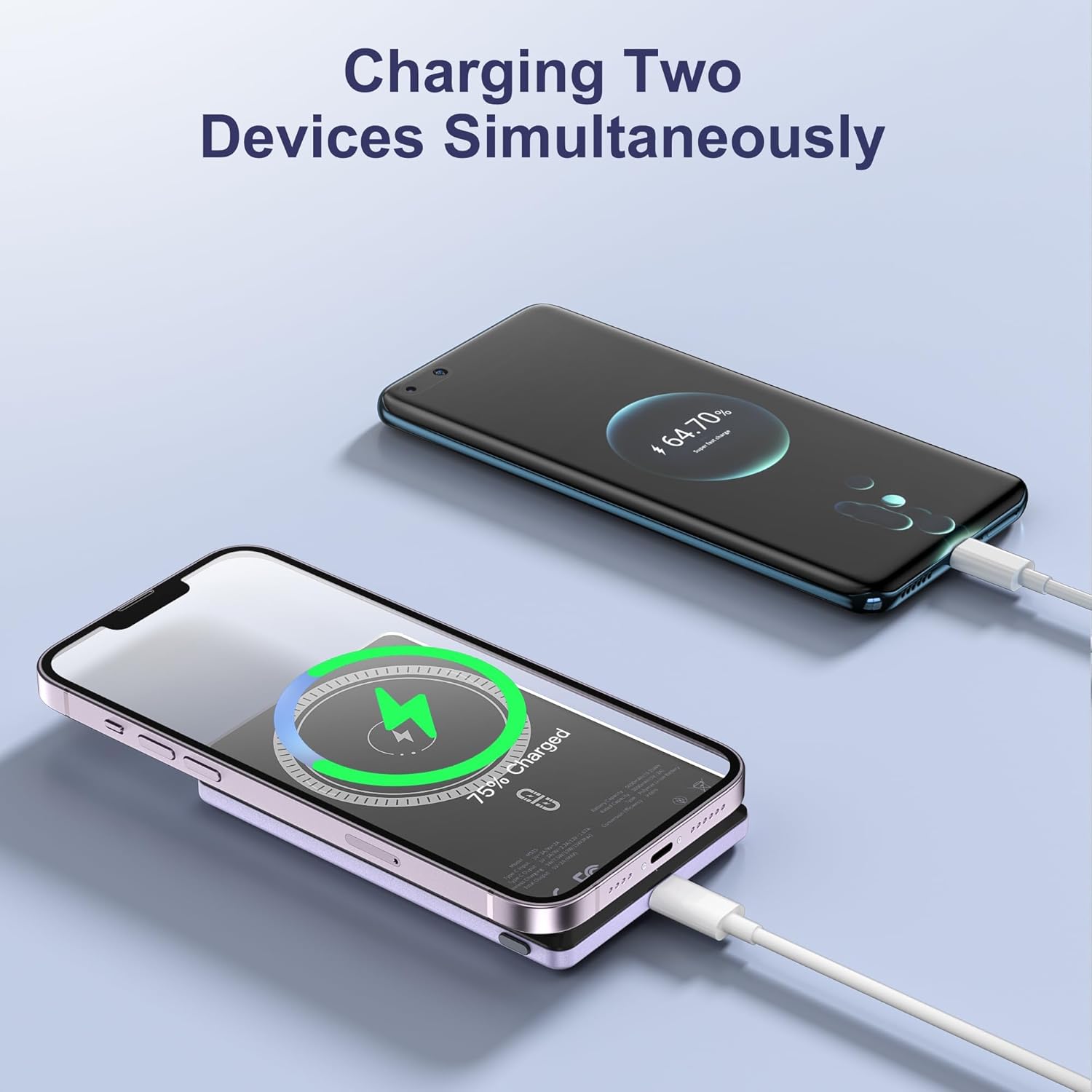
Figure 4: Charging two devices simultaneously.
4.4 Ho Bulela/Ho tima
The power bank automatically activates charging when a device is connected wirelessly or via cable. To turn off the power bank, press the power button twice in quick succession.
5. Likarolo tsa Bohlokoa
- Moralo oa Ultra-Slim: Measuring just 0.32 inches (8mm) in thickness, it's designed for easy portability.
- Bokhoni ba 5000mAh: E fana ka ampmatla bakeng sa tšebeliso ea letsatsi le letsatsi.
- Khokahano ea Magnetic: Ensures a secure and stable wireless charging link.
- 20W PD Ho tjhaja kapele: Delivers efficient wired charging speeds.
- Ho tjhaja ka nako e le 'ngoe: Charge two devices at once (wireless + wired).
- Tšireletso e bohlale: Built-in safeguards against over-current, over-voltage, le short-circuit.

Setšoantšo sa 5: Ho fetaview of NOHON MS15 features.
6. Ho lumellana
The NOHON MS15 Mag-Safe Wireless Power Bank is designed for universal compatibility with:
- Mag-Safe Charging: iPhone 12, 13, 14, and 15 series (including Pro Max models).
- Ho tjhaja ka Waelese: Other Qi-enabled smartphones (requires a magnetic phone case for secure attachment).
- Ho tjhaja ka mehala: Any device compatible with USB-C charging.
Hlokomela: For non-magnetic charging phones, a magnetic phone case is required to ensure a secure connection for wireless charging.
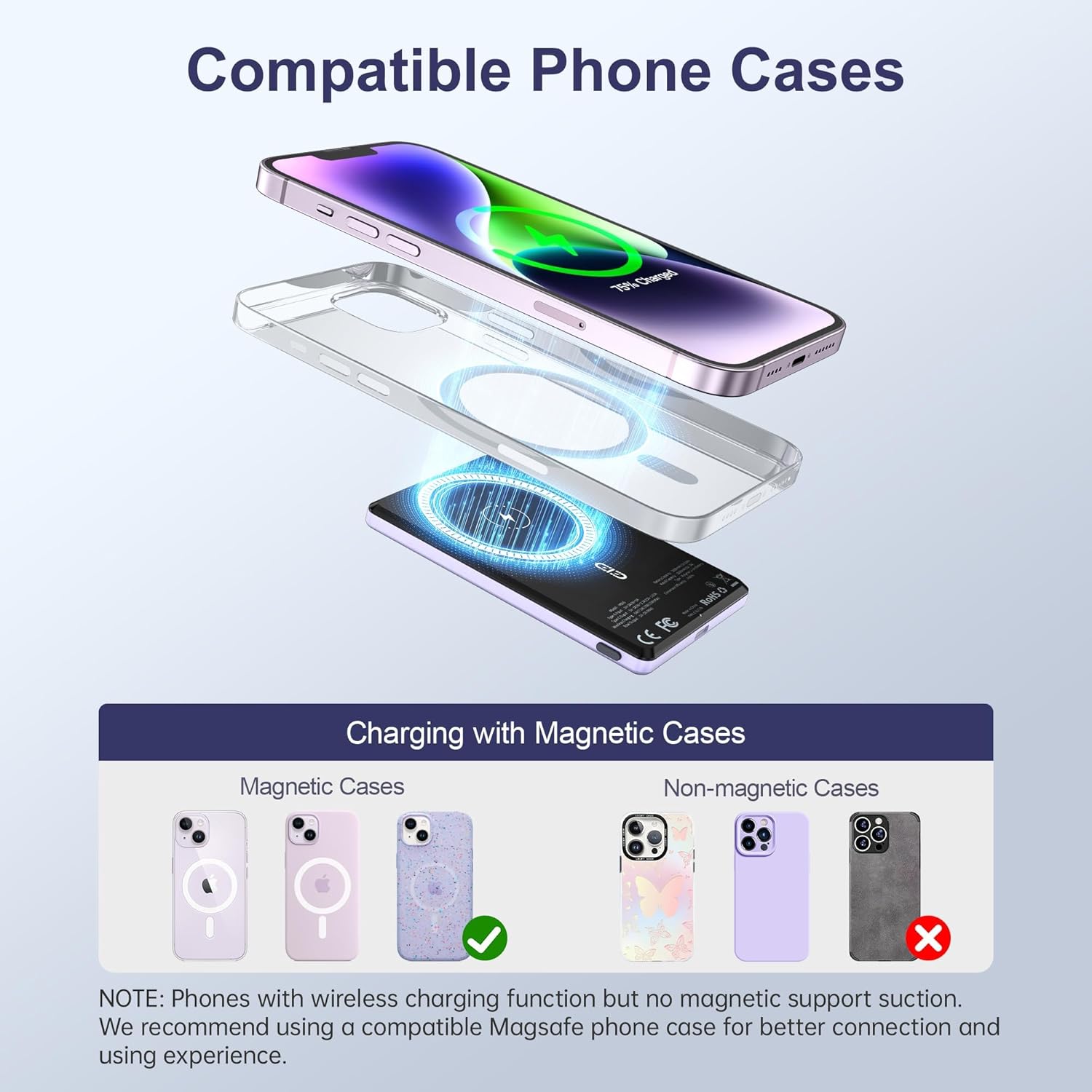
Figure 6: Compatible phone cases for magnetic charging.
7. Tlhokomelo le Tlhokomelo
- Boloka banka ea motlakase hole le metsi, mongobo le mocheso o feteletseng.
- Qoba ho liha kapa ho beha sesebelisoa tlas'a tšusumetso e matla.
- Hloekisa bokaholimo ka lesela le bonolo, le omeletseng. U se ke ua sebelisa lik'hemik'hale tse thata kapa lisebelisoa tse senyang.
- Boloka sebakeng se phodileng, se omileng ha se sa sebelisoe.
8. Ho rarolla mathata
8.1 Sesebelisoa se sa Chese
- Netefatsa hore banka ea motlakase e tjhajiloe ka ho lekaneng. Hlahloba litsupa tsa LED.
- For wireless charging, verify proper alignment between the power bank and your device/magnetic case.
- For wired charging, check that the USB-C cable is securely connected to both the power bank and your device. Try a different cable if necessary.
- Remove any non-magnetic cases that may interfere with wireless charging.
8.2 Power Bank Overheating
- It is normal for the power bank to become slightly warm during charging.
- If it becomes excessively hot, discontinue use immediately and contact customer support.
- Ensure proper ventilation and avoid charging in direct sunlight or enclosed spaces.
9. Litlhaloso
| Sebopeho | Lintlha |
|---|---|
| Nomoro ea Mohlala | MS15 |
| Bokhoni ba Battery | 5000mAh |
| Litekanyo tsa Sehlahisoa | 4 x 2.5 x 0.32 lisenthimithara |
| Boima ba Ntho | 4.1 lik'hilograma |
| Sehlahisoa sa ho tjhaja ka Wired | PD 20W (USB Type C) |
| Sesebelisoa sa ho tjhaja waelese | Up to 15W (for Android), 7.5W (for iOS) |
| Likarolo Tse Khethehileng | Fast Charging, Slim Design, Wireless Charging, Magnetic Attachment |
| Mmala | Violet Ash |
10. Official Sehlahisoa Video
Video 1: Sehlahisoa se Felletseview of the NOHON Mag-Safe Power Bank. This video demonstrates the features and usage of the power bank, including its slim design and magnetic attachment.
11. Tiisetso le Tšehetso
NOHON products typically come with a 12-month warranty. For any product inquiries, technical support, or warranty claims, please contact NOHON customer service through the retailer's platform or the official NOHON website. Please have your purchase details and model number (MS15) ready.